Check ChatGPT Pro Codex Quota Reset: Usage Dashboard, /status, Pro 5x/20x, and Credits
ChatGPT Pro gives Codex much more headroom, but not unlimited access. Check the Codex usage dashboard and /status before reading reset windows, credits, or API billing.
On this page
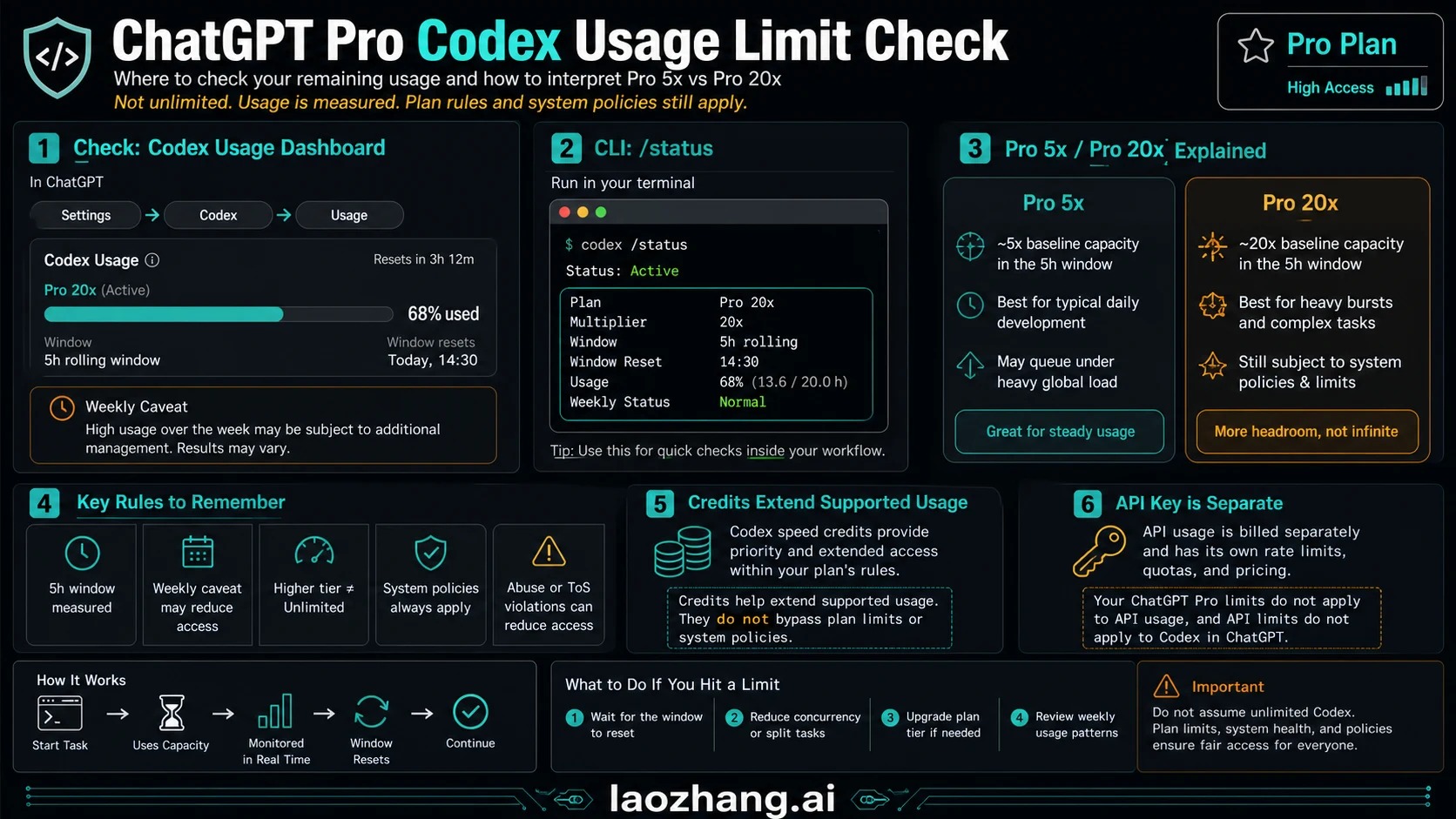
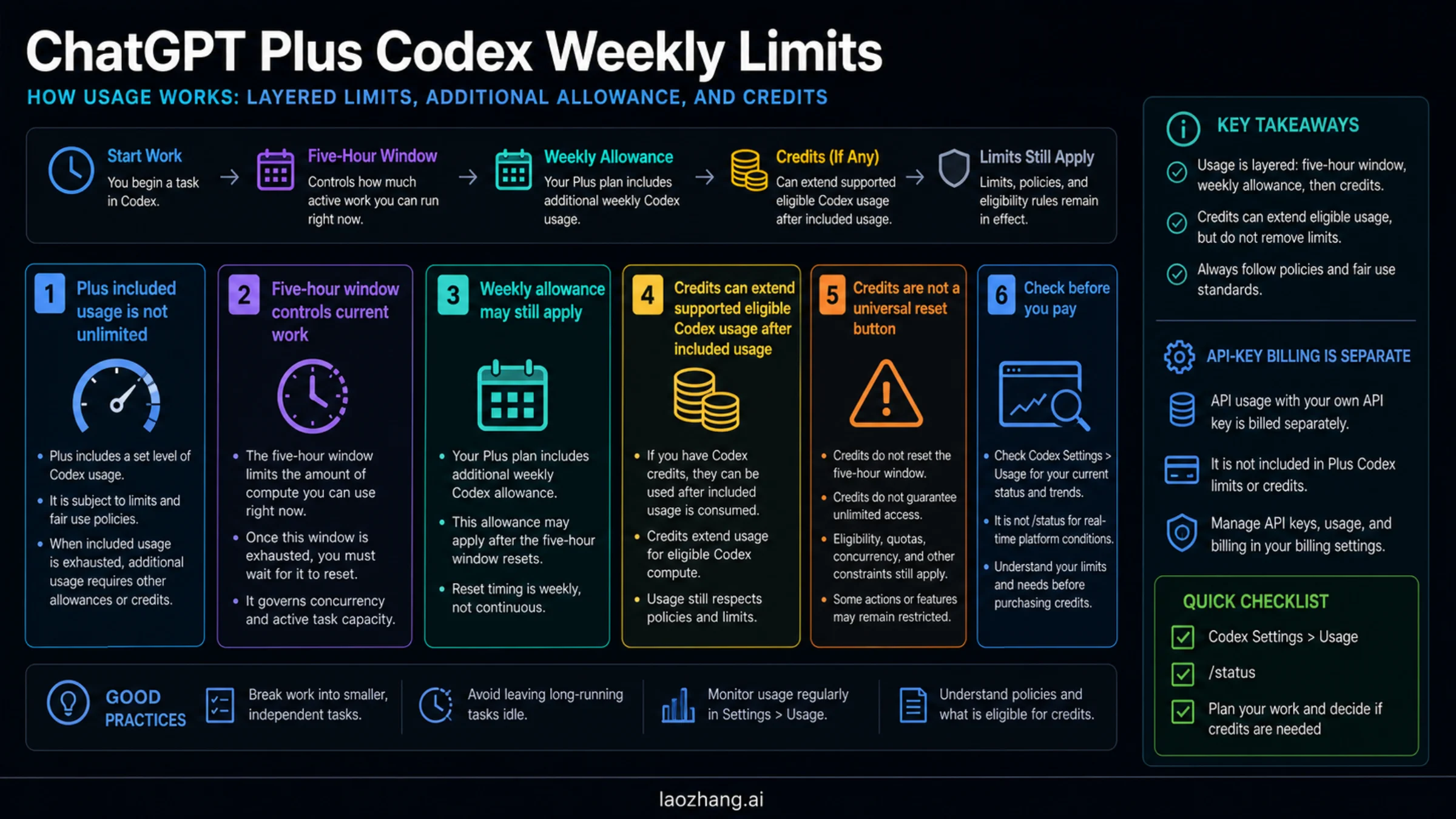
ChatGPT Pro gives Codex much more headroom, but it does not turn Codex into unlimited access. Start in the Codex usage dashboard or limit banner, then run /status in the active CLI session; only after that should you read the visible reset window, weekly pressure, credits, and API-key boundary.
As of June 1, 2026, OpenAI's Codex pricing and plan notes describe Pro as higher-allowance plan shapes, not as a blank check. Pro 5x and Pro 20x raise the included Codex allowance relative to Plus, but local work, cloud tasks, code review, fast mode, image work, and other agentic usage can still consume the included pool faster than a simple message count suggests.
Use this order before upgrading, waiting, or buying credits:
- Check the Codex usage dashboard or limit banner for the account-side state.
- Run
/statusin the active Codex CLI session for session-level state. - Compare Pro 5x or Pro 20x against the model and work mode you are using.
- Treat credits as compatible overflow, not as a way to bypass all plan rules.
- Keep API-key work on the API billing ledger instead of reconciling it with ChatGPT Pro quota.
Fast Answer: Check the Reset Meter First
A Pro user should not begin with a public table alone. Public plan tables are planning references; the account dashboard and active session are the live evidence. The direct reset check is Codex usage page or limit banner first, /status second, then plan-shape interpretation.
| Question | First surface | What it proves | What it cannot prove |
|---|---|---|---|
| Do I still have Codex quota right now? | Codex usage dashboard or limit banner | Account-side availability and reset cues | API-key spend or every local token |
| What is happening in this CLI session? | /status inside Codex CLI | Current session state and model/config context | Full weekly account history |
| Am I on Pro 5x or Pro 20x? | ChatGPT plan and Codex pricing page | Which included plan shape applies | A guaranteed unlimited ceiling |
| Can credits continue the work? | Credits and Codex usage panel | Whether compatible paid overflow is available | Freedom from plan or system policies |
| Is API-key usage involved? | OpenAI Platform usage and API billing | API organization/project spend | ChatGPT Pro subscription usage |
| Did fast mode or review use more than expected? | Dashboard plus task history | A likely burn-rate explanation | A precise universal token ledger |
For the broader plan table, link out to OpenAI Codex usage limits. For token and context meters, use the Codex token usage meter guide. The Pro check should stay narrower: remaining Pro headroom, reset timing, overflow choice, and the API/subscription split.
How The Codex Reset Check Works
There are two reset questions, and they should not be collapsed into one answer.
| Reset question | Where to check | Reader-safe interpretation |
|---|---|---|
| Is the current 5-hour Codex window constrained? | Codex usage page or limit banner | If a reset time is visible, wait for that window, downshift the model, split the task, or use compatible credits. |
| Is a weekly or cyclic account limit involved? | Codex usage page, plan state, and recent task history | Weekly pressure can still apply even when a single short window looks normal. |
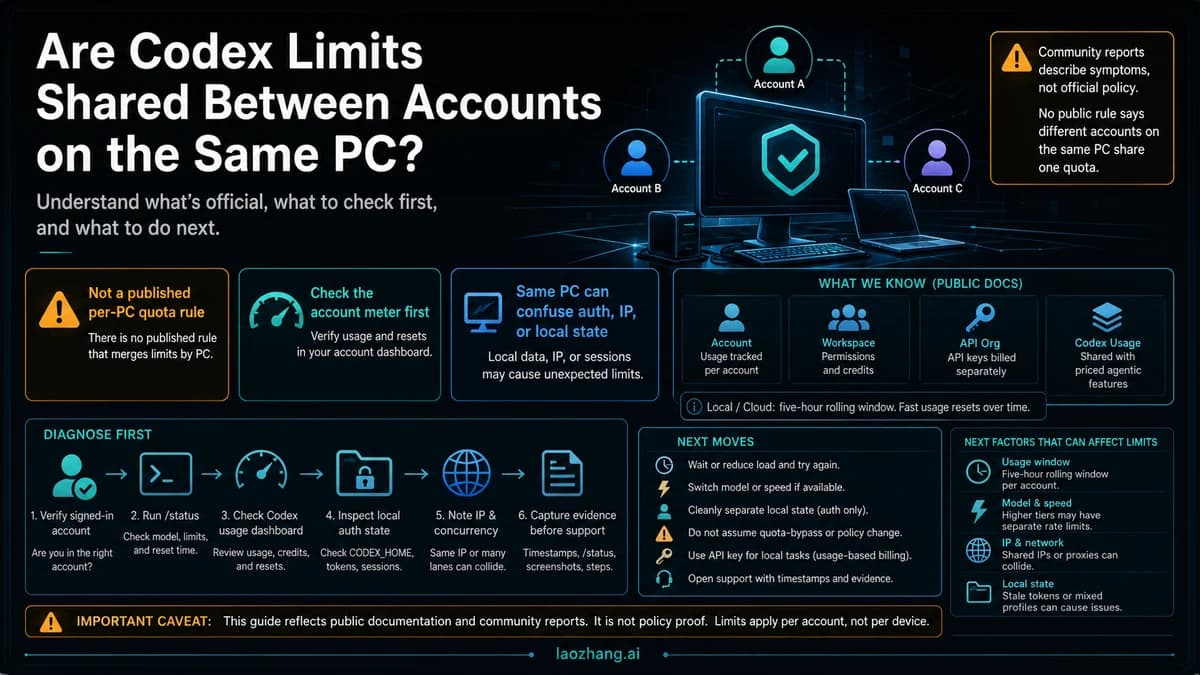
| Is the terminal session itself the problem? | /status in the active CLI conversation | It confirms model, configuration, writable roots, and token/context state; it is not the full subscription ledger. |
| Is the work using API billing? | OpenAI Platform usage and API billing | API-key work does not consume the ChatGPT Pro subscription pool. |
The most reliable note to save is a four-field snapshot: plan shape, visible reset wording, current work mode, and whether credits or API billing are involved. If those fields are missing, "my Pro quota reset is wrong" is usually too vague to debug.
Pro 5x And Pro 20x Are Plan Shapes, Not Unlimited Mode
OpenAI's Codex plan page lists Pro 5x and Pro 20x as larger included usage bands across models and work modes. The exact amount depends on the model, task size, whether work is local or cloud, and whether code review or fast mode is involved. The same documentation also notes that local and cloud usage share a five-hour window and that additional weekly limits can apply.
That means the first decision is not simply whether Pro is stronger than Plus. It is whether your work pattern fits the included pool. Daily local CLI work, short reviews, and occasional cloud tasks usually fit a different burn profile from long cloud tasks, image-heavy runs, or fast-mode loops.
| Plan shape | Best reading | Risk to watch |
|---|---|---|
| Pro 5x | High allowance for sustained daily Codex work | Heavy runs can still collide with a five-hour or weekly boundary |
| Pro 20x | Much larger allowance for intensive daily work | Not unlimited; policies, weekly pressure, and system load still matter |
| Plus | Useful baseline for lighter Codex use | Weekly and five-hour limits can appear sooner |
| API key | Usage-based API lane | Separate billing, separate rate limits, no ChatGPT Pro pool |
OpenAI's Help Center and Codex pricing page both describe the Pro 2x/boost promotion as date-bound through May 31, 2026. Because that date has passed, do not carry the promotional multiplier into June planning unless your live account panel says a newer offer applies.
Read The Dashboard And /status Together
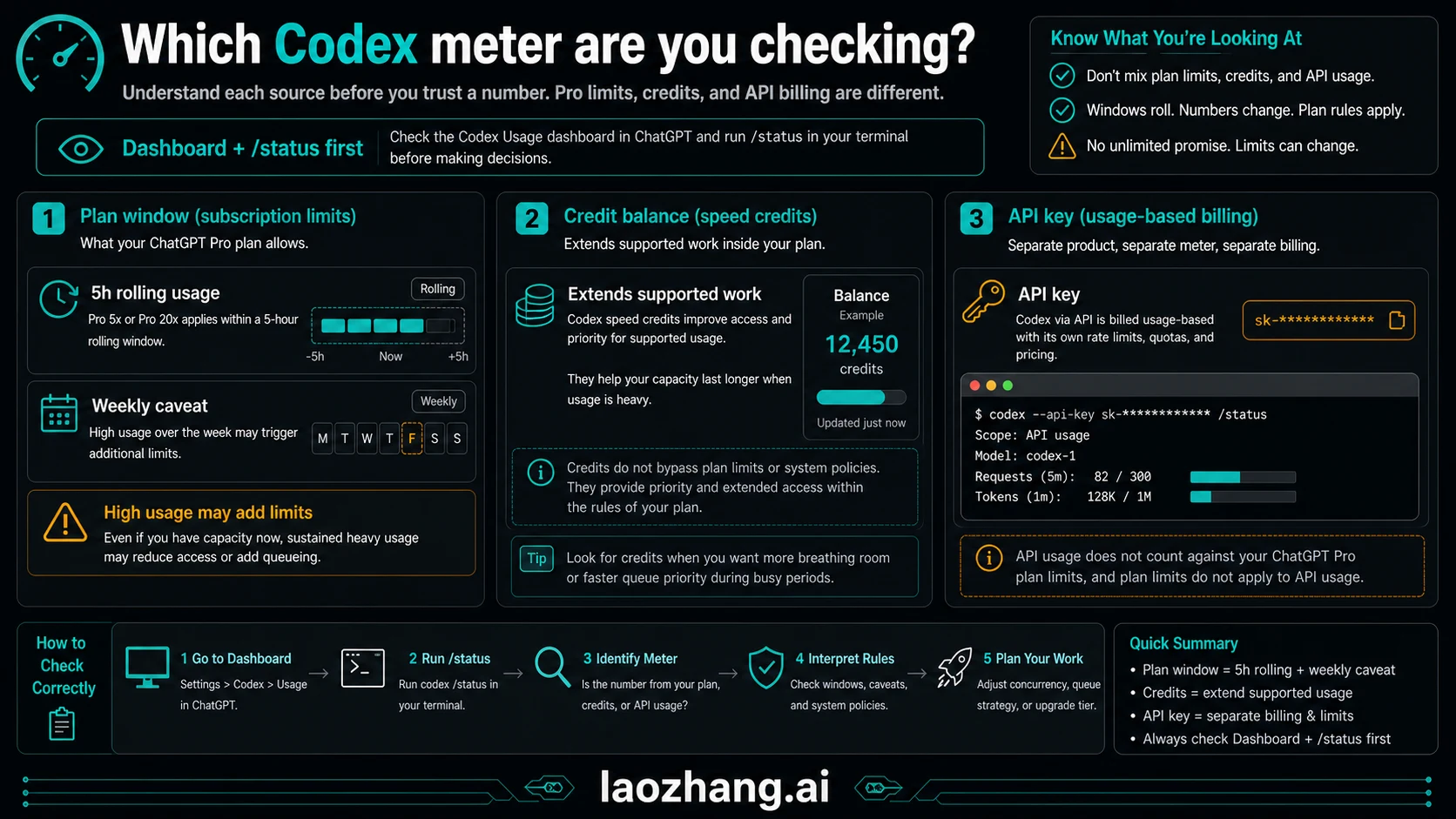
The dashboard or limit banner is the account-side meter. Use it for remaining included usage, reset timing, credits, and available plan options. It is the place to check before you assume Pro has more room, before you buy credits, and before you tell a teammate that a limit is a product bug.
The CLI command is the work-surface meter. Run it inside the active session:
/status/status is useful when the question starts in the terminal: active model, session configuration, context pressure, and the current run's state. It should not be stretched into a complete account ledger. If the dashboard says the plan is constrained but /status still looks normal, trust the account-side panel for plan availability. If /status shows a local-session issue while the account panel looks fine, handle the active run first.
A clean check produces four notes: which plan shape is active, which reset wording is visible, whether the current work is local CLI, cloud, code review, or API-key usage, and whether credits are being offered. Without those notes, the number is easy to misread.
Why A Pro Limit Can Arrive Earlier Than Expected
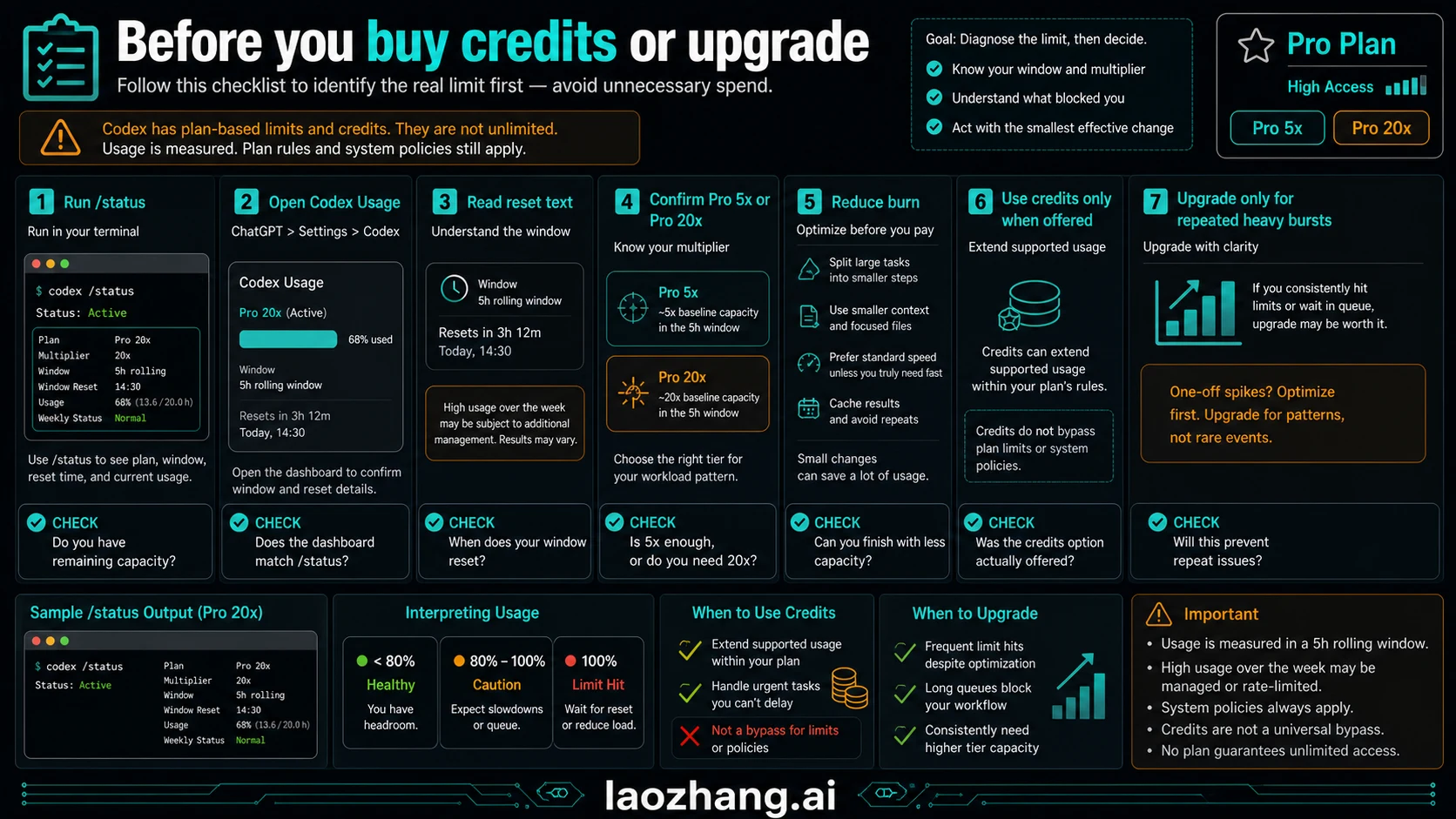
A Pro limit can feel early when the reader compares it with a simple plan multiplier instead of the actual work mode. Codex usage is not only a message count. Model choice, task complexity, cloud execution, review usage, fast mode, image generation, and other agentic features can draw from the same included capacity.
Before a long run, check five items:
- Model and mode: larger reasoning models and fast mode can consume included usage faster.
- Execution location: local and cloud work can share the five-hour window.
- Task size: broad refactors, multi-file debugging, and review loops cost more than small edits.
- Weekly pattern: repeated high-pressure sessions can trigger weekly boundaries even when one short window looks fine.
- Shared agentic usage: OpenAI notes that some other agentic features can share the included limits.
This is also where Pro differs from a pure API budget. API usage is paid by API billing rules; ChatGPT Pro Codex usage is governed by subscription allowance, credits, and plan policies. Mixing those ledgers creates false confidence.
Credits, API Keys, And What They Do Not Fix
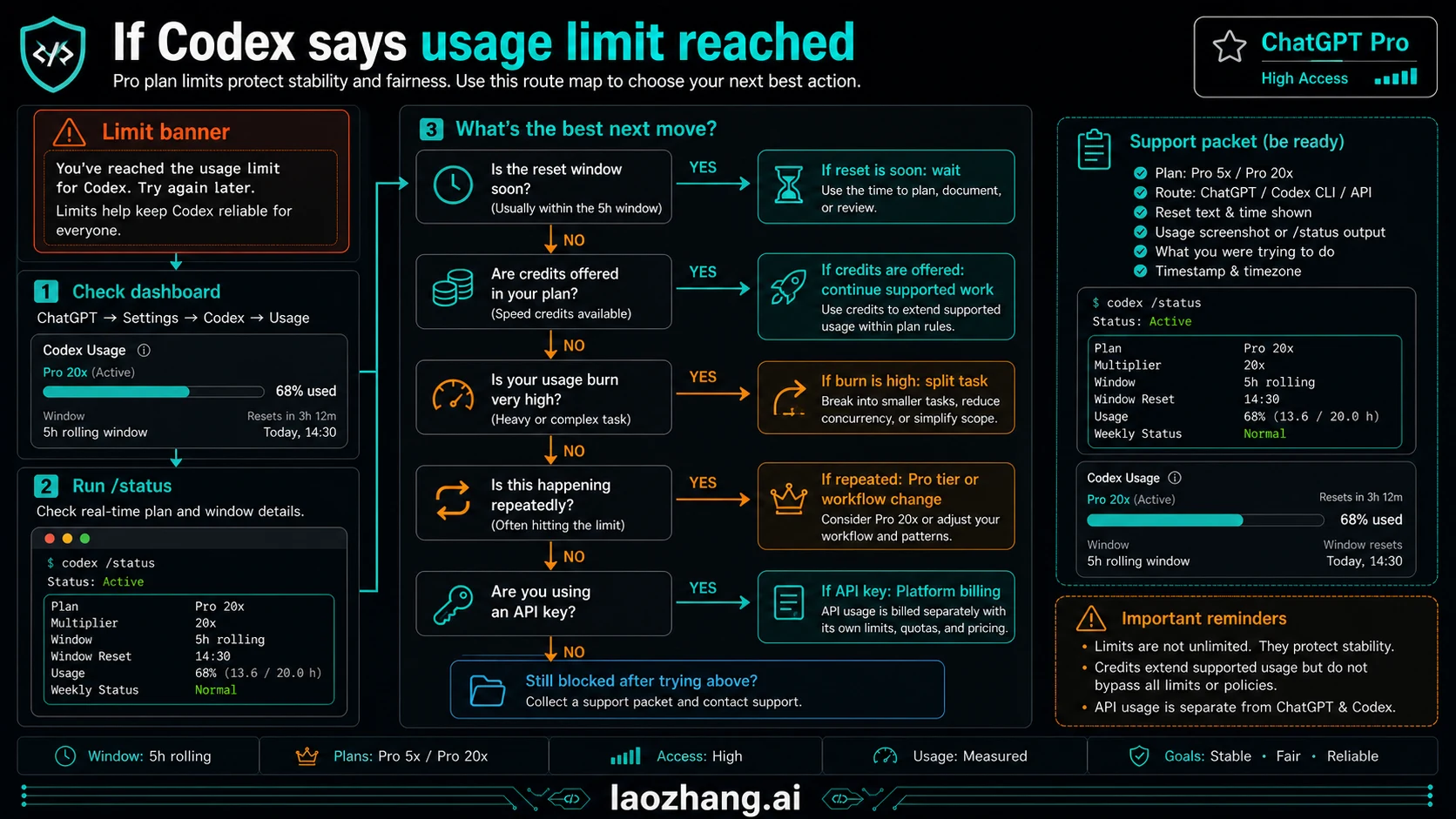
Codex credits can let compatible Codex work continue after included usage is consumed. They are useful when the work belongs in ChatGPT/Codex and you need a controlled overflow lane. They do not erase every plan rule, safety policy, system-load condition, or feature-specific boundary.
API keys are separate. OpenAI's Codex authentication docs distinguish ChatGPT sign-in from API-key access: ChatGPT sign-in uses subscription access, while API-key work is billed through the OpenAI Platform. Cloud Codex requires ChatGPT sign-in, and features tied to ChatGPT credits belong on the ChatGPT side.
If your main confusion is the API/subscription split, keep Codex API key vs subscription open next to the dashboard. If you are comparing Plus and Pro headroom, use the Plus Codex weekly credit page only as the Plus-side boundary, not as a Pro answer.
Decision Table After You Hit A Limit
| What you see | Most likely meaning | Next move |
|---|---|---|
| Dashboard shows a reset time | Included pool is constrained for the visible window | Wait, downshift model/mode, or split the task |
| Limit banner offers credits | Compatible overflow may be available | Buy only if the task belongs in ChatGPT/Codex |
/status is normal but dashboard is constrained | Session state is not the same as account allowance | Trust dashboard for plan availability |
| API usage is rising | Work is using API billing | Check Platform usage, not ChatGPT Pro quota |
| Review or fast mode burned more than expected | Work mode consumed included usage faster | Reduce concurrency, disable fast mode where practical, or schedule resets |
| Team needs predictable throughput | Subscription allowance is not a service-level budget | Move repeatable API work to API billing or plan team seats deliberately |
FAQ
Is ChatGPT Pro Codex unlimited?
No. Pro gives much higher Codex allowance than Plus, especially in Pro 5x and Pro 20x shapes, but OpenAI still describes windows, weekly boundaries, model-dependent usage, credits, and policy constraints.
Where should I check remaining Codex usage on Pro?
Start with the Codex usage page or limit banner in ChatGPT. Use /status only for the active CLI session. Keep a note of plan shape, reset wording, work mode, and credit/API lane before making a purchase or upgrade decision.
How often does ChatGPT Pro Codex quota reset?
OpenAI describes Codex limits with five-hour windows, plus possible weekly limits. The exact reset you should act on is the one shown in your Codex usage page or limit banner, not a universal public clock.
Does /status show my full ChatGPT Pro account limit?
No. /status is useful inside the active Codex CLI session. It is not the same as an account-wide subscription dashboard or API billing report.
Do credits make Codex unlimited?
No. Credits can extend compatible Codex usage after included limits, but they do not bypass every plan rule, policy, system condition, or feature boundary.
Does an API key use my ChatGPT Pro Codex allowance?
API-key work belongs to OpenAI Platform billing and API limits. ChatGPT sign-in belongs to subscription access and ChatGPT/Codex credits. Check the right ledger before comparing cost or remaining usage.