Best AI for Math in 2026: Pick the Right Solver, Tutor, or Checker
The best math AI is not one tool. Use a solver for exact answers, a scan-first app for homework capture, and a tutor mode for learning, then verify important results.
On this page
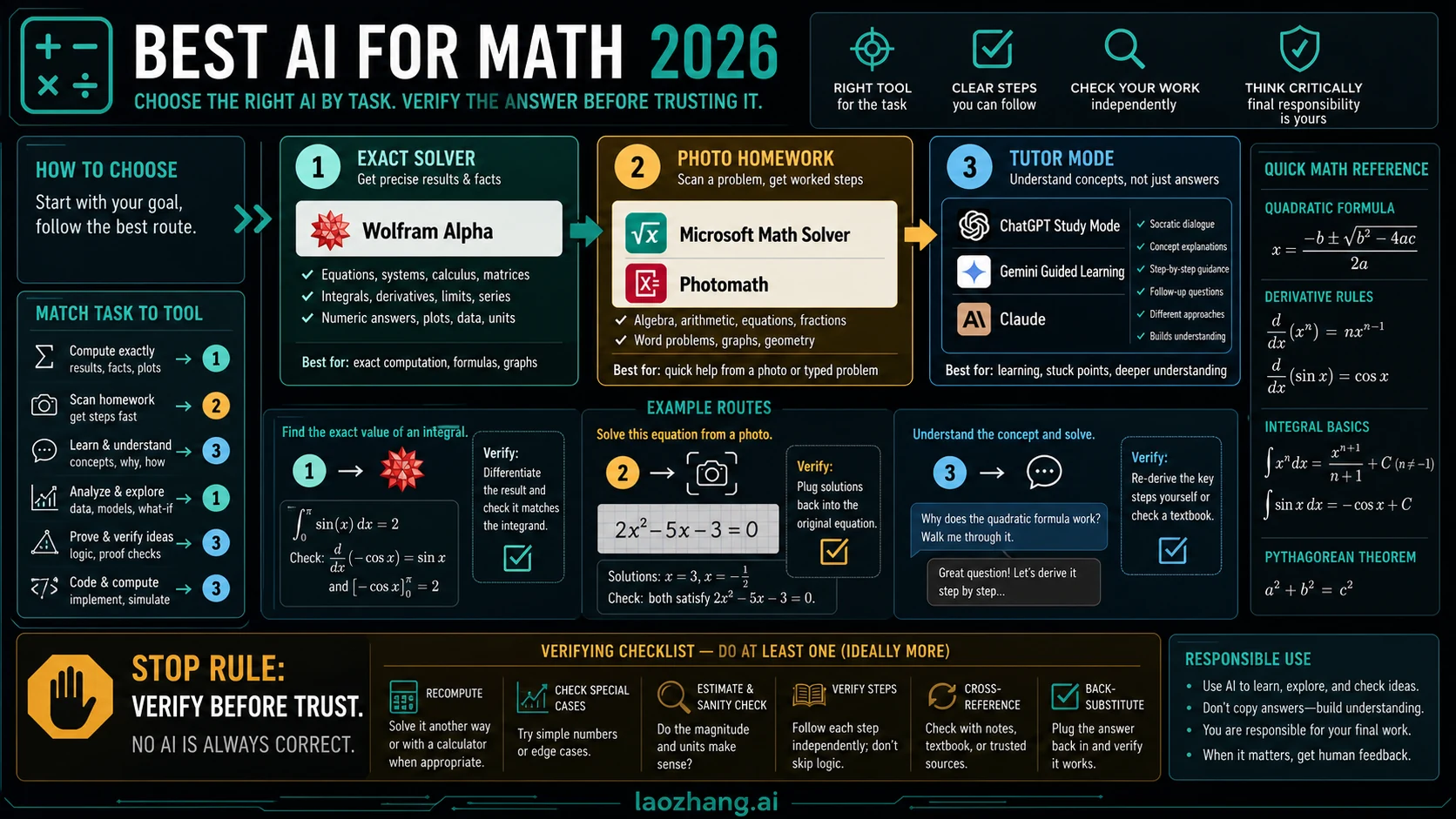
The best AI for math is the one that matches the problem: use Wolfram Alpha for exact computation, Microsoft Math Solver or Photomath when the work starts from a photo, and ChatGPT Study Mode, Gemini Guided Learning, or Claude when you want a tutor-style explanation instead of only an answer.
Here is the fast route board.
| Math job | Open first | Why |
|---|---|---|
| Exact computation, symbolic algebra, graphing | Wolfram Alpha | A computation engine is safer than a fluent chatbot when the answer must be exact. |
| A worksheet, handwritten problem, or screenshot | Microsoft Math Solver or Photomath | A scan-first solver reduces transcription mistakes and usually shows steps. |
| Learning a concept or debugging your reasoning | ChatGPT Study Mode, Gemini Guided Learning, or Claude | A tutor-style chatbot can ask questions, explain ideas, and review your work. |
| Classroom practice or teacher-managed tasks | SchoolAI or a teacher-controlled tool | The workflow needs controls, practice tasks, and student-safety boundaries. |
| Advanced proof, research, or high-stakes work | A solver plus an independent chatbot review | No single AI answer should be treated as proof. |
Important stop rule: do not trust a fluent AI math answer until you verify it with substitution, graphing, a second solver, or an error-audit prompt.
The Best AI for Math Depends on the Job
Most people ask for the best AI for math as if there is one winner. That shortcut breaks down as soon as you change the input. A typed calculus integral, a blurry worksheet photo, a word problem, a statistics interpretation, and a proof outline do not need the same tool.
The safest way to choose is to split the job into three roles.
| Role | Best fit | Use it for | Watch out for |
|---|---|---|---|
| Solver | Wolfram Alpha, Symbolab, Mathway, Microsoft Math Solver, Photomath | Exact answers, algebra, calculus, graphing, step-by-step computation | Steps may be gated, and the tool may not teach why the method works. |
| Tutor | ChatGPT Study Mode, Gemini Guided Learning, Claude | Concept explanation, hints, alternative approaches, reasoning review | The explanation can sound convincing even when the math is wrong. |
| Checker | A second solver, graphing, substitution, or chatbot error audit | Verifying an answer before using it | Checking is a workflow, not one product button. |
For most readers, the right answer is a pair: one solver and one tutor. Use the solver to get a reliable computational baseline. Use the tutor to understand the method, ask why a step is valid, or find where your own reasoning broke. Then verify the final result before treating it as correct.
Solver vs Tutor: Do Not Mix Up the Job
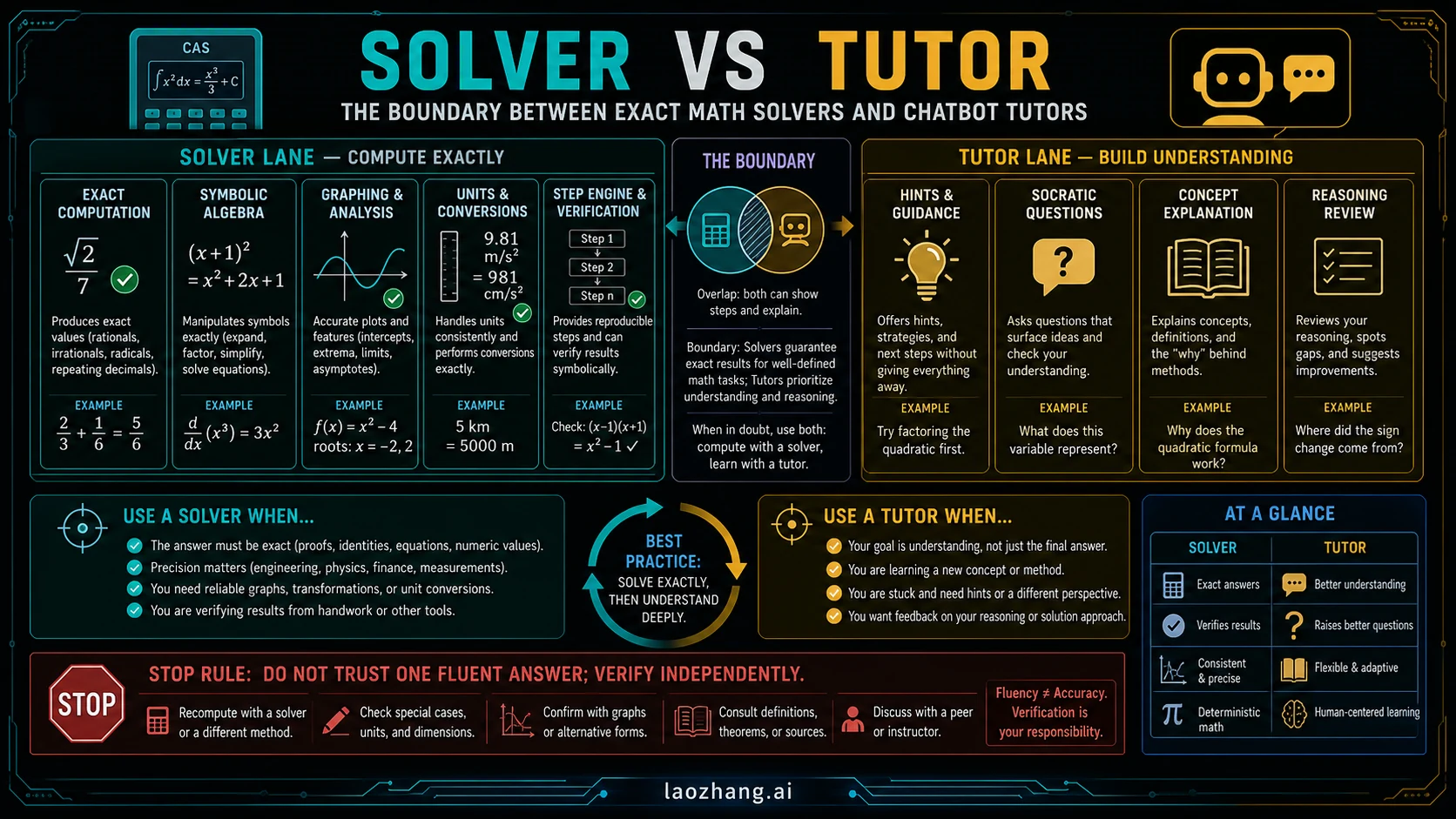
An AI math solver is built around calculation. It should handle equations, simplification, graphing, symbolic manipulation, units, or step-by-step transformations. Wolfram Alpha is the strongest first pick when the problem is really a computation or symbolic reasoning task: calculus, algebra, graphing, limits, series, matrices, units, or numeric checks. Symbolab and Mathway also belong in this lane when you want a conventional solver workflow.
A scan-first solver is built around input capture. Microsoft Math Solver and Photomath are better first choices when the hard part is turning a handwritten or printed problem into a clean math expression. They are especially useful for school worksheets, arithmetic, algebra, trigonometry, and problems where the first mistake would be typing the expression incorrectly.
A tutor model is built around conversation. ChatGPT Study Mode and Gemini Guided Learning are designed around learning behavior: guided questions, explanations, and step-by-step support. Claude can also be useful as a reasoning reviewer or explanation partner, especially when you paste your own work and ask it to find the weakest step. If you want a broader comparison of chatbot behavior, the existing ChatGPT vs Claude guide is a better place to compare those general-purpose assistants.
The trap is asking a chatbot to behave like a calculator and then trusting the polished explanation. For arithmetic, symbolic algebra, and exact transformations, a solver is usually safer. For understanding, Socratic hints, and alternate explanations, a tutor is usually more useful.
First Picks by Math Situation
If the answer must be exact
Start with Wolfram Alpha. It is the best first route when the problem has a symbolic or computational core: "solve this equation," "differentiate this function," "plot this curve," "simplify this expression," or "check this integral." It is also useful when you need a second opinion on a chatbot answer because the output can be compared directly against substitution, graphing, or numerical evaluation.
Use a chatbot after the solver if you need the method explained in plain language. A good prompt is:
Explain why this solution works step by step. Do not change the final answer unless you can identify an algebraic error. Point out the exact step where a common mistake would happen.That prompt keeps the chatbot in reviewer mode instead of letting it invent a new answer path.
If the problem starts with a photo
Start with Microsoft Math Solver or Photomath. The main value is not only "AI solves math." The value is input handling: camera capture, expression recognition, and a workflow that expects school-style problems. After scanning, compare the recognized expression with the original problem before reading the answer. If the scan misreads a minus sign, exponent, radical, or fraction bar, every later step can be wrong.
Mathos and similar newer math platforms can be useful when you want a more modern interface, PDF-style input, or multiple learning features in one place. Treat those features as convenience, not proof. The final answer still needs a check.
If the goal is learning
Start with a tutor mode, not an answer-only solver. Ask for hints first, then steps, then a final check. This order matters because a full solution shown too early can make the work feel easier while reducing what you actually learn.
Use this prompt shape:
Act as a math tutor. Ask me one guiding question at a time. If I make a mistake, identify the concept behind the mistake before showing the next step. Do not give the final answer until I ask for a check.ChatGPT Study Mode and Gemini Guided Learning are good fits for this behavior because the product direction is explicitly learning-oriented. Claude can also handle the same prompt pattern well. If paid access becomes part of your decision, use a current plan comparison rather than relying on a stale claim; the ChatGPT plan comparison handles that subscription question better than a math-tool selection workflow.
If you are a teacher or parent
Use a classroom or supervision-first tool. SchoolAI and teacher-managed platforms are better fits when the goal is practice generation, safe prompts, classroom control, or student progress review. A solo homework solver is not the same thing as a classroom workflow.
Parents should use AI as an explanation and checking layer, not as a shortcut to finished homework. A useful parent prompt is:
Explain this problem at a middle-school level. Show the concept first, then one similar practice question, then check my child's answer without giving away the next problem.If the work is advanced or high-stakes
Do not rely on a single model. For proofs, contest preparation, research, engineering calculations, finance, or anything with consequences, use at least two independent checks. A solver can verify algebra or computation. A chatbot can review the reasoning and search for hidden assumptions. You should still inspect the logic yourself.
Advanced math is where fluent AI mistakes become costly. A model may preserve the shape of a proof while skipping a condition, assuming a theorem that does not apply, or making a small sign error that changes the result. That is why the verification workflow below is not optional.
How to Verify AI Math Answers
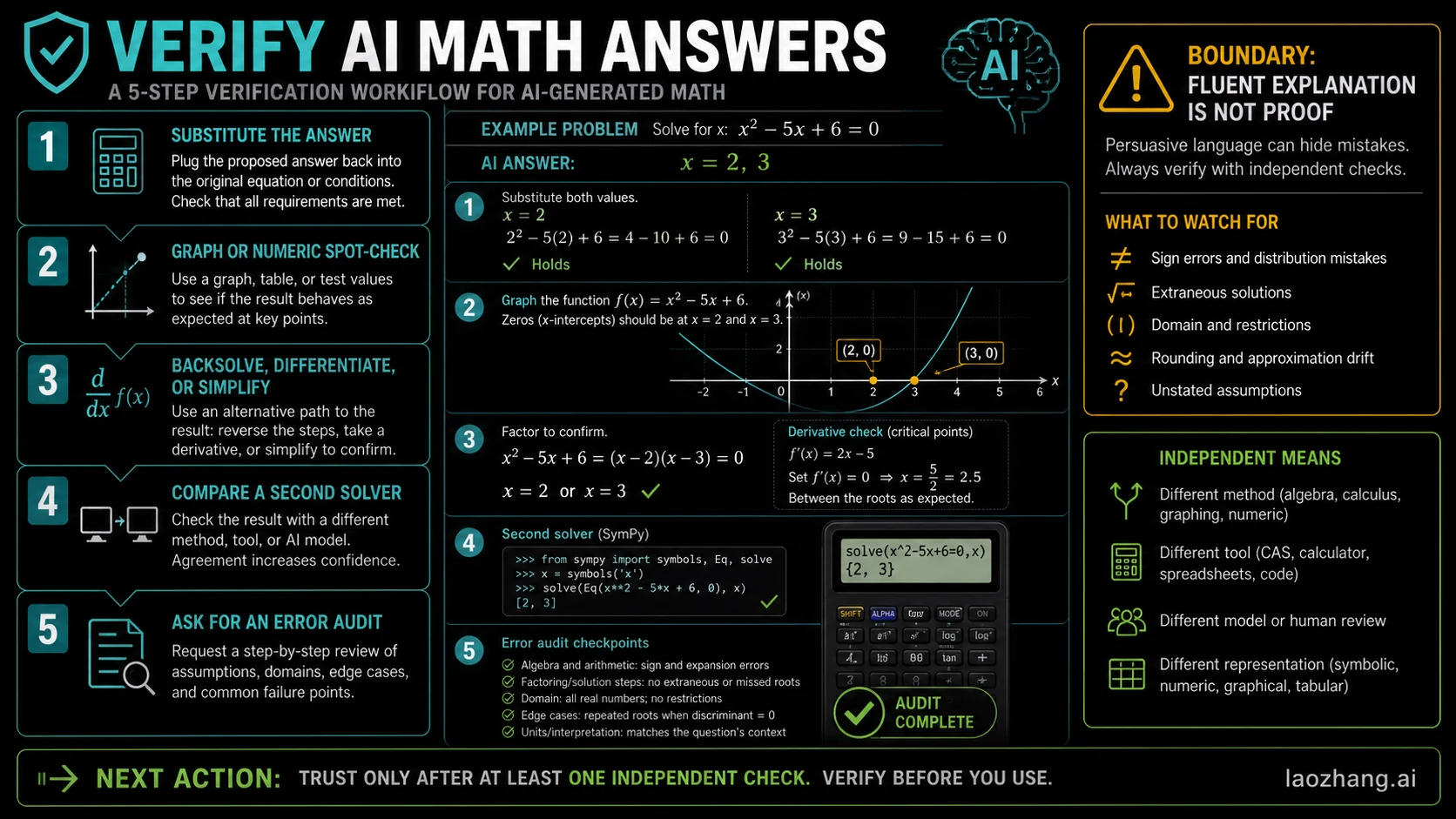
Use this five-step verification routine whenever the answer matters.
- Substitute the answer back into the original problem. For equations, plug it in. For derivatives, differentiate or integrate the claimed result when possible. For units, check dimensions.
- Graph or do a numeric spot-check. Test a few values. If the claimed expression behaves differently from the original, something is wrong.
- Backsolve, differentiate, or simplify. Reverse the operation that produced the answer. This catches many algebra and calculus errors.
- Compare a second solver. Put the same problem into Wolfram Alpha, Microsoft Math Solver, Symbolab, or another independent route.
- Ask for an error audit. Paste the solution into a chatbot and ask it to find mistakes, not to praise or rewrite the answer.
Use this prompt for the last step:
Audit this solution for math errors. Check algebra, assumptions, signs, domains, and whether each step follows from the previous one. If the final answer is correct, say why. If it is wrong, point to the first wrong step.This is stronger than asking "is this right?" because it gives the model a critical role. Even then, the audit is only one check. The strongest confirmation is when a symbolic solver, a numerical test, and your own reasoning all agree.
A Simple Route Matrix for Different Readers
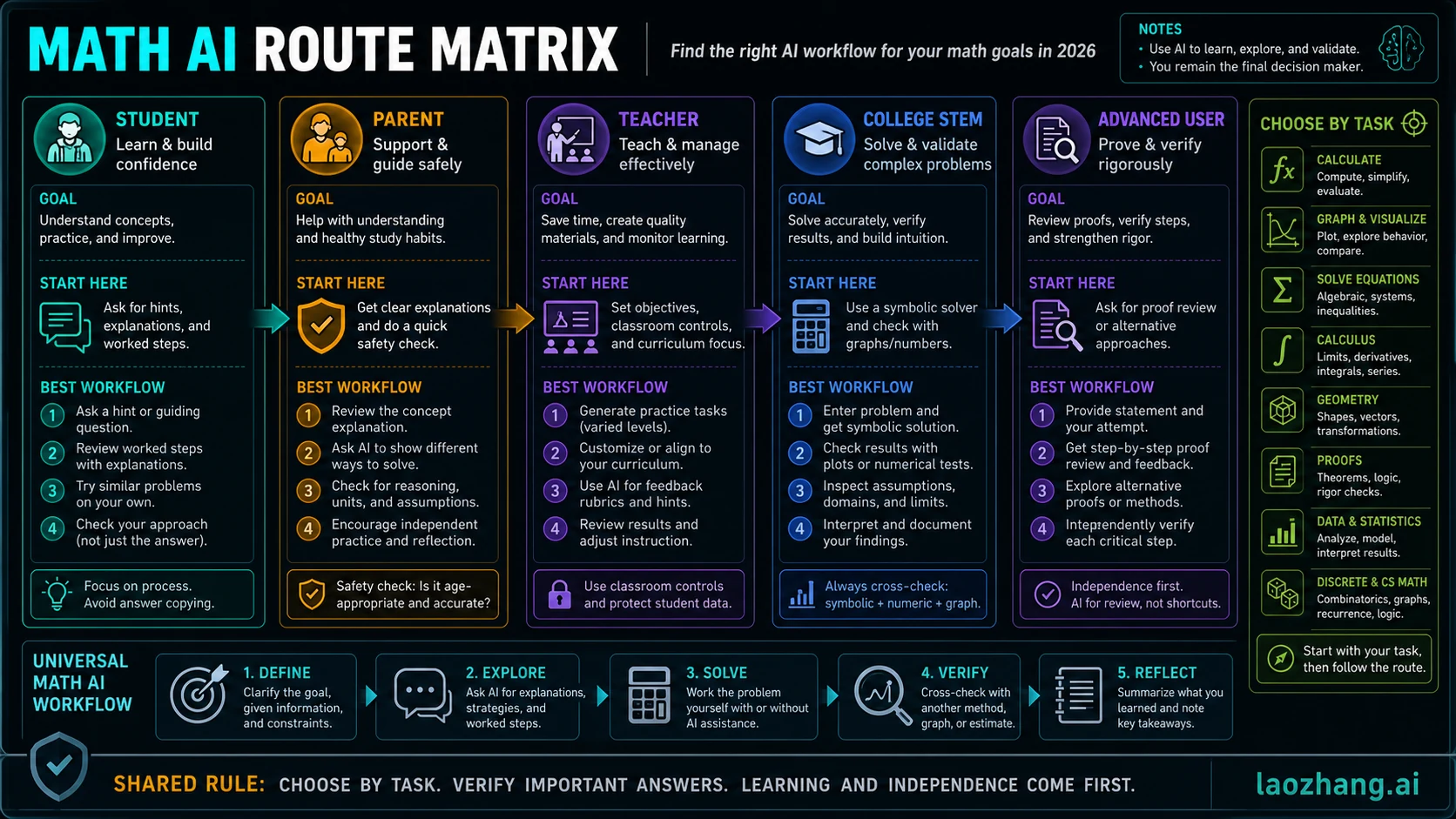
| Reader | Best first route | What to ask for | What to avoid |
|---|---|---|---|
| Middle school or high school student | Photomath, Microsoft Math Solver, or a tutor mode | Hints, steps, and concept explanations | Copying a final answer without understanding the method. |
| College STEM student | Wolfram Alpha plus a chatbot reviewer | Symbolic result, graph check, then explanation | Trusting a single generated derivation. |
| Parent | Tutor mode plus a scan-first solver | Grade-level explanation and a similar practice problem | Letting the tool do the whole assignment. |
| Teacher | SchoolAI or teacher-managed tools | Practice sets, guided prompts, classroom controls | Uncontrolled open-ended answer generation for students. |
| Advanced user | Solver plus independent review | Assumption checks, proof review, and numerical tests | Treating natural-language confidence as proof. |
The pattern is consistent: choose the route by job, then decide how much explanation and verification you need.
What About ChatGPT, Gemini, and Claude for Math?
General chatbots are useful for math, but their best role is usually tutoring, explanation, and review. They can help you understand a method, generate practice problems, compare solution paths, and identify a likely error in your work. They are weaker when you ask them to be the only calculator.
ChatGPT is a strong fit when you want an interactive tutoring loop, especially with Study Mode. Gemini is useful when you want guided learning and broader Google ecosystem support. Claude is helpful for long explanations, reasoning review, and feedback on written solution logic. None of them should be treated as the final authority for exact computation.
If your question shifts from math learning to API model selection, that is a different job. For developer routing between model families, use the Gemini API vs OpenAI vs Claude guide instead. For math homework and learning, the job is to solve, learn, or verify math, not choose an API stack.
Free Access, Paywalls, and Current-Claim Caveats
Many math tools advertise free solving, free scans, or free explanations, but the useful limit is often in the details: number of steps, advanced problem types, camera features, saved history, tutoring depth, or daily usage. Those details change often. Treat any price, quota, or "unlimited" claim as current only on the product's own page.
The practical rule is simple:
- Use free solver access for quick checks and simple homework.
- Consider paid access only if you repeatedly need step-by-step explanations, advanced problem types, saved work, or higher limits.
- Do not pay for a chatbot plan just because you need one exact answer. Test a solver first.
- Do not pay for a solver if your real need is concept tutoring and feedback on your own reasoning.
Privacy also matters. Camera-based math apps may process worksheet images. Chatbots may store conversation history depending on product settings. If the problem includes personal data, school information, or sensitive documents, check the tool's data controls before uploading. For Google-related privacy questions, the Google AI data deletion guide is the better follow-up.
FAQ
What is the best AI for math overall?
There is no single overall winner. Wolfram Alpha is the safest first pick for exact computation, Microsoft Math Solver or Photomath is the better first pick for scanned homework, and ChatGPT Study Mode, Gemini Guided Learning, or Claude is better when you want tutoring and explanation.
Is ChatGPT good at math?
ChatGPT can be good at explaining math, generating practice problems, and reviewing your reasoning. It should not be your only calculator for exact answers. Verify important results with substitution, graphing, or an independent solver.
Which AI is best for calculus?
Start with Wolfram Alpha for calculus computation, graphing, limits, derivatives, and integrals. Use a chatbot afterward to explain the method, compare approaches, or review where your own work went wrong.
Which AI is best for word problems?
Use a tutor-style chatbot first if the hard part is translating words into equations. Then use a solver to check the equation and final answer. Word problems often fail at setup, not arithmetic.
What is the best free AI math solver?
For quick free checks, start with Microsoft Math Solver, Photomath, or the free parts of Wolfram Alpha, Symbolab, and Mathway. Recheck current limits on each product page because free steps, scans, and advanced explanations can change.
Can AI help without cheating?
Yes. Ask for hints, concept explanations, similar practice problems, and error checks on your own work. Avoid prompts that ask the tool to produce a final answer for submission. The difference is whether AI helps you learn the method or replaces your work.
How do I know an AI math answer is correct?
Use at least one independent check. Substitute the answer, graph it, test numeric values, backsolve, compare a second solver, or ask a chatbot to audit the solution for the first wrong step. If the answer affects a grade, project, or real-world decision, use more than one check.
Sources5
External pages this guide links to, in the order they appear. Last updated May 23, 2026.
Sources5
External pages this guide links to, in the order they appear. Last updated May 23, 2026.
- 1.Wolfram Alphawolframalpha.com/pro/step-by-step-math-solver
- 2.Microsoft Math Solvermathsolver.microsoft.com
- 3.Photomathsupport.google.com/photomath/answer/14328660
- 4.ChatGPT Study Modeopenai.com/index/chatgpt-study-mode
- 5.Gemini Guided Learningblog.google/products-and-platforms/products/gemini/guided-learning-google-gemini