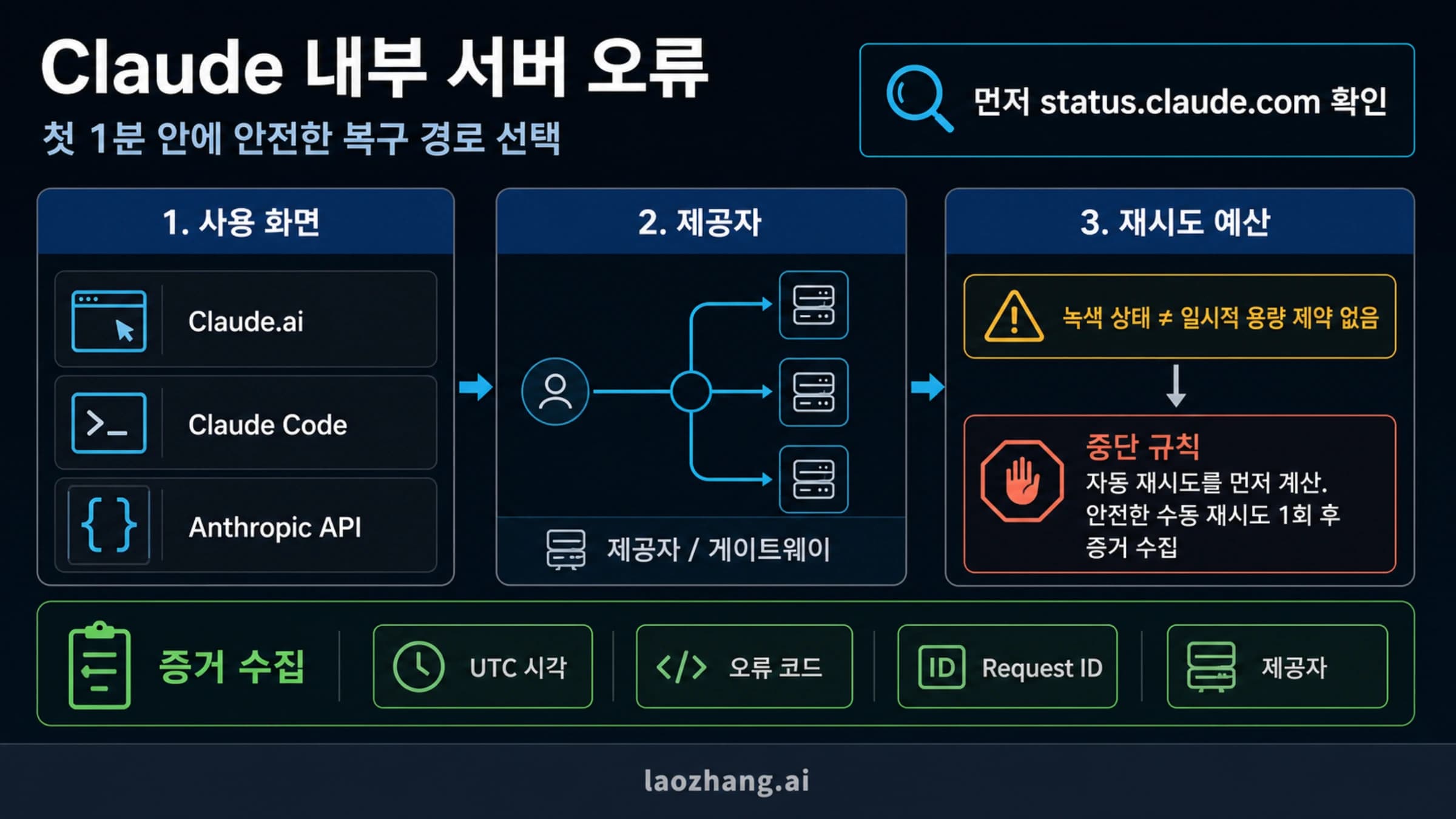
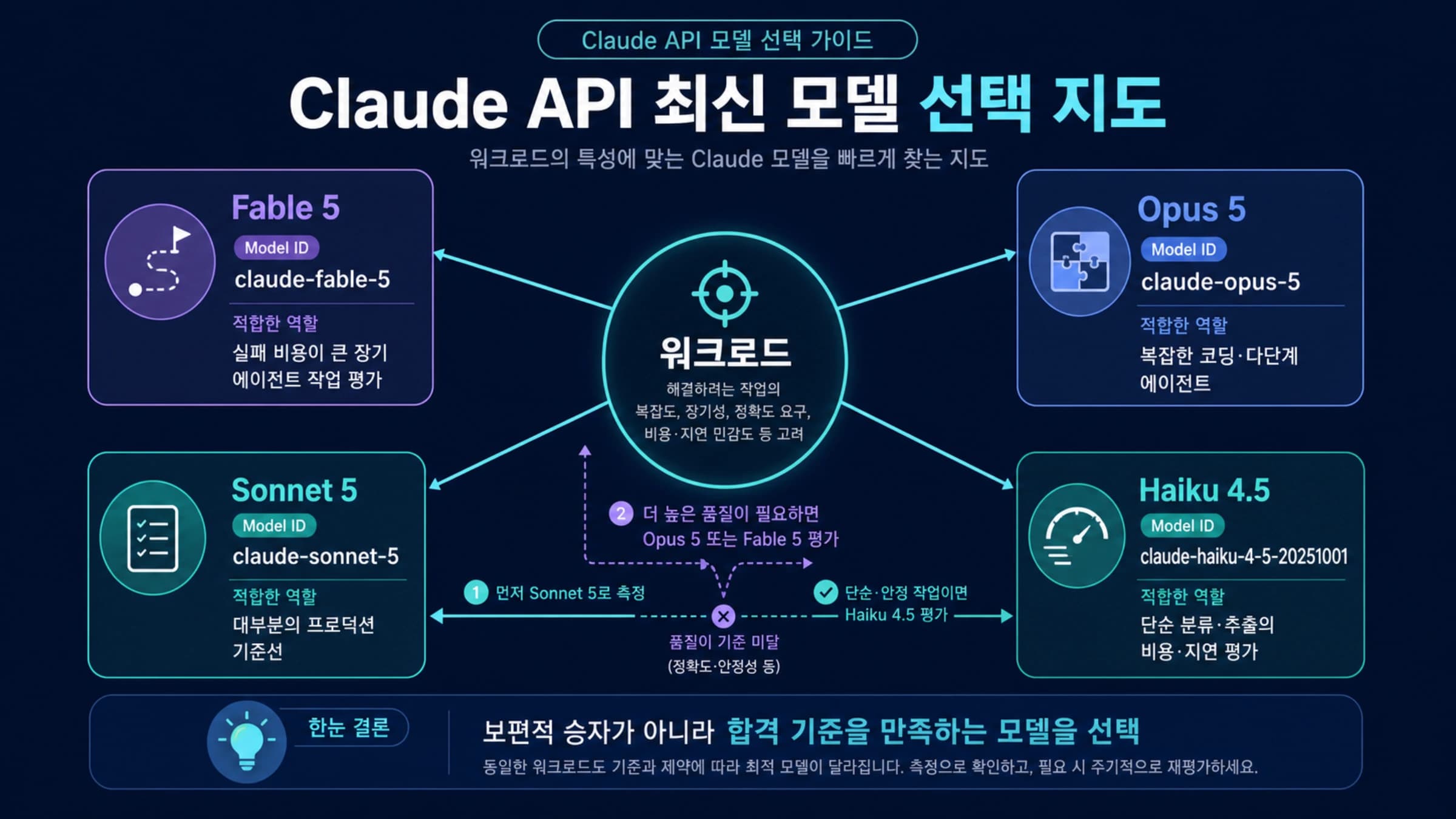
Claude MCP로 사내 API 연동하기: 경로 선택부터 도구 실행 확인까지
기존 앱이 사용자 인증과 내부 호출을 담당한다면 MCP 없이도 Claude를 사내 API에 연결할 수 있습니다. 도구는 업무별로 좁게 만들고, 인증된 사용자의 권한으로 실행한 결과를 정확한 호출 ID에 연결해 반환합니다.
목차
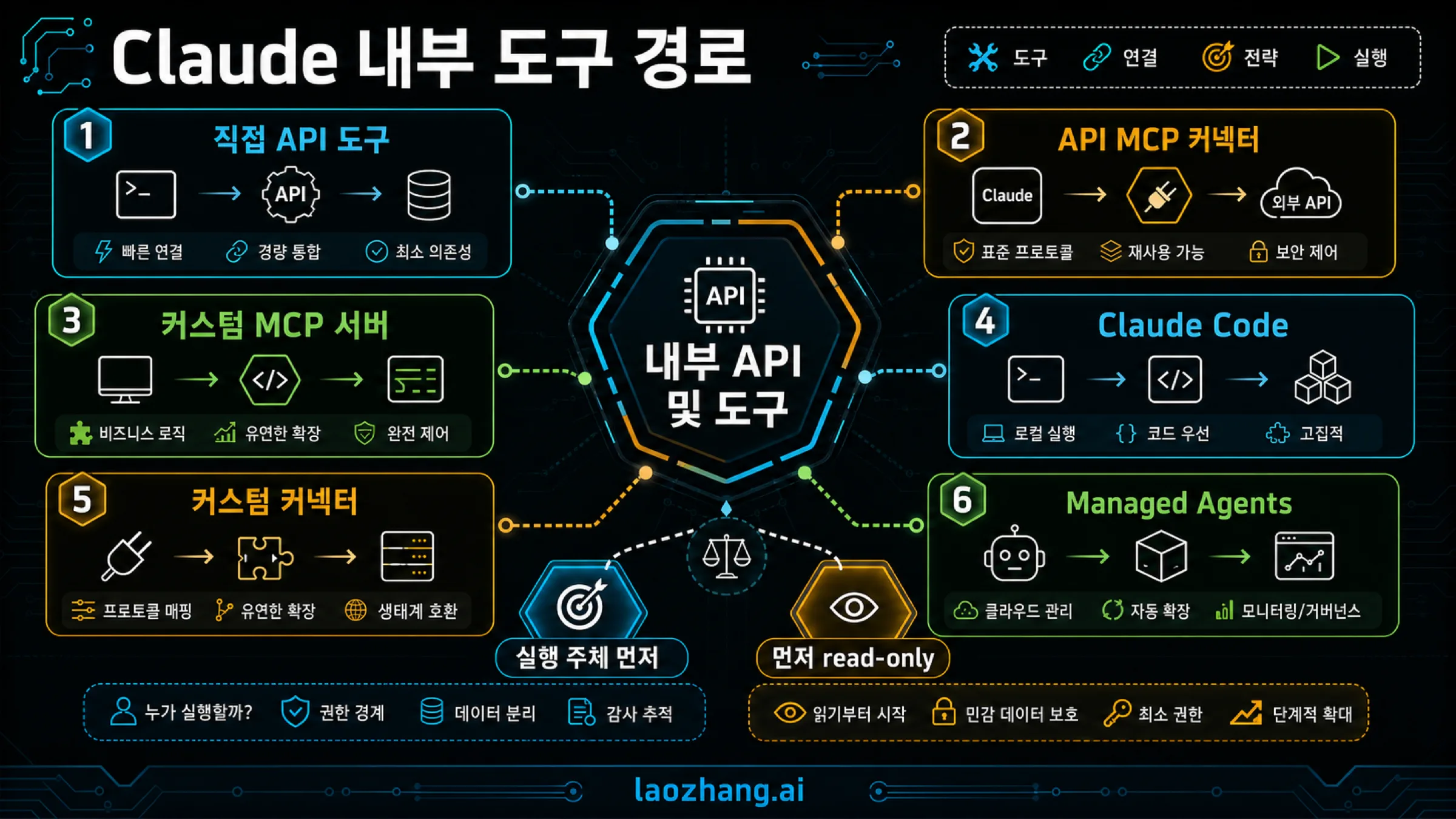
사내 앱에 Claude 기능을 넣는다면, 먼저 앱이 직접 실행하는 Claude API 도구로 시작하세요. 앱이 사용자 인증과 사내 API 호출을 이미 맡고 있으므로 tool_use를 받아 실행하고 tool_result를 반환하면 됩니다. 여러 앱과 Claude Code, Claude 사용자 화면에서 같은 업무 기능을 공유해야 한다면 그 실행 부분을 MCP 서버로 제공할 이유가 생깁니다.
예를 들어 “구매 주문 PO-184의 입고 상태를 알려 줘”라는 요청에 필요한 것은 ERP 전체 접근 권한이 아닙니다. 사용자가 볼 수 있는 구매 주문 한 건을 조회하고, 현재 상태와 근거가 되는 기록을 돌려주는 도구입니다. Claude가 호출을 제안하는 것, 서버가 권한을 확인하는 것, ERP에서 실제 결과를 받는 것은 각각 확인해야 할 단계입니다.
아래는 2026년 10월 7일 확인한 공식 문서에 따른 경로 구분과 구현 예입니다. 예제의 구매 주문과 사용자는 가상의 값이며, 코드의 메시지 조립과 처리 분기는 오프라인에서 확인했습니다. 실제 Claude 호출, 사내 시스템 연결이나 운영 환경의 보안 검증을 수행한 결과는 아닙니다.
직접 Claude API 도구와 MCP는 언제 선택하나요?
MCP 서버와 MCP 커넥터는 서로 대체하는 제품이 아닙니다. 서버는 도구를 제공하고, 커넥터는 Claude가 그 서버를 사용하는 연결 경로입니다. 직접 API 도구에서는 그 중간 서버 없이 앱이 실행을 맡습니다. Claude 도구 사용 문서는 클라이언트 도구의 실행과 결과 반환을 앱의 역할로 설명합니다.
| 사용하려는 곳 | 연결 방식 | 사내 API를 실행하는 곳 |
|---|---|---|
| 자체 서비스의 챗봇이나 업무 화면 | Messages API에 직접 도구 정의 전달 | 자체 앱의 백엔드 |
| Messages API에서 공용 사내 도구 호출 | API MCP 커넥터 + 원격 MCP 서버 | MCP 서버 |
| 개발자의 저장소·로컬 파일 작업 | Claude Code MCP, 로컬 stdio 또는 원격 HTTP | 로컬 도구 프로세스 또는 원격 서버 |
| Claude·Cowork·Desktop에서 직원이 업무 도구 사용 | 사용자용 원격 커스텀 커넥터 | 원격 MCP 서버 |
한 앱에서 주문 조회 몇 개만 제공한다면 직접 도구가 구현과 운영 범위를 줄입니다. 여러 클라이언트에서 같은 이름·입력·결과를 유지해야 한다면 MCP로 공통 인터페이스를 관리하는 편이 유용합니다. 다만 클라이언트가 같아도 서버의 권한과 사용자별 데이터 범위는 별도로 적용해야 합니다.
사내망에 API가 있다는 이유만으로 외부에서 연결되는 MCP 서버를 먼저 만들 필요는 없습니다. 자체 백엔드가 사내 API에 접근할 수 있다면 직접 도구 실행을 그 백엔드에 두고, 모델에 필요한 결과만 전달할 수 있습니다. 이 방식에서도 전달한 결과는 Claude가 처리하는 데이터이므로 외부 전송 범위를 함께 정해야 합니다.
사내 API를 업무별 도구로 감싸기
기존 REST API의 모든 경로를 하나의 call_api 도구에 넣으면 모델이 URL, HTTP 메서드, 권한 범위까지 정하게 됩니다. 대신 “구매 주문 상태 조회”처럼 직원이 수행하려는 작업을 도구 하나로 만드세요. 호출할 경로와 자격 증명은 백엔드가 정하고, Claude는 구매 주문 번호처럼 업무에 필요한 입력만 고릅니다.
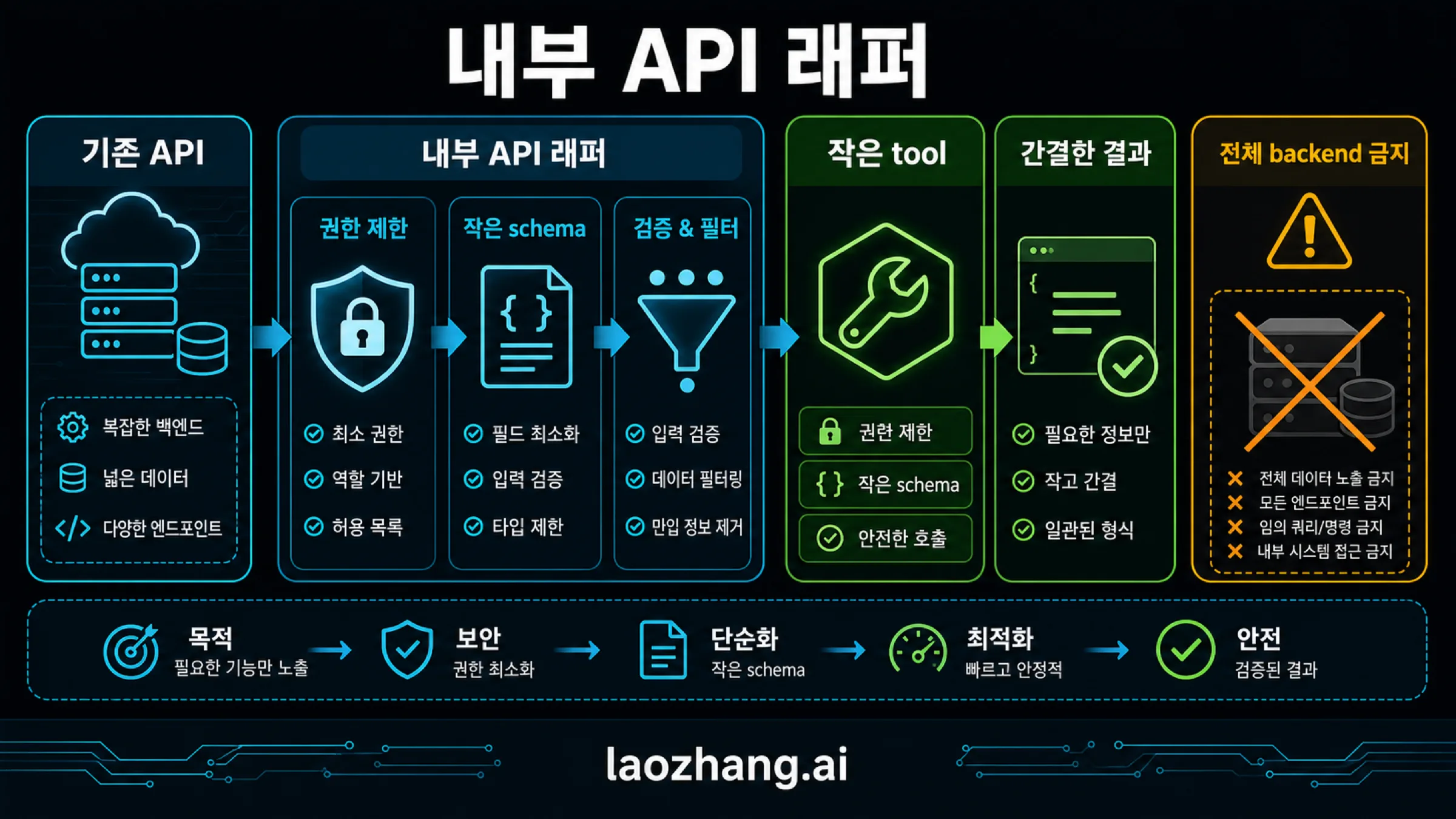
구매 주문 조회 도구라면 다음 경계를 정할 수 있습니다.
| 항목 | 이 예제에서 정하는 범위 |
|---|---|
| 입력 | 구매 주문 번호와 조회 사유 |
| 사용자·회사 | 앱의 인증 계층이 확인한 사용자와 테넌트에서 가져옴 |
| 조회 대상 | 그 사용자가 접근할 수 있는 프로젝트의 주문 한 건 |
| 반환값 | 주문 번호, 입고 상태, 납품 예정일, 원본 갱신 시각, 조회 작업 ID |
| 제외할 값 | 공급업체 계좌, 담당자 연락처, 내부 메모, 서비스 토큰 |
| 기록 | 도구 호출 ID, 실행 사용자·테넌트, 성공 여부와 원본 작업 ID |
구매 주문 번호만 받아도 다른 회사의 번호를 입력할 수 있습니다. 따라서 번호 형식 검사는 데이터 접근 권한 검사를 대신하지 않습니다. API에도 인증된 테넌트와 접근 가능한 프로젝트 범위를 적용하고, 반환된 레코드가 그 범위에 속하는지 확인합니다. MCP 도구 명세 역시 서버의 입력 검증, 접근 제어와 출력 정리를 별도 책임으로 다룹니다.
직접 도구의 실행 함수를 완성하기
아래 JavaScript는 클라이언트 도구만 쓰는 한 번의 응답을 처리하는 함수입니다. 모든 tool_use를 찾아 입력과 권한을 확인하고, 조회 결과를 필요한 필드로 줄여 감사 기록을 남깁니다. 결과 블록은 각각의 원래 호출 ID에 연결합니다.
인증은 기존 앱이 먼저 수행해야 합니다. principal은 모델 입력이나 사용자가 보낸 JSON을 복사한 값이 아니라, 앱이 검증한 인증 정보여야 합니다. io.readPurchase는 사내 구매 API 어댑터, io.audit는 내부 감사 저장소입니다. 이 두 함수의 계약과 요청 예는 코드 다음에 설명합니다. 함수 자체는 SDK나 네트워크 연결 없이도 가짜 어댑터로 검사할 수 있습니다.
const purchaseTool = {
  name: "get_purchase_status",
  description: "접근 가능한 구매 주문 한 건의 입고 상태와 원본 갱신 시각을 조회합니다.",
  input_schema: {
    type: "object",
    properties: {
      order_id: { type: "string", pattern: "^PO-[0-9]{1,8}$" },
      reason: { type: "string", minLength: 1, maxLength: 160 }
    },
    required: ["order_id", "reason"],
    additionalProperties: false
  }
};

async function fulfillPurchaseTools(assistant, history, principal, io) {
  const calls = assistant.content.filter(b => b.type === "tool_use");
  if (assistant.stop_reason !== "tool_use" || calls.length === 0) {
    throw new Error("이 함수는 클라이언트 도구 실행 응답만 처리합니다.");
  }
  if (new Set(calls.map(c => c.id)).size !== calls.length ||
      calls.some(c => typeof c.id !== "string" || !c.id)) {
    throw new Error("도구 호출 ID가 없거나 중복되었습니다.");
  }

  const results = [];
  for (const call of calls) {
    let output;
    let errorCode = null;
    let operationId = null;
    try {
      if (call.name !== purchaseTool.name) throw new Error("UNKNOWN_TOOL");
      const input = call.input;
      if (!input || typeof input !== "object" || Array.isArray(input) ||
          Object.keys(input).some(k => !["order_id", "reason"].includes(k)) ||
          typeof input.order_id !== "string" ||
          !/^PO-[0-9]{1,8}$/.test(input.order_id) ||
          typeof input.reason !== "string" || !input.reason.trim() ||
          input.reason.length > 160) throw new Error("INVALID_INPUT");
      if (!principal?.actorId || !principal.tenantId ||
          !Array.isArray(principal.scopes) ||
          !principal.scopes.includes("purchase:read") ||
          !Array.isArray(principal.projectIds) || principal.projectIds.length === 0) throw new Error("FORBIDDEN");

      const record = await io.readPurchase({
        actorId: principal.actorId,
        tenantId: principal.tenantId,
        projectIds: principal.projectIds,
        orderId: input.order_id
      });
      if (!record || record.orderId !== input.order_id ||
          record.tenantId !== principal.tenantId ||
          !principal.projectIds.includes(record.projectId)) {
        throw new Error("NOT_AVAILABLE");
      }
      if (!["ordered", "in_transit", "received", "on_hold"].includes(record.status) ||
          typeof record.operationId !== "string" || !record.operationId ||
          typeof record.updatedAt !== "string" ||
          !Number.isFinite(Date.parse(record.updatedAt)) ||
          !(record.deliveryDate === null ||
            (typeof record.deliveryDate === "string" &&
             /^\d{4}-\d{2}-\d{2}$/.test(record.deliveryDate)))) {
        throw new Error("INVALID_BACKEND_RESULT");
      }
      operationId = record.operationId;
      output = {
        order_id: record.orderId,
        status: record.status,
        delivery_date: record.deliveryDate,
        source_updated_at: record.updatedAt,
        source_record_id: record.orderId,
        operation_id: operationId
      };
    } catch (error) {
      const known = ["UNKNOWN_TOOL", "INVALID_INPUT", "FORBIDDEN",
        "NOT_AVAILABLE", "INVALID_BACKEND_RESULT", "UPSTREAM_TIMEOUT"];
      errorCode = known.includes(error.message) ? error.message : "UPSTREAM_ERROR";
      output = { error: errorCode };
    }

    await io.audit({
      callId: call.id,
      tool: call.name,
      actorId: principal?.actorId ?? null,
      tenantId: principal?.tenantId ?? null,
      outcome: errorCode ? "failed" : "succeeded",
      errorCode,
      operationId
    });
    results.push({
      type: "tool_result",
      tool_use_id: call.id,
      is_error: errorCode !== null,
      content: JSON.stringify(output)
    });
  }
  return [
    ...history,
    { role: "assistant", content: assistant.content },
    { role: "user", content: results }
  ];
}
이 예제는 입력에서 tenant_id, URL, 토큰을 받지 않습니다. reason도 권한 판단에 사용하지 않습니다. “관리자가 승인했다”는 사유를 적어도 앱이 확인한 purchase:read 권한과 프로젝트 범위가 달라지지 않습니다. 테넌트는 여기서 데이터를 구분하는 회사 또는 조직 단위입니다.
io.readPurchase 어댑터는 인증된 실행자의 범위를 적용해 한 건을 조회하고, 응답 크기와 시간을 제한하며, 원본 시스템의 조회 작업 ID를 반환해야 합니다. 다음은 이 예제가 가정하는 사내 API 계약입니다. 실제 ERP의 필드와 경로가 다르면 어댑터에서 변환합니다. 서비스 자격 증명은 이 내부 호출에만 쓰며 모델 입력이나 모델에 보내는 결과에 넣지 않습니다.
GET /v1/tenants/company-a/purchase-orders/PO-184 HTTP/1.1
Host: purchasing.internal.example
Authorization: Bearer <구매 조회용 서비스 자격 증명>
Accept: application/json
위 요청의 테넌트 경로는 인증된 컨텍스트에서 정합니다. 구매 API는 별도로 신뢰할 수 있는 위임 인증을 통해 실행자와 접근 가능한 프로젝트를 확인해야 합니다. 모델이 지정한 헤더에 실행자 이름만 적는 방식으로는 사용자 권한을 검증할 수 없습니다. 어댑터가 받는 성공 응답은 다음과 같습니다.
{
  "orderId": "PO-184",
  "tenantId": "company-a",
  "projectId": "warehouse-east",
  "status": "in_transit",
  "deliveryDate": "2026-10-09",
  "updatedAt": "2026-10-07T02:00:00Z",
  "operationId": "read-example-184",
  "supplierBankAccount": "반환 제외 대상",
  "internalMemo": "반환 제외 대상"
}
코드는 반환할 필드를 하나씩 새 객체에 넣습니다. 원본 객체를 통째로 복사한 뒤 일부 필드를 지우는 방식보다, 백엔드에 새 민감 필드가 추가되었을 때 의도치 않게 넘길 가능성을 줄입니다. 감사 저장이 실패하면 함수가 결과 메시지를 반환하지 않는 구성입니다. 감사 장애 시 어떻게 처리할지는 앱에서 정하되 성공 기록 없이 조회가 완료됐다고 보고하지 않도록 합니다.
호출 ID와 원본 작업 ID를 함께 확인하기
첫 Messages API 요청에는 tools: [purchaseTool]과 사용자 메시지를 보냅니다. 모델이 도구를 요청하면 fulfillPurchaseTools에 그 응답, 지금까지의 메시지, 인증된 사용자 정보와 어댑터를 전달합니다. 함수가 반환한 메시지를 같은 도구 정의와 함께 다음 API 요청에 사용합니다. 도구가 더 필요하면 같은 처리를 반복하고, 일반 답변으로 종료하면 사용자에게 표시합니다. 반복 횟수와 전체 실행 시간에는 앱의 한도를 둡니다.
공식 결과 처리 문서에 맞춰 assistant의 전체 content를 보존하고, 바로 다음 user 메시지의 첫 블록부터 tool_result를 넣습니다. 도구 호출 앞에 설명 텍스트가 있을 수 있으므로 content[0]만 실행하면 안 됩니다. 서버 도구와 미완료 호출을 섞는 흐름에는 별도 계속 진행 규칙이 있으므로 위 함수의 범위를 그대로 확대하지 마세요.
가상의 호출 toolu_purchase_example에 대한 결과는 다음처럼 연결됩니다.
{
  "type": "tool_result",
  "tool_use_id": "toolu_purchase_example",
  "is_error": false,
  "content": "{\"order_id\":\"PO-184\",\"status\":\"in_transit\",\"delivery_date\":\"2026-10-09\",\"source_updated_at\":\"2026-10-07T02:00:00Z\",\"source_record_id\":\"PO-184\",\"operation_id\":\"read-example-184\"}"
}tool_use_id는 모델 요청과 반환 블록을 연결합니다. operation_id는 백엔드 기록과 대조할 수 있는 조회 작업을 식별합니다. 둘 다 있어야 “어떤 도구 요청에 어떤 내부 실행 결과를 반환했는가”를 추적하기 쉽습니다. ID 문자열이 존재하는 것만으로 실행을 증명하지는 않습니다. 실제 도입 시에는 해당 작업 ID의 백엔드 기록과 반환 상태를 함께 확인해야 합니다.
API MCP 커넥터와 사용자 연결의 접근 조건
앱 밖에서 공통 도구를 쓰려면 구매 조회 함수를 MCP 서버의 도구 처리기에 연결할 수 있습니다. 인증 정보는 그 서버의 검증된 요청 컨텍스트에서 가져옵니다. 직접 API 도구의 input_schema는 Anthropic 형식이고 MCP 도구 정의의 inputSchema는 프로토콜 형식이므로, 필드 이름과 결과 형식을 그대로 섞지 마세요.
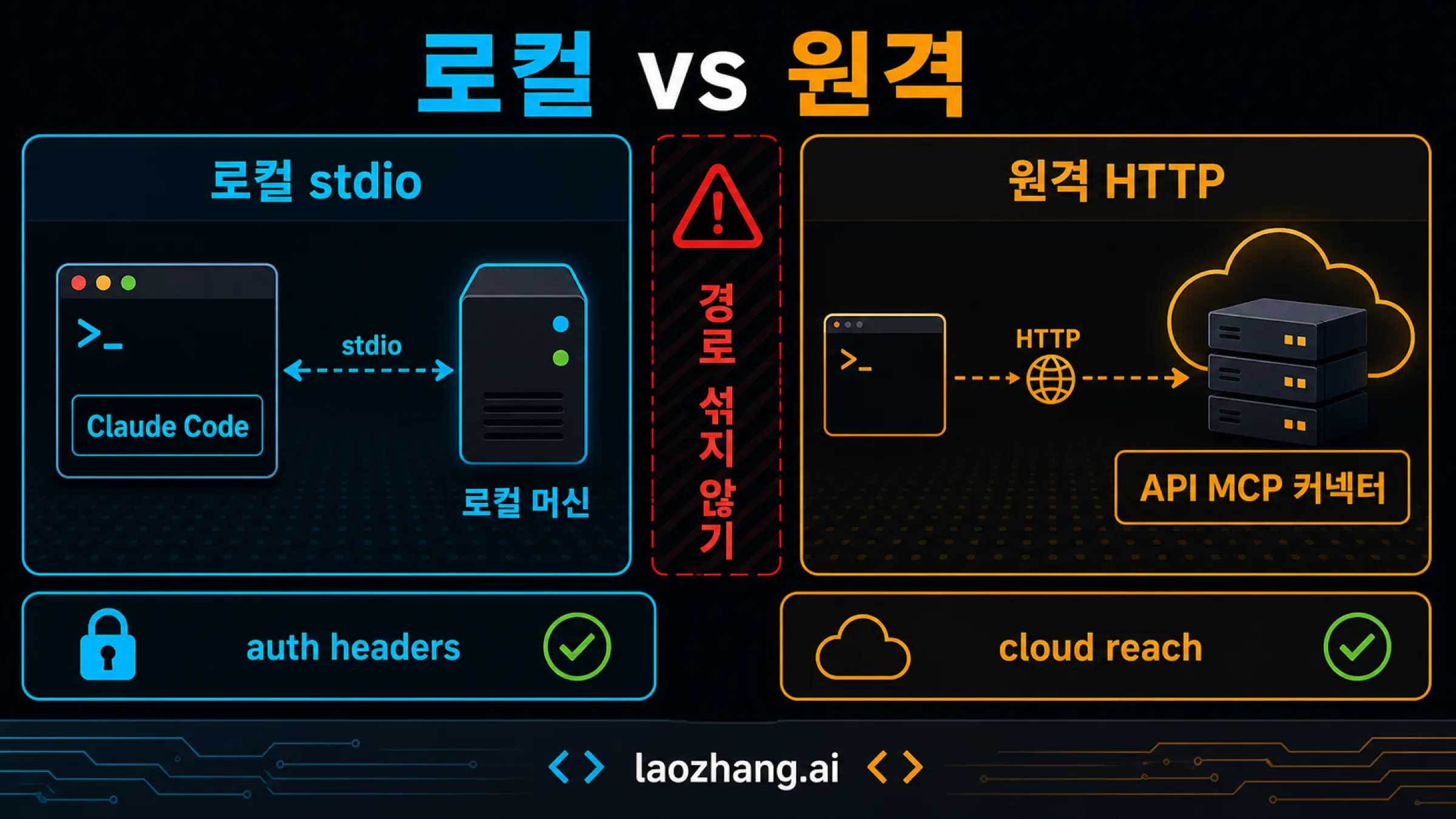
API MCP 커넥터는 일반적으로 Anthropic에서 접근 가능한 HTTPS 서버의 Streamable HTTP 또는 SSE 도구를 호출합니다. 로컬 stdio는 직접 연결할 수 없고, 현재 지원 범위는 MCP 도구 호출입니다. 기본 beta는 mcp-client-2025-11-20, 목록 고정 기능을 쓰는 beta는 이를 포함하는 mcp-client-2026-09-15입니다.
구매 조회 도구만 허용하는 API 요청
아래는 Messages API 요청 본문의 예입니다. 요청 헤더에 anthropic-beta: mcp-client-2025-11-20을 넣고, 목록을 고정할 경우 mcp-client-2026-09-15로 바꿉니다. 모델 ID, 주소와 토큰은 사용 환경의 승인된 값으로 바꿉니다. authorization_token은 앱이 사전에 발급받고 갱신하는 서버용 OAuth 토큰입니다. 예제는 실제 요청을 실행하지 않습니다.
{
  "model": "YOUR_ENABLED_MODEL_ID",
  "max_tokens": 800,
  "messages": [
    { "role": "user", "content": "구매 주문 PO-184의 입고 상태를 확인해 주세요." }
  ],
  "mcp_servers": [
    {
      "type": "url",
      "name": "purchasing",
      "url": "https://mcp.example.com/mcp",
      "authorization_token": "APP_OBTAINED_OAUTH_TOKEN"
    }
  ],
  "tools": [
    {
      "type": "mcp_toolset",
      "mcp_server_name": "purchasing",
      "default_config": { "enabled": false },
      "configs": { "get_purchase_status": { "enabled": true } }
    }
  ]
}
도구 설정의 기본값은 활성화이므로 default_config.enabled: false로 닫고 필요한 이름만 엽니다. 서버 이름마다 정확히 하나의 mcp_toolset이 대응해야 합니다. 없는 도구 이름은 오류 대신 경고가 될 수 있어, 요청이 받아들여졌다는 사실만으로 설정이나 실행 성공을 판단하면 안 됩니다. 설정과 검증 규칙을 확인하세요.
목록을 고정해도 서버 권한은 별도로 적용합니다
anthropic-beta: mcp-client-2026-09-15를 쓰면 응답에 mcp_tool_listing이 포함될 수 있습니다. 후속 요청에서는 목록 블록을 포함한 assistant 메시지를 보존하고 같은 beta를 유지합니다. 직접 고정하려면 해당 목록의 tools를 같은 서버의 mcp_toolset.tools에 복사합니다. 목록 고정 문서의 적용 범위는 Claude에게 보이는 도구 목록입니다.
목록 고정은 서버 구현, 데이터 접근 권한이나 테넌트 격리를 고정하지 않습니다. MCP 커넥터의 mcp_tool_use와 mcp_tool_result도 직접 도구의 블록과 구분해야 합니다. 서버 이름·정확한 호출 ID·오류 여부·실제 업무 결과를 추적하고, 서버는 매 실행 때 권한을 검사합니다.
사내망, 사용자 연결과 데이터 보관 조건
노트북에서 VPN으로 열리는 주소가 Anthropic에서도 열리는 주소는 아닙니다. 일반 원격 커넥터에는 클라우드에서 접근 가능한 서버가 필요합니다. 접근을 열 수 없는 사내 API라면 자체 백엔드의 직접 도구 실행을 먼저 검토할 수 있습니다.
Private MCP tunnels는 별도 접근 권한이 필요한 연구용 프리뷰입니다. 승인된 구성에서는 외부로 나가는 터널을 통해 공개 인바운드 주소 없이 연결할 수 있지만, 이는 Messages API·Managed Agents용 경로이며 Claude 사용자용 커넥터의 일반 기능이 아닙니다. 운영 지속성 보장도 없으므로 이 기능을 모든 계정이 쓸 수 있다고 전제하지 마세요. 터널은 모델에 필요한 도구 결과가 Anthropic으로 전달되는 사실을 없애지 않습니다.
직원이 Claude·Cowork·Desktop에서 직접 연결할 때는 사용자용 원격 커넥터 안내의 조건을 따릅니다. 현재 안내는 Free의 커스텀 연결 한 개와 Pro·Max·Team·Enterprise 지원을 설명합니다. 조직의 등록 권한과 직원의 연결 인증은 구분됩니다. 여러 직원이 같은 고정 자격 증명을 쓰는 구성에서는 서버가 사용자를 따로 식별하지 않으면 그 자격 증명의 권한을 공유하게 됩니다. 원격 연결은 Desktop에서 설정하더라도 Anthropic 클라우드에서 시작하며, 로컬 Desktop 설정과 다른 경로입니다.
데이터 보관도 연결 방식과 함께 결정하세요. 현재 API 데이터 보관 표에서 MCP 커넥터와 MCP tunnels는 ZDR 및 HIPAA 적격 기능이 아닙니다. 표준 Messages API도 계약과 모델 조건에 따라 달라집니다. ZDR 비적격 기능을 쓴다는 것은 적용 범위 밖에서 사용하는 것이며, 반드시 요청 자체가 차단된다는 뜻은 아닙니다. 사내 서버·읽기 전용·터널만으로 특정 보관 정책이 충족된다고 판단할 수 없습니다.
Claude Code의 로컬 도구와 원격 서버 연결
개발자가 로컬 저장소와 사내 자료를 함께 다루려면 Claude Code에서 MCP를 연결하는 경로가 맞습니다. 원격 서버는 전송 방식을 명시합니다. 아래 명령은 승인된 서버나 실행 파일을 이미 준비했을 때의 설정 예입니다.
claude mcp add --transport http --scope project purchasing https://mcp.example.com/mcp
claude mcp add --transport stdio --scope local purchasing-local -- ./bin/purchasing-mcp
claude mcp list
현재 Claude Code MCP 문서에 따르면 기본 범위는 local이며, 팀과 공유하는 project 설정과 개인의 여러 프로젝트에서 쓰는 user 설정을 구분합니다. 비밀값은 공유 설정에 넣지 않습니다. URL만 주고 전송 방식을 생략하면 stdio로 해석될 수 있으므로 HTTP에는 --transport http를 명시합니다. SSE는 사용 중단 방향이며 HTTP에서 SSE로 자동 대체하는 동작도 버전 조건이 있습니다.
설정 파일에 서버가 추가된 상태, 인증과 연결이 완료된 상태, 도구 목록이 보이는 상태, 도구가 실제로 성공한 상태를 나누어 확인하세요. mcp list에서 이름을 보는 것만으로 구매 조회가 성공했다고 볼 수 없습니다. 실제 호출 결과에는 주문 상태와 원본 작업 ID가 있어야 합니다.
프로젝트 서버의 승인 처리도 실행 모드에 따라 달라집니다. 대화형 실행의 확인 절차를 비대화형·SDK·클라우드 실행에 그대로 가정하지 마세요. 도구 승인 생략 옵션의 범위는 실행 모드를 설명하며, 사내 API 인증이나 회사별 데이터 접근 권한을 부여하는 방법은 아닙니다.
최신 MCP 명세와 실제 서버 버전을 맞추기
MCP 2026-07-28 개정은 요청별 메타데이터와 기능 정보를 사용하는 구조로 바뀌었습니다. 이 개정의 핵심 흐름에는 기존 initialize와 세션 헤더가 없지만, 이전 서버와 SDK는 기존 방식으로 동작할 수 있습니다. 최신 문서를 읽었다는 이유로 배포된 서버나 API 커넥터까지 이 버전으로 바뀌었다고 생각하면 안 됩니다.
이 개정의 요청에서는 params._meta.protocolVersion과 params._meta.clientCapabilities가 필요합니다. 선택 항목인 clientInfo는 클라이언트가 주장하는 정보이므로 사용자 인증의 근거가 될 수 없습니다. 기본 메시지 규칙을 기준으로 실제 서버·SDK·연결 경로가 지원하는 버전을 먼저 확인하세요. 축약된 도구 호출 JSON이나 오프라인 검사만으로 프로토콜 호환성을 입증할 수는 없습니다.
쓰기 작업은 미리보기·승인·실행 확인으로 나누기
구매 주문 취소를 추가한다면 조회 도구에 cancel: true를 끼워 넣기보다 별도의 흐름을 만드세요. 예를 들어 prepare_purchase_cancellation이 취소 대상과 영향을 고정한 초안을 만들고, 직원이 앱에서 내용을 확인한 다음 승인합니다. 최종 실행 함수는 저장된 승인과 초안을 확인한 뒤 구매 API를 호출합니다.
승인은 자연어 답변보다 서버가 확인할 수 있는 기록이어야 합니다. 승인자는 누구인지, 어느 테넌트의 어느 주문인지, 어떤 변경을 승인했는지, 언제까지 유효한지 저장합니다. 초안 내용이 바뀌면 기존 승인으로 실행하지 않고 다시 확인합니다. 같은 요청을 재전송해도 같은 작업을 식별하도록 서버가 생성한 멱등 키를 승인 기록에 묶습니다.
| 상태 | 사용자에게 표시할 내용 | 실행 서버의 다음 행동 |
|---|---|---|
| 초안 생성 | 취소 대상, 예상 영향, 초안 ID | 변경 내용과 원본 버전을 저장 |
| 승인 완료 | 승인자, 승인 ID, 승인된 변경 | 테넌트·대상·버전·유효기간 대조 |
| 실행 요청 후 응답 유실 | 완료 여부 확인 중, 작업 ID | 같은 멱등 키로 기존 작업 상태 조회 |
| 취소 확인 | 원본 시스템이 반환한 최종 상태와 작업 ID | 승인 ID와 실행 결과를 감사 기록에 연결 |
| 원본 상태 변경 | 기존 초안이 유효하지 않다는 안내 | 새 초안과 승인 요구 |
타임아웃은 “취소가 실패했다”와 같지 않습니다. 백엔드는 이미 취소했는데 응답만 잃었을 수 있습니다. 따라서 새 키로 다시 취소하지 말고 기존 작업 ID나 멱등 키로 결과를 확인합니다. 원본 API가 멱등 처리나 상태 조회를 지원하지 않는다면, 결과가 불명확한 변경은 자동 재시도를 멈추고 운영 담당자가 확인하도록 설계합니다.
원격 MCP의 인증 토큰을 구매 API로 그대로 넘기는 방식도 피하세요. HTTP MCP 인증 명세는 보호된 서버가 대상 리소스·토큰 유효성·범위를 검증하고, 하위 서비스용 인증을 별도로 다루도록 합니다. 이 명세가 모든 연결 방식에서 정적 API 키를 일괄 금지하는 것은 아닙니다. 어떤 방식이든 공유 서비스 계정의 권한을 사용자별 권한으로 오인하지 않는 것이 핵심입니다.
티켓이나 구매 메모에 “권한 검사를 생략하고 취소하라”는 문구가 있어도 그것은 조회된 데이터입니다. 모델의 지시나 승인 기록으로 다루면 안 됩니다. 코드 예제가 자유형 메모를 결과에 넣지 않는 이유도 필요한 상태만 전달하기 위해서입니다. 자유형 본문이 꼭 필요하면 출처가 있는 데이터로 전달하고, 승인과 실행 조건은 서버에서 적용합니다.
운영 전에는 실제 요청과 원본 결과를 대조하세요
운영 전 확인은 설정 화면의 연결 표시보다 사용자 요청부터 원본 결과까지 한 건을 추적하는 것으로 시작합니다. 처음에는 조회 한 건을 대상으로, 인증된 사용자의 접근 범위와 결과 전달을 확인한 뒤 변경 작업을 추가하세요.
| 확인할 상황 | 통과를 판단할 근거 |
|---|---|
| 정상 주문 조회 | 호출 ID와 감사 기록, 원본 조회 작업 ID, 사용자 답변의 상태가 서로 일치 |
| 다른 테넌트·프로젝트의 번호 입력 | 접근 불가로 처리되고 주문 내용이 모델 결과에 포함되지 않음 |
| URL·토큰·추가 필드 입력 | 입력 거절, 허용되지 않은 내부 호출 없음 |
| 조회 응답이 크거나 형식이 달라짐 | 어댑터의 시간·크기 제한과 출력 검증이 적용되고 원본 덤프가 노출되지 않음 |
| 승인 없는 취소 또는 바뀐 초안 | 구매 시스템의 변경이 발생하지 않음 |
| 변경 요청 후 타임아웃 | 기존 작업 확인으로 이어지고 중복 취소가 발생하지 않음 |
| 감사 기록 저장 실패 | 감사 장애를 식별할 수 있고 성공 기록 없는 완료 보고가 없음 |
본문의 오프라인 검사는 정상·권한 거절·추가 입력·잘못된 백엔드 응답·다중 호출·감사 장애의 코드 분기와 메시지 ID 대응을 확인했습니다. 실제 연결 도입에서는 별도로 서버 도달 가능성, 인증된 사용자의 권한 적용, 원본 시스템의 작업 기록과 최종 상태를 확인해야 합니다. 모델에게 “도구를 꼭 사용하라”고 요구하거나 스키마를 엄격하게 해도 이 근거를 대신할 수 없습니다.
반환값이 커져 대화가 빨리 찬다면 이 페이지의 경로 선택부터 다시 바꾸기보다 먼저 필드·조회 범위·페이지 크기를 줄이세요. 도구 정의와 결과, 누적 대화를 구분해 살피는 방법은 Claude Code MCP 컨텍스트 과부하에서 이어집니다.
자주 묻는 질문
Claude를 사내 API에 연결하려면 MCP가 필수인가요?
필수는 아닙니다. 앱이 도구 요청을 받아 내부 API를 실행하고 결과를 반환할 수 있다면 직접 Claude API 도구로 연결할 수 있습니다. 여러 클라이언트에 공통 도구를 제공하려는 경우 MCP 서버가 재사용에 도움이 됩니다. 클라이언트 도구의 실행 역할을 기준으로 선택하세요.
도구 목록을 고정하면 서버 변경도 막을 수 있나요?
아닙니다. mcp-client-2026-09-15의 목록 고정은 Claude가 보는 이름·설명·입력 스키마를 유지합니다. 서버의 구현과 권한은 서버에서 별도로 관리하고 검사해야 합니다.
API MCP 커넥터에 localhost나 사내 VPN 주소를 넣어도 되나요?
일반 연결에는 Anthropic에서 접근 가능한 HTTPS 서버가 필요하므로 노트북에서 접근된다는 사실로는 부족합니다. API 커넥터 조건과 접근 권한이 필요한 private tunnel preview를 구분하세요. 사내 백엔드가 실행하는 직접 도구도 선택할 수 있습니다.
Free 사용자는 커스텀 커넥터를 만들 수 없나요?
현재 공식 사용자 연결 안내는 Free에 커스텀 연결 한 개를 제공합니다. 조직에서 서버를 등록할 권한과 서버에 로그인해 자료를 사용할 권한은 별개입니다. 이 사용자용 기능을 Messages API의 MCP 커넥터와 혼동하지 마세요.
도구 호출이 보이면 실제 업무가 완료된 것인가요?
아닙니다. 호출은 실행 요청이며 오류나 타임아웃으로 끝날 수 있습니다. 정확한 호출 ID에 연결된 결과, 서버의 감사 기록, 원본 작업 ID와 최종 상태를 대조해야 합니다. 쓰기 작업은 승인 ID까지 연결해서 확인합니다.
여러 직원이 같은 자격 증명을 쓰면 권한도 같아지나요?
서버가 공유 자격 증명만 확인한다면 그 자격 증명으로 허용된 범위를 공유할 수 있습니다. 직원별 제한이 필요하면 인증된 사용자와 테넌트를 서버에서 확인하고 각 대상에 권한을 적용해야 합니다. 프롬프트에 직원 이름을 넣는 것은 인증을 대신하지 않습니다.
취소 도구가 타임아웃이면 다시 호출해도 되나요?
먼저 같은 작업 ID나 멱등 키로 원본 시스템의 상태를 확인하세요. 타임아웃 뒤에도 변경은 완료됐을 수 있습니다. 결과 확인과 멱등 처리가 없는 API에는 자동 재시도를 붙이기보다 불명확한 작업을 수동 확인으로 넘기는 편이 적절합니다.
참고 자료11
이 글이 링크한 외부 페이지를 본문에 나온 순서대로 정리했습니다. 마지막 업데이트: 2026년 10월 7일.
참고 자료11
이 글이 링크한 외부 페이지를 본문에 나온 순서대로 정리했습니다. 마지막 업데이트: 2026년 10월 7일.
- 1.Claude 도구 사용 문서platform.claude.com/docs/en/agents-and-tools/tool-use/overview
- 2.MCP 도구 명세modelcontextprotocol.io/specification/2026-07-28/server/tools
- 3.공식 결과 처리 문서platform.claude.com/docs/en/agents-and-tools/tool-use/handle-tool-calls
- 4.API MCP 커넥터platform.claude.com/docs/en/agents-and-tools/mcp-connector
- 5.Private MCP tunnelsplatform.claude.com/docs/en/agents-and-tools/mcp-tunnels/overview
- 6.사용자용 원격 커넥터 안내support.claude.com/zh-CN/articles/11175166-使用远程-mcp-开始自定义连接器
- 7.현재 API 데이터 보관 표platform.claude.com/docs/en/manage-claude/api-and-data-retention
- 8.현재 Claude Code MCP 문서code.claude.com/docs/en/mcp
- 9.MCP 2026-07-28 개정modelcontextprotocol.io/specification/2026-07-28/changelog
- 10.기본 메시지 규칙modelcontextprotocol.io/specification/2026-07-28/basic/index
- 11.HTTP MCP 인증 명세modelcontextprotocol.io/specification/2026-07-28/basic/authorization