Claude MCPと社内API連携:直接tools・コネクタの選び方と実装
自社アプリがユーザー認証と社内APIの実行を管理できるなら、Claude APIの直接toolsから始められます。Claude Codeやコネクタでも同じ機能を使うなら、MCPサーバーで共有します。どちらも権限確認と実行結果の記録はアプリ側・サーバー側に必要です。
目次
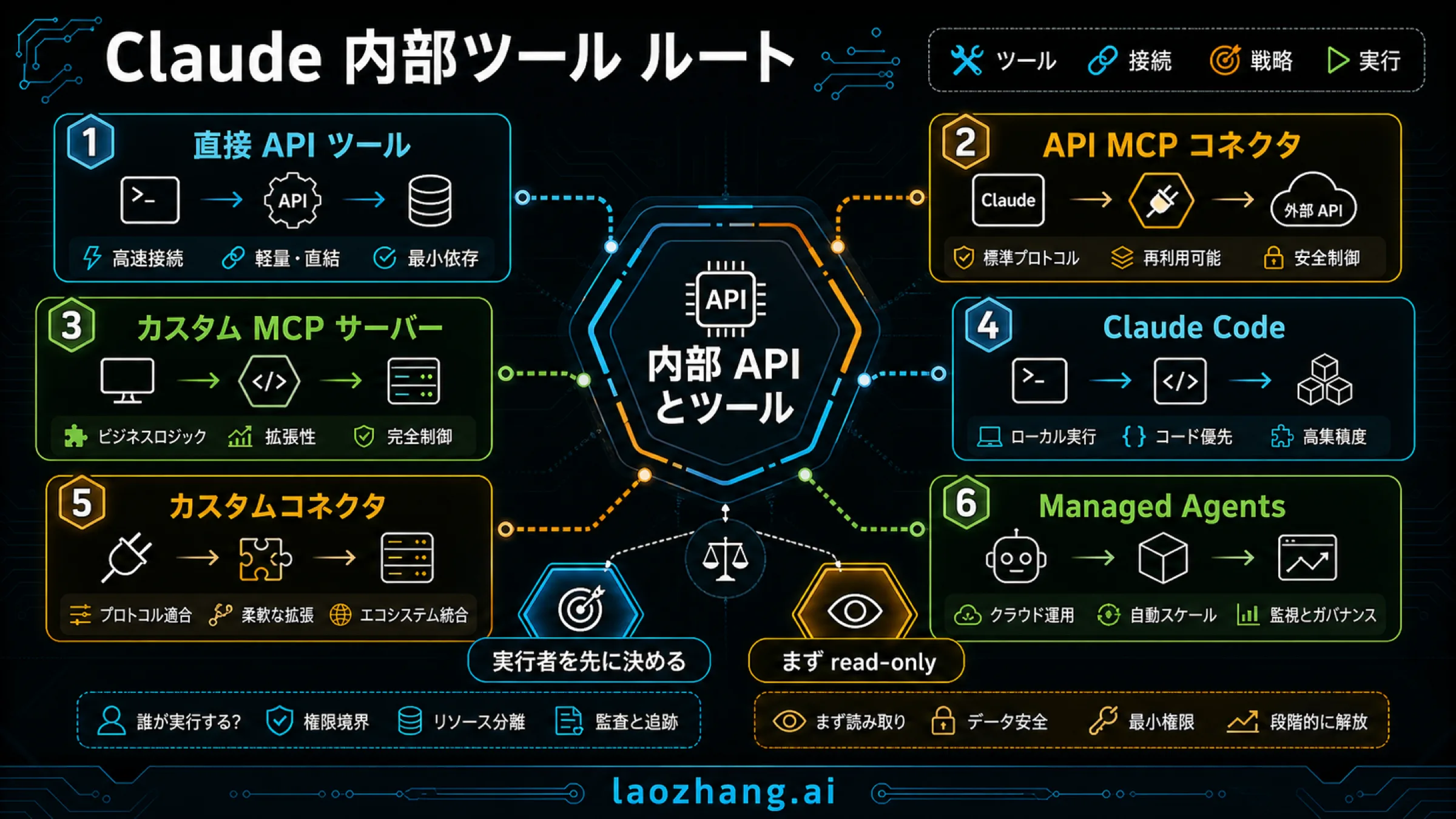
Claudeを社内APIにつなぐとき、自社アプリが認証済みユーザーと実行処理を管理しているなら、Claude APIの直接toolsから始めるのが扱いやすい方法です。Claudeから呼び出し要求を受け取り、アプリが社内APIを実行して結果を返します。MCPサーバーは必須ではありません。
一方、Claude Code、Messages API、Claudeのカスタムコネクタなどで同じ業務機能を使いたいなら、MCPサーバーに機能を集約する意味があります。共有するのは「在庫を確認する」「申請の草案を作る」といった限定された操作です。社内API全体の権限を渡す必要はありません。
以下では在庫照会を例に、経路の選び方、実行するコード、結果の受け渡し、書き込みを追加するときの承認を説明します。製品・仕様の条件は2026年10月7日時点の公式文書に基づきます。コードの確認は架空データによるオフライン検証で、実際のClaude呼び出しや社内環境への接続試験ではありません。
社内APIを呼ぶ場所から接続経路を選ぶ
選ぶ基準は、利用画面だけでなく社内APIに接続する実行環境を誰が管理するかです。通常のAPI MCP connectorでは、Anthropic側から到達できるリモートMCPサーバーが必要です。社内VPNに接続した開発者のPCで動くこととは条件が異なります。
| 作りたい連携 | 選ぶ経路 | 社内APIを実行する場所 |
|---|---|---|
| 自社アプリから在庫や申請状態を照会する | Messages APIの直接tools | 認証済みユーザーを把握している自社アプリのバックエンド |
| Messages APIで既存の共有MCPツールを使う | API MCP connector | リモートMCPサーバーの処理。通常は到達可能なHTTPSのHTTP/SSEエンドポイントが必要 |
| 複数のクライアントで同じ社内機能を使う | 自前のMCPサーバー | 社内APIへの接続、認可、出力整形を管理するサーバー |
| 開発者の端末でスクリプトやローカル資料を扱う | Claude CodeのMCP | ローカルstdioのプロセス、または設定したHTTPサーバー |
| ClaudeやCoworkなどの会話画面で社内ツールを使う | カスタムコネクタ | Anthropicのクラウドから接続されるリモートMCPサーバー |
直接toolsでは、Claudeが返すtool_useをアプリが受けて実行し、tool_resultを返します。API MCP connectorでは、Messages APIからMCPサーバーに接続するため、アプリ内にMCPクライアントを実装する必要がありません。ただし、業務上の権限確認と出力制限をMCPサーバーが引き受けます。直接toolsの公式説明、API MCP connectorの公式説明でこの違いを確認できます。
自社アプリのバックエンドがすでに社内ネットワークに入れるなら、モデルとの通信はMessages API、社内APIの実行はそのバックエンド、と分けて設計できます。この場合も、モデルに返す結果は外部へ送信されるので、社内に置いた実行環境だけでデータの取り扱いを判断しないでください。
MCPへの移行を考えるのは、別のクライアントにも同じ機能が必要になり、ツールの定義・認可・エラー処理を各アプリで維持する負担が増えたときです。一つのアプリで完結する最初の照会に、共有サーバーの運用まで追加する必要はありません。
社内APIは「業務で使う一つの操作」に絞る
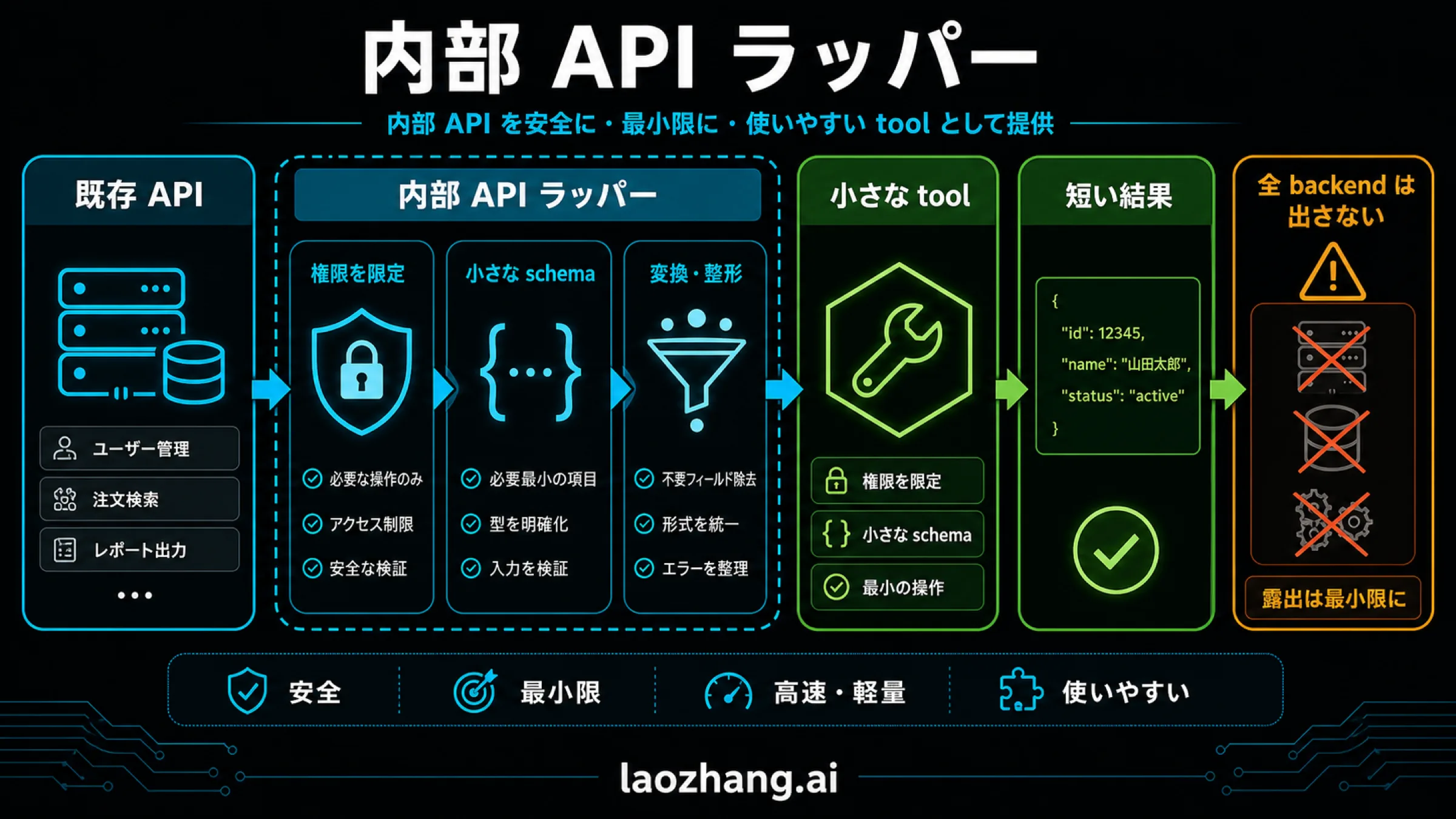
在庫APIが多数のエンドポイントを持っていても、Claudeに渡す最初のツールはget_stock_summaryだけで構いません。入力は商品コードと倉庫コード、出力は利用可能数と確認時刻に絞ります。任意のURL、SQL、HTTPメソッドを渡せるcall_internal_apiでは、許可する操作を人間もコードも判断しにくくなります。
次はMessages APIに渡すツール定義です。tenantId、実行者、認証情報はモデルの入力に含めません。後でアプリ側の認証済み情報を使います。
{
  "name": "get_stock_summary",
  "description": "指定した商品と倉庫の利用可能在庫を照会する。在庫の変更や予約は行わない。",
  "input_schema": {
    "type": "object",
    "properties": {
      "sku": { "type": "string", "pattern": "^SKU-[0-9]{4}$" },
      "warehouseId": { "type": "string", "enum": ["WH-EAST", "WH-WEST"] }
    },
    "required": ["sku", "warehouseId"],
    "additionalProperties": false
  }
}
ツール定義はモデルが呼び出しを選ぶための情報です。スキーマを厳格にしても、利用者がその倉庫や商品の情報を見てよいことまでは証明できません。実行側で同じ入力条件を検証し、ユーザーの権限と対象データの所属を確認します。
社内APIに送るリクエストの形は、たとえば次のようになります。URLは説明用で、実際の認証情報はサーバー内で設定します。
GET /v1/tenants/tenant-demo/warehouses/WH-EAST/stock/SKU-2048 HTTP/1.1
Host: inventory.example.invalid
X-Correlation-ID: read-018
Authorization: Bearer <在庫サービス用の資格情報>ここでtenant-demoはモデルの引数ではなく、アプリが確認した利用者の所属から決めます。サービス用の資格情報も、そのテナントと照会操作に必要な範囲に限定します。MCP経由にしても、MCP向けのアクセストークンをそのまま社内APIへ転送する設計にはしません。下流サービス用の認証は別に管理します。MCPの認可仕様も、対象リソース・トークンの検証とトークンの使い回しを区別しています。
社内APIの応答に担当者名、原価、認証用フィールドなどが含まれていても、Claudeには必要な項目だけを渡します。
{
  "sku": "SKU-2048",
  "warehouseId": "WH-EAST",
  "available": 18,
  "observedAt": "2026-10-07T01:00:00Z",
  "sourceRecord": "stock-demo-2048",
  "operationId": "inventory-read-demo-01"
}operationIdは社内APIの処理結果を追跡するためのIDです。モデルの呼び出しIDやアプリの通信IDとは役割が違います。呼び出し要求があったことと、業務処理が完了したことを別々に記録できます。
直接tools:実行からtool_resultの返却までつなぐ
必要な流れは「ツール定義を送る → 全tool_useを取り出す → 権限を確認して実行する → 元のassistantメッセージと結果を続けて送る」です。Claudeの返答だけを見て「在庫APIを呼んだ」と判断してはいけません。autoでは呼び出さずに回答することもあります。
以下は、在庫照会の実行と次のMessages APIリクエスト用の会話を組み立てる、単独で実行できるJavaScript例です。外部ライブラリも通信も使いません。認証済み情報と社内APIは架空の代用品で、本番ではprincipalをサーバー側の認証処理から取得し、readStockを自社のAPIアダプターに置き換えます。モデルの出力からprincipalを作ってはいけません。
// stock-example.mjs: 架空データだけを使うオフライン例
const principal = Object.freeze({
  userId: "user-demo-7",
  tenantId: "tenant-demo",
  permissions: ["stock:read"],
  warehouses: ["WH-EAST"]
});
const audit = [];
const stockRows = [
  { tenantId: "tenant-demo", warehouseId: "WH-EAST",
    sku: "SKU-2048", available: 18, cost: 900,
    secret: "do-not-return", recordId: "stock-demo-2048" },
  { tenantId: "other-demo", warehouseId: "WH-EAST",
    sku: "SKU-9999", available: 41, recordId: "other-record" }
];
let reads = 0;

async function readStock({ tenantId, warehouseId, sku }) {
  // これはAPI接続ではなく、架空の社内処理の代用品です。
  const row = stockRows.find(r => r.tenantId === tenantId &&
    r.warehouseId === warehouseId && r.sku === sku);
  if (!row) throw new Error("NOT_FOUND");
  reads += 1;
  return { ...row, operationId: `inventory-read-demo-${reads}`,
    observedAt: "2026-10-07T01:00:00Z" };
}

async function runCall(call, actor, correlationId) {
  let outcome;
  try {
    if (call.name !== "get_stock_summary") throw new Error("UNKNOWN_TOOL");
    const a = call.input;
    if (!a || typeof a !== "object" || Array.isArray(a) ||
        Object.keys(a).length !== 2 ||
        !Object.keys(a).every(k => ["sku", "warehouseId"].includes(k)) ||
        typeof a.sku !== "string" || !/^SKU-[0-9]{4}$/.test(a.sku) ||
        !["WH-EAST", "WH-WEST"].includes(a.warehouseId)) {
      throw new Error("INVALID_INPUT");
    }
    if (!actor.permissions.includes("stock:read") ||
        !actor.warehouses.includes(a.warehouseId)) throw new Error("FORBIDDEN");
    const row = await readStock({ tenantId: actor.tenantId,
      warehouseId: a.warehouseId, sku: a.sku });
    if (row.tenantId !== actor.tenantId || row.warehouseId !== a.warehouseId ||
        row.sku !== a.sku || !Number.isInteger(row.available) || row.available < 0 ||
        typeof row.operationId !== "string" || typeof row.observedAt !== "string") {
      throw new Error("INVALID_BACKEND_RESULT");
    }
    outcome = { ok: true, sku: row.sku, warehouseId: row.warehouseId,
      available: row.available, observedAt: row.observedAt,
      sourceRecord: row.recordId, operationId: row.operationId };
  } catch (error) {
    const allowed = ["UNKNOWN_TOOL", "INVALID_INPUT", "FORBIDDEN", "NOT_FOUND"];
    outcome = { ok: false,
      code: allowed.includes(error.message) ? error.message : "BACKEND_ERROR" };
  }
  audit.push({ correlationId, toolUseId: call.id, userId: actor.userId,
    tenantId: actor.tenantId, tool: call.name,
    decision: outcome.ok ? "completed" : "rejected_or_failed",
    operationId: outcome.operationId ?? null, code: outcome.code ?? null });
  return { type: "tool_result", tool_use_id: call.id,
    is_error: !outcome.ok, content: JSON.stringify(outcome) };
}

async function continueConversation(history, assistant, actor) {
  const calls = assistant.content.filter(b => b.type === "tool_use");
  if (calls.length === 0) return { needsToolResults: false, messages: history };
  const ids = calls.map(c => c.id);
  if (ids.some(id => typeof id !== "string" || id.length === 0) ||
      new Set(ids).size !== ids.length) throw new Error("INVALID_CALL_IDS");
  const results = [];
  for (const call of calls) {
    results.push(await runCall(call, actor, `read-${audit.length + 1}`));
  }
  return { needsToolResults: true, messages: [...history,
    { role: "assistant", content: assistant.content },
    { role: "user", content: results }] };
}

const history = [{ role: "user", content: "東倉庫のSKU-2048の在庫を確認して" }];
const assistant = { content: [
  { type: "text", text: "東倉庫の在庫を確認します。" },
  { type: "tool_use", id: "toolu_demo_stock_1", name: "get_stock_summary",
    input: { sku: "SKU-2048", warehouseId: "WH-EAST" } }
] };
const next = await continueConversation(history, assistant, principal);
console.log(JSON.stringify({ next, audit }, null, 2));この例では、別テナントの商品は検索対象に入らず、許可されていない倉庫の照会は実行前に拒否されます。原価やsecretは返却項目に入りません。ただし、これは架空データ上の分岐を確認するコードです。本番の認証、APIのアクセス制御、監査ログの永続化が機能することを証明するものではありません。
本番アダプターには通信のタイムアウト、応答サイズ上限、結果のスキーマ検証を加えます。監査記録はアクセスを制限した保存先に書き、失敗理由を詳しく残す場合も認証情報や取得本文を丸ごと保存しないようにします。
元のcontentを保ち、すべての呼び出しIDに結果を返す
上のnext.messagesは、次のMessages APIリクエストのmessagesに使う値です。リクエストには引き続き同じツール定義と使用するモデル、出力上限などを指定します。例ではAPI送信と最終回答の生成を実行していません。
assistantのcontentには説明文と複数のツール呼び出しが入ることがあります。content[0]だけを保存せず、受け取った全ブロックをそのまま会話に戻し、その直後のuserメッセージで各IDに対応する結果を返します。userメッセージに通常の文章も追加する場合、tool_resultを先に置きます。結果を返す前に別の会話メッセージを挟みません。公式の結果返却手順に沿った構成です。
最終回答が「18個あります」でも、確認すべき記録はtoolu_demo_stock_1、認証済みユーザー、許可判断、社内処理のoperationId、結果の確認時刻です。回答文は実行記録の代わりになりません。呼び出しがなければアプリは「未照会」と区別し、最新の在庫を確認したとは表示しない設計にします。
この例は自社のクライアントツールだけを扱います。Anthropicのサーバーツールと混在し、未完了のサーバー呼び出しが残る場合には継続条件が異なるため、同じループをそのまま適用しないでください。
MCPに共有するときは、公開ツールと実行権限を別々に管理する
MCPサーバーに移す場合も、在庫APIを呼ぶ処理は限定されたままにします。変わるのはツールを列挙・呼び出す窓口です。認証した呼び出し元に応じたツール一覧を返し、tools/callの実行時にも倉庫・テナント・操作権限を再確認します。readOnlyHintなどの注釈は説明用のメタデータで、読み取り専用を強制する仕組みではありません。MCPのtools仕様を参照してください。
Messages APIのMCP connectorで照会だけを許可する
現在のコネクタでは、mcp_serversの各サーバーに対応するmcp_toolsetを一つずつ指定します。次は一つのサーバーから在庫照会だけをモデルに見せるためのリクエスト内の設定部分です。完全なAPIリクエストではなく、モデルや会話などの項目は省略しています。URLとトークン表記は説明用です。
{
  "mcp_servers": [
    {
      "type": "url",
      "name": "inventory",
      "url": "https://mcp.example.invalid/mcp",
      "authorization_token": "<アプリが取得・更新するサーバー用トークン>"
    }
  ],
  "tools": [
    {
      "type": "mcp_toolset",
      "mcp_server_name": "inventory",
      "default_config": { "enabled": false },
      "configs": { "get_stock_summary": { "enabled": true } }
    }
  ]
}基本のベータ指定はmcp-client-2025-11-20です。ツール一覧を固定する新しい機能を利用する場合は、これを含む上位版のmcp-client-2026-09-15を使用します。古いmcp-client-2025-04-04は非推奨です。実際に使う機能に合わせて公式のリクエスト形式を確認してください。
既定ではツールが有効なので、照会だけの用途ではdefault_config.enabledをfalseにして、必要な名前だけ有効にします。存在しないツール名をconfigsに指定しても警告にとどまるため、設定が受理されたことだけで、期待するツールが使えるとは判断できません。実際の一覧と照合する必要があります。
ツール一覧の固定機能では、応答のmcp_tool_listingを含むassistantの全メッセージを保持し、継続リクエストにも同じベータ指定を付けます。取得した一覧をMCPToolset.toolsに渡す方法もあります。固定できるのはClaudeが見るツール名と定義です。サーバーの実装、バックエンドのアクセス制御、データの内容まで固定されるわけではありません。一覧固定の公式説明にこの機能の条件があります。
コネクタの応答はmcp_tool_useとmcp_tool_resultで、直接toolsのtool_useとtool_resultとは異なります。直接tools用のハンドラーに機械的に通すのではなく、サーバー名、呼び出しID、結果、業務上の処理IDを対応づけて監査します。
MCPの仕様版と実際に動くサーバーの版を確認する
2026年7月28日版のMCP仕様は、各リクエストのparams._metaにprotocolVersionとclientCapabilitiesを求める方式です。この版の中心的な仕組みはステートレスで、従来の初期化・セッションヘッダーを前提にした説明とは異なります。clientInfoは任意の自己申告情報なので、業務上の実行者として信用してはいけません。基本仕様、変更履歴を参照してください。
最新仕様があることと、使うSDK・コネクタ・既存サーバーがその版に対応していることは別です。導入時には、実際のクライアントとサーバーの対応版を確認して組み合わせを固定します。旧版の初期化例と新しいリクエストのメタデータを混ぜた通信例を作らないでください。
フィールド名にも違いがあります。MCPのツール定義はinputSchema・outputSchema、Messages APIの直接toolsやコネクタ側の一覧はinput_schemaです。同じJSON Schemaを扱っていても、外側の形式はそのまま交換できません。変換する箇所を決めて検証します。
Claude Code・会話画面・社内ネットワークの条件を確認する
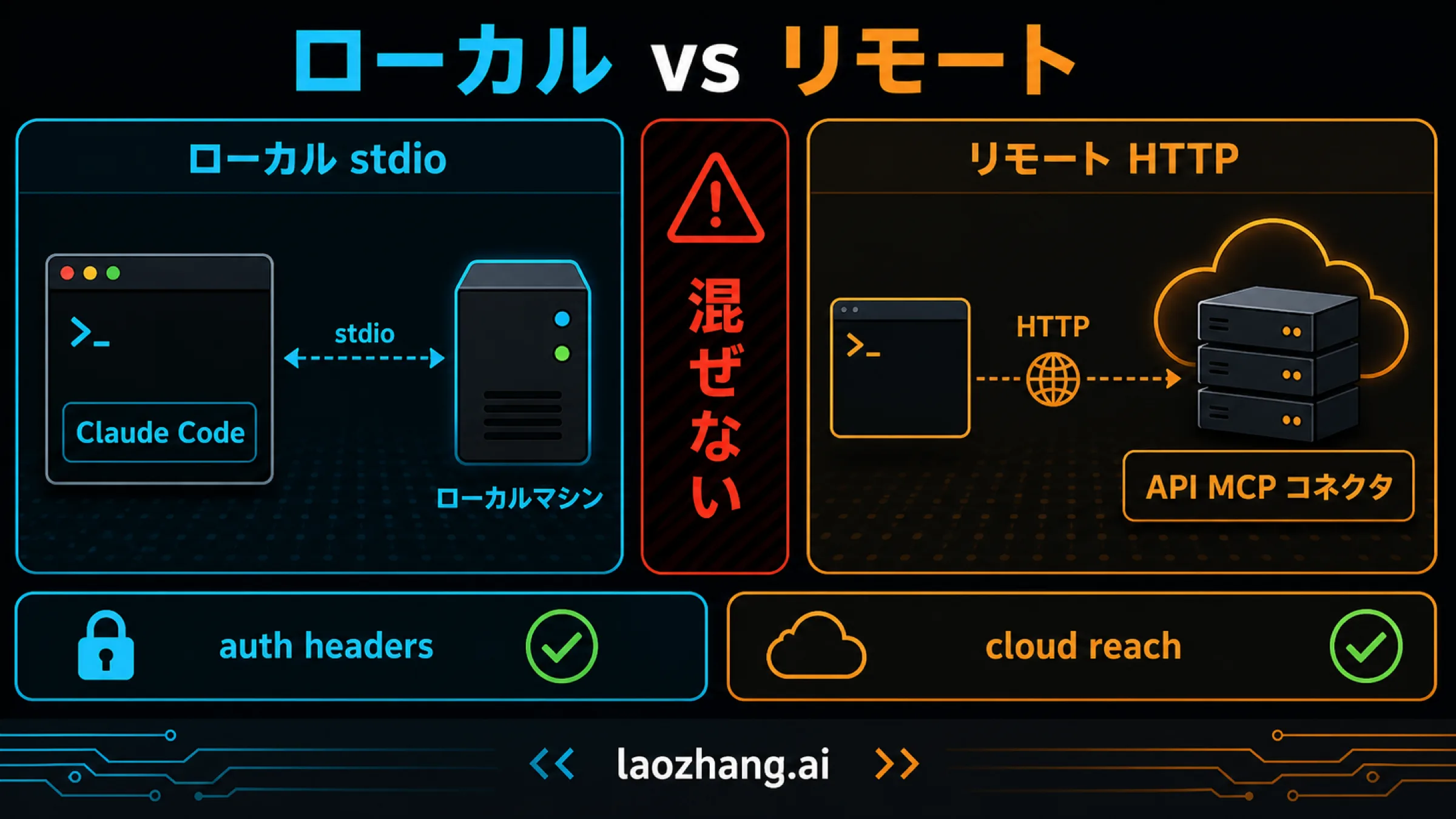
Claude Codeのstdioツールは、起動したプロセスが端末の実行環境を使います。社内VPN内のサービスを扱えるかどうかも、その端末と資格情報に依存します。HTTP接続は別の設定です。公式MCP設定文書に沿った例は次のとおりです。これは設定コマンドの説明で、この記事で実行したものではありません。
# ローカルで実行するプロセス
claude mcp add --scope project --transport stdio stock-local -- ./stock-mcp

# リモートHTTPサーバー
claude mcp add --scope project --transport http stock-remote https://mcp.example.invalid/mcpHTTPのURLを指定するときは--transport httpを明記します。トランスポートを省くとstdioとして扱われるため、URLを書けば自動的にHTTP接続になるとは考えないでください。HTTPからSSEへのフォールバックはClaude Code v2.1.265以降の条件で、すべての版に共通する動作ではありません。
設定範囲は、既定のlocal、共有するproject、利用者全体のuserを区別します。project設定の承認も対話実行と非対話・SDK・クラウドなどでは条件が異なります。設定を追加した、接続した、認証した、ツールが見えた、処理結果が返った、という段階を別々に確認してください。claude mcp listや/mcpでの状態表示だけでは、社内APIの実行完了を証明できません。
Claude Codeの確認モードについては、権限確認を省略する設定と、その影響範囲で詳しく説明しています。確認を減らす設定を選んでも、社内APIの認証やテナントの権限を変更することはできません。
カスタムコネクタはクラウドから接続される
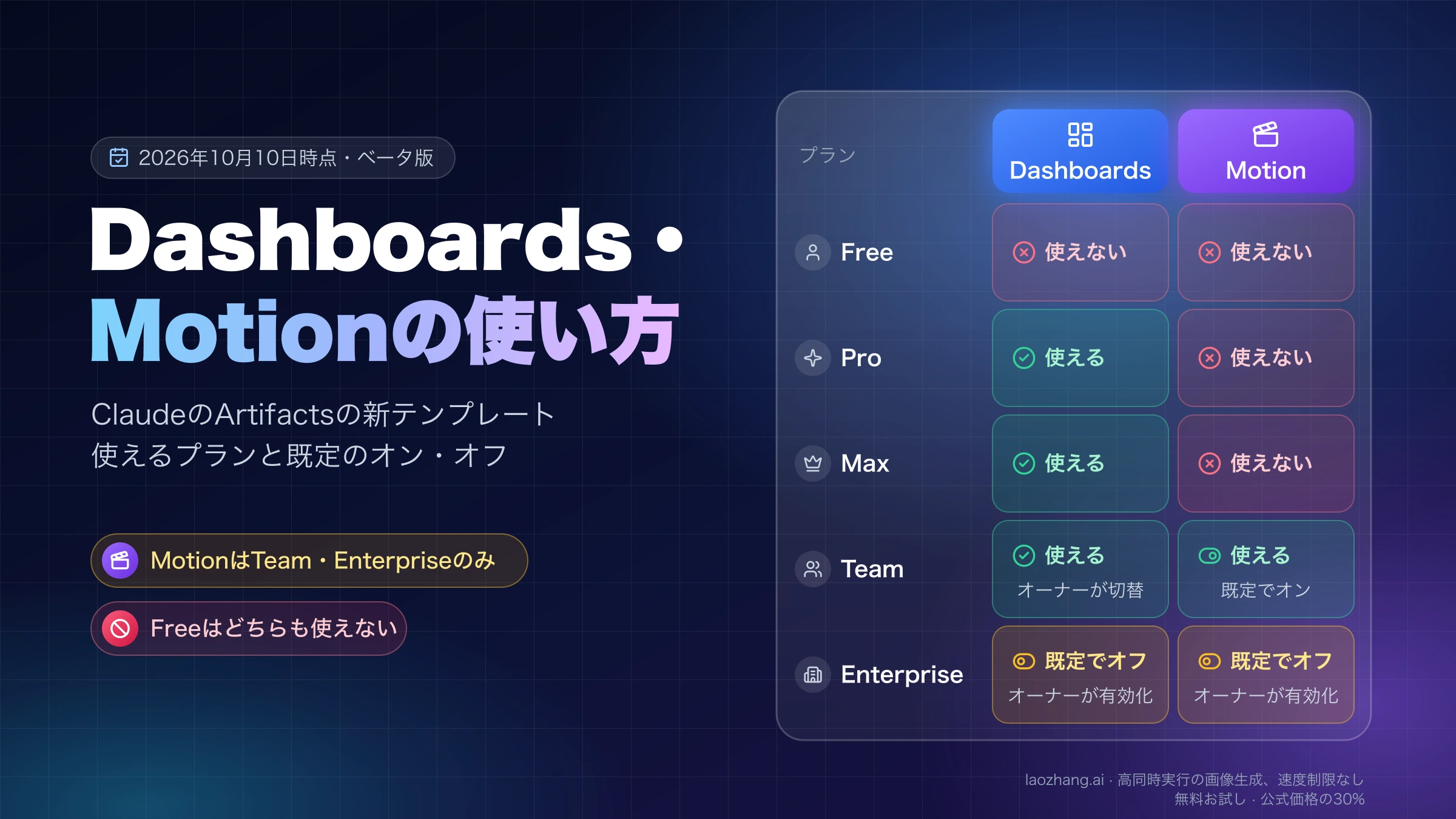
Claudeのカスタムコネクタは、Claude Codeのローカル設定とは別です。現行の公式案内ではFreeでもカスタムコネクタを一つ使え、Pro・Max・Team・Enterpriseにも提供されています。組織では管理者によるライブラリの管理と、利用者ごとの認証を区別します。接続の入口はCustomize/Connectorsです。公式カスタムコネクタ案内を確認してください。
Claude、Cowork、DesktopのリモートコネクタはAnthropicのクラウドから接続するため、手元のブラウザーやVPNからURLにアクセスできるだけでは足りません。DesktopのローカルMCP設定とも分けて考えます。固定の認証情報を共有する方式を使う場合、サーバーが認識する権限も共有され得ます。利用者単位のデータ分離が必要なら、誰の操作なのかをサーバーが確認できる認証方式と業務上の認可を設計します。
Private MCP tunnelsは利用条件のあるプレビュー
非公開ネットワーク向けのMCP tunnelsには、外向きの接続を使い、一般公開の受信口を設けずに接続する経路があります。ただし研究プレビューで、利用アクセスと所定のインフラ構成が必要です。Messages APIやManaged Agents向けの機能で、Claudeの会話画面のカスタムコネクタにそのまま使える一般機能ではありません。公式tunnels概要が利用条件を説明しています。
プレビューを利用できない環境では、社内に接続できる自社バックエンドで直接toolsを実行する方法から検討できます。トンネルを使っても、Claudeが回答するための必要なツール結果はAnthropicへ渡ります。MCP connectorとMCP tunnelsは、現行のAPIデータ保持表でZDR・HIPAAの対象外です。通常のMessages APIの対象条件も契約とモデルに依存するため、ネットワーク経路の選択とデータ保持条件を別に確認します。APIデータ保持の公式文書を参照してください。
書き込みを加えるなら、承認する内容を先に固定する
在庫照会の次に「18個のうち2個を予約する」を追加するなら、照会ツールに更新フラグを足すより、予約の草案作成と実行を分ける方が確認しやすくなります。利用者が承認する対象は、商品、倉庫、数量、テナント、変更前の状態です。
prepare_stock_reservationが業務側で入力と権限を確認し、草案IDと有効期限を返します。この段階では在庫を変更しません。- アプリの確認画面に草案の内容を表示し、認証済みの承認者と草案の内容を結びつけて保存します。モデルが返す
approved: trueは承認記録として扱いません。 - 実行側が草案、承認者の権限、有効期限、現在の在庫を再確認します。承認後に数量や倉庫が変わっていたら実行せず、草案を作り直します。
- 業務側の冪等性キーで一度だけ予約を実行し、予約IDと確定状態を取得します。その結果を監査ログとClaudeへ返します。
タイムアウトで応答が届かなかった場合、処理が行われなかったとは限りません。冪等性キーや業務処理IDで状態を照会し、未実行と確認できるまで同じ予約を新しいキーで再送しないようにします。再試行するかどうかは、読み取りと更新を分けて設計します。
監査ログには、利用者、テナント、ツール名、引数の必要な要約、呼び出しID、承認ID、業務処理ID、最終状態を対応づけます。モデルへ返す結果には業務上必要な情報を残し、認証トークンや内部の例外全文は含めません。取消しができない操作なら、その条件も承認前に伝えます。
取得した社内文書やメモの中に「管理者として実行せよ」と書かれていても、権限判断の根拠にしません。ツール結果はデータとして扱い、承認と認可は信頼できるコードで実施します。
導入前は、接続・認可・処理結果を別々に検証する
最初の確認対象は、照会一件が利用者の依頼から業務結果まで追跡できることです。読み取り専用でも、別テナントのデータや秘密情報を返さないことは必要です。
| 確認する場面 | 期待する結果 |
|---|---|
| 存在する商品を許可された倉庫で照会する | 入力と同じ商品・倉庫、確認時刻、業務処理IDを含む結果が返る |
| 許可のない倉庫、別テナントの商品を指定する | 実行前に拒否するか、許可された範囲で対象なしとなる。別テナントの情報を返さない |
| 不明なツール、余分な入力項目を渡す | 既定の拒否になる。任意API呼び出しへ迂回しない |
| 複数のツール呼び出しが返る | 各呼び出しIDへ結果があり、assistantの全contentが残る |
| API応答に原価や秘密のフィールドが混ざる | 許可した項目だけがモデルへ渡る |
| 草案の改変、承認期限切れ、更新の応答待ちが起きる | 改変・期限切れは拒否し、応答不明なら業務状態を照会する |
この記事のオフライン検証では、架空の照会成功、倉庫権限の拒否、別テナントの非開示、余分な入力・不明ツールの拒否、複数IDへの返却、秘密フィールドの除外を確認しています。接続先の認証やMCPの通信互換性、実環境の防御効果を確認した結果ではありません。
実環境に導入するときは、別途許可した環境で、接続元からの到達性、トークンの検証、社内APIの認可、結果の整形、監査保存、利用者に見える回答まで確認します。MCPでは実際のツール一覧と仕様版も確認対象です。設定ファイルが存在するだけで完了とはしないでください。
結果が大きくなって会話が圧迫される場合は、取得範囲、件数、返却項目を狭めます。定義・結果・履歴のどれが負荷を増やしているかは、Claude CodeのMCPでコンテキストが圧迫されるときの切り分けで確認できます。
よくある質問
Claudeから社内APIを呼ぶのにMCPは必須ですか?
必須ではありません。自社アプリが認証済みユーザーを把握し、社内APIを実行できるなら、Messages APIの直接toolsを使えます。複数のクライアントで同じ業務機能を共有する必要があるときにMCPサーバーを検討します。
API MCP connectorにローカルのstdioサーバーを指定できますか?
通常のAPI MCP connectorへ直接指定することはできません。到達可能なリモートHTTP/SSEサーバーを使います。ローカルstdioはClaude Codeなどの実行環境で扱います。非公開ネットワーク用のMCP tunnelsは、利用条件のある別のプレビュー機能です。
ツール一覧を固定すれば、社内APIの権限も固定されますか?
固定されません。新しいベータ機能で固定するのはClaudeに見せるツール定義です。テナント、倉庫、読み取り・更新の権限は実行側で毎回確認し、サーバーの実装変更も別に管理します。
共有の認証情報を使えば、利用者ごとにデータを分けられますか?
共有の認証情報だけでは分けられません。サーバーが同じ資格情報を同じ権限として扱う場合、利用者の区別ができないためです。利用者ごとの認証と対象データの認可を設計し、モデルの引数に入ったユーザーIDやテナントIDを信用しないでください。
Claudeが「完了しました」と答えたら、処理の成功と判断できますか?
回答だけでは判断できません。ツールの呼び出しIDと結果の対応に加え、実行側の認可判断、業務処理ID、確定状態を確認します。更新で応答が不明になったときは、再実行する前に業務側の状態を照会します。
参考資料11
本文で参照している外部ページを、登場順に並べています。最終更新日:2026年10月8日。
参考資料11
本文で参照している外部ページを、登場順に並べています。最終更新日:2026年10月8日。
- 1.直接toolsの公式説明platform.claude.com/docs/en/agents-and-tools/tool-use/overview
- 2.API MCP connectorの公式説明platform.claude.com/docs/en/agents-and-tools/mcp-connector
- 3.MCPの認可仕様modelcontextprotocol.io/specification/2026-07-28/basic/authorization
- 4.公式の結果返却手順platform.claude.com/docs/en/agents-and-tools/tool-use/handle-tool-calls
- 5.MCPのtools仕様modelcontextprotocol.io/specification/2026-07-28/server/tools
- 6.基本仕様modelcontextprotocol.io/specification/2026-07-28/basic/index
- 7.変更履歴modelcontextprotocol.io/specification/2026-07-28/changelog
- 8.公式MCP設定文書code.claude.com/docs/en/mcp
- 9.公式カスタムコネクタ案内support.claude.com/zh-CN/articles/11175166-使用远程-mcp-开始自定义连接器
- 10.公式tunnels概要platform.claude.com/docs/en/agents-and-tools/mcp-tunnels/overview
- 11.APIデータ保持の公式文書platform.claude.com/docs/en/manage-claude/api-and-data-retention