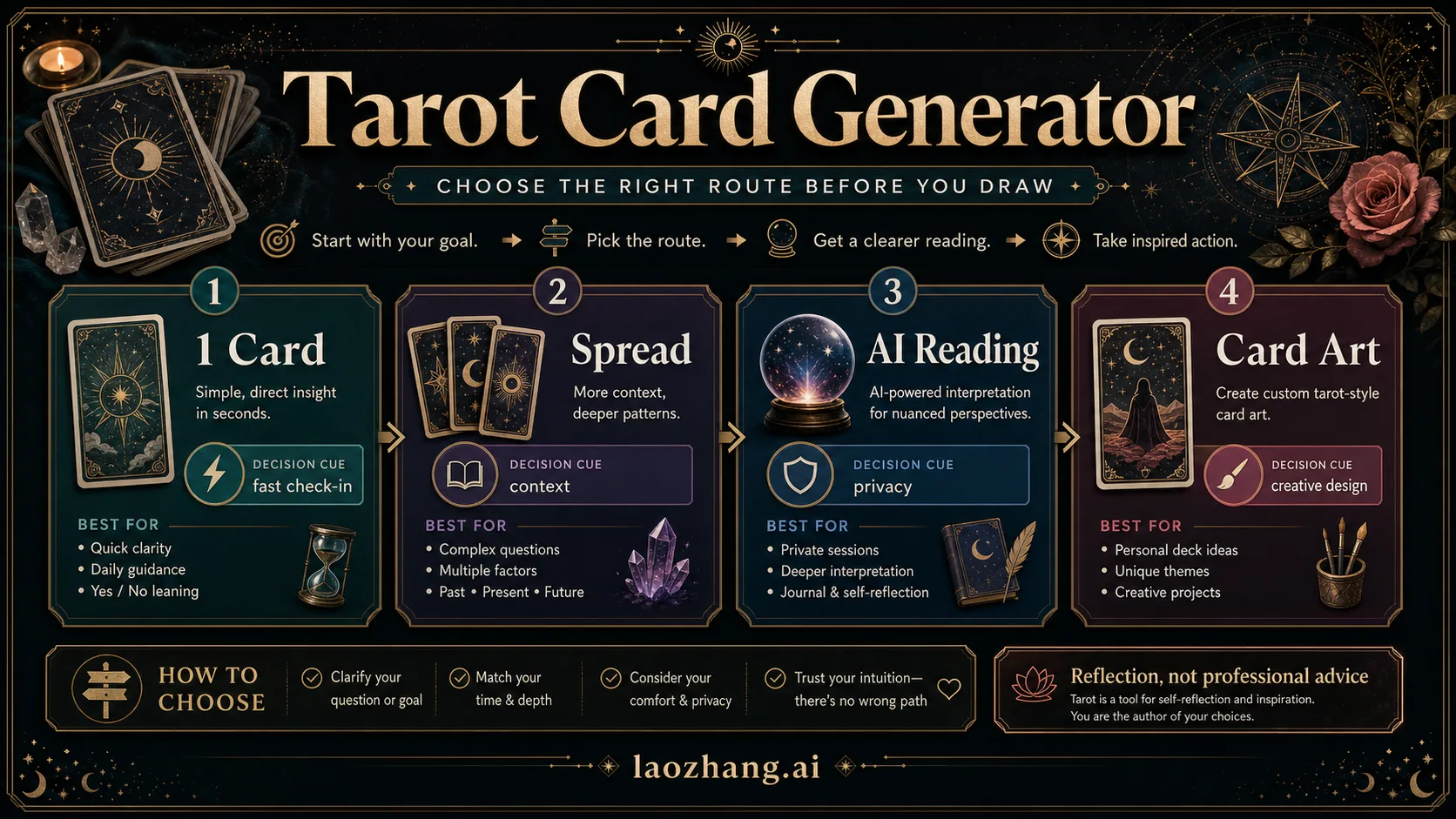
A tarot card generator is useful only after you choose the job. Use one card for a fast check-in, a spread when the question has context, reversals when you want alternate meanings, AI interpretation when you need wording help, and AI image generation only when you are designing tarot-style artwork.
Use this quick route board before you draw:
- Choose one card when you want a fast daily reflection or a yes/no leaning you can journal about.
- Choose a three-card or named spread when the question has time, context, or multiple factors.
- Turn reversals on only if you want alternate or shadow meanings; leave them off when you need a simpler reading.
- Use AI interpretation for wording help, not for private details or high-stakes decisions.
- Use AI image generation for custom tarot-style card art, not as the same thing as a reading.
Stop rule: treat generated tarot as reflection, learning, entertainment, journaling, or creative prompting. Do not use it to decide medical, legal, financial, mental-health, relationship-crisis, or irreversible life choices.
TL;DR: choose the generator by job
| Your job | Generator route | Setting to check | Good output looks like |
|---|---|---|---|
| You want a quick check-in | One-card random draw | Full deck or Major Arcana-only | One card, upright/reversed state, short meaning, journal prompt |
| You need context | Three-card or named spread | Position labels | Each card has a position meaning, not just a generic card meaning |
| You want alternate meanings | Reversal-capable draw | Reversals on/off | Reversed cards are explained as nuance, not doom |
| You need help wording the reading | AI tarot interpretation | Prompt privacy | The AI summarizes themes without exposing private facts |
| You want a visual card | AI tarot card art | Originality and rights | A new tarot-style image, not a copied deck card |
The fastest generator is not always the best generator. A one-click random card is excellent when the question is small. It is weak when the question has past, present, future, conflict, timing, or choice layers. A large spread can feel impressive, but it is often worse for a simple daily check-in because it creates more interpretation than the question can support.
The best first move is to name the job in one sentence: "I want a one-card reflection on today's focus," "I want a three-card view of this decision," or "I want an original tarot-style card illustration." That sentence tells you which button, spread, or AI workflow should come next.
Set up the draw before you click generate
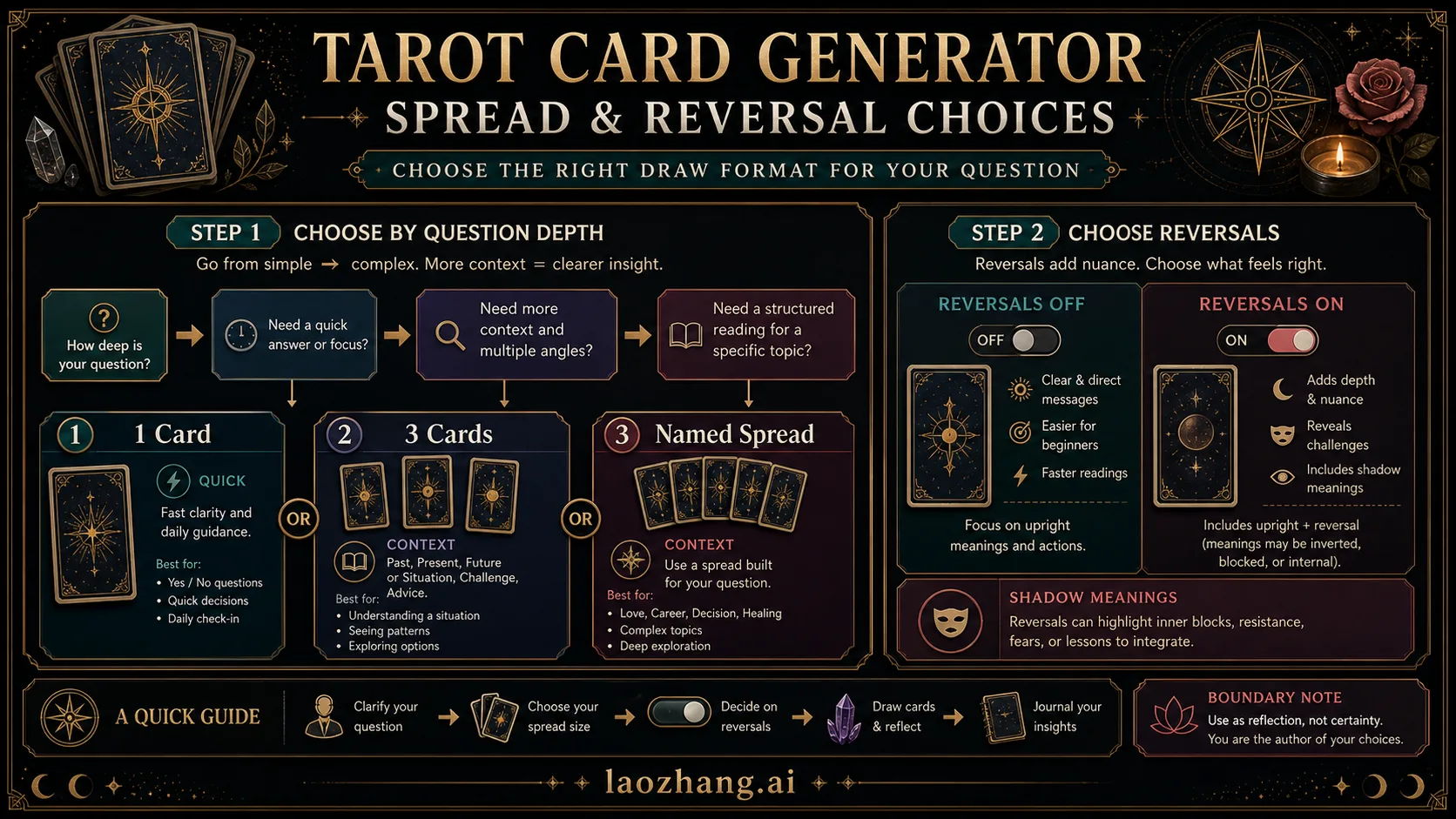
Start with the question, then choose the amount of structure. The generator is only doing the draw; you still decide how much context the draw should carry.
Use one card when speed matters
A one-card tarot generator is the right route when you want a fast theme, not a complete diagnosis. It works well for daily reflection, a journaling prompt, a mood check, or a light yes/no leaning where the point is to slow down and notice your assumptions.
Keep the question broad enough for reflection: "What should I pay attention to today?" is safer than "Will this person reply by Friday?" The first question gives you a lens. The second invites you to treat a random draw as a prediction engine.
For a one-card draw, the useful output should include the card name, upright or reversed state if reversals are enabled, a compact meaning, and one next question for your notes. If the tool only shows a card image with no meaning or context, it may still be fun, but it is less useful as a working tarot card generator.
Use three cards when the question has context
A three-card spread is the best middle route. It adds structure without becoming a maze. Past / present / future is familiar, but it is not the only useful frame. Situation / obstacle / advice, you / other person / shared pattern, or option A / option B / tradeoff can be more practical depending on the question.
The important part is that each position should change how the card is read. If a generator draws three cards but gives the same generic meaning for each one, the spread is mostly decorative. A better tarot spread generator explains why the same card means something different in "obstacle" than it would in "advice."
Use named spreads when you already know why the structure fits. Celtic Cross, relationship spreads, career spreads, and shadow-work spreads can be useful, but they also create more interpretation load. If you cannot explain why the extra positions matter, use a three-card spread first.
Decide reversals before the draw
Reversals are not mandatory. Turning them on can add alternate meanings, blocked energy, internalized patterns, or a "look again" signal. That can be useful when the question is subtle. It can also make a light reading feel heavier than it needs to be.
Leave reversals off when you are new, when the question is already emotional, or when you want a clean prompt for journaling. Turn them on when you want nuance and you are comfortable reading a reversed card as a different angle, not as automatic bad news.
The key is to decide before the draw. Switching reversals after seeing a card is just another way to edit the result until it matches your mood.
How to judge a random tarot card generator
A good random tarot card generator should make the draw contract visible. You do not need a complex tool, but you do need to know what it is actually doing.
| Check | Why it matters | Green flag |
|---|---|---|
| Deck scope | Major Arcana-only draws feel different from full 78-card draws | The tool labels the deck or lets you choose |
| No replacement in spreads | A multi-card spread should not repeat the same card unless the tool explains why | Drawn cards are removed from the current spread |
| Position meanings | A spread needs position-specific interpretation | Each card is tied to its spread slot |
| Reversal control | Reversals change reading complexity | You can turn reversals on or off before drawing |
| Reset behavior | Redrawing too quickly can turn reflection into button pressing | The tool makes it easy to save, copy, or journal instead |
| Privacy | AI interpretation may process your prompt text | The tool does not require sensitive personal details |
Randomness is less important than transparency. Most readers cannot audit the shuffle algorithm, and most casual generators will not prove cryptographic randomness. What you can check is whether the tool is honest about deck scope, card replacement, reversal settings, and spread positions.
If the tool offers AI interpretation, add one more check: can you get a useful reading without giving it names, addresses, account details, private medical facts, legal facts, or financial numbers? If the answer is no, the prompt is too specific for a tarot workflow.
Use AI interpretation without exposing private details
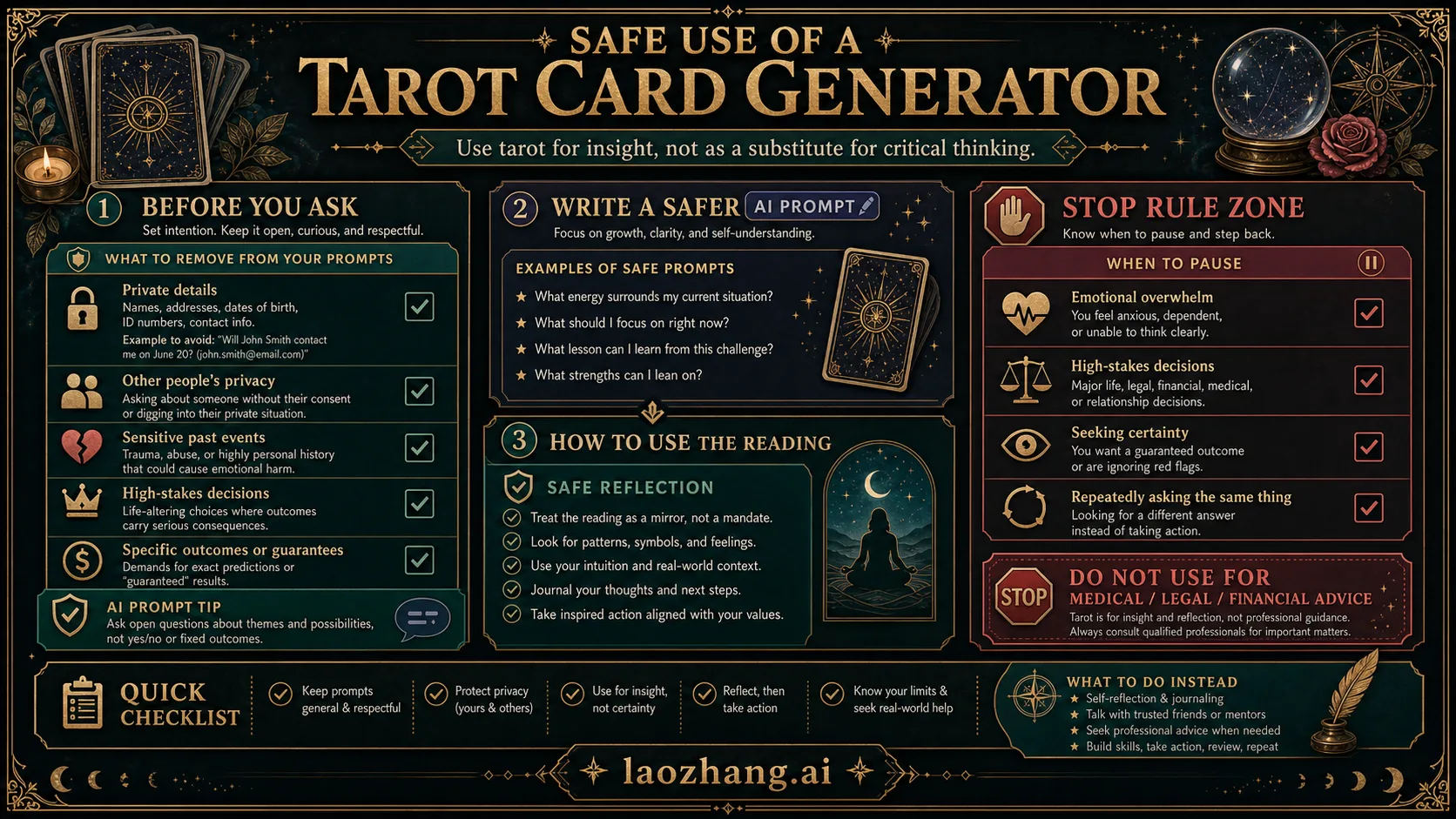
AI tarot reading is best used as a language helper. It can summarize the cards, connect the spread positions, suggest journal questions, and make a dense reading easier to understand. It should not become the place where you paste private conversations, personal identifiers, medical symptoms, legal facts, or financial details.
Use a privacy-safe prompt shape:
textCards: Three-card spread, Situation / Obstacle / Advice.
Draw: The Star upright, Five of Cups reversed, Queen of Swords upright.
Context: I am reflecting on a work decision.
Task: Give a reflective interpretation, two journal questions, and one grounded next step.
Boundary: Do not present this as professional advice or certainty.
That prompt gives the AI enough structure to help without turning the reading into a data dump. It also tells the model what kind of answer you want: reflective, bounded, and practical.
Avoid prompts like "Tell me whether I should quit my job," "Diagnose this relationship," or "Should I invest this amount?" A tarot card generator can help you examine feelings, assumptions, options, and patterns. It should not decide for you.
Use AI for tarot-style card art, not as a reading
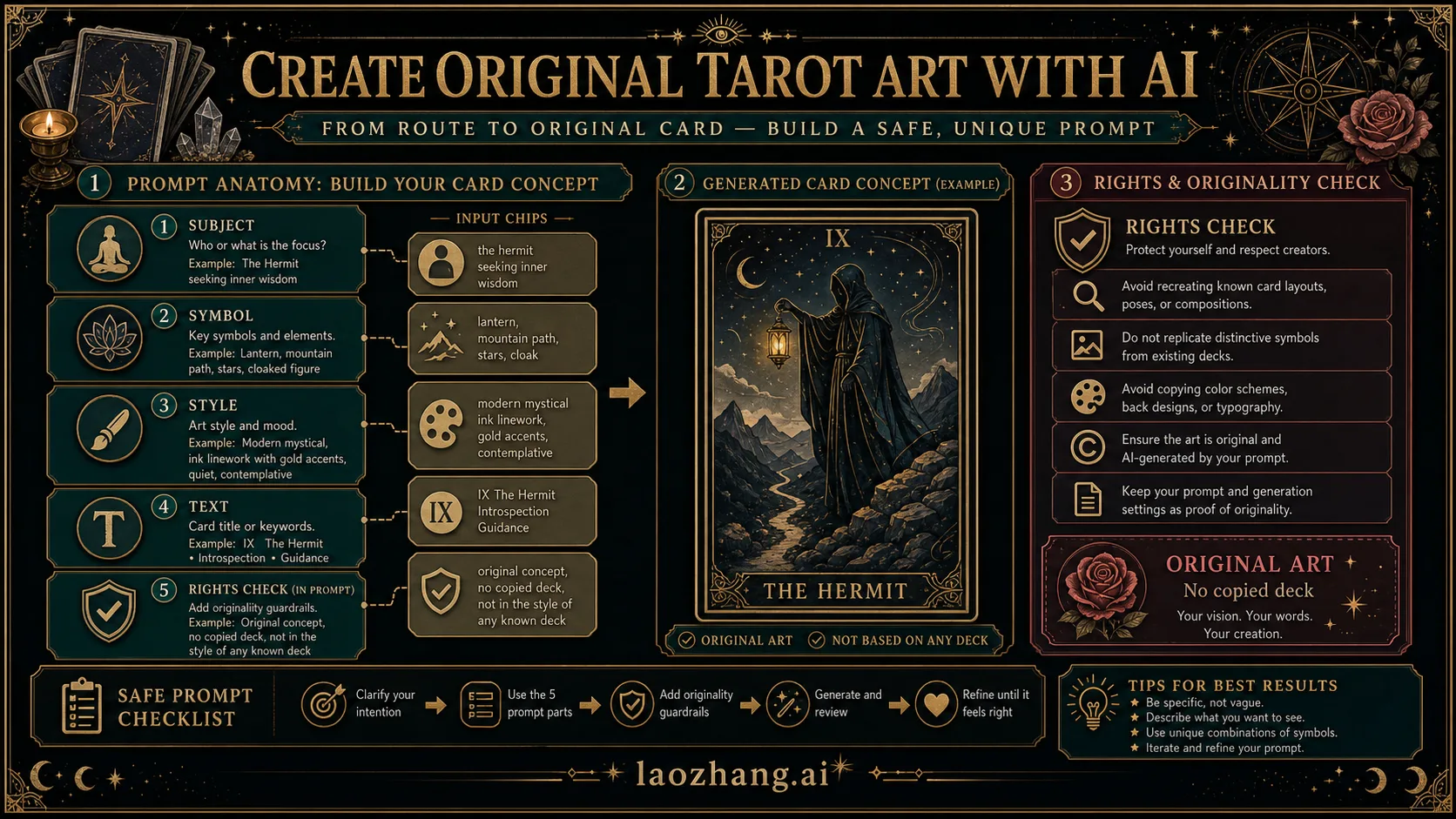
The phrase AI tarot card generator can mean two different things. One route generates a reading: cards, spread, meanings, and reflection. The other route generates artwork: a tarot-style card image for a project, deck concept, poster, journal page, or game prop.
Keep those routes separate. If your goal is a reading, the core output is the card draw and interpretation. If your goal is custom artwork, the core output is a new image. A good art prompt includes subject, symbol, mood, palette, composition, text rules, and originality boundary.
Use this prompt skeleton for art:
textCreate an original tarot-style card illustration.
Card idea: The Lantern Keeper.
Symbols: lantern, bridge, night water, open gate.
Mood: calm, reflective, hopeful.
Style: ornate border, modern editorial fantasy, no copied deck art.
Text: title only, readable, "The Lantern Keeper".
Boundary: do not reproduce Rider-Waite or any existing tarot deck card.
If you already have a sketch or card image and want to restyle it, use an image-to-image workflow instead of pretending it is a reading. The practical workflow is closer to an editor than a tarot spread; see the existing image-to-image AI generator guide when the job is visual iteration.
A simple workflow that works with most generators
- Write the question in one sentence.
- Choose one route: one card, three-card spread, named spread, AI interpretation, or artwork.
- Set deck scope and reversals before drawing.
- Draw once and write down the result before redrawing.
- Interpret the card through its position, not only its generic meaning.
- Convert the reading into one journal question or one small next action.
- Stop if the question becomes medical, legal, financial, crisis-related, or irreversible.
This workflow matters because random generators make it easy to keep clicking until the answer feels better. The useful habit is the opposite: draw, read, reflect, then pause.
Example route choices
Daily focus: use one card, reversals off, full deck if available. Ask, "What should I pay attention to today?" Write one sentence after reading the meaning.
Decision with context: use a three-card spread such as situation / obstacle / advice. Turn reversals on only if you are comfortable with nuance. Compare the advice card with the obstacle card before deciding what to do.
Relationship reflection: avoid asking what another person secretly thinks. Use a spread like my pattern / their possible need / shared boundary. Keep names and private messages out of AI prompts.
Creative deck concept: use AI image generation. Prompt for an original card idea, symbolism, palette, and border style. Do not ask for a copy of a known deck card.
FAQ
What is a tarot card generator?
A tarot card generator is an online tool that draws tarot cards digitally. It may generate one random card, a multi-card spread, card meanings, AI interpretation, or tarot-style card artwork.
Is a random tarot card generator enough for a real reading?
It is enough for reflection and journaling when the question is small. For a deeper reading, use a spread with position meanings and decide reversals before the draw.
Should I turn reversals on?
Turn reversals on when you want alternate or shadow meanings. Leave them off when you are new, when the question is emotionally heavy, or when you want a simpler reading.
What is the difference between an AI tarot reading and AI tarot card art?
An AI tarot reading interprets drawn cards. AI tarot card art creates a visual card image. Treat them as separate routes so artwork prompts do not replace the reading logic.
Can I ask a tarot generator to make major life decisions?
No. Use generated tarot for reflection, learning, entertainment, journaling, or creative prompting. Do not use it as medical, legal, financial, mental-health, relationship-crisis, or irreversible life advice.
What should a good tarot spread generator show?
It should show the cards, the spread positions, whether reversals are enabled, and how each card meaning changes inside its position. For multi-card spreads, it should avoid repeated cards unless it clearly explains the draw rule.