Claude Code Remote Control: Complete Guide to Coding from Any Device (2026)
Claude Code Remote Control lets you monitor and manage your local terminal sessions from any phone, tablet, or browser. Released February 25, 2026, this research preview feature keeps all code execution on your machine while giving you full remote access. This guide covers setup, real workflows, security architecture, troubleshooting, and a comparison with alternatives like SSH and OpenClaw.
On this page
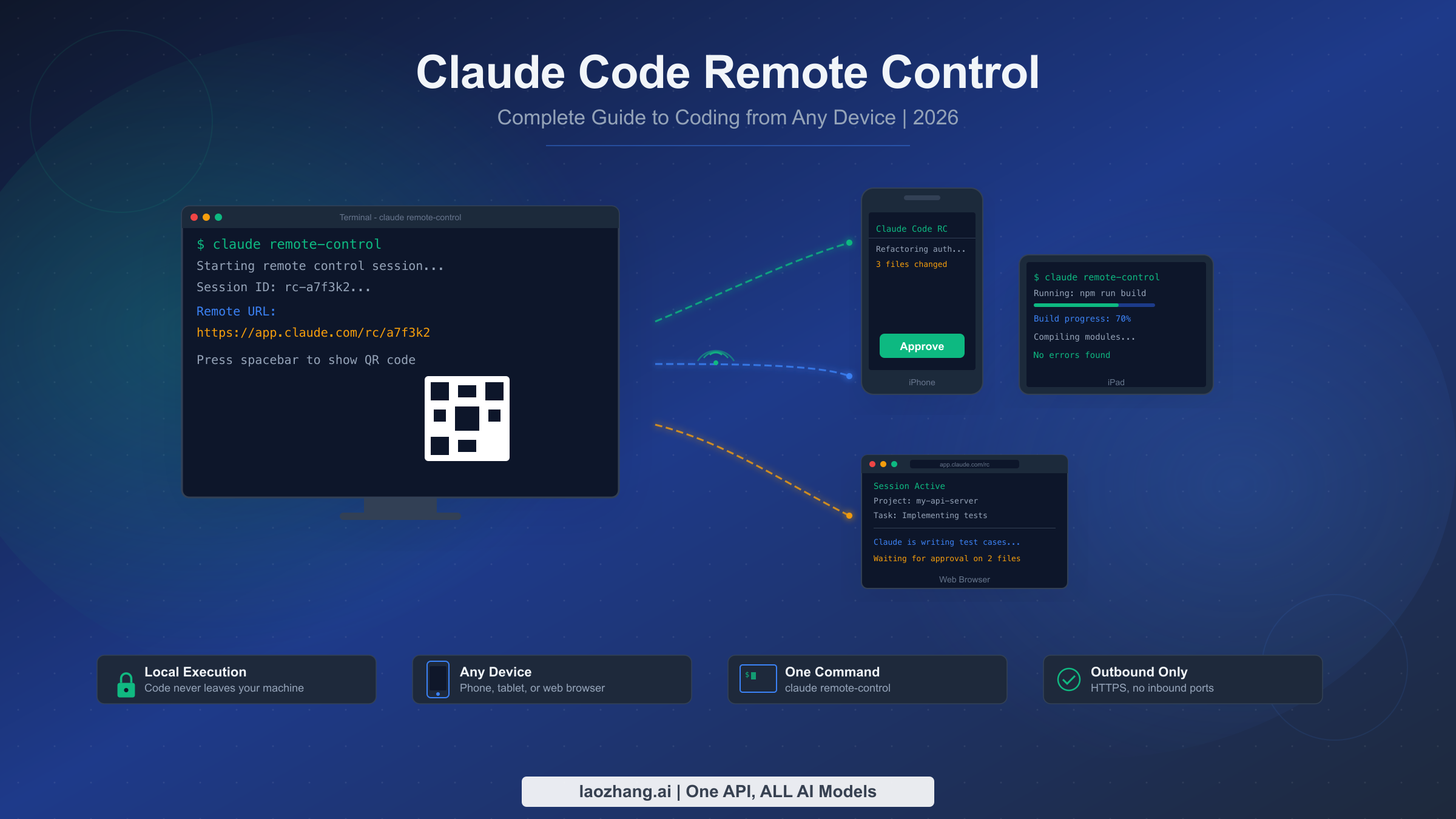
Claude Code Remote Control is a feature released on February 25, 2026, that lets developers monitor and manage their local Claude Code terminal sessions from any phone, tablet, or browser. Run claude remote-control in your terminal, scan the QR code with your phone, and continue coding from anywhere while all execution stays on your machine. Available as a research preview for Max and Pro plan subscribers, this feature transforms how developers interact with AI-powered coding by decoupling the interface from the execution environment.
TL;DR
Claude Code Remote Control turns your phone into a window to your running terminal sessions. One command (claude remote-control) generates a secure URL and QR code. Connect from any device to approve file changes, send messages, and monitor progress. Your code never leaves your machine since only text messages travel through Anthropic's encrypted relay. Requires Claude Code v2.1.52+ and a Max plan ($100-$200/month, as of March 2026). Pro plan support is coming soon.
What Is Claude Code Remote Control and How Does It Work?
Claude Code Remote Control is not a traditional remote desktop or SSH tool. Instead of forwarding your entire terminal session to another machine, it creates a lightweight communication channel between your local Claude Code instance and a remote device. Think of it as a walkie-talkie for your coding session rather than a full remote terminal connection.
When you run claude remote-control (or type /rc inside an active Claude Code session), your local CLI establishes an outbound HTTPS connection to Anthropic's relay servers. This connection carries only text-based messages: session output, approval requests for file changes, and your responses. The remote device, whether it is your phone, a tablet, or a web browser on another computer, connects to the same relay and displays the session state in real time. You can read Claude's output, approve or reject proposed file modifications, send new instructions, and even interrupt running tasks.
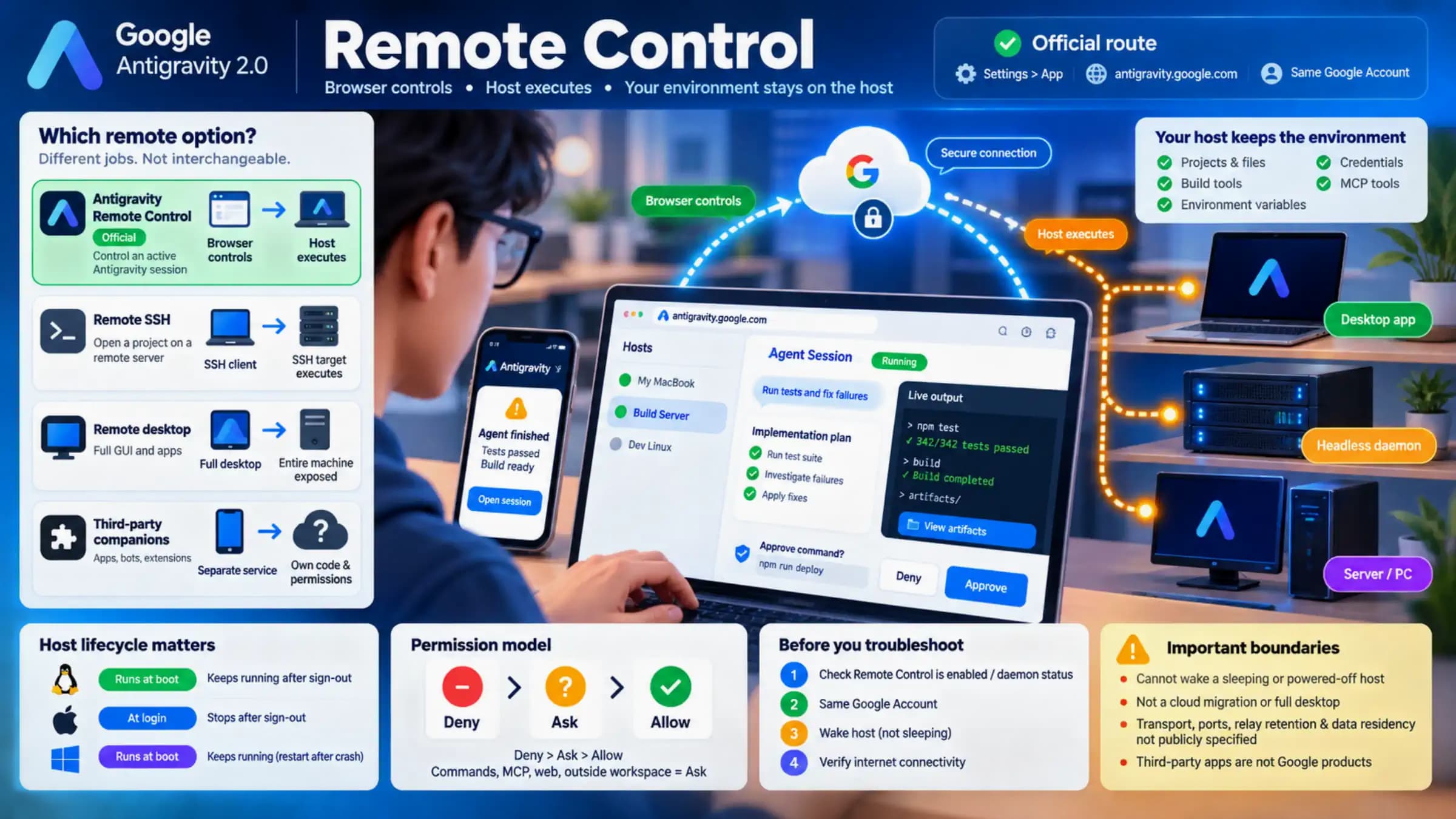
The critical distinction from other remote access tools is the execution model. With SSH, your commands execute on a remote server. With Claude Code Remote Control, every command still executes on your local machine. Claude reads and modifies files locally, runs your test suites locally, and accesses your MCP servers locally. The remote device is purely a view-and-interact layer, not an execution environment. This architecture means your source code, credentials, and development tools never travel over the network. Anthropic's relay servers route encrypted messages but never see or store your actual code.
This design serves a specific developer workflow that has emerged with AI-powered coding. When Claude Code is working on a complex task, like refactoring a module, writing tests, or implementing a feature, the process often takes several minutes. During that time, developers are stuck watching their terminal. Remote Control breaks this tether by letting you walk away from your desk, grab coffee, commute, or work on something else entirely, and then check back from your phone to approve the next batch of changes or redirect the work.
The mobile experience itself is worth understanding in detail, since no other article has described what you actually see on your phone. When you connect to a Remote Control session from a mobile device, the interface presents a clean, scrollable view of your session's output. Claude's messages appear as formatted text with syntax-highlighted code snippets. When Claude proposes a file change, you see a diff view showing exactly what will be added, modified, or removed. Below each diff, you get two buttons: approve and reject. You can also tap to expand a text input field and type a message to Claude, providing additional context or redirecting the work. The interface is responsive enough to be usable on a phone screen, though tablets provide a more comfortable viewing experience for reviewing larger diffs. Notifications are not built in at the operating system level as of March 2026, so you need to periodically check the session rather than relying on push notifications, though this is a feature that would make sense in future updates.
Step-by-Step Setup: Get Remote Control Running in Under 60 Seconds
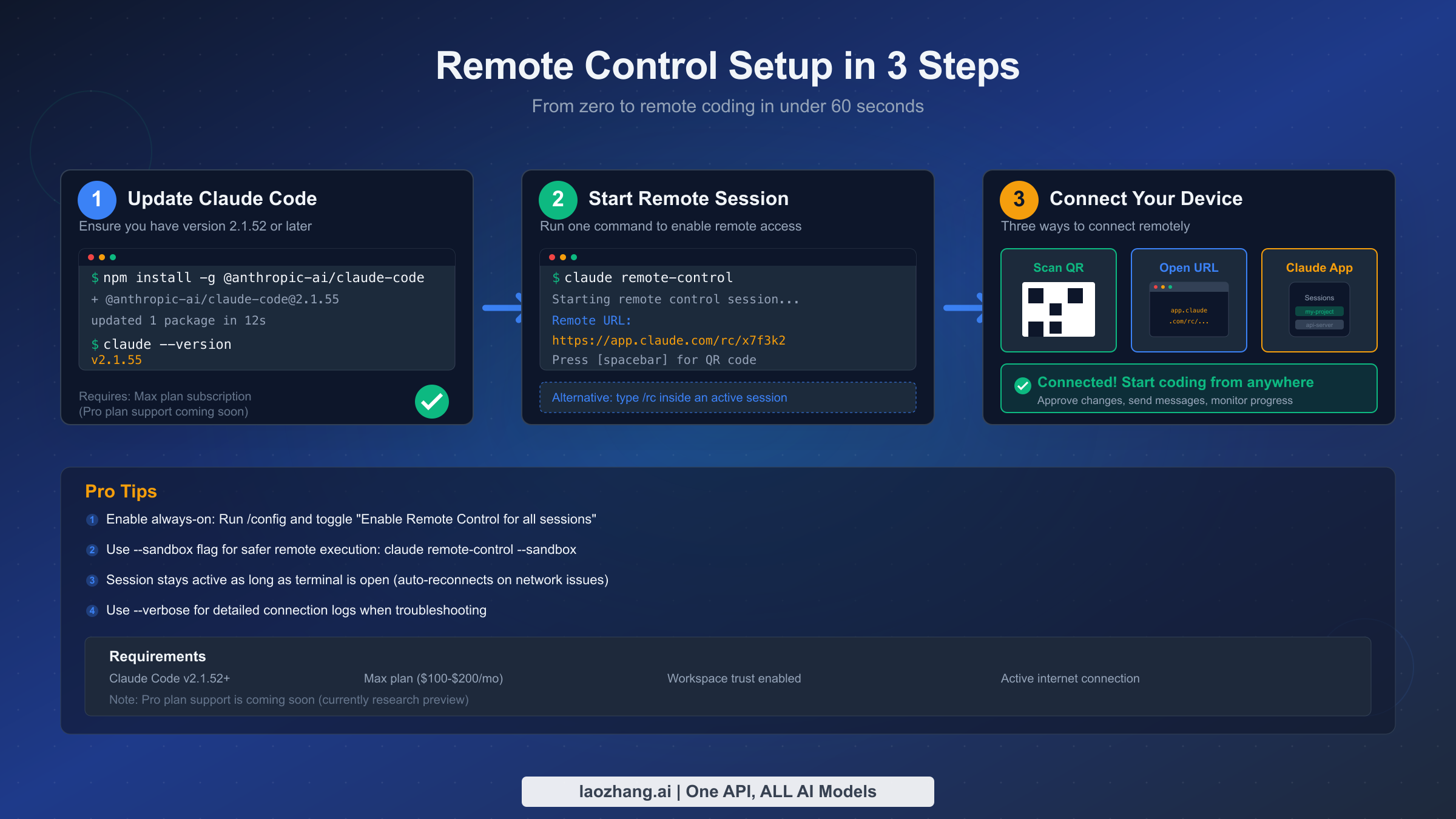
Setting up Remote Control takes less than a minute if you already have Claude Code installed. The process has three parts: ensuring your CLI is up to date, starting a remote session, and connecting from your device.
Updating Claude Code to the required version is the first step. Remote Control requires version 2.1.52 or later (as confirmed in the official documentation). Open your terminal and run the update command:
npm install -g @anthropic-ai/claude-codeAfter the installation completes, verify the version with claude --version. You should see v2.1.52 or higher. If you are using a managed installation through your organization, check with your admin about update policies. The feature also requires that your workspace has trust enabled, which is the default for most personal setups but may need explicit configuration in enterprise environments.
Starting the remote session is a single command. Navigate to your project directory and run:
claude remote-controlYou will see output confirming that the remote control session is active, along with a unique URL (something like https://app.claude.com/rc/your-session-id). Press the spacebar to display a QR code directly in your terminal. This QR code encodes the same URL, making it easy to connect from your phone's camera without typing anything. If you are already inside an active Claude Code session, you can type /rc instead of starting a new process.
For developers who want Remote Control available for every session without manually enabling it each time, you can configure it as a default. Run /config inside Claude Code and toggle "Enable Remote Control for all sessions." Once enabled, every new Claude Code session will automatically start with Remote Control active. This is particularly useful if you regularly step away from your desk or work across multiple devices.
Connecting from your remote device offers three paths. The fastest is scanning the QR code with your phone's camera, which opens the session directly in your mobile browser or the Claude app. Alternatively, you can copy the URL and paste it into any browser. If you have the Claude app installed on your phone or tablet, any active Remote Control sessions also appear in your session list, so you can tap to connect without scanning or typing anything.
Once connected, the remote interface mirrors your terminal session. You see Claude's messages, file change proposals with diffs, and can tap to approve, reject, or modify the work. You can also type new messages to redirect Claude, ask questions, or provide additional context. The connection persists as long as your terminal session remains active. If your network drops temporarily, Remote Control automatically reconnects, though an outage lasting roughly ten minutes will terminate the session.
There are a few useful flags worth knowing about. The --sandbox flag runs Remote Control in a sandboxed mode that adds an extra layer of safety for remote execution. The --verbose flag outputs detailed connection logs, which is invaluable when troubleshooting connectivity issues. And --no-sandbox explicitly disables sandboxing if it has been enabled globally.
Pro vs Max: Which Plan Unlocks Remote Control?
Understanding which Claude subscription plan includes Remote Control requires some nuance, because the situation has evolved since the feature launched. As of March 2026, Remote Control is available as a research preview, and the official documentation states it works on both Max and Pro plans, although its original announcement focused primarily on Max subscribers.
The Claude Max plan comes in two tiers: the 5x tier at $100 per month and the 20x tier at $200 per month (pricing verified from claude.com/pricing, March 2026). Both tiers include Remote Control along with significantly higher usage limits compared to the $20/month Pro plan. For a deeper look at how these plans compare across all features, not just Remote Control, check out our detailed breakdown of Claude's subscription plans.
The practical question most developers face is whether Remote Control alone justifies upgrading from Pro to Max. The honest answer is probably not, since Remote Control is one feature among many. However, the Max plan's value proposition extends well beyond remote access. Max 5x provides five times the usage limits of Pro, which matters significantly when you are running Claude Code for extended tasks like large refactors, comprehensive test generation, or multi-file feature implementations. Max 20x takes that further with twenty times the limits plus priority access during peak hours.
If you are a developer who regularly uses Claude Code for hours each day and finds yourself hitting Pro's usage caps, the Max 5x plan at $100 per month is likely worth considering even without Remote Control. If you primarily use Claude for occasional questions and short coding tasks, the Pro plan at $20 per month still offers excellent value, and Remote Control support is coming to Pro as well. The key factor is not Remote Control specifically but rather how intensively you use Claude Code in your daily workflow.
Remote Control is currently not available on Team or Enterprise plans, which is worth noting for organizations evaluating the feature. Anthropic has not announced a timeline for enterprise availability, so teams requiring remote access should plan accordingly. In the meantime, individual developers on enterprise teams who want to experiment with Remote Control can use a personal Max subscription for side projects or open-source contributions. The cost of a Max 5x subscription at $100 per month is comparable to what many companies already spend on developer tools and productivity software per seat, making it a reasonable expense for developers who spend significant time in AI-assisted coding workflows.
5 Workflows That Make Remote Control Worth Every Dollar
The real power of Remote Control becomes clear not from its technical capabilities but from how it changes your daily development patterns. Most existing articles about Remote Control describe the feature in abstract terms, like "monitor your builds from your phone." Here are five specific workflows that demonstrate the actual productivity transformation, drawn from real usage patterns since the feature launched.
The Long-Running Refactor Walk-Away is the most immediately valuable workflow. Start Claude Code on a significant refactoring task, something like migrating a codebase from one authentication library to another. These tasks can take twenty to thirty minutes of Claude analyzing, modifying, and testing code across dozens of files. With Remote Control, you kick off the task, step away from your desk, and monitor progress from your phone. When Claude pauses to ask about an ambiguous case or needs approval for a file change, you handle it from wherever you are. Instead of being chained to your terminal watching a progress stream, you reclaim that time. The mental shift is significant: you stop thinking of Claude as a tool you operate and start thinking of it as a colleague you check in with.
The Commute-Time Code Review turns otherwise dead time into productive development. When you are on a train or bus, you can review the test results from a task you kicked off before leaving. Claude can present diffs on your phone, and you can approve individual file changes, ask Claude to revise specific functions, or reject changes that do not look right. The mobile interface shows enough context to make informed decisions, and since Claude handles the actual editing, you do not need a full keyboard or IDE. Developers who commute thirty to sixty minutes each way report reclaiming meaningful hours each week this way.
The Overnight Build-and-Test Pipeline takes advantage of Claude Code's ability to work through complex, multi-step tasks. Before leaving the office or going to bed, you start Claude on a comprehensive task: implement a feature, write tests for it, run the test suite, and fix any failures. With Remote Control configured, you can check your phone in the morning to see the results, approve final changes from bed, and arrive at work with a ready-to-review pull request. This workflow depends on using the --sandbox flag for safety, since you want Claude to operate with appropriate guardrails when you are not actively watching.
The Meeting Multitask addresses the common scenario where a development task is blocked by something simple. You are in a meeting, and Claude is working through a task that requires periodic approvals. Instead of deferring the task until after the meeting, you keep your phone on the table and handle approvals as they come in. A quick glance, a tap to approve, and Claude continues. This works because Remote Control's interaction model is low-bandwidth: you are not writing code on your phone, you are making binary decisions (approve or reject) and occasionally typing a short message.
The Multi-Project Monitoring Setup is more advanced but powerful for developers managing several projects. You can have Claude Code running in separate terminal windows for different projects, each with Remote Control enabled. From your phone, you can switch between sessions to check on different tasks. One session might be running tests for project A while another is implementing a feature for project B. This workflow is limited by the constraint that each Claude Code instance supports only one remote session, but since you can run multiple instances, you can monitor multiple streams of work.
These workflows share a common theme: Remote Control's value is not about typing code on a small screen. It is about continuity and asynchronous development. You set AI-powered tasks in motion, go about your life, and intervene when needed. This represents a genuine shift in how developers interact with AI coding tools, moving from synchronous pair-programming to asynchronous task management.
Security Deep Dive: Why Your Code Never Leaves Your Machine
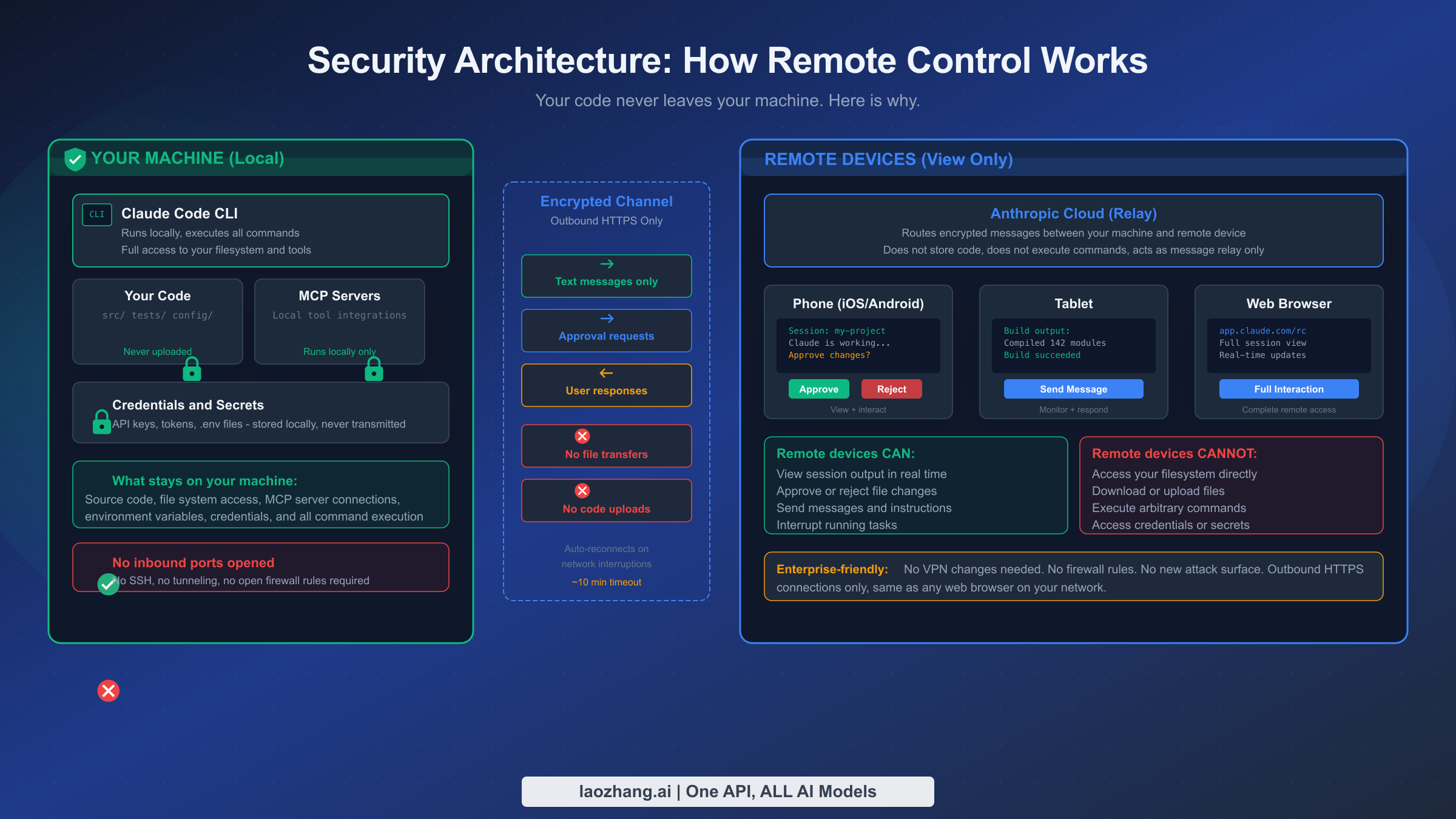
Security is the most important and most misunderstood aspect of Remote Control. When developers hear "remote access to your terminal," the immediate reaction is often concern. How can this be safe? What ports are opened? Can someone intercept my session? These are the right questions, and the answers are more reassuring than you might expect.
The architecture is fundamentally different from traditional remote access tools. Remote Control uses an outbound-only HTTPS connection model. Your local Claude Code CLI initiates an outbound connection to Anthropic's relay servers, the same type of connection your browser makes when loading a webpage. No inbound ports are opened on your machine. No SSH daemon is started. No firewall rules need to change. No VPN configuration is required. From a network perspective, Remote Control looks identical to any other HTTPS traffic from your machine.
This is a critical point for enterprise developers and security teams. Traditional remote access tools like SSH require opening inbound ports, which increases the attack surface. Tools like ngrok or Cloudflare Tunnel, while not requiring open ports, still route your actual terminal session through a third-party server. Remote Control takes a different approach entirely: it routes only text messages through Anthropic's relay, never your code, files, or credentials.
What exactly travels through the encrypted channel? Only three types of data: text messages from Claude's output (status updates, generated code snippets shown in the terminal, questions), approval requests (file diffs that Claude wants to write), and your responses (approve, reject, or text messages). Your source code files are never uploaded. Your environment variables and API keys stay on your machine. Your MCP server connections remain local. If someone were to intercept the relay traffic (which is encrypted with TLS), they would see fragments of terminal output and file diffs, not your entire codebase.
The authentication model is also worth understanding. When you start a Remote Control session, it generates a unique session URL with a cryptographic token. Only someone with that exact URL can connect to your session. The URL is shown in your terminal and encoded in the QR code, so the assumption is that you control who sees it. There is no persistent credential or account access involved. If you are concerned about URL leakage, treat the session URL with the same care you would treat any temporary authentication token.
For enterprise developers who need to explain Remote Control to a CISO or security team, the key talking points are: outbound HTTPS only (no new inbound attack surface), text-only relay (no code transmission), session-scoped authentication (no persistent access), and local execution only (the remote device cannot execute commands on your machine). This makes Remote Control significantly safer than most alternatives for remote development access, which is why many security-conscious organizations are more comfortable with it than with traditional SSH-based remote setups.
It is also worth addressing the threat model directly, because understanding what Remote Control protects against and what it does not helps you make informed decisions. The architecture protects against unauthorized access to your codebase. Even if Anthropic's relay servers were compromised, an attacker would only see encrypted text messages and file diffs, not your full source code or credentials. The session URL with its cryptographic token protects against unauthorized session hijacking, as long as you keep the URL private. What the architecture does not protect against is someone physically looking at your phone screen while you review diffs, or a compromised device that has malware capturing screen contents. These are the same risks you face with any mobile app that displays sensitive information, and the mitigations are the same: use device encryption, enable screen lock, and be aware of your surroundings when reviewing code on a phone in public.
For teams evaluating Remote Control in regulated environments, the key compliance consideration is data residency. Since all code execution happens on your local machine, the data residency requirements for your source code are met by default. The text messages that travel through Anthropic's relay are transient and not stored beyond the session lifetime, according to Anthropic's documentation. However, organizations with strict compliance requirements (SOC 2, HIPAA, FedRAMP) should verify these claims independently and potentially wait for enterprise plan support with contractual guarantees. For most development teams, the security posture of Remote Control is substantially better than the ad-hoc solutions developers typically use, such as pushing to a branch and reviewing on GitHub's mobile app, or using TeamViewer to access their work machine.
Troubleshooting: Common Issues and How to Fix Them
Despite being relatively straightforward to set up, Remote Control can encounter issues in real-world environments. Most existing guides skip troubleshooting entirely, leaving developers frustrated when things do not work as expected. Here are the most common problems and their solutions, based on real user reports and documented behavior since the feature launched.
Connection drops after a few minutes is the most frequently reported issue. Remote Control sessions have an approximately ten-minute timeout for network interruptions. If your phone switches from WiFi to cellular, or if you enter an area with poor connectivity, the session may disconnect. The solution is to ensure stable network connectivity on both ends. On the terminal side, your machine needs a consistent internet connection. On the remote device side, avoid switching networks mid-session. If a disconnection does occur, Remote Control will attempt to auto-reconnect. If it fails, you will need to restart the remote session with claude remote-control again, though your underlying Claude Code session and its work continue uninterrupted.
QR code not scanning properly is usually a terminal configuration issue rather than a Remote Control bug. Some terminal emulators render the QR code at a size or resolution that phone cameras struggle to read. Try resizing your terminal window to make the QR code larger, or switch to a different terminal emulator. As a fallback, copy the URL displayed above the QR code and paste it into your phone's browser manually. Some developers report better results with iTerm2 on macOS or Windows Terminal on Windows compared to default terminal apps.
Session shows "connecting" but never completes on the remote device typically indicates a network restriction. Corporate firewalls, VPN configurations, or restrictive network policies may block the WebSocket connection that Remote Control uses. If you are on a corporate network, check whether WebSocket connections to *.claude.com are allowed. Try connecting from a different network (like your phone's cellular data) to determine whether the issue is network-specific.
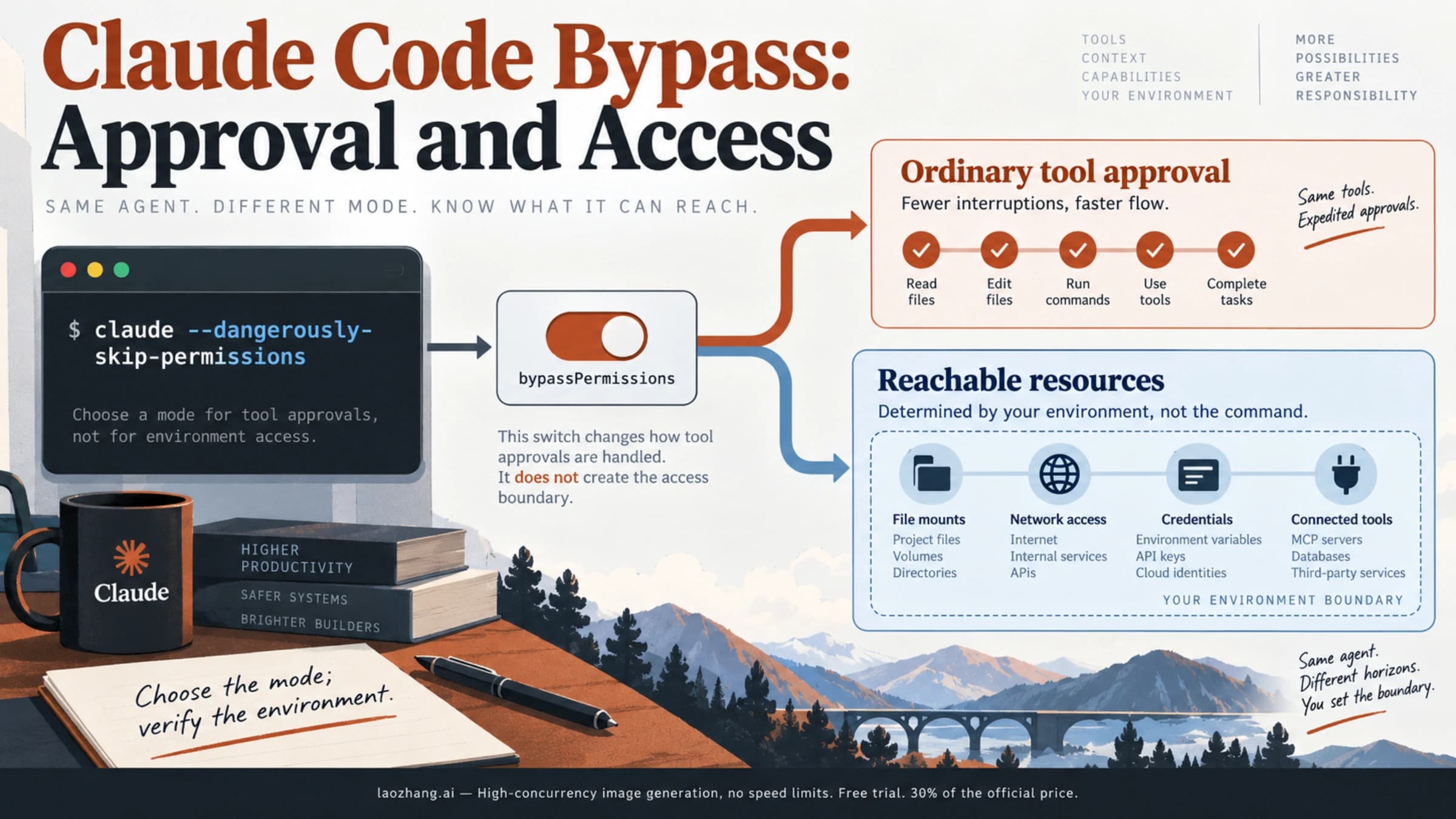
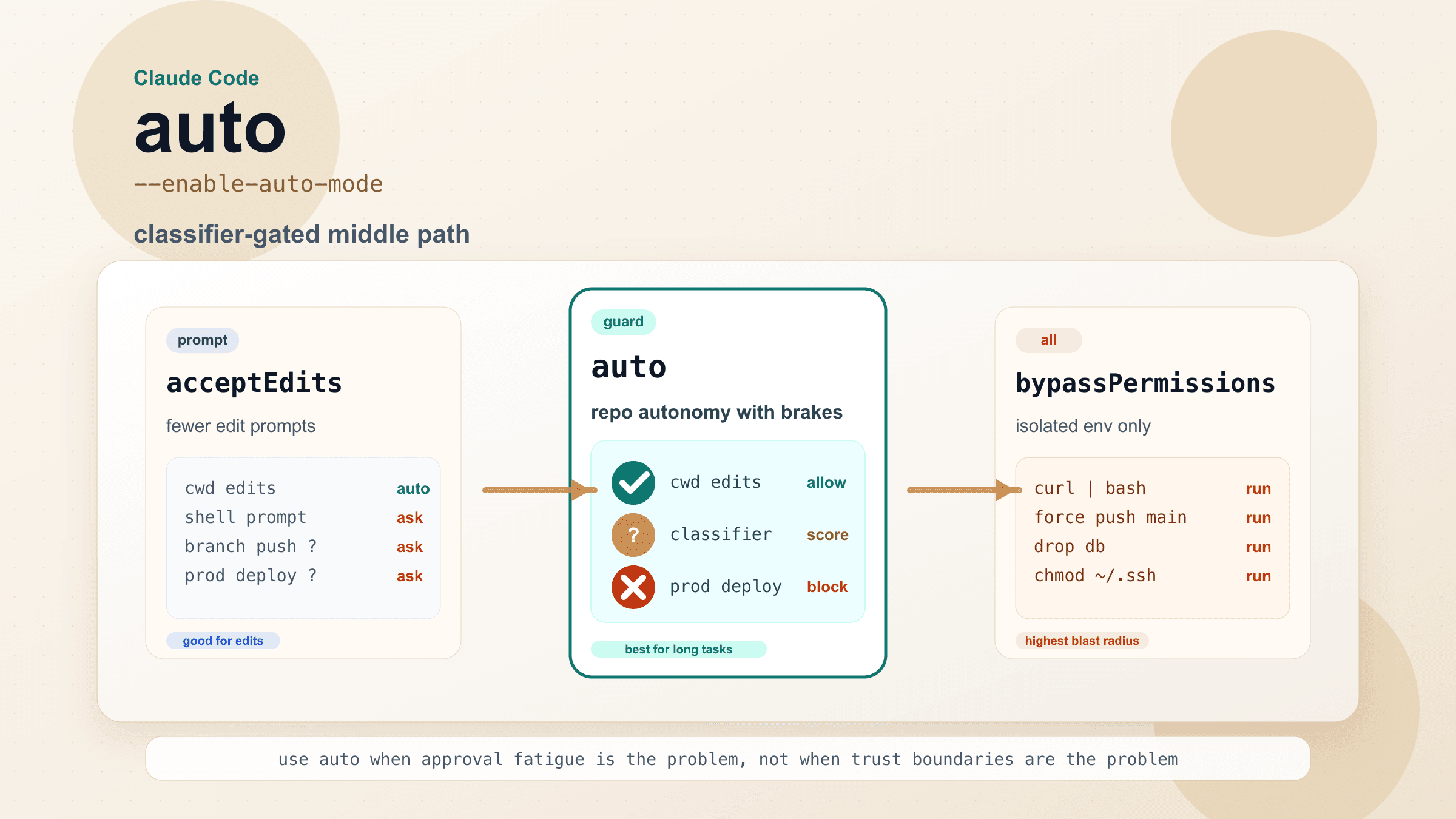
The --dangerously-skip-permissions flag does not work with Remote Control as noted by developer Simon Willison. This is actually intentional behavior, not a bug. Remote Control deliberately enforces the permission model because the whole point of remote access is supervised automation. If Claude could skip permissions while controlled remotely, it would defeat the purpose of the approval workflow. If you need unattended execution, consider whether Remote Control is the right tool for your use case, or use the --sandbox flag instead for controlled autonomy.
Only one remote session per Claude Code instance is a current limitation. If you try to start a second remote session on the same instance, it will replace the first one. To monitor multiple projects remotely, run separate Claude Code instances in different terminal windows, each with its own Remote Control session. Each instance gets a unique URL and QR code.
Remote Control not appearing as available usually means your Claude Code version is outdated or your subscription plan does not include the feature. Run claude --version to verify you have v2.1.52 or later. Check your subscription status at claude.com/settings to confirm you have a Max or Pro plan. If both check out and the feature still is not available, try reinstalling Claude Code entirely with npm install -g @anthropic-ai/claude-code.
Latency feels high when approving changes is something developers notice especially on mobile networks. The round trip from your phone through Anthropic's relay to your local machine and back adds some latency, typically 200-500 milliseconds on a good connection but potentially several seconds on congested cellular networks. This latency is noticeable when you are rapidly approving a series of file changes but is generally not a problem for the typical Remote Control workflow of periodic check-ins. If latency is consistently above a few seconds, verify that both your local machine and remote device have strong network connections. Using WiFi on the remote device rather than cellular typically improves responsiveness. Also check whether a VPN on either end is adding routing overhead, as some VPN configurations can significantly increase latency by routing traffic through distant servers.
Terminal session ended but Remote Control URL still shows old state can happen when your Claude Code session finishes or crashes while you are disconnected. The remote interface may show the last known state without indicating that the session has ended. Refreshing the page in your mobile browser will update the status. If you see a "session ended" message, you need to start a new Claude Code session and a new Remote Control session from your terminal. There is no way to reconnect a Remote Control URL to a different or restarted session since each URL is cryptographically bound to a specific session instance.
Remote Control vs SSH, Claude on the Web, and OpenClaw
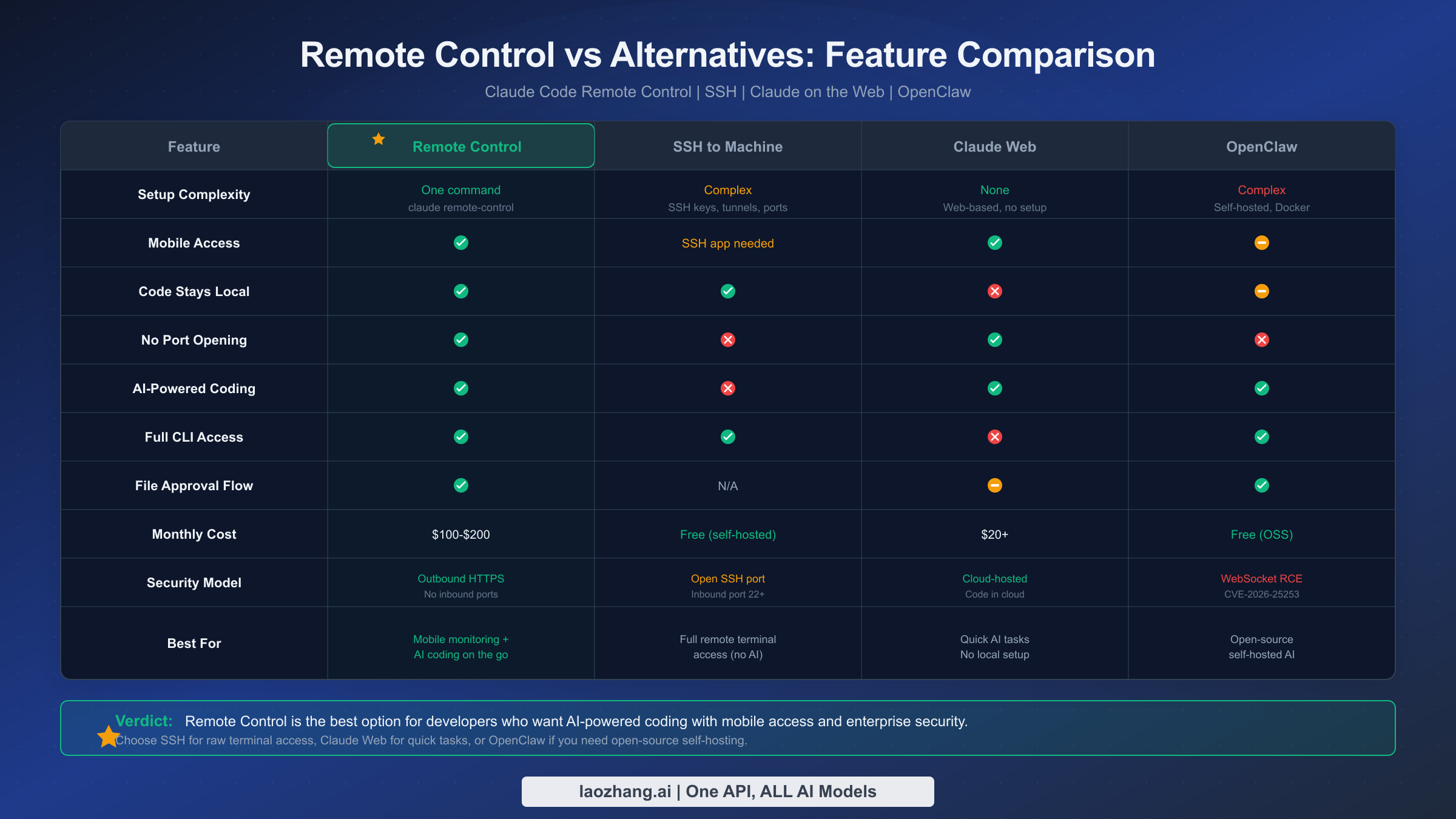
Choosing the right remote development tool depends on your specific needs. Remote Control is not a universal solution. It excels in scenarios that other tools handle poorly, and vice versa. Understanding these trade-offs helps you choose wisely or combine tools effectively.
Remote Control vs SSH represents the most common comparison. SSH gives you full remote terminal access to any machine. You can run any command, access any file, and use any tool, but it requires opening inbound ports, managing SSH keys, and dealing with network configuration. Remote Control, by contrast, is limited to Claude Code interactions but requires zero network configuration and keeps your code local. Choose SSH when you need general-purpose remote terminal access to a server. Choose Remote Control when you specifically want to monitor and interact with Claude Code sessions from your phone or tablet without the security overhead of SSH.
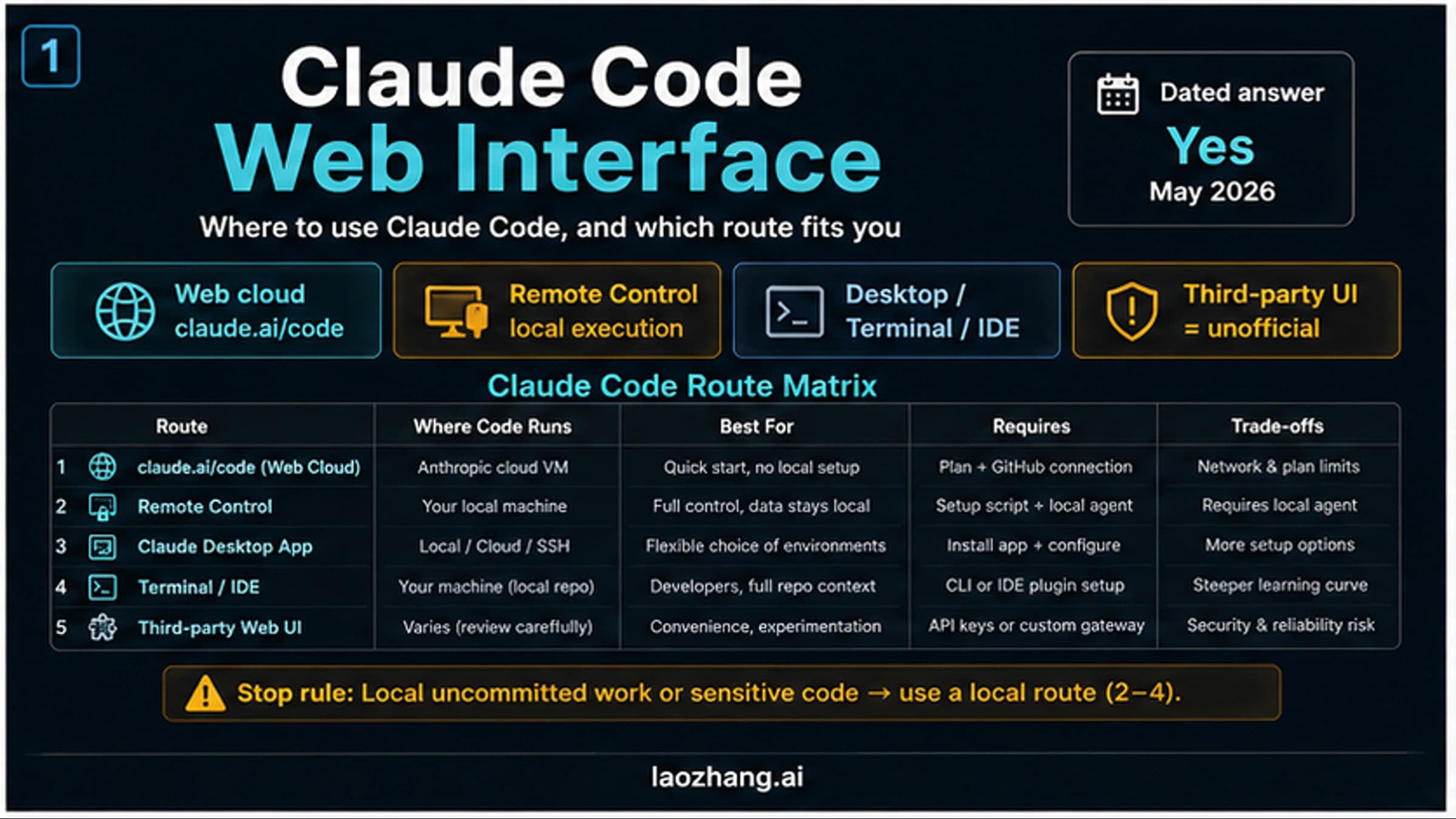
Remote Control vs Claude on the Web (claude.ai) is a different kind of comparison. Claude's web interface lets you chat with Claude from any device with zero setup, but it does not have access to your local files, your project context, or your development tools. Code you write in the web interface lives in the cloud, not on your machine. Remote Control bridges this gap by giving you phone access to a fully contextualized Claude Code session that can read and modify your actual project files. Choose Claude's web interface for quick questions and standalone coding tasks. Choose Remote Control when you need AI coding with full project context and local execution.
Remote Control vs OpenClaw is particularly relevant because OpenClaw is an open-source alternative that aims to provide similar functionality. OpenClaw lets you run Claude Code (or other AI tools) through a self-hosted web interface. It offers more flexibility and customization, but comes with significant trade-offs. You need to self-host the infrastructure (typically using Docker), manage your own security, and handle updates yourself. OpenClaw also had a significant security vulnerability (CVE-2026-25253, a WebSocket remote code execution flaw) that highlighted the risks of self-hosted solutions. Remote Control has the advantage of being officially supported by Anthropic, with no self-hosting required and a proven security architecture. For a comprehensive look at setting up OpenClaw, see our OpenClaw installation and deployment guide.
The decision framework comes down to three questions. First, do you need AI-powered coding or general remote access? If general, use SSH. Second, do you need local project context or is cloud-based chat sufficient? If cloud-based is fine, use Claude's web interface. Third, do you need official support and managed security, or do you prefer open-source flexibility? If official support, use Remote Control; if open-source, evaluate OpenClaw carefully. Many developers use a combination: Remote Control for monitoring AI coding tasks, SSH for general server administration, and Claude's web interface for quick questions on the go.
Claude Code's agent team capabilities add another dimension to Remote Control. When running multi-agent tasks where Claude spawns sub-agents to work in parallel, Remote Control lets you monitor the entire team's progress from your phone. This is a capability that none of the alternatives offer, since they are designed for single-session interactions.
Getting Started Today: Your Remote Coding Journey Begins Here
Claude Code Remote Control represents a genuine evolution in how developers interact with AI coding tools. Rather than being tethered to your terminal watching Claude work, you can set complex tasks in motion and check in from anywhere. The feature's security architecture, which keeps all execution local while routing only text messages through an encrypted relay, addresses the legitimate concerns developers have about remote access.
Getting started takes three straightforward steps that you can complete in well under a minute, regardless of your operating system or terminal setup. First, update Claude Code to v2.1.52 or later with npm install -g @anthropic-ai/claude-code. Second, run claude remote-control in your project directory. Third, scan the QR code with your phone. That is it. You are now remotely monitoring and interacting with your Claude Code session.
The most impactful workflow to try first is the "walk-away refactor." Start Claude on a meaningful task, something that would normally take ten to twenty minutes, and then step away from your desk. Check your phone periodically to approve changes and provide guidance. This single experience usually converts skeptics because it demonstrates the fundamental value proposition: your time is freed while Claude continues working, and you maintain full control through a lightweight mobile interface.
Before committing to Remote Control as part of your daily workflow, it helps to understand the current limitations so your expectations are calibrated. The feature does not support push notifications as of March 2026, so you need to actively check the session rather than being alerted when Claude needs input. Multi-session management on the mobile side is functional but not polished, requiring you to switch between browser tabs or app views to monitor different projects. And the research preview label means the feature could change in ways that affect your workflow, though Anthropic has historically maintained backward compatibility with CLI features.
Despite these limitations, Remote Control fills a gap that no other tool adequately addresses. Developers who have integrated it into their workflow consistently report that it changes their relationship with AI-powered coding. Instead of AI assistance being an activity that requires your full attention at a desk, it becomes something you can weave into the rest of your day. You start a complex task before a meeting, approve changes during a coffee break, and review the final result on your commute home. This asynchronous interaction pattern is likely the future of AI-assisted development, and Remote Control is the first major tool to make it practical.
As a research preview, Remote Control will continue to evolve. Anthropic has signaled support for Pro plan users is coming, and the feature's capabilities will likely expand over time. For now, if you are a Max plan subscriber who uses Claude Code regularly, enabling Remote Control for all sessions through /config is a low-effort, high-reward configuration change that makes your AI-assisted development workflow significantly more flexible.
Sources4
External pages this guide links to, in the order they appear. Last updated Mar 1, 2026.
Sources4
External pages this guide links to, in the order they appear. Last updated Mar 1, 2026.