Realtime API vs Transcription Pipeline Cost: A Like-for-Like Budget
For transcripts, start with transcription. For a spoken assistant, compare Realtime—including mini—with the whole STT–LLM–TTS stack. A ten-minute call is not ten minutes of user audio plus ten minutes of assistant audio.
On this page
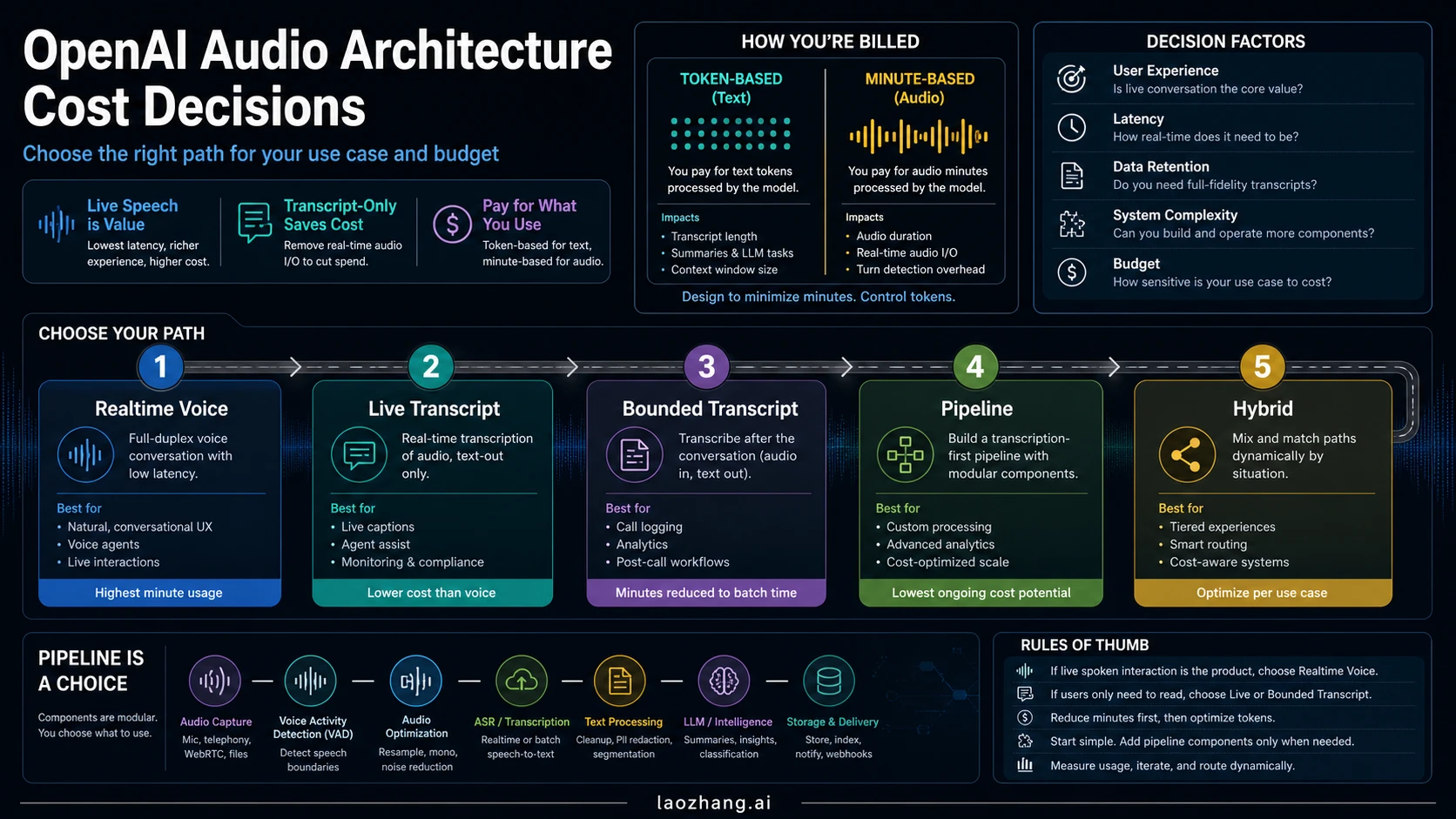
Use transcription when the required result is text. Use a voice route when the assistant must speak back, then compare the complete conversation cost. An STT–LLM–TTS pipeline is not automatically cheaper than OpenAI Realtime: the current mini model changes the arithmetic, and a transcript-only price does not buy a spoken assistant.
For a new OpenAI transcription integration, the recommended starting models are gpt-live-transcribe for audio arriving live and gpt-transcribe for a completed recording. Realtime speech-to-speech models serve a different job. GPT-Live adds another option: a voice frontend billed by active elapsed time, with backend reasoning and tools billed separately. These distinctions come from OpenAI's transcription workflow guide and voice cost guide.
The practical comparison is therefore: same required output, same workload, all charged components, and the same definition of a successfully completed task. The examples below use official rates checked on October 6, 2026, and explicitly stated workload assumptions. They are calculations, not measured API invoices or voice-quality benchmarks.
Choose the output before choosing the API
Start with what the user must receive. “Realtime transcription” and “Realtime voice agent” both involve live audio, but only one needs to generate a spoken answer.
| Required result | Route to evaluate first | What changes the decision |
|---|---|---|
| Captions or a live transcript | gpt-live-transcribe | The audio is still arriving, and text must appear during capture. No assistant voice is required. |
| Transcript of a recording | gpt-transcribe | The recording is complete. Streaming its text output does not make the audio source live. |
| Interactive spoken assistant | gpt-realtime-2.1 and gpt-realtime-2.1-mini | The application needs a spoken conversation; evaluate task success, interruptions, and useful response time. |
| Spoken assistant with separately chosen reasoning and tools | GPT-Live or an STT–LLM–TTS pipeline | Backend control matters enough to justify separate components and their accounting. |
| Live help followed by archive, notes, or QA | Hybrid | Only part of the workflow needs speech; post-call processing can run independently. |
These are starting points for evaluation, not guarantees about accuracy, latency, or account access. A pipeline can stream its stages and begin some backend work before the final transcript. Conversely, native speech-to-speech does not establish that a particular application will complete tasks better.
Check specialist requirements before selecting the lowest price. OpenAI currently directs speaker-labeled file transcripts to gpt-4o-transcribe-diarize, and word timestamps or subtitle formats to whisper-1. The newer live transcription route does not provide word timestamps, speaker identification, or confidence scores. See the workflow guide and live transcription requirements. Those capabilities can change which outputs are actually comparable.
Current prices: three different clocks
The OpenAI pricing page lists the following relevant rates as of October 6, 2026. Dollar figures are USD and exclude separately charged services, taxes, and other provider fees.
| Model or component | Meter and rate | Useful interpretation |
|---|---|---|
gpt-live-transcribe | $0.017 per audio minute | $1.02 for 60 metered audio minutes; text transcription only |
gpt-transcribe | $0.0045 per audio minute | $0.27 for a 60-minute recording; text transcription only |
gpt-realtime-whisper | $0.017 per audio minute | An existing live transcription option, rather than the recommended new starting model |
gpt-realtime-2.1 audio | Input $32, cached input $0.40, output $64 per million tokens | Count input and generated output separately |
gpt-realtime-2.1-mini audio | Input $10, cached input $0.30, output $20 per million tokens | A lower token rate; useful task completion still needs evaluation |
gpt-live-1 voice frontend | $0.05 per minute, billed per second | Active elapsed session time, including silence and backend waiting; backend costs are additional |
The original gpt-realtime-2 discussed in the earlier version of this page remains listed at the same audio rates as gpt-realtime-2.1. It also has its own current model page; do not infer its shutdown from notices naming other Realtime families.
Realtime text is another charge, not something absorbed by the audio row. Per million text tokens, gpt-realtime-2.1 lists input/cached input/output at $4/$0.40/$24; mini lists $0.60/$0.06/$2.40. Image input, if used, is $5/$0.50 for full/cached input on the larger model and $0.80/$0.08 on mini. These rates come from the same pricing table.
Older file transcription estimates are still useful when budgeting existing integrations: gpt-4o-transcribe and the diarization model have an estimated $0.006 per minute, while gpt-4o-mini-transcribe has an estimated $0.003. Their underlying token prices mean those estimates are not a fixed per-minute invoice. OpenAI has announced removal of the named legacy transcription models, including whisper-1, on February 26, 2027. Keep that migration cost in an existing-stack decision; see the deprecation notice.
A call minute is not an audio minute in each direction
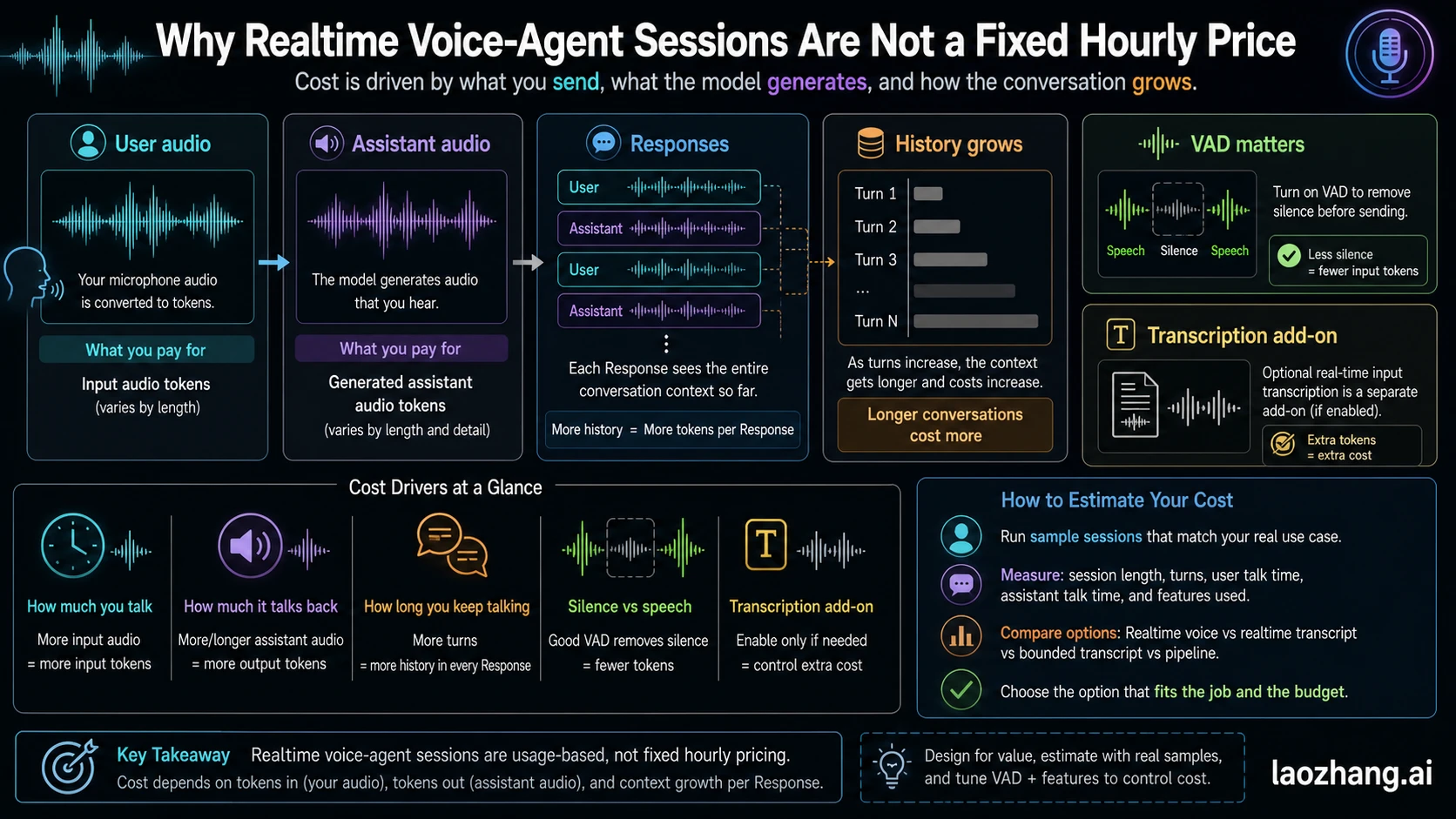
OpenAI's Realtime accounting guide describes approximately one input audio token per 100 ms and one assistant audio token per 50 ms. That gives about 600 input tokens or 1,200 output tokens per audio minute, with small variations from special tokens.
For fresh, uncached audio alone:
Full Realtime: $0.0192 × user audio minutes
             + $0.0768 × generated assistant audio minutes

Realtime mini: $0.0060 × user audio minutes
             + $0.0240 × generated assistant audio minutes
If a one-minute conversation contains 30 seconds of user speech and 30 seconds of assistant speech, those formulas yield $0.048 for the larger model or $0.015 for mini. They exclude text, repeated history, tools, optional transcription, and operations.
The older $5.76 figure describes one uncached hour of user audio plus one generated hour of assistant audio: $1.152 + $4.608. It is not the price of one elapsed call hour. A quiet call and a conversation with long spoken answers have different audio quantities.
Realtime currently does not charge for connections or network bandwidth. VAD can filter empty audio unless the client manually adds it as input. GPT-Live uses a different clock: silence, microphone muting, and backend waiting still count while its voice session is active. OpenAI explains both meters here.
Worked budget: a ten-minute spoken support session
Suppose the required result is a spoken resolution with a usable transcript. Every route must pass the same resolution and transcript checks. The illustrative session lasts ten minutes: four minutes of user speech, three minutes of generated assistant speech, and three minutes of pauses or waiting. These quantities are assumptions, not observed conversation averages.
For a Realtime estimate, assume the following additional totals across all Responses, beyond fresh audio:
- 2,000 uncached input text tokens, 10,000 cached input text tokens, and 500 output text tokens;
- 1,000 uncached input audio tokens and 5,000 cached input audio tokens from reused context;
- no image input;
- separate
gpt-transcribeinput transcription for four audio minutes, assuming the chosen integration supports that configuration.
The cost guide treats optional input transcription as separately billed. Do not assume a transcript is included in the speech-to-speech media price.
| Realtime line | Full model calculation | Mini calculation |
|---|---|---|
| Fresh audio | 4 × 0.0192 + 3 × 0.0768 = $0.3072 | 4 × 0.006 + 3 × 0.024 = $0.0960 |
| Additional text | (2,000 × 4 + 10,000 × 0.40 + 500 × 24) / 1M = $0.0240 | (2,000 × 0.60 + 10,000 × 0.06 + 500 × 2.40) / 1M = $0.0030 |
| Additional audio context | (1,000 × 32 + 5,000 × 0.40) / 1M = $0.0340 | (1,000 × 10 + 5,000 × 0.30) / 1M = $0.0115 |
| Separate input transcription | 4 × 0.0045 = $0.0180 | 4 × 0.0045 = $0.0180 |
| Subtotal | $0.3832 | $0.1285 |
That difference demonstrates why a current comparison must include mini. It does not prove that mini produces an equally usable result.
For an illustrative existing pipeline, assume ten metered live audio minutes, $0.012 of text-model work, and 1,800 characters sent to tts-1. Assume those characters produce the same accepted spoken content and three minutes of audio with the selected voice and speed. At its listed $15 per million characters, TTS costs $0.027:
Live STT:       10 × $0.017                 = $0.170
Text model:    illustrative usage cost     = $0.012
TTS:           1,800 × $15 / 1,000,000      = $0.027
Pipeline subtotal                         = $0.209
The character-to-duration relationship is a workload assumption, not an official conversion; replace it with your own accepted output and voice settings. The STT line assumes ten metered stream minutes, not just the four minutes of user speech. This is an accounting example for an existing stack, not a recommendation to start a new tts-1 integration. OpenAI has announced removal of tts-1, tts-1-hd, and two named gpt-4o-mini-tts snapshots on January 6, 2027. See the TTS deprecation notice and choose a supported launch route.
If your TTS uses gpt-4o-mini-tts, its pricing row instead lists $0.60 per million input text tokens and $12 per million output audio tokens. Apply its actual token usage; do not borrow Realtime's audio-token-to-seconds conversion for a different TTS model. Current TTS rates support the calculation, not a universal spoken-minute estimate.
GPT-Live would add 10 × $0.05 = $0.50 for the active voice frontend. With the same illustrative $0.012 backend-model line, its subtotal is $0.512. That includes the pauses and backend waiting in the ten-minute session; tools remain separate. A slower backend can therefore increase voice charges even if its own token bill is lower.
Add the costs every route still has
Assume $0.008 in external tool charges, $0.03 in telephony/storage/monitoring allocation, and $0.10 in QA or human fallback per attempted session. These are fictional business inputs, not official OpenAI rates. An actual stack may have different costs for each route.
| Route | Voice, transcription, and model subtotal | Other assumed costs | Total per attempted session |
|---|---|---|---|
| Full Realtime | $0.3832 | $0.138 | $0.5212 |
| Realtime mini | $0.1285 | $0.138 | $0.2665 |
| Existing live STT–LLM–TTS pipeline | $0.2090 | $0.138 | $0.3470 |
| GPT-Live with separate backend | $0.5120 | $0.138 | $0.6500 |
Under these exact inputs, the pipeline falls between full Realtime and mini. Change talk time, context, TTS route, backend work, or review requirements and the order can change. A transcript-only route would cost less here because it delivers less: it cannot replace the required spoken resolution.
The STT meter can reverse this result. Holding the other hypothetical lines unchanged, the pipeline costs 0.017 × metered STT minutes + 0.177. It drops below mini's $0.2665 at fewer than about 5.26 metered STT minutes: five minutes yields $0.262, while 5.5 minutes yields $0.2705. That is a break-even calculation, not a promise that a ten-minute live connection will be billed for only its speech. Confirm your route's actual duration accounting and that reducing submitted audio preserves the transcript and spoken task.
For 1,000 attempts, multiply the final column by 1,000. Then divide by accepted completed tasks. If all four configurations hypothetically complete 900 usable tasks, their costs per completed task are about $0.579, $0.296, $0.386, and $0.722, respectively. If completion rates differ, use each route's own denominator and include spending on failed attempts and retries. Do not assume equal completion merely to make a price comparison easy.
Turn the example into your own worksheet
Use actual provider usage for the billable units, and product measurements for usefulness. They answer different questions.
| Worksheet input | What to collect |
|---|---|
| Workload and output | Attempt count, required spoken/text outputs, acceptance criteria, and completed-task count |
| Realtime | Per-Response text/audio/image input, cached input by modality, output text/audio, and separate input transcription |
| Transcription pipeline | Metered audio duration or model token usage, text-model usage, TTS characters/tokens, and external calls |
| GPT-Live | Final active voice seconds plus independently charged backend models and tools |
| Operations | Carrier fees, storage and retention, logging, retries, review time, fallback, and migration work |
For each Realtime input modality, use:
input cost = ((total input − cached input) × normal rate
              + cached input × cached rate) / 1,000,000

output cost = output tokens × output rate / 1,000,000
Sum that calculation across Responses and applicable modalities. Cached tokens are a subset of input tokens, not an extra charge and not a discount on output. Use cached_tokens_details for the matching modality; subtracting one aggregate cached count from every modality would undercount usage.
The official per-Response example exposes these details through response.done.usage. Count each response ID once, collect optional transcription usage separately, and avoid charging total_tokens again after charging the component counts. Missing usage means an incomplete estimate, not a zero-cost request.
Conversation history is included in subsequent Realtime Responses. Cache is best-effort: changing instructions, tools, or earlier history can reduce reuse, and truncation can disturb the cache. A duration-only estimate cannot capture this. Compare short and long conversations using actual usage totals rather than applying an invented “history multiplier.”
For GPT-Live, session.usage.updated contains cumulative usage.seconds: replace the previous snapshot rather than summing snapshots. Collect final usage from session.closed once. WebRTC initialization bills 15 seconds that are credited into a running session: a 90-second session is 90 seconds, not 105. Count unused creation attempts and independently charged backend work as applicable. Backend response IDs also need deduplication. These rules are documented in GPT-Live usage and costs.
For example, a 90-second frontend with $0.02 of backend work costs 90 / 60 × $0.05 + $0.02 = $0.095 before other services. Muting or leaving the connection open does not stop its clock; close the voice session when conversation is finished.
Finally, calculate:
cost per usable completed task =
  all application spending, including failed attempts and retries
  / tasks meeting the same acceptance criteria
Run low, typical, and high workload cases. Vary assistant speech length, context reuse, backend waiting, retries, and review time. A client timeout or canceled playback is not evidence that provider work was uncharged. For implementing an application budget boundary, see the separate guide to an LLM API spend kill switch.
When a pipeline or hybrid earns its complexity
A transcription pipeline makes sense when you need inspectable intermediate results or independent component choices. Audio, transcript, text-model output, and synthesized speech can have separate quality checks and retention rules. That control carries integration work: streaming, turn detection, interruption handling, retries, and usage reconciliation all belong in the plan.
The current live transcription route also has specific implementation requirements, including 24 kHz PCM and client-side VAD or manual commits; server and semantic VAD are not supported for gpt-live-transcribe. Completions can arrive out of order, so associate them using item_id. Consult the live transcription guide rather than treating migration as a universal model-name swap.
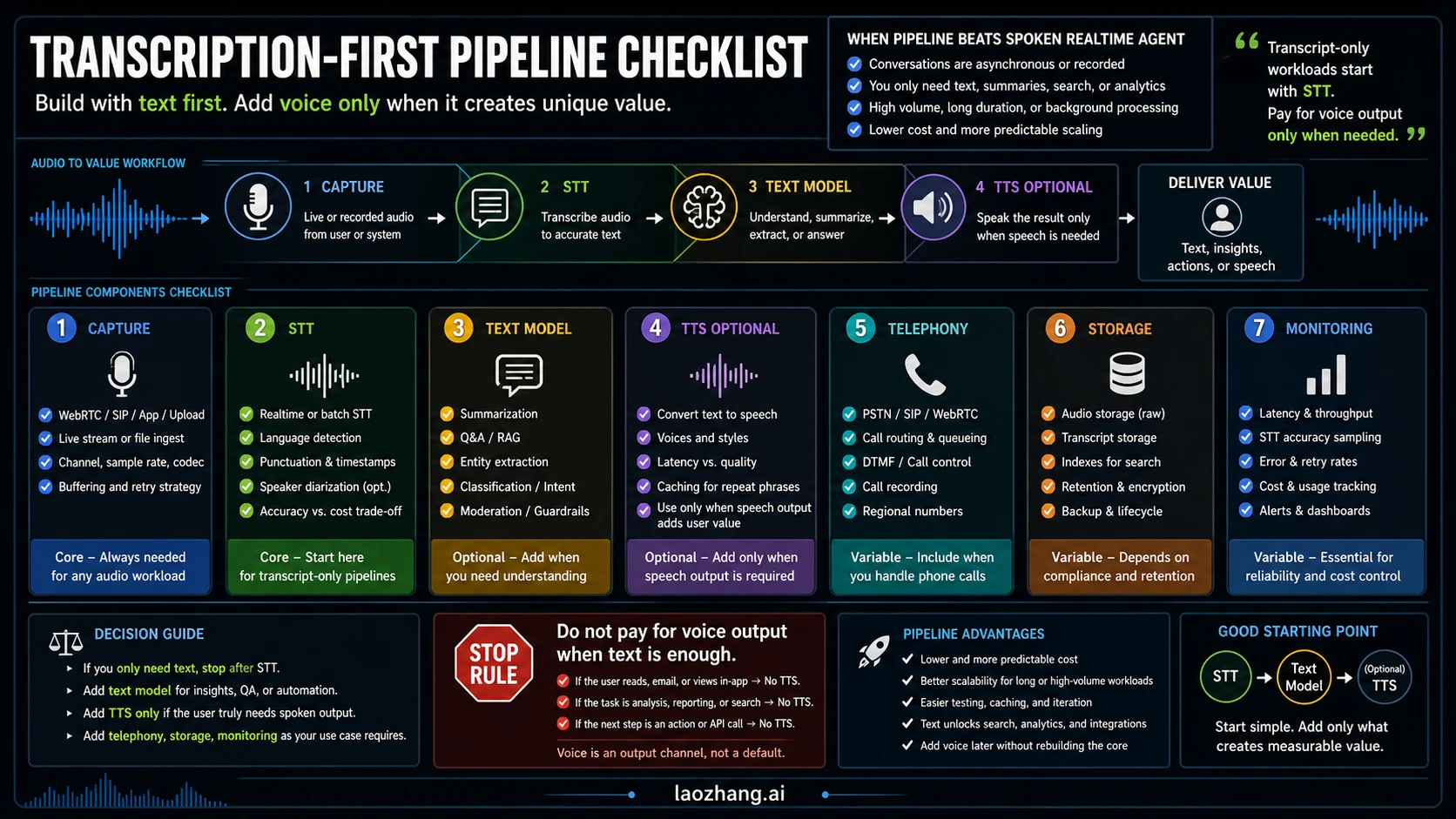
A hybrid works when the product genuinely contains two jobs. For example, an assistant may need three minutes of live dialogue, followed by seven minutes of recorded material for later analysis. Assuming 1.2 minutes of user audio and 0.9 minutes of assistant audio, mini's fresh live-media estimate is $0.0288. Transcribing a separate seven-minute recording costs $0.0315; an illustrative $0.012 summary brings those selected components to $0.0723, before live context, tools, transcript requirements, and operations.
That example buys three minutes of spoken interaction and later text processing. It is not an equivalent replacement for ten minutes of interactive speech. Likewise, if a usable transcript already exists, do not add another transcription pass automatically; if the archive needs audio not covered by that transcript, budget the missing work.
Keep the live boundary attached to a user need. Collect known context before opening a GPT-Live conversation when appropriate, close it during long background work, and restore the necessary context on resumption. Compare saved voice time with reconnection costs and the effect on task completion. For Realtime, shorten unnecessary replies and manage history without deleting information the task needs. Cost controls should preserve the output you promised.
FAQ
Is a transcription pipeline always cheaper than Realtime API?
No. A transcript is a cheaper starting artifact than a complete spoken assistant, but that is a different result. In the stated ten-minute spoken-workflow example, full Realtime costs $0.5212, mini costs $0.2665, and an existing live STT–LLM–TTS stack costs $0.3470 after the assumed additional expenses. Those are scenario calculations using current OpenAI rates, not guaranteed prices or equal-quality results.
Which API should I use for live captions?
Start by evaluating gpt-live-transcribe, OpenAI's recommended model for live audio transcription. Its listed rate is $0.017 per audio minute, and it returns text rather than a spoken assistant. Check whether its lack of word timestamps or speaker identification fits your captions product. See the transcription workflow guide and pricing.
Do streamed transcripts require a Realtime connection?
Not for a completed recording. File transcription can stream text as the file is processed; a persistent live audio stream is a separate workflow. gpt-transcribe is the recommended file starting model, with a $0.0045-per-audio-minute pricing row. File uploads have a 25 MB limit. See file transcription and pricing.
Does silence cost money?
For conversational Realtime, connections are currently uncharged and VAD can filter empty audio unless it is manually added to the conversation. Responses and their context still incur token charges. GPT-Live bills active elapsed seconds, including silence and backend waiting, until the session closes. These are different billing rules, documented in the voice cost guide.
Can I budget Realtime at $5.76 per call hour?
No. At the larger model's rates, $5.76 corresponds approximately to one uncached user-audio hour plus one generated assistant-audio hour. It excludes text, repeated context, optional transcription, tools, and operations. Measure the audio in each direction and apply the Realtime accounting rules; use a completed-task budget for the product decision.
Should I remove a legacy model immediately because it is deprecated?
Deprecation is an announced migration deadline, not proof that the model has already stopped working. For the relevant existing integrations, named legacy transcription models are scheduled for February 26, 2027, while tts-1, tts-1-hd, and two named mini-TTS snapshots are scheduled for January 6, 2027. Check the exact model or snapshot in the deprecation notices, then evaluate a supported replacement against your required outputs.
Sources7
External pages this guide links to, in the order they appear. Last updated Oct 7, 2026.
Sources7
External pages this guide links to, in the order they appear. Last updated Oct 7, 2026.
- 1.transcription workflow guidedevelopers.openai.com/api/docs/guides/transcription
- 2.voice cost guidedevelopers.openai.com/api/docs/guides/voice-latency-cost
- 3.live transcription requirementsdevelopers.openai.com/api/docs/guides/realtime-transcription
- 4.OpenAI pricing pagedevelopers.openai.com/api/docs/pricing
- 5.current model pagedevelopers.openai.com/api/docs/models/gpt-realtime-2
- 6.deprecation noticedevelopers.openai.com/api/docs/deprecations
- 7.file transcriptiondevelopers.openai.com/api/docs/guides/speech-to-text