Nano Banana 2 503 “Model Is Overloaded”: Retry, Pause, or Queue
For a confirmed Nano Banana 2 503 response, retry with jitter within an attempt and time budget. Keep the image workflow intact, verify image output, and defer work when recovery cannot fit the deadline.
On this page
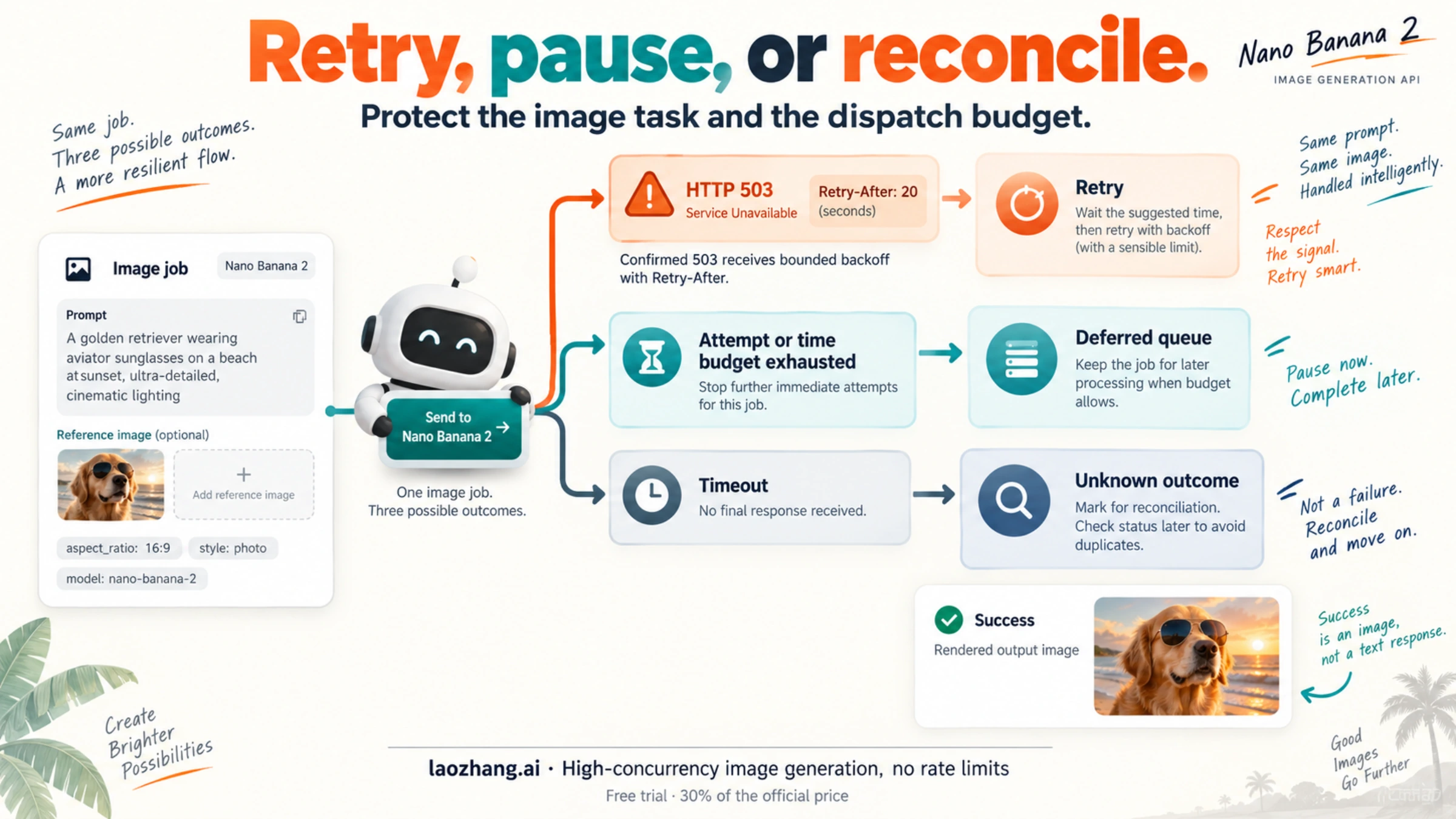
A Nano Banana 2 503 “Model is overloaded” response calls for a limited retry, followed by a clear stopping decision. Confirm the HTTP status and the route that returned it, wait with exponential backoff and jitter, and stop when your attempt or elapsed-time budget runs out. A timeout with no final response needs a different action: preserve the job as result unknown instead of automatically sending the image-generation POST again.
The current native Nano Banana 2 model ID is gemini-3.1-flash-image. Keep that image model, your edit input when applicable, and the requested image output connected throughout recovery. A text response or HTTP 200 alone is not a completed image job. Google's model page and image-generation guide document that identity and image workflow.
The code below implements a native REST request with one retry owner, a sample four-attempt limit, and a 45-second request budget. It has been checked with synthetic responses and a fake clock, without live image generation. Those settings demonstrate a bounded policy; they are not measured Nano Banana 2 recovery times.
Confirm the 503 branch before retrying
Record the endpoint or provider, model ID, HTTP status, structured error body, timestamp, elapsed time, and request ID if present. Keep keys, private images, and sensitive prompts out of shared logs. On a direct generateContent request, the HTTP status is the primary branch; an error body such as this adds useful detail:
{
  "error": {
    "code": 503,
    "status": "UNAVAILABLE",
    "message": "The model is overloaded. Please try again later."
  }
}
The message is an illustrative error shape, not a live incident report. A gateway can return its own 503, so the same number does not establish that Google rejected the upstream request. Ask that provider for the matching upstream status and request identifier before assigning the cause.
HTTP 503 means the responding service is temporarily unable to handle the request, for example because of overload or maintenance. One response does not prove a Google-wide outage, identify a GPU problem, or tell you when capacity will return. For current incident scope, use the surface-specific Nano Banana 2 status checks; the Gemini API and a third-party image tool do not have one universal health signal.
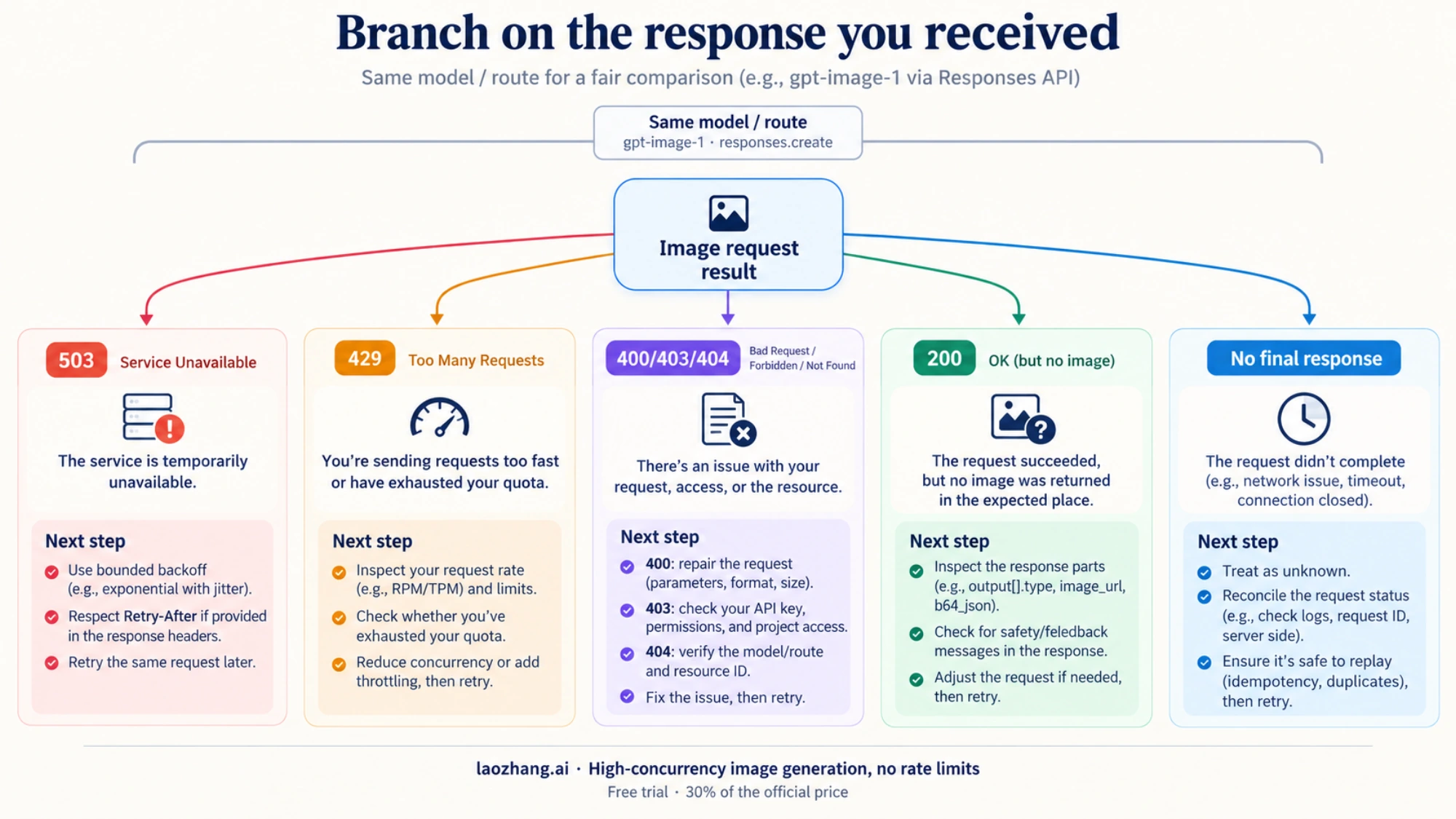
503 vs 429: which action changes?
| What you actually receive | First action | What ends this branch |
|---|---|---|
| HTTP 503 from the native image route | Apply bounded backoff; inspect any Retry-After header | Image output, exhausted budget, or a different error |
| HTTP 429 | Read the limit details; distinguish short-term rate pressure from exhausted quota | The relevant limit permits work again; a retry loop cannot replenish quota |
| HTTP 400, 403, or 404 | Correct the request, access, or resource before sending it again | The underlying problem is corrected |
| HTTP 402 with depleted prepaid credit | Address the stated billing prerequisite | Credit/access is restored through the proper account process |
| HTTP 200 with no valid image part | Inspect response parts, finish reasons, and prompt feedback | A valid image response; do not label every case a safety block |
| Timeout or disconnect without a final response | Mark the outcome unknown and investigate the existing job | Evidence establishes completion or that replay is safe |
Google's troubleshooting guide recommends backoff, jitter, and bounded retries for transient failures such as 503 and short-term 429 errors. A 429 can also require a quota decision rather than waiting a few seconds. Changing a billing tier is not a demonstrated fix for a 503.
Do not classify errors by searching exception text for "503" or "overloaded". A log line, prompt, or unrelated error can contain those strings. In the Python Google Gen AI SDK, APIError.code is an integer; use the typed status and retain the error details. The Interactions error reference describes a separate protocol with string codes such as service_unavailable; it is not the native generateContent error schema.
A bounded native image request in Node.js
Save the following as nano-image.mjs in a Node.js environment with built-in fetch. It sends the current model's native generateContent request and accepts an optional inline image for editing. It does not install a package or depend on SDK retry behavior.
The application retries only a received HTTP 503. It returns stopped for other HTTP errors or missing image output, deferred when retries no longer fit, and uncertain when the transport result is unknown. Only image contains output to save.
import { Buffer } from 'node:buffer';
import { setTimeout as sleep } from 'node:timers/promises';

const endpoint = 'https://generativelanguage.googleapis.com/v1/models/' +
  'gemini-3.1-flash-image:generateContent';

export function retryAfterMs(value, wallTime = Date.now()) {
  if (!value) return 0;
  if (/^\d+$/.test(value.trim())) return Number(value) * 1000;
  const date = Date.parse(value);
  return Number.isFinite(date) ? Math.max(0, date - wallTime) : 0;
}

export function imageFrom(body) {
  for (const candidate of body?.candidates ?? []) {
    for (const part of candidate.content?.parts ?? []) {
      if (part.thought) continue;
      const image = part.inlineData;
      if (!image || typeof image.data !== 'string') continue;
      if (!/^[A-Za-z0-9+/]+={0,2}$/.test(image.data)) continue;
      const bytes = Buffer.from(image.data, 'base64');
      if (bytes.toString('base64').replace(/=+$/, '') !==
          image.data.replace(/=+$/, '')) continue;
      const png = bytes.subarray(0, 8).equals(
        Buffer.from([137, 80, 78, 71, 13, 10, 26, 10]));
      const jpeg = bytes[0] === 255 && bytes[1] === 216 && bytes[2] === 255;
      const webp = bytes.toString('ascii', 0, 4) === 'RIFF' &&
        bytes.toString('ascii', 8, 12) === 'WEBP';
      const ext = image.mimeType === 'image/png' && png ? 'png' :
        image.mimeType === 'image/jpeg' && jpeg ? 'jpg' :
        image.mimeType === 'image/webp' && webp ? 'webp' : null;
      if (ext) return { bytes, mimeType: image.mimeType, ext };
    }
  }
  return null;
}

export async function generateImage({
  apiKey, prompt, inputImage = null,
  maxAttempts = 4, budgetMs = 45000, callTimeoutMs = 12000
}, {
  fetchFn = fetch, now = () => performance.now(),
  wait = sleep, random = Math.random, wallNow = Date.now
} = {}) {
  if (!apiKey || !prompt || !Number.isInteger(maxAttempts) ||
      maxAttempts < 1 || budgetMs <= 0 || callTimeoutMs <= 0) {
    throw new Error('Supply a key, prompt, and positive retry limits.');
  }
  const parts = [{ text: prompt }];
  if (inputImage) {
    if (!['image/png', 'image/jpeg', 'image/webp'].includes(inputImage.mimeType)
        || typeof inputImage.data !== 'string' || !inputImage.data.length) {
      throw new Error('Editing requires image MIME type and base64 data.');
    }
    parts.push({ inlineData: inputImage });
  }
  const payload = JSON.stringify({
    contents: [{ role: 'user', parts }],
    generationConfig: { responseModalities: ['TEXT', 'IMAGE'] }
  });
  const deadline = now() + budgetMs;
  const trace = [];
  const defer = reason => ({ state: 'deferred', reason, trace });

  for (let attempt = 1; attempt <= maxAttempts; attempt++) {
    const remaining = deadline - now();
    if (remaining < 1000) return defer('elapsed_budget');
    const controller = new AbortController();
    const timer = setTimeout(() => controller.abort(),
      Math.min(callTimeoutMs, remaining));
    let response, raw;
    try {
      response = await fetchFn(endpoint, {
        method: 'POST', signal: controller.signal,
        headers: { 'Content-Type': 'application/json', 'x-goog-api-key': apiKey },
        body: payload
      });
      raw = await response.text();
    } catch {
      // A timeout/disconnect can hide completed work. Do not replay it here.
      return { state: 'uncertain', reason: 'transport_or_timeout', trace };
    } finally {
      clearTimeout(timer);
    }
    let body;
    try { body = JSON.parse(raw); } catch { body = null; }
    trace.push({ attempt, httpStatus: response.status,
      apiCode: body?.error?.code, apiStatus: body?.error?.status });

    if (response.ok) {
      const image = imageFrom(body);
      return image ? { state: 'image', image, trace } : {
        state: 'stopped', reason: 'no_valid_image', trace,
        promptFeedback: body?.promptFeedback,
        finishReasons: body?.candidates?.map(c => c.finishReason)
      };
    }
    if (response.status !== 503) {
      return { state: 'stopped', reason: 'http_error',
        httpStatus: response.status, error: body?.error, trace };
    }
    if (attempt === maxAttempts) return defer('attempt_budget');

    const hint = retryAfterMs(response.headers.get('retry-after'), wallNow());
    const jitter = random() * Math.min(4000, 500 * 2 ** (attempt - 1));
    const delay = Math.max(hint, jitter);
    // Leave at least one second for another call; never shorten the hint.
    if (delay + 1000 >= deadline - now()) return defer('retry_after_or_budget');
    await wait(delay);
  }
}
A calling module supplies its existing authorized key and prompt. This generation example includes all file-writing imports and preserves the returned image format:
import { writeFile } from 'node:fs/promises';
import { generateImage } from './nano-image.mjs';

const result = await generateImage({
  apiKey: process.env.GEMINI_API_KEY,
  prompt: 'Create a clean product photo of a blue ceramic mug on a white table.'
});

if (result.state === 'image') {
  const filename = `generated.${result.image.ext}`;
  await writeFile(filename, result.image.bytes);
  console.log(`Saved ${filename}; open it to verify the rendered image.`);
} else {
  console.log(result.state, result.reason);
  // Persist the existing job's state; do not start an unconditional retry here.
}
For an edit, read the original image and pass it into the same function, alongside the editing instruction. For example, replace the generation call above with this call and keep its result handling:
import { readFile } from 'node:fs/promises';

const original = await readFile('mug.png');
const result = await generateImage({
  apiKey: process.env.GEMINI_API_KEY,
  prompt: 'Change the mug to green. Keep the camera angle and background.',
  inputImage: { mimeType: 'image/png', data: original.toString('base64') }
});
Use the actual input MIME type. The example sends inline image bytes; it does not upload a file or change authentication. Keep the original edit image attached to every permitted retry. Dropping the image would change an editing task into a new generation task.
What the limits actually bound
maxAttempts: 4 means one initial request and at most three retries. The jitter windows in this example are 0–500, 0–1,000, and 0–2,000 milliseconds. With no server hint, their maximum combined wait is 3.5 seconds. The 45-second budget includes request time and waiting; each request gets at most 12 seconds, or the remaining budget if smaller. If a request times out, the function stops with an unknown outcome rather than treating that timeout as another confirmed 503.
A Retry-After header changes that calculation. HTTP allows either seconds or an HTTP date. The code waits at least the server's hint, and defers if that wait leaves insufficient time for another call. A 120-second hint cannot fit a 45-second interactive budget: shorten the user's wait by returning a queued or paused state, not by shortening the server's requested delay.
Choose your own limits from the user-facing deadline and workload. If a legitimate image routinely needs longer than 12 seconds, that sample per-call timeout is too short for your application. Increasing it must still fit the total budget, and cancellation must still be treated as an unknown server outcome. Backoff gives a transient failure another opportunity; it cannot create capacity or guarantee recovery.
Make one layer responsible for retries
The REST example owns its retries in the application. Audit any gateway or transport wrapper that also retries, because four application attempts multiplied by five hidden transport attempts can produce 20 upstream submissions for one user action.
For Python SDK users, explicitly configure the policy instead of assuming a default. Google's troubleshooting page describes automatic retries, while the public python-genai main-branch implementation checked on October 6, 2026 uses one attempt when retry_options is None. That source snapshot is not proof of every installed release. The retry implementation and option types make the relevant behavior inspectable.
When an outer application policy owns retries, the corresponding option fragment is:
from google.genai import types

http_options = types.HttpOptions(
    timeout=12_000,  # milliseconds, not seconds
    retry_options=types.HttpRetryOptions(attempts=1),
)
Pass these options to the existing SDK client through its supported configuration. attempts=1 includes the initial request and disables SDK retries in the inspected implementation. This fragment configures transport behavior; it does not by itself implement an elapsed-time budget, output validation, or the unknown-result branch. Check the installed release before integrating it, and test exc.code == 503 inside an except errors.APIError as exc branch rather than matching its message.
Verify an image before marking the job complete
The example searches candidate parts for non-thinking inline image data, decodes base64, and checks that its MIME type matches a PNG, JPEG, or WebP signature. It then gives the caller bytes to save. Those checks reject text-only output, malformed base64, and some incorrectly labeled data; they do not fully decode or visually validate an image.
Complete the job only after the saved file opens or your image decoder confirms that it renders. For an edit, also confirm that the expected edit input and requested output were used. Keep the distinction between “response received,” “image bytes found,” and “usable image delivered” in your job state.
If a 200 response has no image, inspect promptFeedback, candidate finishReason, and the actual returned parts. A safety-related finish reason is one possibility; a parsing mismatch, text-only answer, or a different response schema can also explain the result. Repeatedly replaying that response through the 503 loop will not diagnose it.
Stop retry pressure across your workers
A retry limit on each user request is only part of the solution. Ten workers that each retry four times can still send 40 calls during the same unavailable period. Put a concurrency limit in front of generation, queue work that cannot acquire a permit, and keep each permit until the response body has been read or the request has stopped. Base that limit on your actual account constraints and observed workload rather than an invented universal Nano Banana 2 setting.
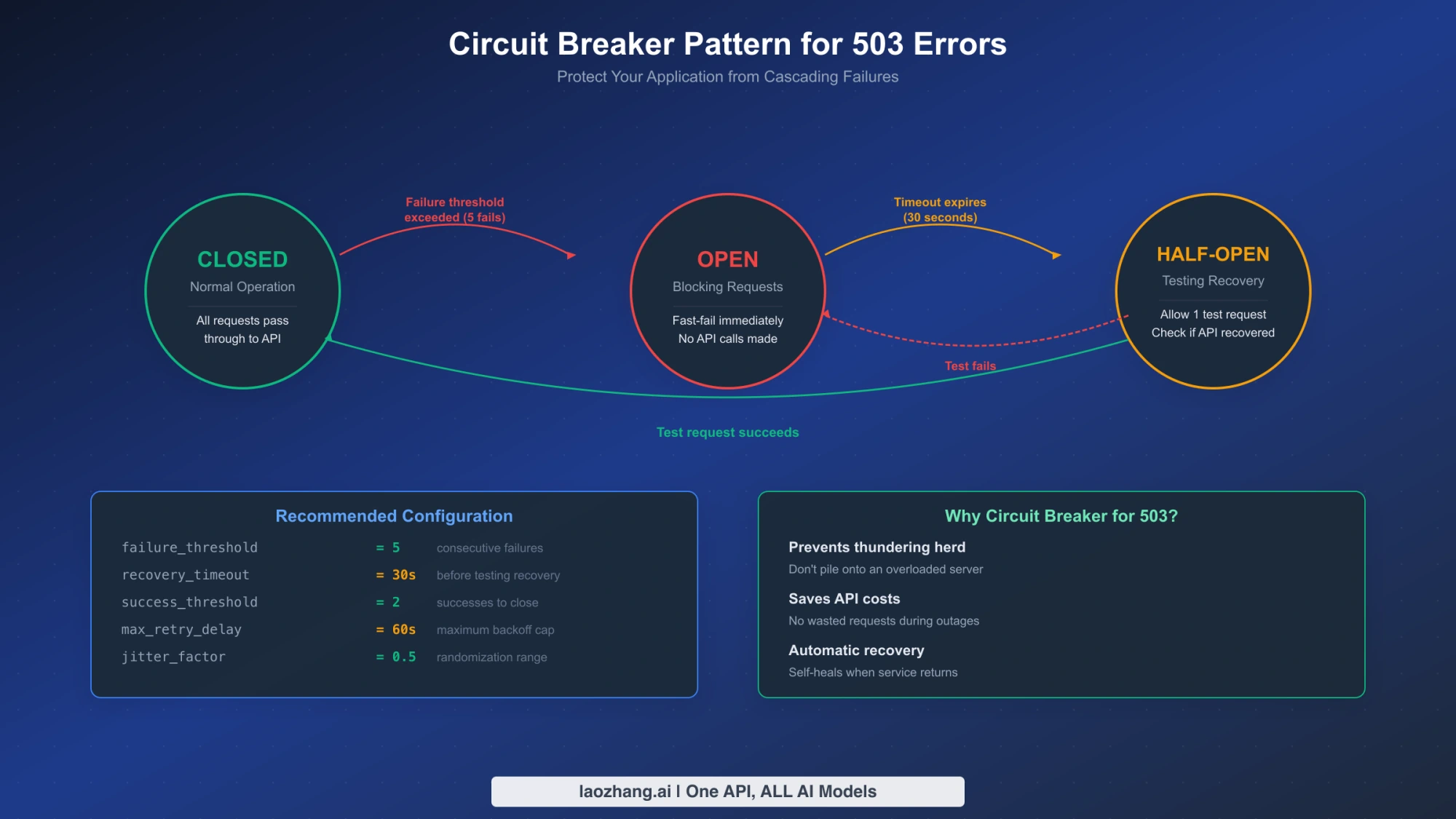
For repeated confirmed 503s, a circuit breaker can pause new dispatches for a chosen cooldown. Count the status for the model and route being protected; one malformed request should not open the availability breaker. A safe recovery sequence is:
- Open: preserve pending jobs and block normal dispatch to the failing route.
- Half-open: after the cooldown, atomically reserve exactly one probe permit. Other workers remain queued while that probe is in flight.
- Probe result: close the breaker only on usable image output. A new 503, unknown transport result, or no-image response keeps normal dispatch paused until the next decision.
- Resume: release queued work gradually under the concurrency limit, rather than waking every worker at once.
Reserve the permit before any asynchronous call. In one Node.js process, a shared synchronous claim can protect that reservation; across processes or hosts, use a transactional compare-and-set or equivalent shared-store operation. Attach a generation/version token to the permit so a late completion from an older request cannot close a newly opened breaker. Always settle or release the permit in the result path, including exceptions. A boolean canExecute() that returns true to every half-open caller does not enforce a single probe.
The cooldown and error threshold are application policy, not published recovery timings. Use one legitimate pending image job as the probe when appropriate; a text-model ping does not prove that Nano Banana 2 image generation has recovered. Avoid adding repeated background image probes just to manufacture a health percentage.
Queue, fallback, or Batch: choose the next outcome
When the interactive budget expires after received 503s, persist the same job as deferred, with a next eligible attempt time and its accumulated attempt count. Return a job identifier to the user and make later workers acquire that job atomically. Refreshing the page should inspect the existing job, not create a new generation request. Bound background retries too, and provide a terminal failed or paused state if they are exhausted.
An uncertain transport result needs separate handling. Preserve the job and available identifiers, check logs or provider support for its outcome, and avoid automatically requeuing it as if failure were confirmed. Local job deduplication prevents two workers from dispatching the same job simultaneously; it does not prove that Google deduplicates a repeated POST. HTTP's rule for non-idempotent retries requires a reason to know that replay is safe or that the original operation was not applied.
| User requirement | Useful next choice | Condition to verify |
|---|---|---|
| The original Nano Banana 2 edit must be preserved | Defer the same job | Retain prompt, input image, settings, budget, and job ownership |
| Another image model is acceptable | Offer an explicit image-capable fallback | Supported edit inputs, image output, resolution, privacy, cost, and separate retry budget |
| Many images can wait | Consider Gemini Batch | Model support, asynchronous workflow, job state, and per-item results |
| The previous call may have completed | Pause for reconciliation | Evidence about the original result before any replay or fallback |
A fallback must still satisfy the image task. Switching to a text-only model, replacing the native request with an unrelated protocol, or moving to a Vertex route that needs different access is not a completed recovery. Tell the user when a fallback changes quality, resolution, editing behavior, or charges; do not promise that a second model will be available merely because the first returns 503.
Nano Banana 2's model page lists Batch support. Google's Batch guide describes asynchronous generateContent work with a 24-hour target turnaround, not a completion guarantee. Save the returned job name and inspect that job's state rather than repeatedly submitting the entire batch. A job can fail, be cancelled, or expire; even a successful job requires checking each item's errors and image output. Batch is a suitable scheduling choice for non-urgent work, not an immune route around 503s.
Questions that affect the retry decision
Are failed Nano Banana 2 503 requests free?
Do not assume every failed 503 or timeout is free. Google's billing FAQ explicitly says failed 400 or 500 requests are not charged for tokens but count against quota. That wording does not explicitly cover every 503, a third-party provider's billing, or a request whose result was lost after generation. Reconcile usage through the relevant provider and account records. Additional successful attempts or fallback images may create additional billable work.
How long should I wait for “model is overloaded” to clear?
There is no verified fixed recovery time for your request. Respect a supplied Retry-After header; otherwise use your chosen bounded backoff policy. When recovery exceeds the user's deadline, pause or queue the job and check the applicable incident owner. A historical community report cannot establish the duration of today's Nano Banana 2 failure.
Can I avoid 503 by generating overnight?
You can schedule non-urgent work, but the sources checked for this update do not establish a current universal peak-hour window or success rate for Nano Banana 2. Use your own timestamped route/model measurements to choose a schedule, retain retry limits, and keep an output check. A clock change is not a capacity guarantee.
Will upgrading my plan fix 503 or 429?
A 503 does not establish that your plan is the problem, and buying a higher tier is not a guaranteed capacity fix. For 429, inspect which rate or quota dimension was exhausted and the current limits applicable to your project. A short-term limit may call for slower dispatch; exhausted quota needs a quota decision. Neither branch justifies an unlimited retry loop.
Official documentation
Request parameters, pricing, and billing rules are documented in the LaoZhang API developer docs: Image billing and failures.
Disclosure: laozhang.ai is our own service. Its prices are platform pricing, not an independent comparison.
Sources10
External pages this guide links to, in the order they appear. Last updated Oct 7, 2026.
Sources10
External pages this guide links to, in the order they appear. Last updated Oct 7, 2026.
- 1.model pageai.google.dev/gemini-api/docs/models/gemini-3.1-flash-image
- 2.image-generation guideai.google.dev/gemini-api/docs/generate-content/image-generation
- 3.HTTP 503rfc-editor.org/rfc/rfc9110.html
- 4.troubleshooting guideai.google.dev/gemini-api/docs/troubleshooting
- 5.APIError.code is an integergithub.com/googleapis/python-genai/blob/main/google/genai/errors.py
- 6.Interactions error referenceai.google.dev/gemini-api/docs/api-errors
- 7.retry implementationgithub.com/googleapis/python-genai/blob/main/google/genai/_api_client.py
- 8.option typesgithub.com/googleapis/python-genai/blob/main/google/genai/types.py
- 9.Batch guideai.google.dev/gemini-api/docs/batch-api
- 10.billing FAQai.google.dev/gemini-api/docs/billing