GPT Image 2 vs Seedream 4.5: Choose by Accepted Output
Start with GPT Image 2 for an OpenAI-native workflow, flexible size and quality controls, inpainting, and high-fidelity image inputs. Start with Seedream 4.5 for a flat per-output price and multi-image design workflows. Then decide with cost per accepted image—not one lucky sample.
On this page
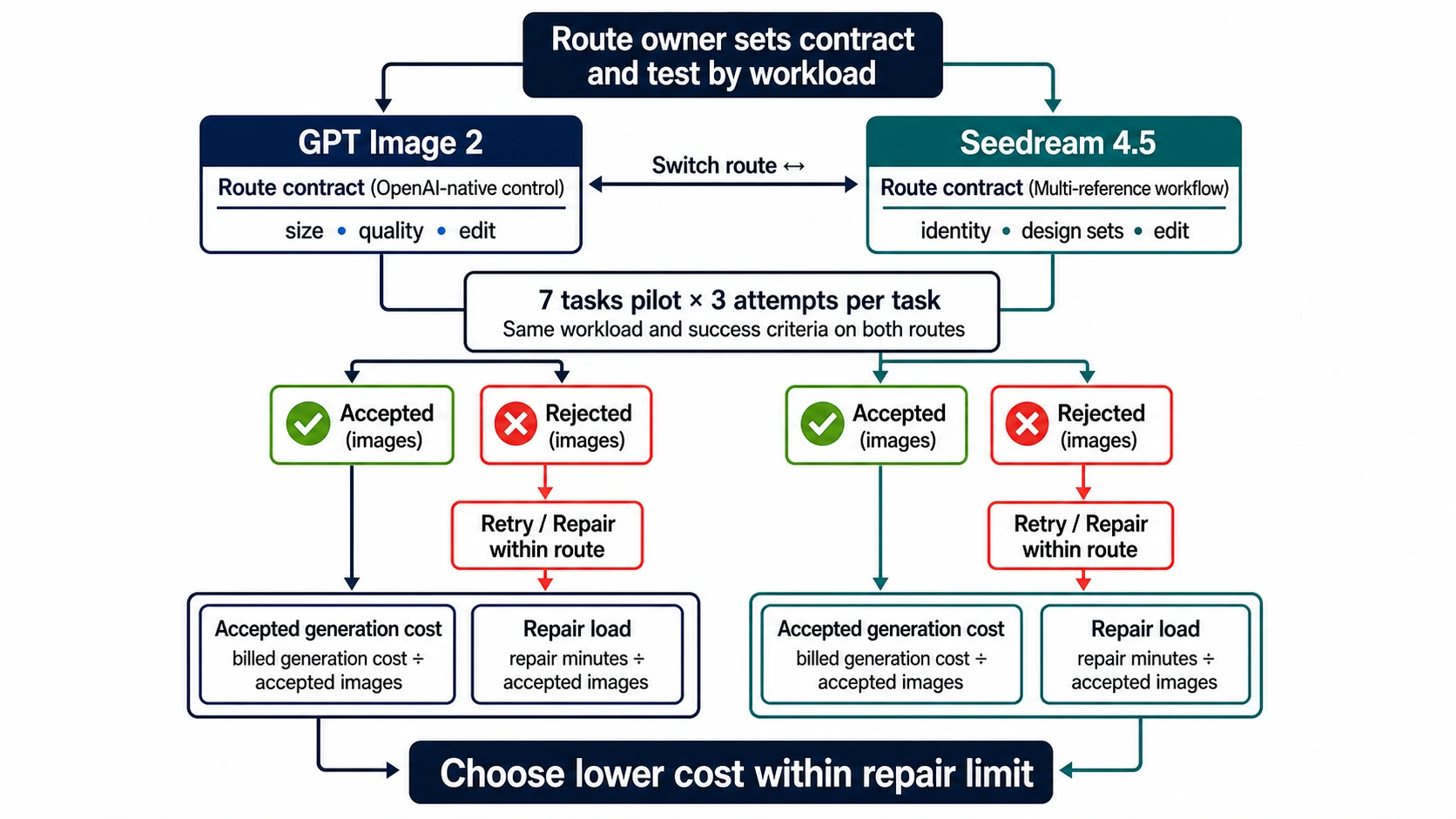
GPT Image 2 vs Seedream 4.5 has no honest universal winner. Start with GPT Image 2 when you need the official OpenAI Images API, explicit size and quality controls, inpainting, or high-fidelity reference inputs. Start with Seedream 4.5 when a flat per-output price, 2K/4K production, multi-image editing, or reference consistency is the center of the job. For typography, visual quality, or brand fidelity, run both on the same acceptance test; neither company’s showcase proves your workload.
The price answer also changes with settings. On July 18, 2026, OpenAI’s calculator estimated a 1024×1024 GPT Image 2 output at about $0.006 low, $0.053 medium, or $0.211 high, before applicable input costs. BytePlus ModelArk listed Seedream 4.5 at $0.04 per output image. “Which is cheaper?” is therefore incomplete until you specify quality, references, retries, and what counts as shippable.
| Start with | When it is the stronger first test | Stop or switch when |
|---|---|---|
| GPT Image 2 | Your product already uses OpenAI; you need low/medium/high quality, many valid sizes, inpainting, high-fidelity reference inputs, or an Images/Responses workflow. | Low or medium outputs repeatedly miss your visual bar, reference-image input cost grows, or layout repair erases the integration advantage. |
| Seedream 4.5 | You prefer a flat output-image price; the job uses several references, consistent product/character details, posters, image sets, or 2K/4K design assets. | Text, reference identity, or exact edits fail your rubric, or the regional/provider contract does not meet your API, privacy, or support requirements. |
| Test both | A miss is expensive: packaging, localized posters, catalog assets, recurring characters, diagrams, or campaign masters. | One route wins three controlled attempts per task on accepted-output cost and repair time. Stop generating more beauty shots. |
Compare the contracts before the pictures
The two official price rows describe different contracts.
OpenAI prices GPT Image 2 from text input, image input for edits, and image output tokens. Size and quality affect the output. Reference images are always processed at high fidelity, so an edit request can carry more input cost than a text-only generation. The Images API handles direct generation and edits; the Responses API image-generation tool supports conversational workflows but also adds usage from the mainline model that calls the tool. The official GPT Image 2 page identifies gpt-image-2 and snapshot gpt-image-2-2026-04-21.
BytePlus currently presents Seedream 4.5 as $0.04 per output image. ByteDance’s Seedream 4.5 model page emphasizes multi-image subject identification, reference-detail preservation, poster composition, small text, and multi-image editing. The international BytePlus price, a regional Volcano Engine contract, and a third-party wrapper can still have different model names, quotas, billing rules, and support boundaries. A flat number is easier to budget, but it does not make every route equivalent.
That distinction fixes a common comparison error: a provider’s “GPT Image 2 High” label is not an official model ID, and a provider’s Seedream price is not automatically BytePlus pricing. Record the route owner next to every result.
Cost per accepted image changes the winner
Sticker price counts attempts. Production pays for accepted assets.
Use:
cost per accepted image = total billed generation cost / accepted outputs
repair load per accepted image = total review and repair minutes / accepted outputs
combined monetary cost = (billed API cost + post-processing cost + labor hours × loaded hourly rate) / accepted outputs
Keep generation cost and repair time as separate metrics unless you have converted labor to money with a documented hourly rate. That prevents a cheap route with heavy repair work from looking artificially good without adding dollars and minutes as if they were the same unit.
Consider the official example rows for a square text-to-image job:
| Route and setting | Current output-price shape | What the row does not include |
|---|---|---|
| GPT Image 2, 1024×1024 low | about $0.006 | Prompt input, retries, human review, and whether low quality passes |
| GPT Image 2, 1024×1024 medium | about $0.053 | Prompt input, reference-image input for edits, and repair time |
| GPT Image 2, 1024×1024 high | about $0.211 | Prompt/reference inputs and whether high quality reduces failures |
| Seedream 4.5 on BytePlus | $0.04 per output image | Route conditions, review, retries, and downstream repair |
For medium GPT Image 2 versus the BytePlus row, Seedream costs less per accepted output when its acceptance rate is more than roughly 75.5% of GPT Image 2’s rate:
$0.04 / Seedream acceptance < $0.053 / GPT acceptance
Seedream acceptance / GPT acceptance > 0.04 / 0.053 ≈ 75.5%
This is a crossover formula, not a benchmark claim. If GPT medium accepts 80% of outputs, Seedream only needs to accept more than about 60.4% to have a lower generation cost per accepted image under these simplified rows. Add OpenAI input costs and human repair before deciding. Conversely, GPT low starts far below $0.04; if low outputs pass your bar, it can be the cheapest official first test.
For asynchronous work, GPT Image 2 supports Batch, and OpenAI’s April 2026 changelog describes a 50% Batch discount. That can reverse a standard-price decision, but only for jobs that can wait and routes that actually expose official Batch behavior.
Where GPT Image 2 has the clearer contract
Flexible output controls
OpenAI’s current image guide accepts thousands of valid resolutions. The maximum edge is 3840px, both edges must be multiples of 16, the long-to-short ratio cannot exceed 3:1, and total pixels must stay within the documented range. Common options include 1024×1024, 2048×2048, 2048×1152, 3840×2160, and 2160×3840. Quality is low, medium, high, or auto; output can be PNG, JPEG, or WebP.
There are two important boundaries. Outputs above 2560×1440 total pixels are described as experimental, and GPT Image 2 does not currently support transparent backgrounds. “Supports 4K” is not the same as “every 4K job is production-safe.”
OpenAI-native generation and editing
Choose the Images API for a direct generation or edit. Choose the Responses image-generation tool when the user needs multi-turn changes and the image must stay inside a broader agent or conversation. GPT Image 2 also lists inpainting support. If authentication, request IDs, observability, and existing OpenAI code matter more than a few cents, this surrounding contract can be the deciding feature.
High-fidelity input processing is useful when small details in a source image matter, but it is not free. Every reference image can increase input tokens. Test with the actual number and resolution of references rather than a text-only demo.
Documented failure boundaries
OpenAI does not promise perfect text or consistency. Its guide says complex prompts may take up to two minutes and notes remaining problems with precise text placement, recurring characters or brand elements, and structured composition. That makes GPT Image 2 a strong first test—not a reason to skip acceptance checks.
Where Seedream 4.5 deserves the first test
Multi-image design and reference preservation
ByteDance’s official positioning is unusually specific: identify the intended subject across several inputs, preserve facial features, lighting and color tone, and perform controlled multi-image edits. The current Volcano Engine Seedream guide covers generation, editing, reference-image work, multi-image input, and coherent image-set output.
That makes Seedream 4.5 a sensible first route for catalog refreshes, character or product systems, mood-board composition, outfit/product transfers, and a sequence that must look related. But an official showcase only demonstrates intended capability. Your pilot still needs distractor references, conflicting styles, and a “change only X” edit to reveal identity drift.
Poster and layout work
Seedream’s model page foregrounds poster composition, logo design, typography, and readable small text. Several search results repeat this advantage, but some same-prompt community tests also show unexpected readable characters when the prompt explicitly forbids text. Treat both as test ideas, not universal outcomes.
For localized campaigns, test exact strings in English and the shipping locale. One fixed English card can require exactly SPRING DESIGN SHOW, SATURDAY 10:30–18:00, and HALL B-17, with no other readable text; pair it with a no-text mirror card. Count spelling errors, missing glyphs, punctuation changes, invented copy, and layout collisions. A pretty poster with one wrong price is a failed output.
Flat-cost planning
The current $0.04 BytePlus output row is simple enough for volume forecasts. It can be attractive when the target is 2K/4K and the team wants one output unit instead of token arithmetic. Still verify whether blocked, failed, or sequential outputs are billed under the exact account and region you will use.
Run this seven-task pilot
Do not compare one GPT image with one Seedream image. Use the same input contract and record every attempt.
- No-text editorial image: require no readable letters, numbers, labels, or logos. This catches unwanted signage and bib-number failures.
- Exact localized poster: include a short title, price, date, and CTA in the target language. Reject any wrong glyph or invented copy.
- Product reference lock: provide two views of a product; change the scene while preserving shape, material, colors, and marks.
- Character consistency: generate three related frames with the same person, clothing, and key features.
- Surgical edit: change one named object or color and require every other visible element to remain stable.
- Dense composition: specify multiple subjects, positions, counts, and relations. Reject missing, duplicated, or misplaced objects.
- Final-size asset: request the actual production dimensions and inspect details at delivery size, not a downscaled preview.
Run at least three attempts per model and task. Keep prompt meaning, references, dimensions, and review rubric aligned; if one API lacks an identical setting, record the mismatch instead of pretending the test is controlled.
| Record for every request | Why it matters |
|---|---|
| Official model or provider route, timestamp, region, and endpoint | Prevents version and contract leakage |
| Requested and returned dimensions, quality, and format | Catches wrappers that ignore parameters |
| Reference-image count and edit instructions | Explains input cost and identity drift |
| Latency plus request ID | Separates a lucky response from an operable route |
| Billed amount and failure state | Makes cost-per-accepted math honest |
| Pass/fail reason and repair minutes | Converts visual preference into a shipping decision |
Use a stop rule: after three failures of the same type, do not keep paying for prompt synonyms. Change the model, simplify the asset, split text into a deterministic overlay, or move the layout to a design tool.
Official API or one gateway?
Use direct OpenAI or BytePlus/Volcano Engine access when upstream identity, contractual controls, regional processing, official support, or complete parameter behavior is the priority.
If the task is to compare both families through one developer account, a gateway can reduce integration work—but it becomes a separate contract. As verified on July 18, 2026, laozhang.ai’s current docs list:
Disclosure: laozhang.ai is our own service. Its prices are platform pricing, not an independent comparison.
seedream-4-5-251128at $0.045/image, with image generation/editing and up to 10 references on its documented route;- default-group
gpt-image-2-vipat $0.03/call, currently documenting common 1K/2K/4K sizes plus low/medium/high quality; - separate usage-billed GPT Image 2 groups for mixed or pure official-key forwarding.
Those are laozhang.ai provider terms, not OpenAI or BytePlus prices. The token group can change upstream route and billing even when the request body still says gpt-image-2. Check current GPT Image 2 route documentation and Seedream route documentation before a pilot. You can compare visual outputs at yingtu.ai and use the English developer docs when you are ready to integrate.
Stop using a gateway route and move to direct official access if you cannot verify upstream identity, failure billing, data handling, parameter parity, or support ownership.
Final decision
Choose GPT Image 2 first for an OpenAI-native product, flexible size/quality controls, inpainting, or high-fidelity reference workflows. Choose Seedream 4.5 first for flat per-output planning, multi-image composition, reference-consistent design systems, and poster/image-set workflows. For text accuracy and visual quality, choose neither from a marketing table.
The production winner is the route with the lower cost per accepted image, lower repair time, and an acceptable contract on your seven-task pilot. Recheck prices and route mappings at launch; both are volatile.
For adjacent decisions, compare GPT Image 2 with current Gemini image routes, review the GPT Image 2 API setup, or inspect the deeper GPT Image 2 pricing mechanics.
Sources6
External pages this guide links to, in the order they appear. Last updated Jul 18, 2026.
Sources6
External pages this guide links to, in the order they appear. Last updated Jul 18, 2026.
- 1.OpenAI’s calculatordevelopers.openai.com/api/docs/guides/image-generation
- 2.BytePlus ModelArkbyteplus.com/en/product/modelark
- 3.official GPT Image 2 pagedevelopers.openai.com/api/docs/models/gpt-image-2
- 4.Seedream 4.5 model pageseed.bytedance.com/en/seedream4_5
- 5.April 2026 changelogdevelopers.openai.com/api/docs/changelog
- 6.Volcano Engine Seedream guidedocs.volcengine.com/docs/82379/1829186