Claude MCP Internal Tools API Integration: Choose and Build the Right Route
Start with direct Claude API tools if your application owns execution. Build MCP when several clients need the same bounded interface. In either route, trusted code must authorize the operation and return evidence of what actually happened.
On this page
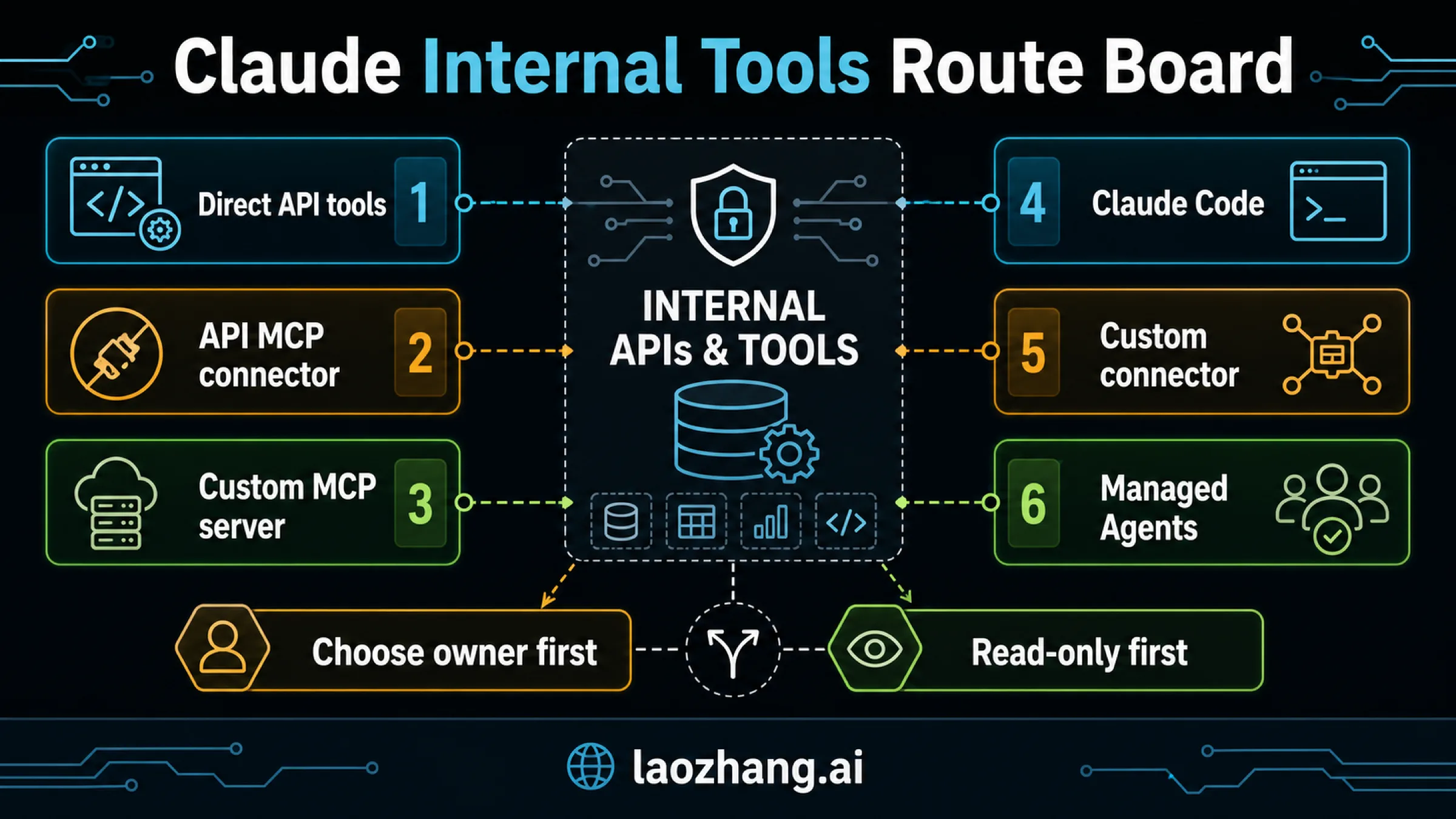
Use direct Claude API tools when one application owns the workflow. Use MCP when several clients need a shared tool interface. Both routes can connect Claude to an internal API; the important decision is which trusted application or server executes the operation, checks access, and returns the result.
For a first integration, choose one bounded read such as checking a support case's status. Define its inputs, authorize the signed-in user, fetch only that user's permitted data, and return a small result with a source reference. A model saying “I checked the case” is insufficient: you need a matching tool call, a completed backend operation, and a result that supports the answer.
The product and protocol conditions below reflect documentation checked on October 7, 2026. The runnable example uses fictitious data and no network calls; it demonstrates the application logic, rather than a deployed Claude or MCP connection.
Direct tools or MCP: choose the execution owner
With Claude API client tools, Claude produces a structured tool_use request. Your application executes it and sends back a tool_result. That fits an existing product backend which already owns authentication, conversation state, retries, and audit logs.
MCP adds a reusable interface between clients and your tool handlers. A custom MCP server can expose the same approved operations to several consumers, while the API team maintains their names, schemas, output limits, and authorization rules. The Messages API MCP connector lets the API call a remote MCP server without your application implementing its own MCP client.
| Your situation | Start with | What you must own |
|---|---|---|
| One product backend needs a few internal operations | Direct Claude API tools | Tool execution, user authorization, result messages, audit, and retries |
| Several applications or Claude clients need the same operations | A custom MCP server | Shared tool contract, server deployment, credentials, authorization, and monitoring |
| Your Messages API application should use that remote server | The API MCP connector | Connector request configuration, approved remote access, and server-side enforcement |
| A developer needs a local process or repository helper | Claude Code MCP | Developer configuration, process access, credentials, and runtime approval behavior |
| People should use tools in Claude, Cowork, or Desktop | A custom remote connector | Product availability, user or organization controls, cloud reachability, and tool authorization |
“Custom MCP server” and “API MCP connector” are complementary choices: the server supplies the interface; the connector is one way to consume it. You can also reuse a domain handler behind direct tools before introducing an MCP adapter.
Do not add MCP merely to wrap a single function already owned by your application. Add it when sharing the contract justifies another service and its operational responsibilities. A hosted agent runtime is a separate decision; you do not need to redesign your runtime to expose one internal read.
Wrap a task, not your entire backend
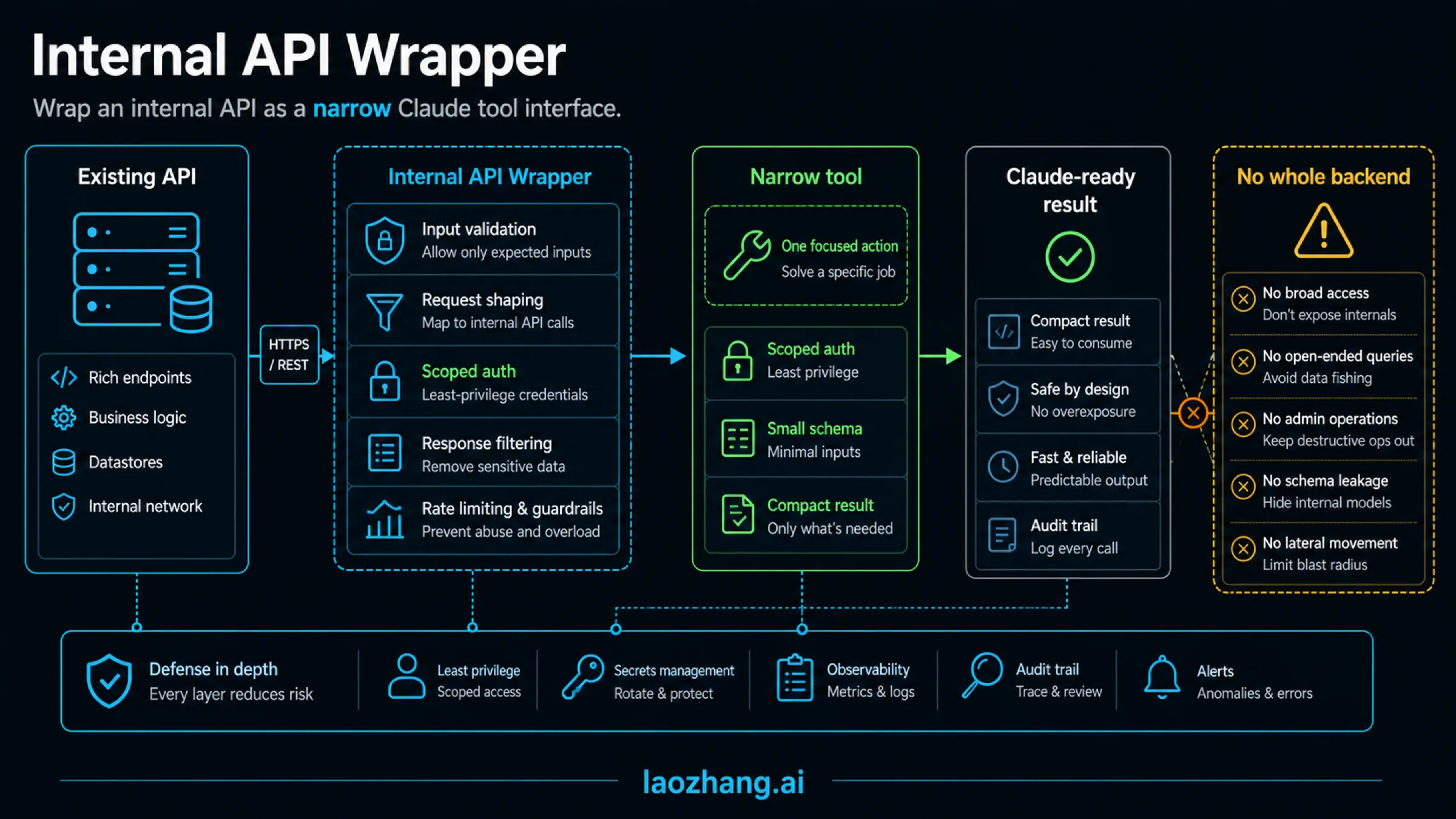
Give Claude a capability that matches the user's job. For a support workflow, get_case_status can accept a case ID and reason, then return the status and the revision that was read. It does not need an arbitrary URL, database query, customer email, or full conversation history.
| Internal capability | A useful tool boundary | Keep outside model-selected arguments |
|---|---|---|
| Read a support case | Case ID, reason; status and source revision returned | User identity, tenant, service credentials, private notes |
| Investigate service errors | Approved service, bounded time range and result limit | Arbitrary SQL, unrestricted log paths, secrets |
| Prepare a case reassignment | Case ID and proposed assignee; preview returned | Final approval identity and permission decisions |
| Apply that reassignment | Approved preview reference and retry key | Unchecked changes to the approved target or payload |
Your application should derive the user and tenant from its authenticated session, not from Claude's arguments. Filter the resource by both tenant and ID. A valid case ID alone does not establish access, and a shared service credential does not identify the human on whose behalf it is used.
Return an explicit field allowlist. Filtering after a full response has already been sent to the model is too late. Status, a timestamp, and a source revision may be sufficient; full database rows and free-form notes often are not. Treat any retrieved text as untrusted data, even if it comes from your own ticket system.
A complete offline direct-tool example
Save the following as case-tool-demo.mjs and run node case-tool-demo.mjs with a current Node.js release. It uses only an in-memory fixture. It defines the tool, validates its arguments, checks a trusted actor's scope, filters the case by tenant, records the outcome, and creates the next Messages API request body.
The actor represents identity already established by your application's authentication middleware. The assistant is a synthetic response, not output from a model. Replace the fixture lookup with your approved internal API adapter only when building the real integration; that adapter needs server-held credentials, response validation, a deadline, and the same resource-level permission check.
const tool = {
  name: "get_case_status",
  description: "Read a permitted support case's status and source revision.",
  input_schema: {
    type: "object",
    properties: {
      case_id: { type: "string", pattern: "^CASE-[0-9]{4}$" },
      reason: { type: "string", minLength: 3, maxLength: 120 }
    },
    required: ["case_id", "reason"],
    additionalProperties: false
  }
};

const actor = {
  user_id: "fixture-agent-7",
  tenant_id: "fixture-north",
  scopes: ["cases:read"]
};
const cases = new Map([
  ["fixture-north:CASE-1042", {
    status: "waiting_on_customer",
    updated_at: "2026-10-06T15:10:00Z",
    revision: "fixture-revision-18",
    private_notes: "Excluded from tool output"
  }],
  ["fixture-south:CASE-9001", {
    status: "open",
    updated_at: "2026-10-06T16:00:00Z",
    revision: "fixture-revision-2"
  }]
]);
const audit = [];

function fail(code) {
  const error = new Error(code);
  error.publicCode = code;
  throw error;
}

function validate(input) {
  if (!input || typeof input !== "object" || Array.isArray(input)) {
    fail("INVALID_INPUT");
  }
  const keys = Object.keys(input);
  if (keys.length !== 2 || !keys.includes("case_id") ||
      !keys.includes("reason") ||
      typeof input.case_id !== "string" ||
      !/^CASE-[0-9]{4}$/.test(input.case_id) ||
      typeof input.reason !== "string" ||
      input.reason.trim().length < 3 || input.reason.length > 120) {
    fail("INVALID_INPUT");
  }
  return { case_id: input.case_id, reason: input.reason.trim() };
}

function execute(call, trustedActor) {
  let outcome = "FAILED";
  let caseId = null;
  let sourceRevision = null;
  try {
    if (call.name !== tool.name) fail("UNKNOWN_TOOL");
    const input = validate(call.input);
    caseId = input.case_id;
    if (!trustedActor?.user_id || !trustedActor?.tenant_id ||
        !trustedActor.scopes?.includes("cases:read")) fail("FORBIDDEN");
    const row = cases.get(`${trustedActor.tenant_id}:${caseId}`);
    if (!row) fail("NOT_FOUND_OR_NOT_PERMITTED");
    sourceRevision = row.revision;
    outcome = "READ_COMPLETED";
    return {
      type: "tool_result",
      tool_use_id: call.id,
      content: JSON.stringify({
        case_id: caseId,
        status: row.status,
        updated_at: row.updated_at,
        source_revision: row.revision
      })
    };
  } catch (error) {
    outcome = error.publicCode ?? "BACKEND_ERROR";
    return {
      type: "tool_result",
      tool_use_id: call.id,
      is_error: true,
      content: JSON.stringify({ error: outcome })
    };
  } finally {
    audit.push({
      tool_call_id: call.id,
      user_id: trustedActor?.user_id ?? null,
      tenant_id: trustedActor?.tenant_id ?? null,
      tool: call.name,
      case_id: caseId,
      outcome,
      source_revision: sourceRevision
    });
  }
}

const initialRequest = {
  model: "YOUR_ENABLED_MODEL_ID",
  max_tokens: 800,
  tools: [tool],
  messages: [{ role: "user", content: "What is CASE-1042's status?" }]
};
const assistant = {
  role: "assistant",
  content: [
    { type: "text", text: "I'll check the case status." },
    {
      type: "tool_use",
      id: "toolu_fixture_1042",
      name: "get_case_status",
      input: { case_id: "CASE-1042", reason: "Support status check" }
    }
  ]
};
const results = assistant.content
  .filter(block => block.type === "tool_use")
  .map(call => execute(call, actor));
const nextRequest = {
  ...initialRequest,
  messages: [
    ...initialRequest.messages,
    assistant,
    { role: "user", content: results }
  ]
};
console.log(JSON.stringify({ nextRequest, audit }, null, 2));
The successful fixture produces a tool_result whose tool_use_id is toolu_fixture_1042 and whose content contains waiting_on_customer and fixture-revision-18. The audit outcome is READ_COMPLETED. The private notes never enter the returned JSON. Asking for CASE-9001 as the north tenant returns NOT_FOUND_OR_NOT_PERMITTED, without disclosing the other tenant's case status.
In a real direct-tool loop, submit initialRequest to the Messages API using your approved model and authentication. When it returns client tool_use blocks, pass those calls to your trusted executor. Preserve the entire assistant content array, then immediately append the user message containing matching tool_result blocks. Results must come first if that user message also contains text. Do not insert another conversation message between the tool request and its results. These are the documented tool-call handling rules.
After submitting the continuation, inspect the next response. It may contain an answer or request more tools. Bound the number of rounds and calls, validate every call, and stop on your application's deadline. The example covers ordinary client tools; mixed responses with unfinished server-tool calls have additional continuation rules in the same documentation.
The offline checks for this example cover syntax, argument rejection, tenant-filtered fixture reads, output filtering, error flags, audit outcomes, and message/ID matching. They do not establish real authentication, deployed isolation, or Claude's behavior. In production, make the audit sink durable and define what happens if it fails; the in-memory array is deliberately just a demonstration.
Use the API MCP connector for an approved remote toolset
If the same case-status handler belongs behind a shared MCP server, expose it as a narrow server tool and connect the Messages API to that server. Keep the handler's authorization and output filtering; the connector does not replace them.
The following is an illustrative request body, not a live connection. Replace the model ID, reserved example URL, and token placeholder with values approved for your deployment. The application obtains and refreshes the token through its authorized authentication flow; do not ask Claude to supply one.
{
  "model": "YOUR_ENABLED_MODEL_ID",
  "max_tokens": 800,
  "mcp_servers": [
    {
      "type": "url",
      "name": "support-tools",
      "url": "https://mcp.example.com/mcp",
      "authorization_token": "APP_SUPPLIED_MCP_ACCESS_TOKEN"
    }
  ],
  "tools": [
    {
      "type": "mcp_toolset",
      "mcp_server_name": "support-tools",
      "default_config": { "enabled": false },
      "configs": {
        "get_case_status": { "enabled": true }
      }
    }
  ],
  "messages": [
    { "role": "user", "content": "What is CASE-1042's status?" }
  ]
}
For the ordinary connector, the documented beta header is anthropic-beta: mcp-client-2025-11-20. The newer mcp-client-2026-09-15 beta includes tool-list pinning and supersedes that header when using the pinning features. The old mcp-client-2025-04-04 format is deprecated. Pair each server with exactly one mcp_toolset, and make its name match mcp_server_name. The connector documentation describes these fields and version conditions.
Default tool enablement is true, so this request deliberately sets it to false and enables only the named read. A misspelled name in configs can produce a warning without a request error. Check the actual available catalog and warnings; accepting the request does not prove your intended tool was found or executed.
The connector supports MCP tools and remote HTTP/SSE access. It cannot directly launch a local stdio process. Its mcp_tool_use blocks identify the server through server_name; mcp_tool_result blocks match the call through tool_use_id. These differ from the direct client's tool_use and tool_result. Handle the selected route's documented shapes rather than feeding MCP blocks into the offline client-tool executor above.
Pinning stabilizes the visible catalog, not backend permissions
With mcp-client-2026-09-15, the API can return an mcp_tool_listing block. Preserve the complete assistant message, including that listing, when continuing the conversation, and retain the same beta header. The listing's tools can also be copied into the corresponding MCP toolset's tools field to supply a pinned catalog. Per-tool configurations still apply to those names. Follow the pinning documentation for the version-specific shape.
This helps control which tool definitions Claude sees. It does not freeze the server's implementation, credentials, data, or access policy. Review the catalog against the approved server and contract outside the model, and continue checking authorization on every execution. A pinned get_case_status can still become unsafe if someone changes its backend to return every case.
Can Claude reach a private internal API?
Direct tools can use your own backend's private-network access. Claude receives the permitted result; your backend performs the internal request. For the normal remote MCP connector, the remote server must be reachable from Anthropic's service. A URL working on your laptop over a VPN is insufficient.
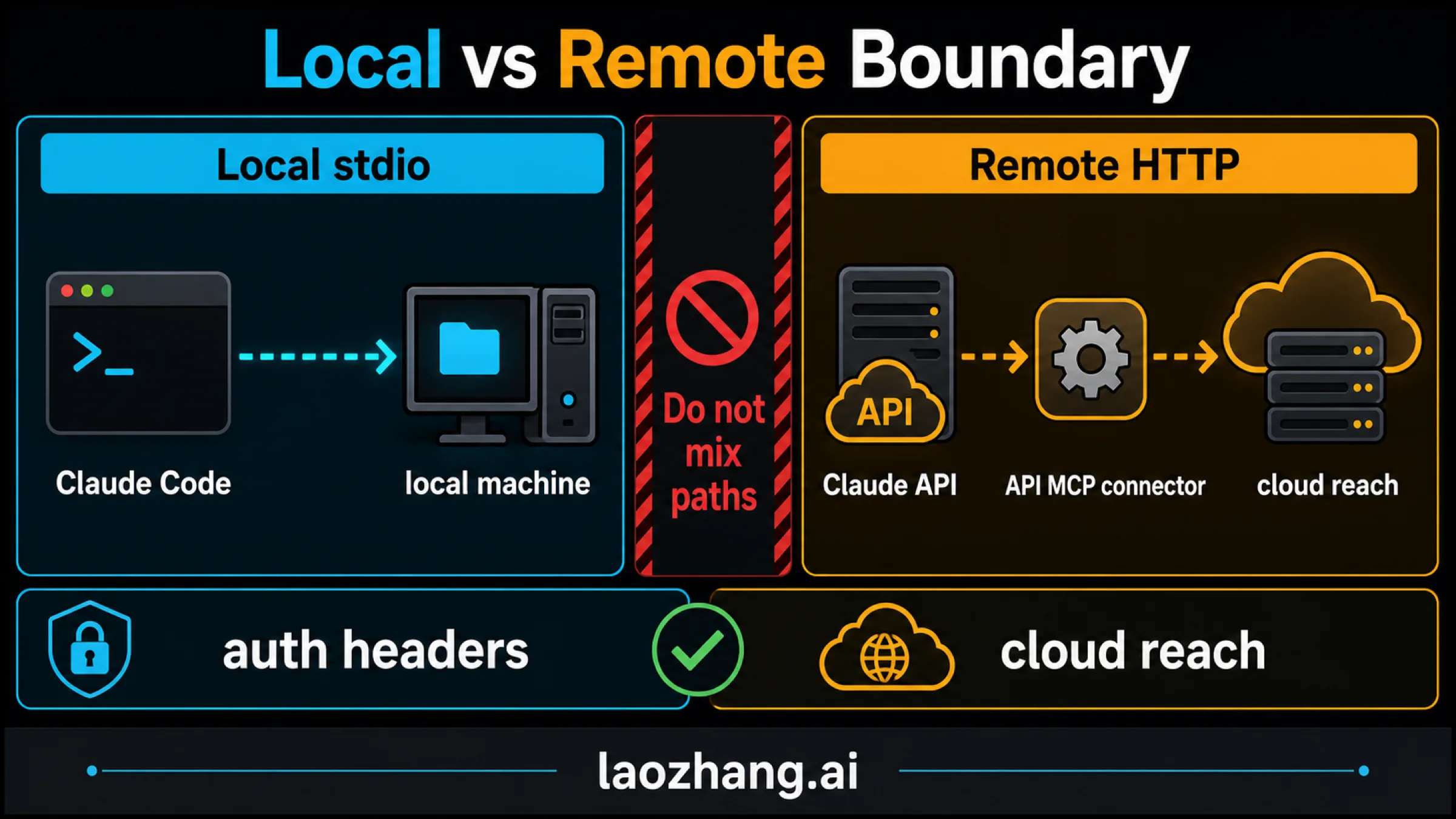
There is now a scoped alternative: Anthropic's private MCP tunnels are a research preview requiring access and an outbound proxy/Cloudflare deployment. This route can avoid exposing an inbound public origin. Messages API and Managed Agents usage require the documented workspace routing and active certificate conditions; upstream server authentication remains a separate responsibility.
Do not assume that preview is available to your account or that it applies to ordinary Claude user connectors. For a first production application without approved tunnel access, an application-owned backend calling a private API is a practical starting point.
Keeping an origin private also does not mean all data stays local. Anthropic must receive tool results needed by the model. The tunnel's TLS design limits Cloudflare's access to payload contents, but Cloudflare still handles connection metadata. The preview has no continuity or uptime commitment. Select the transport after deciding which fields are permitted to leave the internal system.
Claude user connectors and Claude Code have different setup paths
For human workflows, current custom remote connector help lists Claude, Cowork, and Desktop support across Free, Pro, Max, Team, and Enterprise; Free has one custom connector. Organization roles and member authorization affect setup. Remote connections originate from Anthropic's cloud even when the user is on Desktop; local Desktop configuration is a separate mechanism. Shared fixed credentials need an explicit user/resource policy at the server, rather than being treated as per-user isolation.
Claude Code supports both remote HTTP and local stdio workflows. If you choose that route, the documented command examples distinguish transport explicitly:
claude mcp add --scope project --transport http support-tools https://mcp.example.com/mcp
claude mcp add --scope project --transport stdio local-support -- ./support-helper
These are configuration examples for an approved server or executable, not prerequisites for the Messages API route. A URL without --transport http can be interpreted as stdio configuration. Current HTTP-to-SSE fallback has a Claude Code version condition of v2.1.265 or later; SSE itself is deprecated. Project approval behavior also differs between interactive, noninteractive, SDK, and cloud contexts. Consult the Claude Code MCP documentation for your installed runtime rather than assuming every client prompts before every operation.
After adding a server, separately check its connection status, available tools, and one permitted result. A saved configuration proves none of those. If the connection works but definitions or results crowd out the task, follow the Claude Code MCP context diagnosis before expanding your tool catalog.
Authentication must authorize the business operation
A protected HTTP MCP server needs to validate the presented credential before running a tool. When implementing MCP OAuth authorization, check issuer/signature as appropriate, expiration, the intended resource or audience, and required scopes. An expired or invalid credential leads to 401; insufficient scope leads to 403. Send tokens through the authorization header, not query parameters, and use separate downstream credentials rather than passing the MCP client's token through to an unrelated internal API. These requirements are described in the MCP authorization specification.
Passing that check establishes authority to access the MCP resource. Your business policy must still decide which cases, tenants, fields, and actions that caller can access. A token's audience and a case's tenant are different checks. A tenant_id supplied in tool arguments, a self-reported client name, or a model's explanation is not a trusted identity.
MCP authorization is an optional protocol capability, so this is not a claim that every fixed credential is prohibited. A service-to-service credential can be appropriate for a defined workload, but its privilege and attribution must fit that workload. If several users share it, the server needs another trusted mechanism to enforce and audit their individual business permissions.
Match your deployed MCP version
The July 28, 2026 MCP revision uses stateless requests with per-request protocol metadata and capabilities, rather than the older initialization/session-header sequence. Its request params._meta requires protocolVersion and clientCapabilities; optional client information is self-reported and cannot serve as a security principal. The message specification defines those fields.
That specification date does not prove your connector, server, or SDK implements it. Keep the adapter tied to the version actually deployed, including any supported legacy negotiation. MCP tool schemas use inputSchema/outputSchema; Anthropic client-tool definitions use input_schema. Copying one into the other unchanged is not a complete adapter. Tool annotations such as readOnlyHint are metadata, not enforcement; the server must validate inputs, permissions, limits, and outputs. See the MCP tools specification.
Data handling is another route-specific decision. The current API retention feature table marks MCP connector and MCP tunnels as ineligible for ZDR and HIPAA arrangements. Standard Messages API eligibility is conditional on the actual arrangement and model; it is not a blanket zero-retention promise. A connector request can technically succeed while falling outside your ZDR arrangement. Review the applicable feature, model, and contract before sending sensitive data.
Add writes through an approval record and an operation receipt
For a case reassignment, first return a preview containing the case, current revision, proposed assignee, and intended effect. Store that preview in trusted application storage. A person or approved policy then authorizes that exact change; a model-generated approved: true field is not the approval.
Use this execution sequence:
- Create the preview. Authorize the caller's access, validate the target assignee, and record the case revision and complete proposed change. Give it an expiry and preview ID.
- Record approval. Bind a trusted approver, allowed action, tenant, target, payload, and expiry to that preview. Show whether the operation can be reversed.
- Execute the approved change. Recheck access, reject changed or expired previews, and require the backend to apply the expected-revision condition atomically with the update. Pass an idempotency key to a backend that actually enforces it.
- Verify the outcome. Store the backend operation ID and outcome, then read back the case's assignee and revision. Return only the confirmed state, or report that confirmation is pending.
Do not automatically retry a timed-out write as a fresh operation. The backend may have applied it before the response was lost. Look up the operation by its existing ID or idempotency key. If its status remains unknown, report an unknown outcome and require reconciliation; do not label it failed or invent a successful receipt.
Client approval dialogs can help the person decide, but your executor must enforce the approval record. Permission modes in a developer client do not grant backend access or replace that record; the Claude Code permission-mode guide explains that separate distinction.
Verify execution before accepting the answer
Keep attempted calls separate from completed operations. The minimum useful trace connects the authenticated actor, tool request ID, validated resource, authorization decision, backend request or operation ID, returned source revision, and outcome. Logs should exclude credentials and unnecessary private content.
| What you observe | What it establishes | What to check next |
|---|---|---|
| Claude says it checked the case | An answer was generated | Find a corresponding tool request and result |
| A tool request exists | Claude requested an operation | Confirm authorization and backend execution |
| A matching successful result exists | A result was returned for that call | Compare its fields to backend evidence and the final answer |
| A write has a backend receipt | The backend reports an operation outcome | Read back the changed resource and reconcile timeouts |
| A connector is configured | Setup was saved | Check reachability, authentication, catalog, and a permitted call |
For your authorized deployment test, use a known permitted case and a deliberately inaccessible case. Verify that the first returns the expected revision and the second discloses no protected fields. Test missing scope, malformed arguments, unknown tool names, oversized upstream results, and an upstream timeout. For writes, also test stale approval, changed preview data, repeated keys, and a lost response after execution.
Inspect the resulting answer as well as the tool trace. Automatic tool selection can answer without making a call, and schema restrictions do not establish that data was fetched or that the answer is true. If a workflow requires fresh internal evidence, have the application withhold a success state unless its required operation completed and the answer is grounded in that result.
Your first milestone is one read with verified access, a compact result, and a trace you can reconstruct. Once that works in the selected deployment, add approved writes or another client. Expand the interface only for a concrete user task.
FAQ
What tool connects AI-generated code to internal APIs?
Generated code still needs an application integration. For Claude, direct API tools let your backend execute defined operations; MCP provides a shared interface that compatible clients can call. Neither automatically makes generated code authenticated, authorized, or deployed. Start with the existing backend and one bounded operation.
Is MCP required for Claude to use an internal API?
No. With direct client tools, your application receives tool_use, runs the permitted operation, and returns tool_result. MCP becomes useful when you want the same contract across clients. The Claude tool-use overview documents the application-owned route.
Can the Messages API connector call a local stdio server?
Not directly. The normal API MCP connector needs a reachable remote HTTP/SSE server. An approved private MCP tunnel preview can provide a private-network transport alternative, but it does not turn the connector into a launcher for a laptop's stdio process.
Does pinning a tool list enforce access permissions?
No. The mcp-client-2026-09-15 pinning beta stabilizes the visible definitions. Your server must still authorize the caller, tenant, resource, and action on every execution. A stable name does not guarantee an unchanged implementation.
Do read-only tools keep all internal data private?
No. A read can disclose data through its result. Apply a field allowlist before the model receives the response, enforce resource-level access, and review the selected product's data-handling conditions. Self-hosting a server or using a tunnel does not keep model-visible results inside your network.
What should happen when a write times out?
Treat the outcome as unknown until you reconcile it. Query the backend operation status using the existing operation ID or idempotency key, then verify the resource state. Retry only under the backend's documented idempotency behavior and the still-valid approval; never assume a lost response means nothing changed.
Sources11
External pages this guide links to, in the order they appear. Last updated Oct 7, 2026.
Sources11
External pages this guide links to, in the order they appear. Last updated Oct 7, 2026.
- 1.Claude API client toolsplatform.claude.com/docs/en/agents-and-tools/tool-use/overview
- 2.Messages API MCP connectorplatform.claude.com/docs/en/agents-and-tools/mcp-connector
- 3.tool-call handling rulesplatform.claude.com/docs/en/agents-and-tools/tool-use/handle-tool-calls
- 4.private MCP tunnelsplatform.claude.com/docs/en/agents-and-tools/mcp-tunnels/overview
- 5.custom remote connector helpsupport.claude.com/zh-CN/articles/11175166-使用远程-mcp-开始自定义连接器
- 6.Claude Code MCP documentationcode.claude.com/docs/en/mcp
- 7.MCP authorization specificationmodelcontextprotocol.io/specification/2026-07-28/basic/authorization
- 8.July 28, 2026 MCP revisionmodelcontextprotocol.io/specification/2026-07-28/changelog
- 9.message specificationmodelcontextprotocol.io/specification/2026-07-28/basic/index
- 10.MCP tools specificationmodelcontextprotocol.io/specification/2026-07-28/server/tools
- 11.API retention feature tableplatform.claude.com/docs/en/manage-claude/api-and-data-retention