Claude Code Auto Mode: How It Works, What It Blocks, and When to Use It (2026)
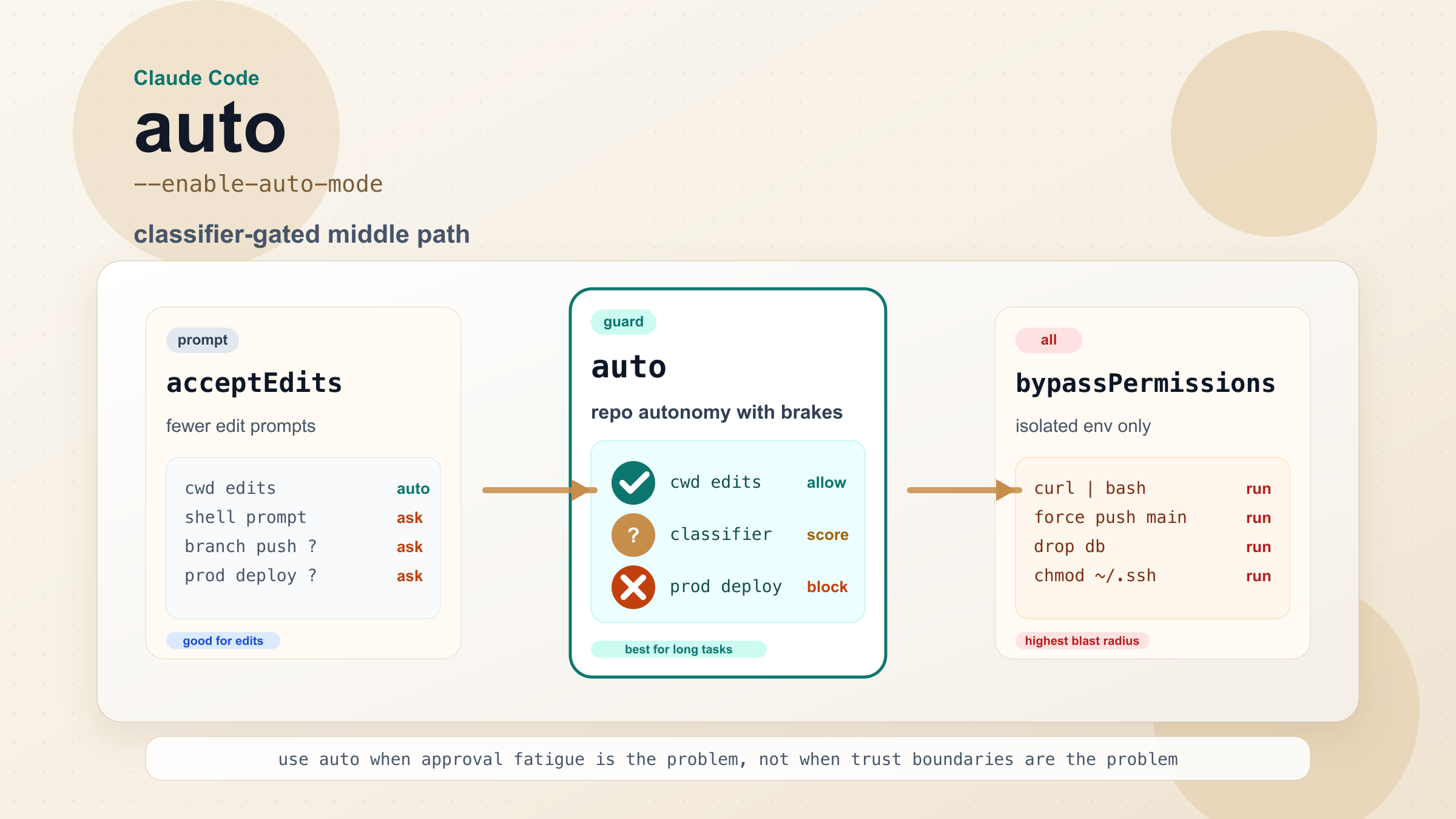
Claude Code Auto mode is not a general 'let the agent loose' switch. It is a classifier-gated middle layer for long-running repo work that can remove approval fatigue without allowing obviously destructive actions like `curl | bash`, production deploys, or force-pushes to `main`.
On this page
Claude Code Auto mode is Anthropic's new research-preview permission mode for developers who are tired of approving the same low-risk actions over and over again during long sessions. As of March 28, 2026, Anthropic documents it as a Team feature that uses a separate Sonnet 4.6 safety classifier to auto-approve low-risk repo work while blocking or challenging actions with a bigger blast radius, such as downloaded-code execution, production deploys, and force-pushes to main. If your problem is prompt fatigue during refactors, test loops, or dependency cleanup, Auto mode is worth understanding. If your task touches production infrastructure, destructive data operations, or unclear external systems, Auto mode is the wrong shortcut.
Evidence note: this guide reflects Anthropic's official Auto mode announcement, permission modes docs, Claude Code product page, and Claude Code changelog, checked on March 28, 2026.
TL;DR
- Auto mode launched on March 24, 2026 as a safer alternative to running Claude Code with
--dangerously-skip-permissions. - The current docs describe it as a Team feature, with Enterprise and API rollout still in progress. If you are on a personal Pro or Max subscription, do not assume you can use it yet.
- Auto mode is best for long-running, repo-scoped work: multi-file refactors, dependency updates, test-fix loops, and similar tasks that stay inside a trusted branch and toolchain.
- It is intentionally stricter than many people expect. Anthropic documents hard blocks around things like
curl | bash, production deploys, destructive shared-infrastructure changes, and force-pushingmain. - If you only want fewer edit prompts,
acceptEditsis often enough. If you need an execution plan before Claude touches anything, useplan. If you want fully unattended execution, do it only inside a properly isolated environment, not on a real shared workstation.
What Claude Code Auto mode actually changes
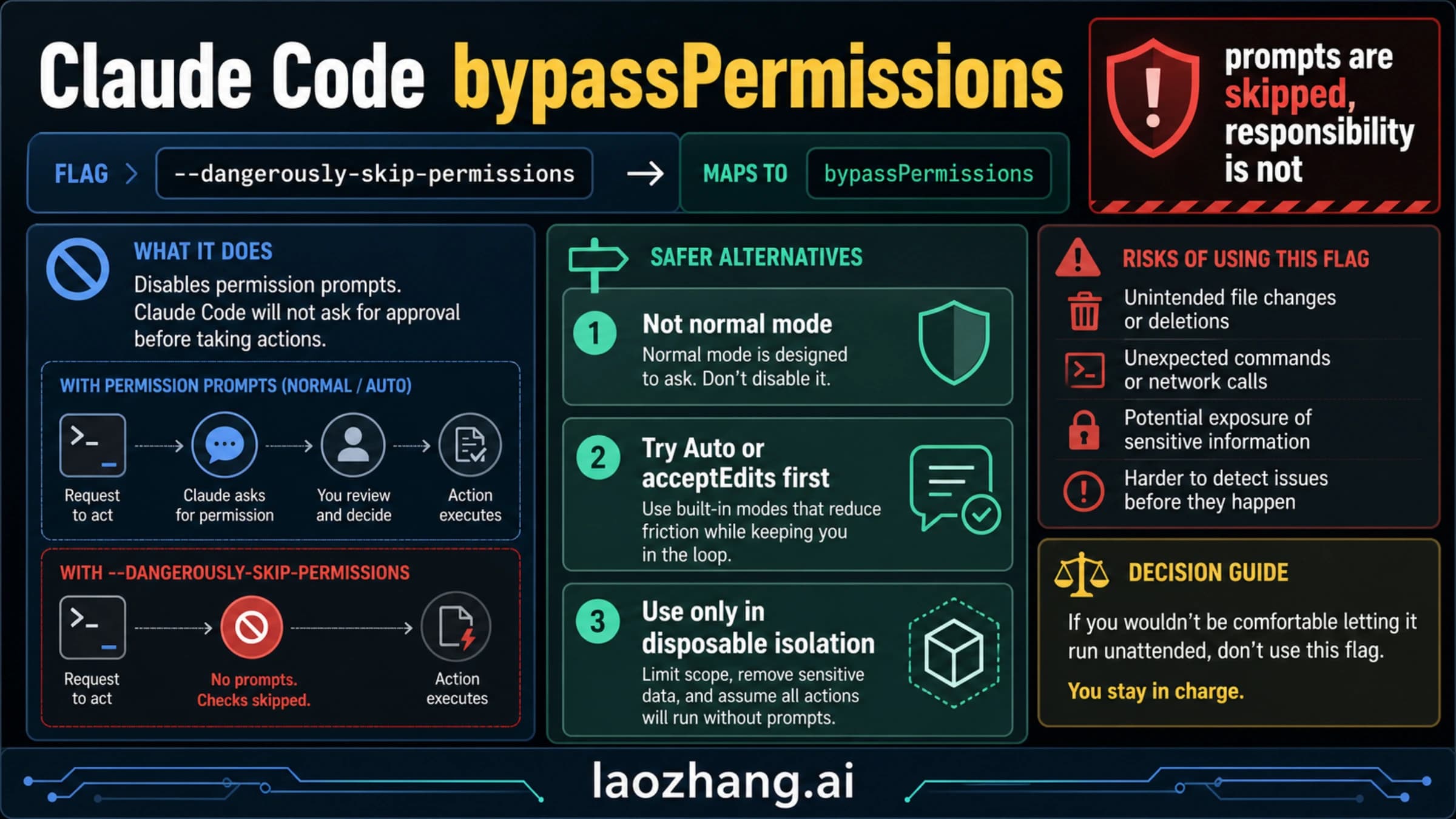
Anthropic launched Auto mode because the gap between Claude Code's normal permission prompts and full bypassPermissions was too wide. In ordinary default mode, Claude asks before it edits files or runs shell commands. That is a good fit for unfamiliar repos, risky work, and people who want maximum visibility, but it becomes exhausting when Claude is doing an hour of routine branch work and every small action needs a click. On the other end of the spectrum, --dangerously-skip-permissions removes those prompts entirely. That can be useful in a disposable container or a heavily sandboxed CI setup, but it is a terrible habit on a real machine with real credentials and production access.
Auto mode sits between those two extremes. The important point is that it is not “Claude can do anything now.” It is closer to “Claude can keep moving on work that still fits a trusted local-repo boundary, and a separate safety layer will intervene when the action looks ambiguous or dangerous.” That distinction matters, because it explains both why Auto mode is genuinely useful and why it will sometimes feel more conservative than users expect.
The easiest way to think about the feature is this: Anthropic is trying to automate the boring, predictable approvals without pretending that every coding session is equally safe. A file edit inside the current working directory is very different from a shell command that downloads and executes remote code. Reading a documentation page with a GET request is very different from applying infrastructure changes in production. Auto mode is designed around that difference. It lets low-risk, highly legible work pass more easily, and it puts a harder boundary around anything that looks like it could spread beyond the repo you intended Claude to work in.
That is why the feature is most useful for developers who already trust Claude Code on the substance of the task, but hate the friction of repeated approvals on the mechanics. If you already know you want Claude to rename a module across thirty files, update the tests, and run the local suite, Auto mode can make that session feel much smoother. If you do not trust Claude with the task itself, Auto mode does not solve the real problem. It only changes how often you are interrupted on the path to the result.
There is one more subtle but important design choice in the docs: Anthropic says the Auto mode classifier receives user messages and tool calls, but not Claude's own text responses or raw tool results. In practice, that means the safety layer is trying to judge requested actions and intent, not reverse-engineer everything Claude might have reasoned about internally. That is a more limited system than many people imagine, which is exactly why you should treat Auto mode as a guardrail around a narrower class of work, not as a blanket proof that the session is “safe now.”
Can you use it right now, and how do you enable it?
The first thing most readers need is not philosophy but eligibility. Anthropic's current documentation makes Auto mode sound broader in marketing copy than it is in day-to-day reality, so the simplest answer is: check plan, admin settings, model, and surface before you assume anything is broken.
Plan access comes first. In the current permission-modes documentation, Auto mode is described as available on Team plans, with Enterprise and API support still rolling out. That means a personal Claude Pro or Max subscription is not the same thing as having Auto mode access. If you are trying to use it on your own individual account and the mode never appears, the issue may be plan eligibility rather than installation. If you need the broader context on Claude Code access tiers, our Claude Code pricing guide is the place to compare the plans themselves.
Admin controls matter too. On Team and Enterprise, Anthropic requires an admin to enable Auto mode before users can turn it on. This is one of the clearest signs that the feature is meant as an organizational workflow choice, not just a personal preference toggle. If you are on the right plan but still do not see the mode, ask whoever manages Claude access for your org before you assume the CLI is outdated.
Model support is narrower than general Claude Code support. Anthropic currently documents Auto mode as working with Claude Sonnet 4.6 and Claude Opus 4.6. It is not available on Haiku, Claude 3 models, or third-party provider surfaces such as Bedrock, Vertex, and Foundry. That is another easy source of confusion: Claude Code may work perfectly in your environment overall, while Auto mode is still unavailable because the current model or hosting path does not support it.
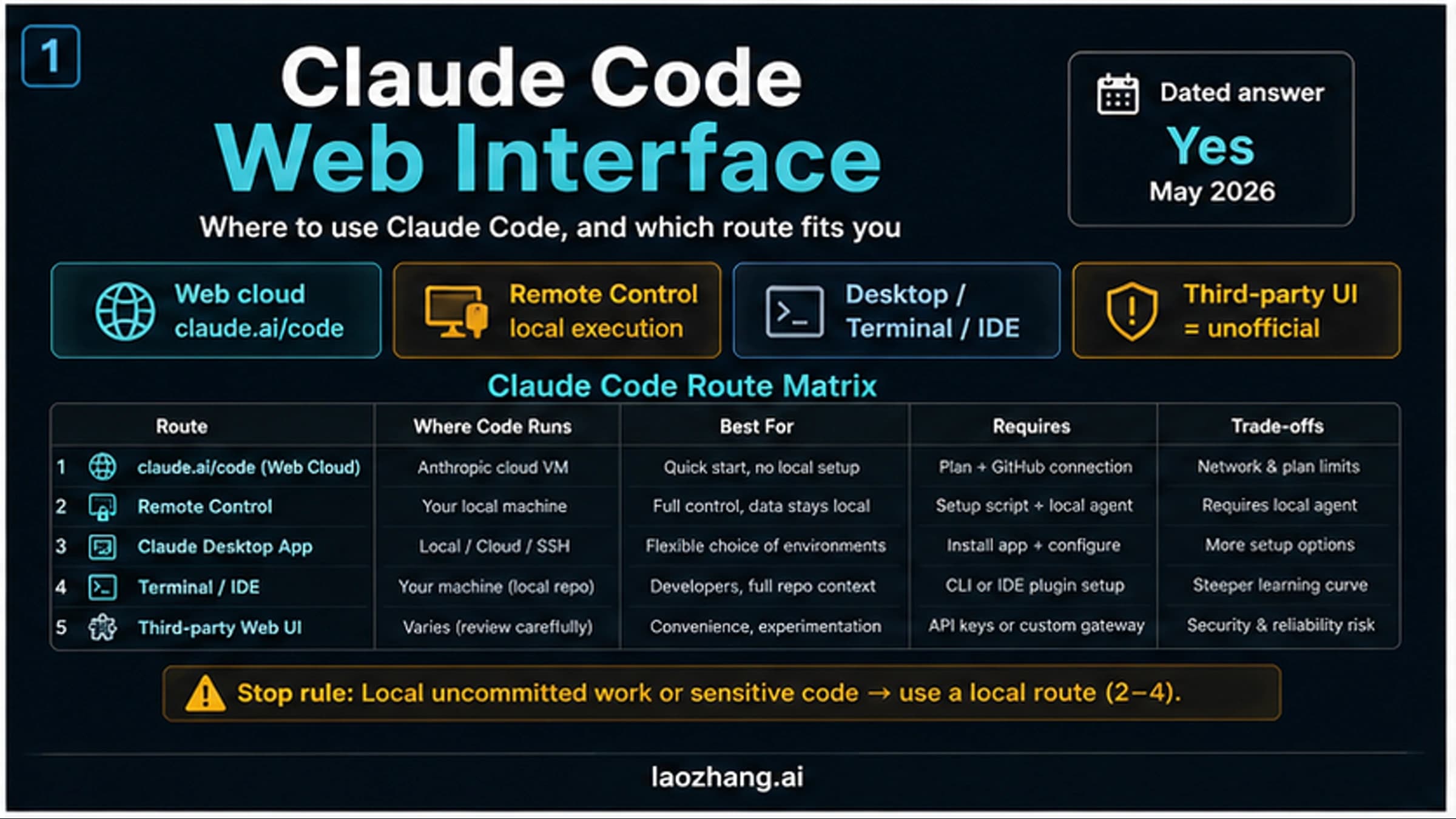
Surface support also matters. The local CLI is the environment to think about first. Anthropic's docs explicitly note that cloud sessions on claude.ai/code do not offer Auto mode. The docs also say Remote Control exposes Ask permissions, Auto accept edits, and Plan mode rather than full Auto mode. So if you are trying to reproduce a blog screenshot inside a cloud-hosted session or the Remote Control UI, you are comparing the wrong surfaces.
If you do meet the requirements, the basic CLI enable path is straightforward:
- Confirm that your org admin has enabled Auto mode.
- Start a local Claude Code session with
--enable-auto-mode. - Use
Shift+Tabto cycle permission modes untilautoappears. - If
autostill does not appear, verify the model, plan, and surface before you waste time debugging the wrong thing.
Anthropic's docs note that auto will not appear in the mode cycle unless you passed that flag at startup, which is why many first attempts fail even on otherwise correct setups. If you still need to get Claude Code itself installed or updated before you try that, start with our Claude Code install guide.
The docs also note one extension-specific wrinkle: in the VS Code extension, the more permissive modes only appear after the setting labeled “Allow dangerously skip permissions” is enabled. That does not mean you are forced to use bypassPermissions; it means the extension is hiding the advanced permission-mode controls behind a setting that Anthropic considers risky enough to gate deliberately. In practice, it is another reminder that the company expects Auto mode to be an explicit choice, not something users stumble into by accident.
Anthropic's changelog adds one final troubleshooting clue that is worth surfacing here. On March 27, 2026, Claude Code 2.1.86 changed the message users saw from “temporarily unavailable” to “unavailable for your plan.” That change is small, but it tells you a lot about real user confusion. If your CLI or UI keeps implying the feature is merely missing for the moment, update first. The current message is more honest: in many cases, the blocker is not rollout timing inside your session. It is plan access.
What Auto mode will allow, what it blocks, and why it falls back
This is the part most launch summaries skip, and it is the part that actually determines whether Auto mode is helpful in your workflow.
Anthropic documents two different paths inside Auto mode. The first is the simple path: some actions are approved without even needing the classifier. The clearest example is file edits inside the current working directory. That is deliberate. Claude Code spends a large share of its time reading files, modifying files, and moving through a known local repo. Auto mode would be pointless if it still treated every ordinary repo edit as suspicious. Anthropic also documents read-only HTTP requests as allowed, lockfile-declared dependency installs as allowed, and narrowly scoped uses of .env where the credential is being sent only to its matching API service.
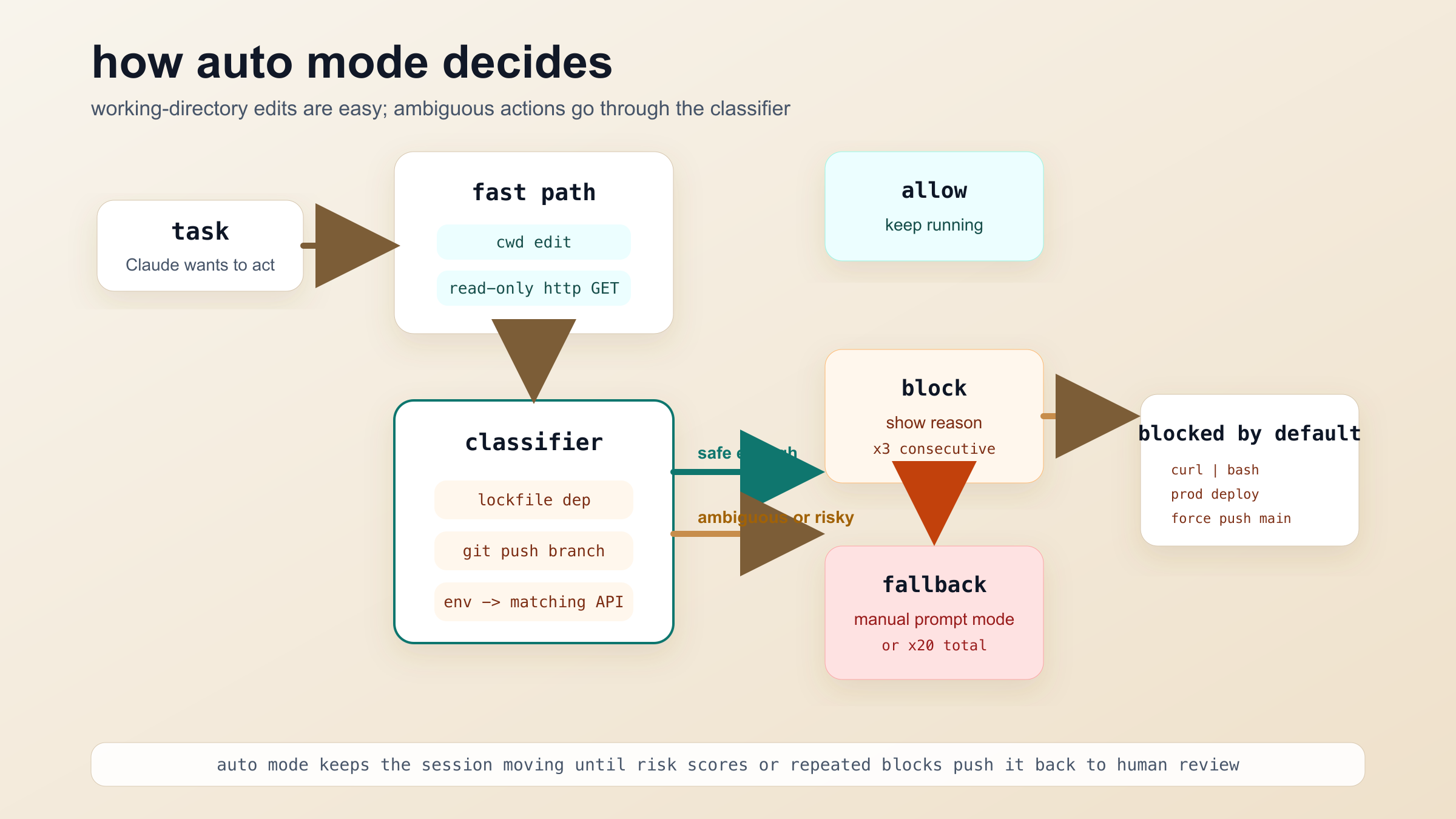
The second path is where the separate safety model matters. Anthropic says Auto mode uses a classifier that runs on Sonnet 4.6 to judge actions that are not obviously in the low-risk bucket. This classifier adds some latency and some extra token cost, because it is another model call layered on top of the main session. That tradeoff is easy to accept if it saves dozens of interrupts during a long refactor. It is less attractive if your tasks are already short, simple, and easy to supervise manually.
What matters more than the existence of the classifier is the default block list. Anthropic's docs call out several categories very clearly:
- downloading code from the internet and executing it
- deploying services or running production database migrations
- modifying shared infrastructure such as Terraform or CloudFormation in ways the classifier deems risky
- mass deletion in cloud storage
- changing IAM or repository permissions
- irreversible destructive actions on existing files
- force-pushing or directly pushing to
main
Those examples are helpful because they show what Anthropic is optimizing for. Auto mode is friendly to local software work that stays inside a repo boundary. It is skeptical of actions that widen scope, harden irreversibility, or reach into systems where the cost of a bad guess is much higher.
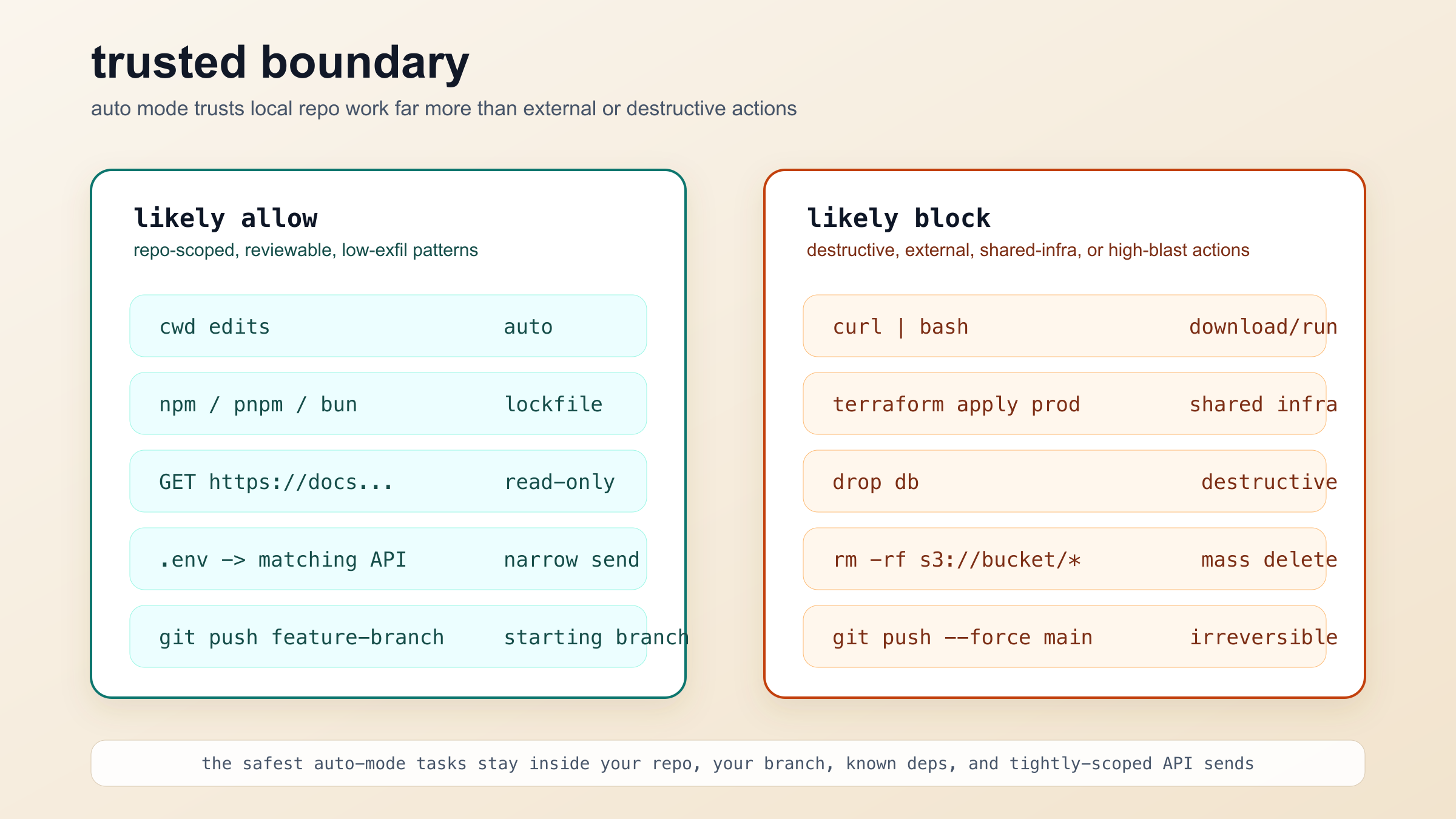
This boundary is also why some developers will bounce off Auto mode the first time they try it. If you expected “agent mode, but without the scary CLI flag,” the feature will feel too strict. If you expected “something that stops nagging me during a repo-local task while still refusing obviously bad moves,” it will feel well judged. The friction is not random. It reflects Anthropic's view that the safest unattended coding is the kind that stays close to your current branch, your current dependency graph, and tightly scoped reads or writes.
One of the best-documented behaviors in the official docs is fallback. If the classifier blocks an action three times in a row, or twenty times total in the same session, Claude Code falls back to manual prompting. That is a smart design. A session that keeps colliding with the guardrail is telling you something: either the task genuinely does not fit Auto mode, or Claude is exploring an approach whose risk profile is too wide for this permission model. In both cases, the right response is not to keep forcing the feature. It is to switch modes or reduce the task's blast radius.
Anthropic also says that when you enter Auto mode, Claude Code drops broad allow rules such as Bash(*) and Agent allow rules. That is another sign that Auto mode is not just acceptEdits plus a marketing label. Anthropic is deliberately preventing prior “allow everything” shortcuts from silently punching holes through the classifier layer. If you had relied on those rules in earlier sessions, Auto mode may feel stricter than your muscle memory expects because it is actively removing the easy bypasses.
Auto vs acceptEdits vs plan vs bypassPermissions
The biggest mistake you can make with this feature is treating it as the new default for everyone. For a lot of real developers, acceptEdits is still the sweet spot. It removes the most repetitive part of the workflow, file-edit approvals, while keeping shell execution under tighter human review. If your sessions are mostly code changes plus a few commands you still want to see individually, acceptEdits gives you most of the speedup without adding a classifier and without changing your trust model very much.
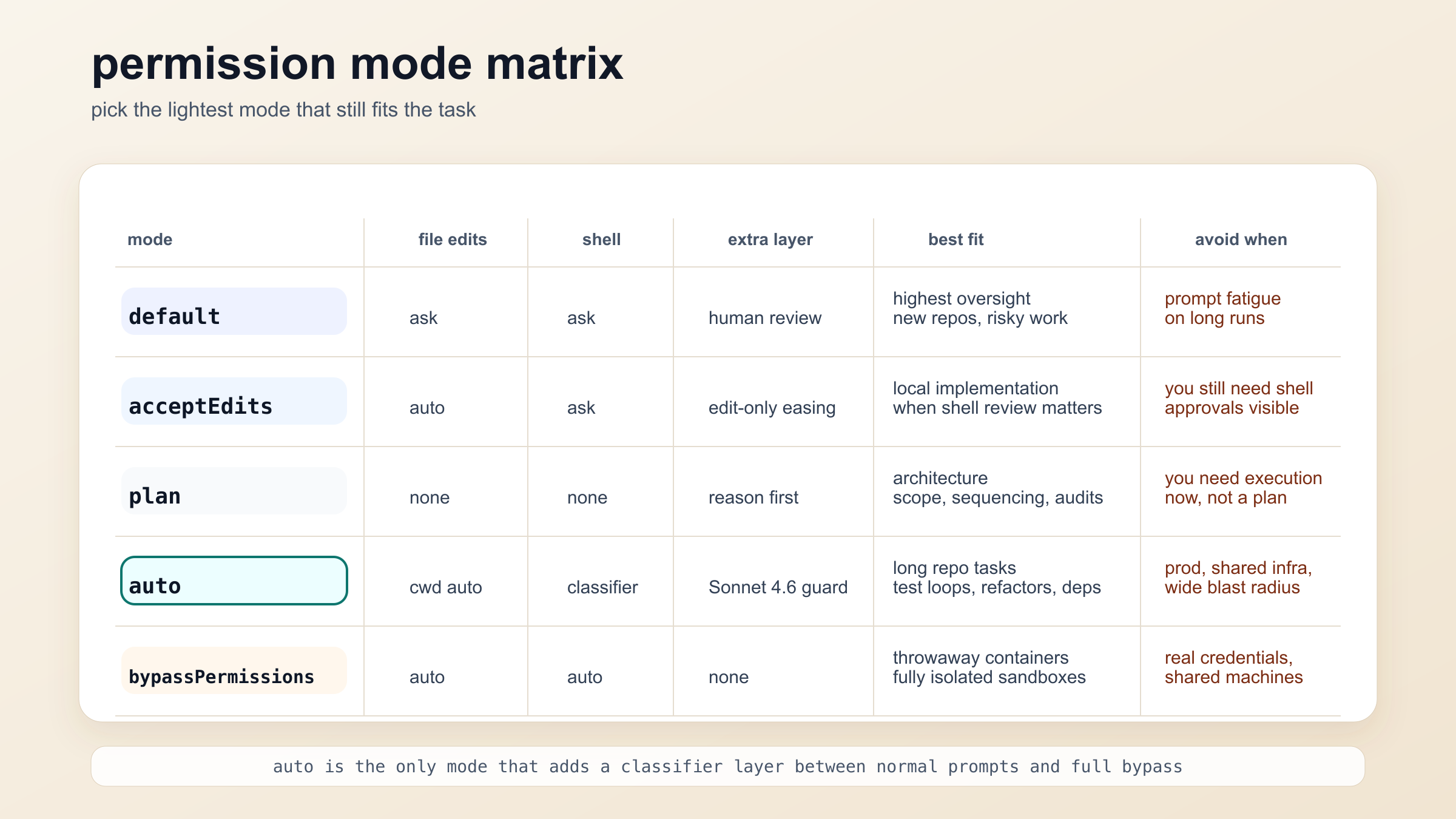
plan is even more different. It is not a lighter or heavier version of Auto mode. It answers a different need. Use plan when you want Claude to reason through architecture, sequencing, and tradeoffs before it touches anything. That is ideal for unfamiliar repos, migrations with many moving parts, or moments when you need a high-confidence execution plan more than you need forward motion right now. People sometimes choose Auto mode when they are actually anxious about scope. In those moments, plan is usually the better tool.
default remains the right answer when oversight is the point. A new codebase, an incident response session, a sensitive credential cleanup, or anything that smells like “I want to approve every move myself” still belongs in normal prompt-driven work. It is slower, but it is slow for a reason.
bypassPermissions, by contrast, is not the natural “power user upgrade” from Auto mode. It is a different contract entirely. It says, in effect, “I accept that this environment is isolated enough, disposable enough, or constrained enough that I am willing to remove the prompt layer entirely.” If that sentence does not describe your setup, you should not be there. Anthropic's own launch framing makes clear that Auto mode exists precisely because many developers wanted more autonomy than default prompts, but not the full risk profile of total bypass.
The shortest useful decision table looks like this:
| If your next task is... | Best mode | Why |
|---|---|---|
| New repo, risky fix, or sensitive cleanup | default | Maximum visibility still matters more than speed |
| Local implementation where shell commands need review | acceptEdits | Removes edit friction without hiding command-level decisions |
| Architecture, migration planning, or scope review | plan | Reasoning first is the real need |
| Long repo-scoped refactor, test loop, or dependency cleanup | auto | This is the exact approval-fatigue case Auto mode was built for |
| Disposable container or heavily isolated sandbox | bypassPermissions | Full unattended execution only makes sense when the environment can absorb mistakes |
My own strong recommendation is simple: choose the lightest mode that solves the actual bottleneck. Do not choose Auto mode because it sounds advanced. Choose it when the repetitive approvals are slowing you down more than the remaining classifier friction. If that is not the problem, another mode is probably a better fit.
The best Auto mode tasks, and the tasks to keep out of it
Auto mode shines when Claude is doing a lot of correct-but-tedious work inside a repo you already trust it to touch. Multi-file refactors are a great example. If the task is to rename an abstraction, update imports, fix tests, and clean up the branch, there is a good chance Auto mode will save a lot of mental tax without changing the actual risk much. Dependency maintenance is another good fit, especially when the changes are declared in lockfiles and the work stays inside normal package-manager behavior. Test-fix loops also benefit because they often involve many small edits and repetitive local commands that do not justify constant human confirmation.
What these tasks have in common is not just that they are “coding.” It is that they are narrow in scope, local in effect, and easy to inspect afterward. The work lives in the branch. The changes are reviewable. The likely damage from a mistake is bounded to the repo or the current task. That is the kind of environment where a classifier-gated mode makes sense.
Auto mode gets much weaker the moment you start mixing coding with operational authority. Production deploys, infra changes, destructive database commands, secrets rotation, permission changes, or wide data deletion should not be part of your “let the agent keep moving” workflow. Anthropic's docs block many of these actions by default, which is good, but the more important point is conceptual: these are the wrong tasks to optimize for fewer prompts. If the blast radius is high, a lower-interruption workflow is not the prize you should be chasing.
There is also a middle band of work where you need to be honest with yourself. Suppose Claude is updating code in a repo that also has access to real credentials, deployment scripts, and cross-service admin tools. Even if your immediate request is “just refactor this module,” the environment around the task may be wide enough that acceptEdits or plan is the better choice. Auto mode is safest when the environment itself is narrow, not just when the natural-language request sounds harmless.
This is where our broader Claude Code rate limit guide becomes relevant too. Auto mode can make longer sessions feel smoother, but it does not make them free. Anthropic's docs explicitly say the classifier adds extra cost and latency. If you are already bumping into long-session usage limits, Auto mode is best seen as a workflow-quality improvement, not a secret way around Claude Code's underlying usage model.
The sharpest rule of thumb is this: use Auto mode for work you would already be comfortable handing to a careful junior engineer inside the repo, not for work you would only trust to a senior operator with production keys and incident authority. That is not a perfect line, but it is a practical one.
Why Auto mode looks unavailable or feels stricter than you expected
The most common failure mode is simple unavailability. If auto never appears, start with the boring checks. Are you on a supported plan? Has your admin enabled it? Are you on Sonnet 4.6 or Opus 4.6? Are you in the local CLI rather than a cloud-hosted claude.ai/code session? Did you actually start the session with --enable-auto-mode? Most “broken” Auto mode reports are one of those five things.
The second common failure mode is that the session keeps hitting blocks and eventually falls back to prompting. When that happens, the correct interpretation is usually not “the classifier is bad.” It is “this task no longer fits the trust boundary Auto mode was designed for.” Maybe Claude is trying to download and run something. Maybe the task drifted toward infrastructure changes. Maybe a previous habit, like broad allow rules, no longer applies because Auto mode dropped those rules when the session started. In all of those cases, the fallback is a signal. Listen to it.
The third frustration is that Auto mode can feel stricter than acceptEdits even though it sounds more advanced. That is real. acceptEdits is permissive in a narrower way: it makes local file editing easier but still forces shell review. Auto mode tries to make more shell-heavy work flow without prompts, which means Anthropic had to introduce a separate safety layer and a much clearer default block list. The feature therefore feels more opinionated. That is not a contradiction. It is the cost of trying to automate more than file writes without sliding all the way into total bypass.
You should also keep surface differences in mind. Anthropic's current docs are clear that not every Claude Code interface exposes the same permission modes. If you move between local CLI sessions, VS Code, Remote Control, and cloud-hosted sessions, you will see different options and different constraints. The mistake is assuming there is one universal Claude Code permission palette that behaves identically everywhere. There is not.
Finally, remember that the feature is still a research preview. That label should not scare you off, but it should change your expectations. You are using a live workflow experiment, not a settled evergreen contract. Anthropic may widen support, refine the classifier, or change how the UI exposes the feature. That is another reason to timestamp your assumptions and revisit the docs when a session behaves differently from what you remember.
Should you turn it on?
Yes, if all four of these statements are true:
- you have access to the feature today
- the task is long enough that repeated approvals are genuinely the problem
- the work stays inside a trusted repo, branch, and tool boundary
- you still plan to review the result like an engineer, not treat the feature as a guarantee
No, or at least not yet, if any of these are true:
- you are on a personal plan that does not currently expose Auto mode
- the task touches production, shared infrastructure, or destructive operations
- the environment itself is wide enough that “repo-scoped” is not a meaningful safety boundary
- you mostly just want fewer edit prompts, in which case
acceptEditsis probably enough
The right way to think about Claude Code Auto mode is not “Anthropic finally made the agent fully autonomous.” The better framing is narrower and more useful: Anthropic built a permission mode for the messy middle where developers already trust Claude with the substance of the task, but do not want to pay the full cost of manual approvals or the full risk of total bypass. If that is your situation, Auto mode is a smart addition. If it is not, the feature will either feel unavailable, too strict, or too risky. In all three cases, that reaction is telling you something real about the workflow fit.