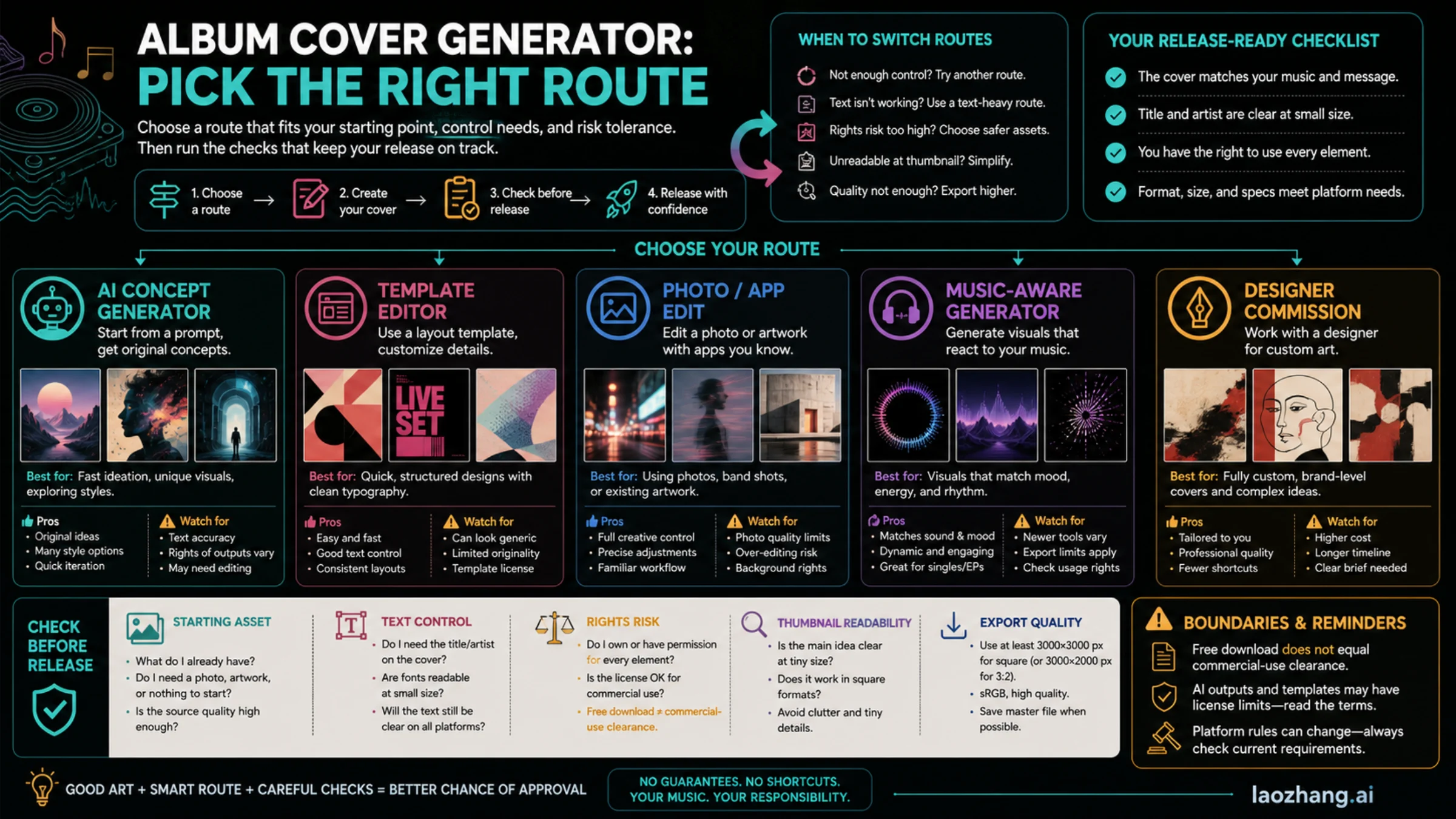
An album cover generator is useful when it helps you get to a usable cover faster, but the right route depends on what you already have. Use AI for fast concepts, a template editor when typography and layout matter, a photo or mobile app when the source is already on your phone, a music-aware tool when the track should steer the mood, and a designer when brand, rights, or launch stakes are high.
| Route | Best fit | Main risk | Check before release |
|---|---|---|---|
| AI concept generator | Fast visual directions from a prompt | Weak text, copied-looking style, unclear license | Thumbnail, text edit, source notes |
| Template editor | Control over title, artist name, and layout | Generic design or watermark/export limits | License, export size, text readability |
| Photo/app edit | A real portrait, object, or phone image | Cropping and low-resolution source files | Square crop, contrast, file quality |
| Music-aware generator | Mood or genre should guide the artwork | Results may still need manual type and rights checks | Prompt notes, final edit, platform rules |
| Designer route | Release campaign, label, or paid promotion | Slower and more expensive | Brief, rights handoff, final deliverables |
Treat the first output as a draft, not a release-ready file. A free download still needs a watermark, resolution, and license check; an AI image still needs a thumbnail test and source notes; and any platform or distributor rule should be verified against the current destination before you upload.
Start With the Route, Not the Tool List
The fastest way to waste time is to open the first album cover generator you find and ask it for "a cool rap cover" or "a dreamy indie cover." You may get something attractive, but you still will not know whether the text can be edited, whether the export is large enough, whether the license allows your release use, or whether the image survives a tiny thumbnail.
Use the route decision before choosing a tool:
| Starting point | Better route | What to ask for | What to avoid |
|---|---|---|---|
| No visual asset yet | AI concept generator | Several cover directions, mood boards, color palettes | Copying a known album, artist, label, or photographer style |
| Title and artist name are fixed | Template editor | Layout control, font pairing, hierarchy | Locking into a template you cannot export cleanly |
| Strong phone photo | Photo editor or mobile cover app | Crop, grade, background cleanup, text placement | Upscaling a low-resolution source until it looks soft |
| Track has a clear mood | Music-aware generator | Genre, tempo, lyric tone, instrumentation, scene cues | Assuming the model understands the legal or branding context |
| Serious campaign or paid ads | Designer | Brief, references, rights handoff, deliverable specs | Treating a generator draft as final brand art |
For quick same-day singles, AI and templates are often enough. For a release with playlist pitching, paid promotion, vinyl, merch, or label scrutiny, the designer route starts to look cheaper than fixing a weak cover late.
Write a Cover Brief Before You Generate
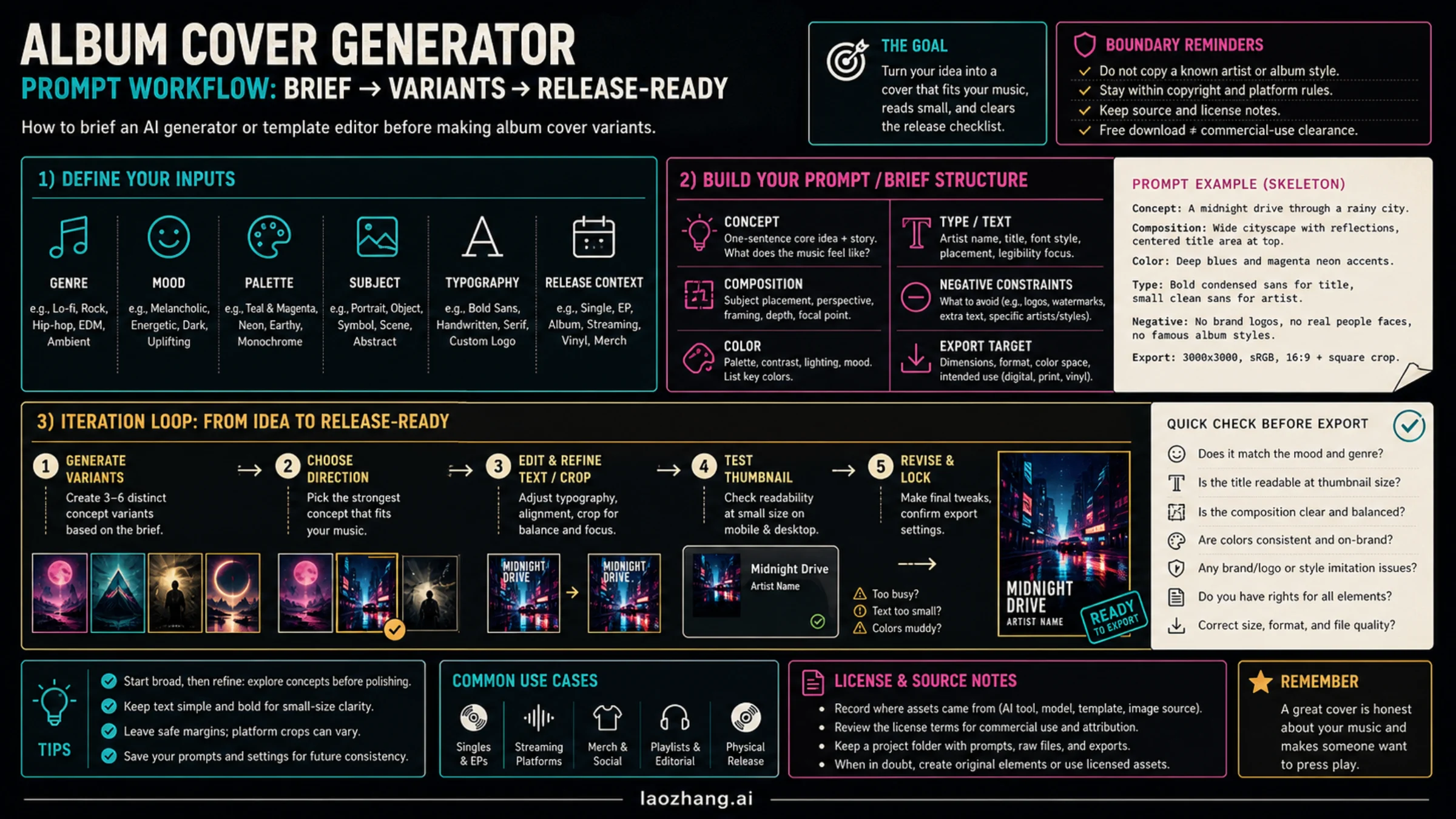
A good album cover prompt is really a short creative brief. It tells the tool what the music feels like, what the cover must contain, and what it must not accidentally copy.
Use this structure:
textCreate square album cover art for [artist / project placeholder].
Genre and mood: [genre, tempo, emotional tone].
Visual subject: [main object, scene, texture, or abstract direction].
Palette: [2-4 color cues].
Typography: leave clean space for [title] and [artist name], or keep text minimal.
Composition: strong central read, readable at thumbnail size.
Avoid: logos, real artist likeness, known album-cover style copying, trademarks, watermarks, tiny unreadable text.
Export target: square cover, high contrast, suitable for final manual text edit.
The placeholders matter. If the album title is still changing, do not ask the generator to bake final typography into the image. Ask for a text-safe composition and add the exact title later in a layout editor. If the title and artist name are final, a template editor may be the better route because it gives you more control over spelling, hierarchy, and alignment.
Generate variants around decisions, not random style changes. Ask for three directions such as "minimal dark electronic," "warm photo-led singer-songwriter," and "loud graphic punk collage." Then choose one direction and refine crop, color, and text. Ten random outputs usually teach less than three deliberate directions.
Use Tool Examples as Routes, Not as a Ranking
The album-cover tool market mixes AI generators, template editors, mobile apps, and design platforms because creators are not all solving the same problem. Some need a fast concept, some need dependable typography, some need a phone-photo workflow, and some need release art with a cleaner rights handoff.
Here is the practical split:
- Use an AI generator when you need visual concepts from scratch.
- Use a template editor when the title, artist name, and layout need dependable control.
- Use a mobile cover app when the source image is already a phone photo or social asset.
- Use a music-aware generator when track mood should drive the first draft.
- Use a designer when rights, brand, campaign, or high-stakes release quality matters more than speed.
If you want concrete tabs to compare, treat tools as examples of routes rather than a fixed ranking:
| Route | Example tabs to compare | Why they fit | Re-check before using |
|---|---|---|---|
| Template editor | Canva, Adobe Express, Kittl, PosterMyWall, Placeit | Templates, fonts, layout control, stock/design assets | Watermark, high-resolution export, stock/license terms |
| AI concept generator | freebeat.ai, Neural Frames, EaseMate AI | Prompt-first cover directions and style exploration | Prompt logs, final text edit, usage rights, export quality |
| Mobile photo route | Cover Art Studio on the App Store | Fast photo-to-cover workflow from a phone asset | App availability, export size, subscription or in-app purchase terms |
| Designer route | A freelance designer, in-house designer, or label creative partner | Human art direction, custom typography, clearer rights handoff | Contract, deliverables, source files, usage scope |
If you want a separate AI image-testing workbench instead of using a template-first editor, YingTu is one possible route. Treat it as a creation or prompt-iteration surface, not as proof that a cover is licensed, accepted by a distributor, or commercially cleared. Check the current model, balance, export, and usage limits before building a production workflow around any image tool.
Edit the First Output Like a Cover, Not a Poster
Album covers are small, square, and often seen in fast-scrolling contexts. A generator may produce an impressive wide scene, but the cover job is stricter:
- The main shape should read in a square crop.
- The artist name and title should be legible or intentionally absent.
- The subject should not depend on tiny details.
- The color contrast should survive dark mode, light mode, and phone brightness.
- The cover should not contain unrelated logos, dates, URLs, QR codes, social handles, or fake platform badges.
If the generated image has good mood but bad text, do not keep regenerating the whole cover. Export the cleanest text-free version, open it in a template editor, and add real typography manually. If the generated image has too many objects, ask for fewer elements and a stronger silhouette. If it looks too close to a famous album, artist portrait, label mark, or photographer style, change direction before you invest more time.
Test Thumbnail Readability Before Export
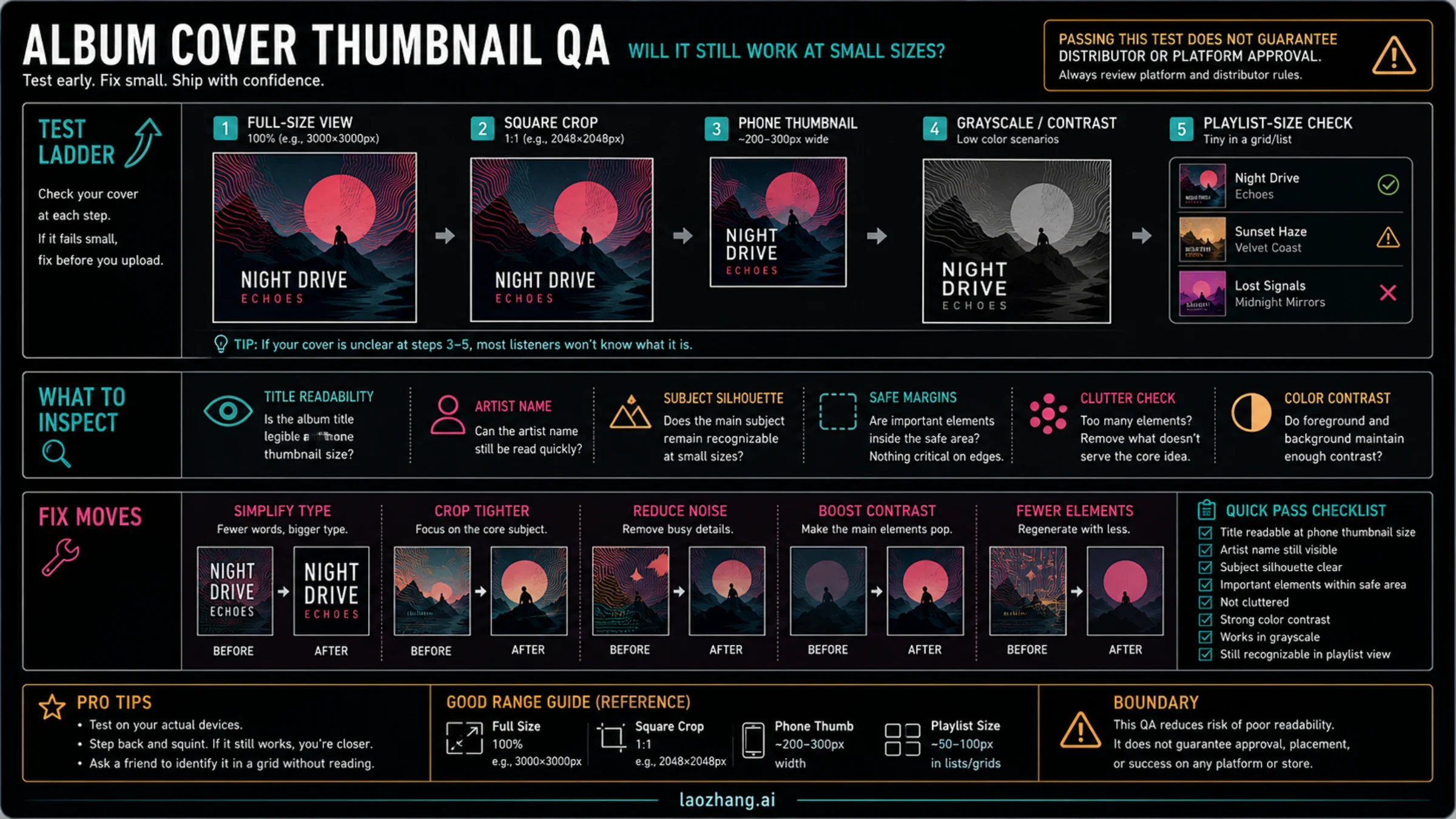
The thumbnail test catches problems that full-size previews hide. Do it before you upload the cover anywhere.
- View the cover full size.
- Crop it to a square if the tool did not already generate a square.
- Shrink it to phone thumbnail size.
- Convert a copy to grayscale or lower saturation.
- Put it on both a light and dark background.
- Ask whether the title, artist name, subject silhouette, and mood still survive.
If the cover fails, fix the largest problem first. Tiny text is usually solved by using less text, larger type, or no visible text at all. A muddy subject is usually solved by simplifying the background or increasing contrast. A weak crop is usually solved by moving the subject closer to center, leaving safer margins, or generating a composition that was square from the start.
This test does not guarantee acceptance by Spotify, Apple Music, a distributor, or a store. It only answers the practical question a listener will answer in half a second: can I recognize this cover?
Export Against the Strictest Destination You Care About
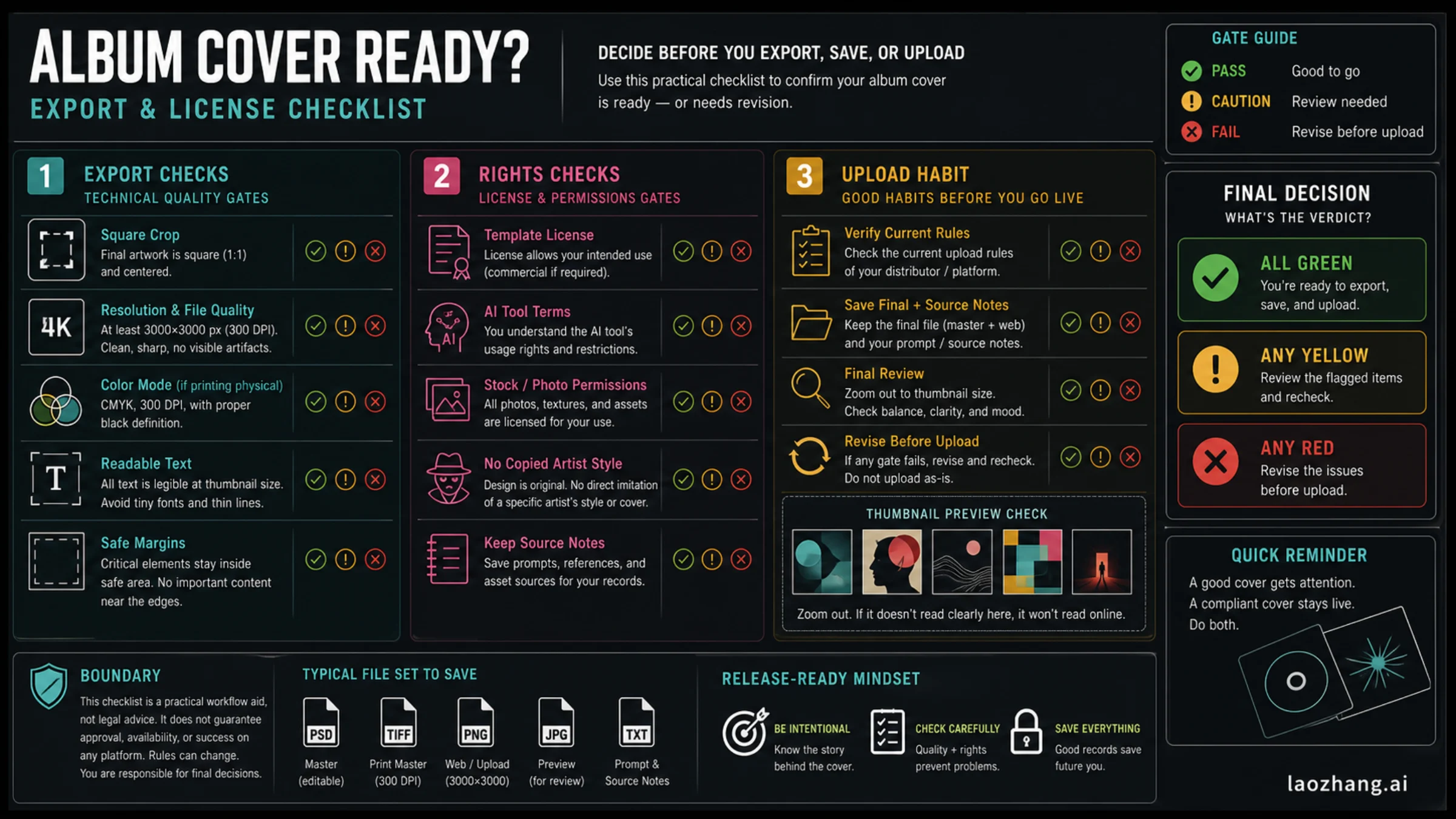
As of June 20, 2026, the official destination rules are not identical:
| Destination source | Current useful check | What it means for your workflow |
|---|---|---|
| Spotify Support cover art requirements | TIFF, PNG, or JPG; 1:1; 640px to 10000px wide and tall; sRGB, 24 bits per pixel; do not upscale | Start square and avoid fake enlargement of a small source |
| Apple Music for Artists cover art | JPG, PNG, or GIF; perfect square; at least 4000 x 4000 pixels | If Apple Music matters, generate or export larger than a casual 1000px cover |
| DistroKid artwork requirements | JPG; at least 1000 x 1000 pixels; ideally square and 3000 x 3000; RGB | A 3000px square JPG is a practical distributor default, but still check your exact route |
The safe export habit is simple: keep a layered or editable source file, export a high-resolution square final, and keep a smaller preview for thumbnail checks. Do not rely on an upscaler to rescue a 768px draft. Upscaling may make the file bigger, but it does not add real cover quality.
If you are sending the same art to several destinations, use the strictest relevant rule as the working target, then export smaller copies only when needed. A 4000 x 4000 master can be downsampled. A tiny cover cannot be made genuinely sharp after the fact.
Check Rights Before You Treat the Cover as Yours
Rights are where album cover generators create false confidence. The tool may let you download an image, but download permission is not the same as a clean commercial-use story.
Check five things:
| Check | Why it matters |
|---|---|
| Tool terms | Some tools split free downloads, watermarked exports, commercial use, and AI credits into separate plan rules |
| Template license | A template may be usable for social graphics but not for a paid release or merch without restrictions |
| Stock/photo source | Unlicensed stock, celebrity images, brand logos, and copied artwork can trigger rejection or legal risk |
| AI authorship notes | The U.S. Copyright Office AI initiative treats AI authorship and copyrightability as a separate legal question, not a simple prompt-to-ownership guarantee |
| Source record | Save the prompt, tool name, template link, stock licenses, receipts, and final edit file |
This is not legal advice. It is a practical way to avoid obvious release problems. If the cover depends on a recognizable person, brand, photographer, label, existing album, or copyrighted artwork, get permission or change the concept.
A 20-Minute Same-Day Workflow
Use this when the release is low-risk and you need momentum:
- Pick the route from the first table.
- Write a six-line cover brief.
- Generate or template three directions.
- Choose one direction and simplify it.
- Add or fix typography in an editor.
- Run the thumbnail test.
- Export a high-resolution square master.
- Check the license, watermark, and destination rules.
- Save the source notes with the final image.
That workflow is deliberately boring at the end. The exciting part is the visual concept. The release-ready part is the checklist.
FAQ
What is the best album cover generator?
The best album cover generator is the route that matches the asset you have. Use AI for fast concepts, a template editor for typography and layout control, a photo app for phone assets, a music-aware generator for mood-led drafts, and a designer for high-stakes releases.
Can I use a free album cover generator for a real release?
Sometimes, but only after checking the export, watermark, resolution, and license. A free download does not automatically mean commercial-use permission, and it does not guarantee distributor or platform acceptance.
Should I put the artist name and title on the cover?
Only if they remain readable and intentional at thumbnail size. Many strong covers use minimal or no text. If you do use text, a template or layout editor is usually safer than asking an image model to spell everything perfectly.
What size should an album cover be?
Use the strictest destination you care about. Spotify currently accepts square art between 640px and 10000px wide and tall, Apple Music currently asks for at least 4000 x 4000 pixels, and DistroKid says 3000 x 3000 JPG is an ideal practical target. Verify the current destination before upload.
Can AI-generated album art be copyrighted?
Do not assume the output is automatically protectable just because you prompted it. The U.S. Copyright Office treats human authorship and AI-generated material as a fact-specific copyrightability issue. For a release workflow, keep source notes and add meaningful human creative decisions where the cover matters.
How do I avoid a cover that looks copied?
Avoid prompts that name a living artist, specific album, label, photographer, or protected franchise as the style target. Use genre, mood, palette, lighting, era, materials, and composition instead. If a result looks too close to an existing cover, discard it and change direction.
Bottom Line
An album cover generator can get you from blank page to strong draft quickly. The work that makes the cover usable is route choice, brief quality, typography control, thumbnail testing, export discipline, and rights checking. Pick the route first, generate fewer but better variants, and do not upload until the final file survives the checks that matter for your release.