Как подключить Claude к внутреннему API: прямые tools или MCP
Если вызовами управляет ваше приложение, начните с прямых tools Claude API: обработчик проверяет доступ и возвращает результат. MCP оправдан, когда один набор внутренних операций нужен нескольким клиентам; авторизацию и подтверждение действий всё равно реализует ваш сервис.
Содержание
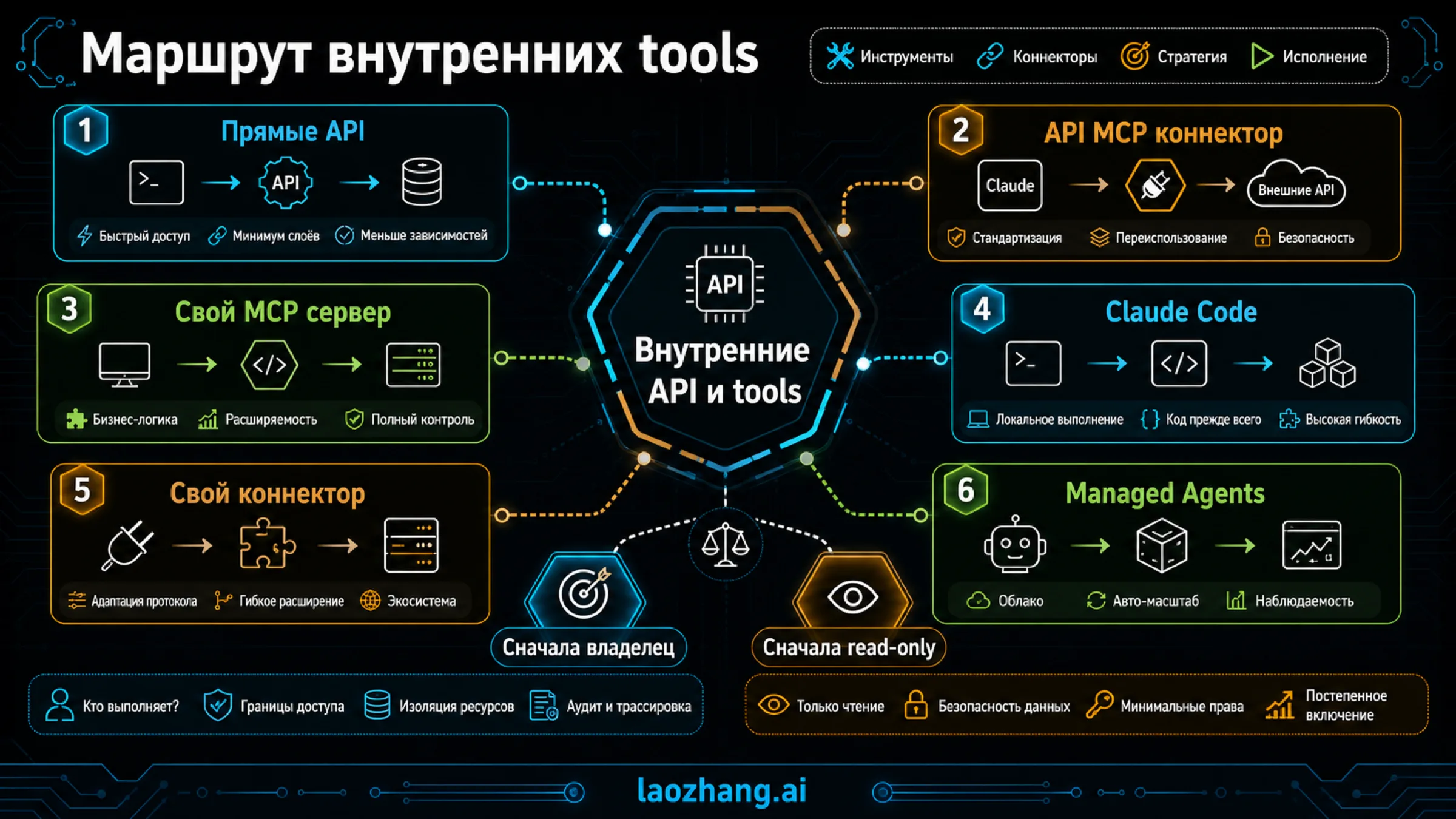
Чтобы подключить Claude к внутреннему API, дайте модели небольшой набор конкретных операций, а выполнение оставьте доверенному коду. Для одного приложения обычно достаточно прямых инструментов (tools) в Messages API. MCP стоит добавлять, когда те же операции нужны нескольким клиентам: например, вашему приложению и Claude Code. Ни описание инструмента, ни наличие коннектора сами по себе не подтверждают, что внутренний запрос выполнен и что пользователь имел право его выполнить.
Начать можно с одной операции только на чтение: сотрудник поддержки спрашивает, устранён ли инцидент INC-204, а инструмент возвращает состояние, время обновления и идентификатор исходной записи. Ниже разобраны выбор маршрута, законченный обработчик такого запроса и проверка результата. Условия коннекторов и версий сверены на 7 октября 2026 года; программный пример проверяется на вымышленных данных без подключения к Claude или внутренней системе.
Выберите маршрут по тому, кто выполняет вызов
Если ваше приложение уже знает пользователя, проверяет его доступ и обращается к внутренним сервисам, добавьте прямой инструмент Claude API. Модель передаёт блок tool_use, приложение выполняет операцию и возвращает tool_result. Именно приложение отвечает за авторизацию, ограничения, повторные попытки и журнал. Это клиентские инструменты, даже если само приложение работает на сервере.
MCP позволяет вынести описание и реализацию операций в общий сервер. Клиент получает список инструментов и вызывает выбранный обработчик через протокол. API MCP connector — один из способов обратиться к этому серверу из Messages API; пользовательский коннектор в Claude и подключение в Claude Code — другие способы, со своими условиями.
| Задача | С чего начать | Где исполняется внутренняя операция |
|---|---|---|
| Добавить несколько возможностей в своё приложение | Прямые tools Claude API | В обработчике приложения, рядом с его проверками доступа |
| Использовать общий удалённый набор инструментов из Messages API | API MCP connector и свой MCP-сервер | На MCP-сервере, который обращается к внутреннему API |
| Дать нескольким клиентам одинаковые операции | Свой MCP-сервер с согласованным контрактом | В общих серверных обработчиках |
| Автоматизировать работу разработчика с локальными ресурсами | MCP в Claude Code | В локальном процессе stdio либо на настроенном HTTP-сервере |
| Дать сотрудникам инструменты в Claude, Cowork или Desktop | Пользовательский удалённый коннектор | На удалённом MCP-сервере; соединение приходит из облака Anthropic |
«Свой MCP-сервер» и «API MCP connector» не конкурируют: сервер предоставляет операции, коннектор доставляет к нему вызовы. Если клиент один и вся логика уже находится в вашем приложении, общий сервер может добавить лишнюю эксплуатационную работу. Если разные клиенты должны одинаково проверять доступ, ограничивать выдачу и обрабатывать ошибки, общая реализация становится полезной.
Для внутреннего API в закрытой сети прямые tools часто удобны ещё и потому, что ваш сервер уже имеет доступ к этой сети. Он получает запрос модели, выполняет внутреннюю операцию и передаёт наружу только нужный результат. Однако эти данные всё равно поступают в выбранный сервис Claude: сетевое расположение обработчика не означает, что сведения остаются исключительно внутри компании.
Сначала спроектируйте узкую операцию
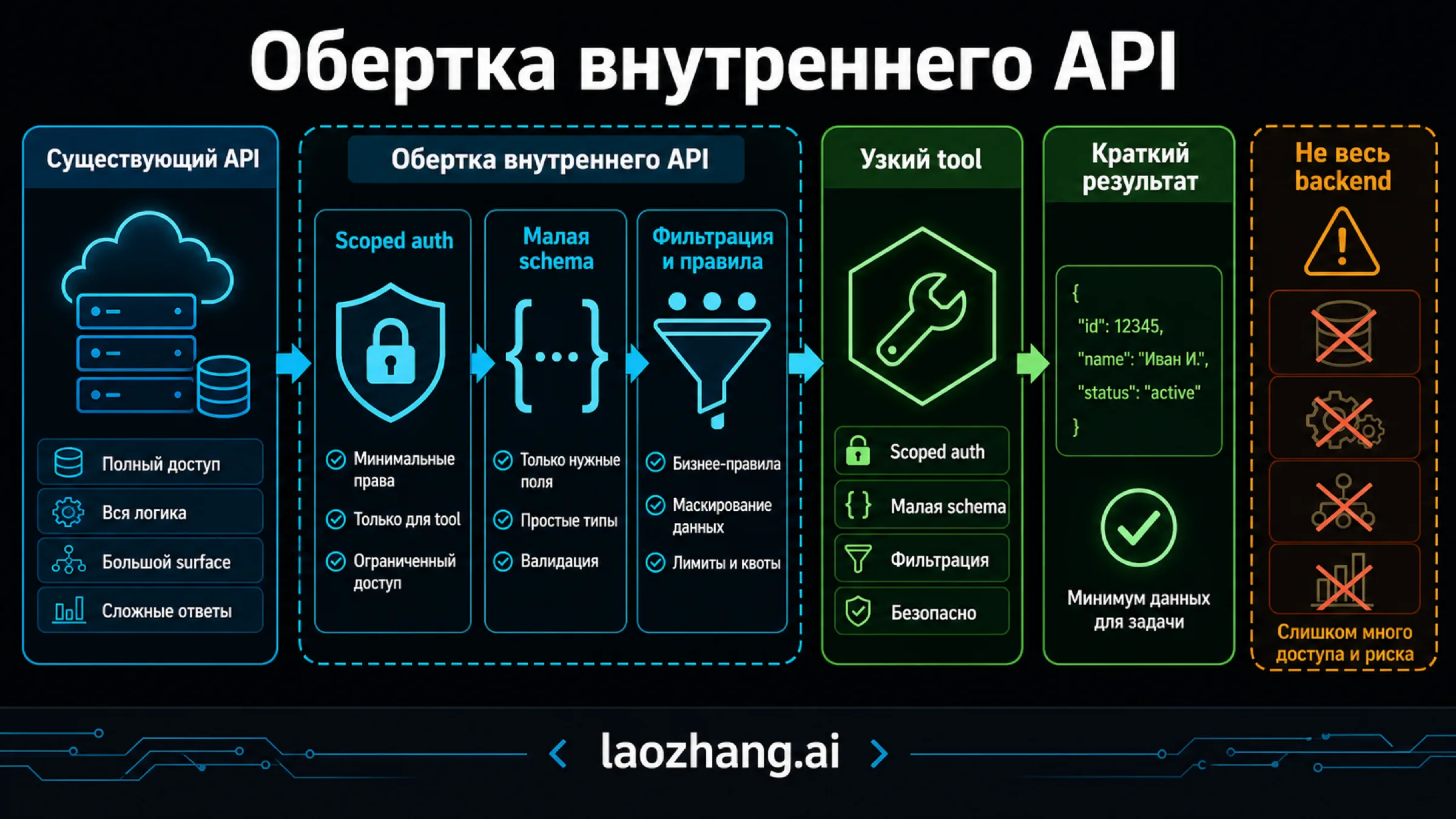
Для вопроса «Устранён ли инцидент?» нужен get_incident_status, а не универсальный call_api с произвольным URL, HTTP-методом и телом запроса. Узкая операция позволяет проверять доступ к конкретному ресурсу и заранее определить, что модель получит в ответ.
В нашем примере контракт выглядит так:
- Модель передаёт только
incident_idв форматеINC-<число>. - Приложение получает сотрудника и организацию из собственной проверенной аутентификации.
- Обработчик проверяет право читать инциденты и доступ к выбранному сервису.
- Внутренний API возвращает запись; обработчик выбирает из неё статус, сервис и время обновления.
- В ответ попадают
source_record_idиapi_result_id, по которым можно найти исходные сведения и результат обращения.
Не предлагайте модели выбирать tenant_id, учётную запись исполнителя или область доступа. Даже если такие поля нужны внутреннему API, их заполняет доверенный код. Значение из аргументов модели — запрос пользователя, а не доказательство его полномочий. Если внутренний API принимает токен сервисной учётной записи, сам обработчик дополнительно ограничивает действия конкретного пользователя: широкий доступ сервиса не должен превращаться в широкий доступ сотрудника.
Ограничение результата тоже следует из задачи. Для проверки состояния не нужны личные данные заявителя, полный журнал или произвольные заметки. Текст тикета может содержать инструкции, направленные против вашей интеграции; рассматривайте его как данные, а не как команды для модели. При необходимости вернуть описание отделяйте его от инструкций приложения и ограничивайте длину. Если проблема уже связана с большими ответами, переходите к разбору перегрузки контекста из-за MCP.
Законченный пример: обработчик и возврат tool_result
Следующий пример на JavaScript можно сохранить в incident-demo.mjs и выполнить командой node incident-demo.mjs. Он не делает сетевых запросов: internalApi — вымышленный внутренний сервис, assistant — заранее заданный ответ модели. Пример показывает реальную работу локальных функций: проверку аргументов, отказ в доступе, фильтрацию результата, запись в журнал и сборку следующего сообщения.
Для рабочей интеграции предполагается внутренний контракт GET /v1/incidents/{incident_id}: сервис возвращает организацию, связанный сервис, состояние, время обновления и собственный идентификатор результата. Его реализацию, получение доверенного пользователя и транспорт Messages API нужно подключить отдельно. Настоящие ключи и внутренние адреса этому примеру не нужны.
const tool = {
  name: "get_incident_status",
  description: "Получить текущее состояние одного доступного инцидента.",
  input_schema: {
    type: "object",
    properties: {
      incident_id: { type: "string", pattern: "^INC-[0-9]+$" }
    },
    required: ["incident_id"],
    additionalProperties: false
  }
};

const records = new Map([
  ["INC-204", {
    tenant_id: "org-demo", service: "payments",
    status: "resolved", updated_at: "2026-10-07T08:20:00Z",
    source_record_id: "incident:INC-204", api_result_id: "api-demo-72",
    private_note: "Эту служебную заметку модель не получит."
  }],
  ["INC-205", {
    tenant_id: "org-other", service: "payments",
    status: "investigating", updated_at: "2026-10-07T08:22:00Z",
    source_record_id: "incident:INC-205", api_result_id: "api-demo-73"
  }]
]);

const internalApi = {
  async getIncident(id) {
    const row = records.get(id);
    return row ? { ...row } : null;
  }
};

const principal = {
  actor_id: "employee-demo", tenant_id: "org-demo",
  permissions: ["incident:read"], services: ["payments"]
};
const audit = [];

async function execute(call, caller, api, journal) {
  let output;
  let failed = false;
  try {
    if (call.name !== tool.name) throw new Error("UNKNOWN_TOOL");
    const input = call.input;
    if (!input || typeof input !== "object" || Array.isArray(input) ||
        Object.keys(input).length !== 1 ||
        typeof input.incident_id !== "string" ||
        !/^INC-[0-9]+$/.test(input.incident_id)) {
      throw new Error("INVALID_INPUT");
    }
    if (!caller || !caller.permissions.includes("incident:read")) {
      throw new Error("ACCESS_DENIED");
    }
    const row = await api.getIncident(input.incident_id);
    if (!row || row.tenant_id !== caller.tenant_id ||
        !caller.services.includes(row.service)) {
      throw new Error("RESOURCE_UNAVAILABLE");
    }
    if (!["investigating", "monitoring", "resolved"].includes(row.status) ||
        typeof row.api_result_id !== "string" ||
        typeof row.source_record_id !== "string" ||
        typeof row.updated_at !== "string" ||
        !Number.isFinite(Date.parse(row.updated_at))) {
      throw new Error("INVALID_UPSTREAM_RESULT");
    }
    output = {
      incident_id: input.incident_id, service: row.service,
      status: row.status, updated_at: row.updated_at,
      source_record_id: row.source_record_id,
      api_result_id: row.api_result_id
    };
  } catch (error) {
    failed = true;
    const known = new Set([
      "UNKNOWN_TOOL", "INVALID_INPUT", "ACCESS_DENIED",
      "RESOURCE_UNAVAILABLE", "INVALID_UPSTREAM_RESULT"
    ]);
    output = { error: known.has(error.message)
      ? error.message : "UPSTREAM_FAILURE" };
  }
  journal.push({
    tool_use_id: call.id, actor_id: caller?.actor_id ?? null,
    tool: call.name, outcome: failed ? "denied_or_failed" : "succeeded",
    api_result_id: output.api_result_id ?? null
  });
  return {
    type: "tool_result", tool_use_id: call.id,
    is_error: failed, content: JSON.stringify(output)
  };
}

const messages = [{
  role: "user", content: "Устранён ли инцидент INC-204?"
}];
const assistant = {
  role: "assistant",
  content: [
    { type: "text", text: "Проверю состояние инцидента." },
    { type: "tool_use", id: "toolu_demo_204",
      name: "get_incident_status", input: { incident_id: "INC-204" } }
  ]
};
const calls = assistant.content.filter(block => block.type === "tool_use");
if (!calls.length || calls.length > 4 ||
    new Set(calls.map(call => call.id)).size !== calls.length) {
  throw new Error("INVALID_CALL_BATCH");
}
const results = [];
for (const call of calls) {
  results.push(await execute(call, principal, internalApi, audit));
}
const continuation = [
  ...messages,
  assistant,
  { role: "user", content: results }
];
console.log(JSON.stringify({ tools: [tool], messages: continuation, audit }, null, 2));
Успешный блок результата содержит:
{
  "type": "tool_result",
  "tool_use_id": "toolu_demo_204",
  "is_error": false,
  "content": "{\"incident_id\":\"INC-204\",\"service\":\"payments\",\"status\":\"resolved\",\"updated_at\":\"2026-10-07T08:20:00Z\",\"source_record_id\":\"incident:INC-204\",\"api_result_id\":\"api-demo-72\"}"
}
В реальном приложении первый запрос Messages API включает выбранный доступный model, max_tokens, tools: [tool] и исходные messages. После ответа с клиентскими вызовами приложение передаёт новый запрос с теми же определениями и messages: continuation. Сам транспорт здесь намеренно не реализован: этот файл — законченный пример обработки и сборки сообщений, а не клиент Claude API.
Сохраняйте всё содержимое сообщения assistant, включая текст и другие допустимые блоки. Не считайте, что вызов всегда находится в content[0]: в примере первым идёт текст. Блоки tool_result должны первыми стоять в следующем сообщении user, без промежуточного сообщения, и ссылаться на точные идентификаторы вызовов. Эти требования описаны в обработке вызовов инструментов. Пример рассчитан на клиентские tools; при смешивании с незавершёнными серверными инструментами применяются дополнительные правила продолжения из той же документации.
Из результата можно сформулировать ответ: «INC-204 устранён; состояние сервиса payments обновлено в 08:20 UTC. Источник — incident:INC-204». Это ожидаемый ответ на заданные данные, а не наблюдавшийся ответ Claude. Если модель ответила без вызова, это не проверка текущего состояния. Для задач с обязательным обращением к системе приложение должно проверять наличие подтверждённого результата, а не полагаться на формулировку ответа или просьбу «обязательно используй инструмент».
API MCP connector: подключение и фиксация списка инструментов
Когда обработчик нужен нескольким клиентам, его можно разместить за MCP-сервером. Для стандартного API MCP connector требуется удалённый HTTPS-адрес; поддерживаются HTTP/SSE и вызовы инструментов. Локальный stdio-процесс напрямую сюда не подключается. Текущая базовая beta — mcp-client-2025-11-20, старая mcp-client-2025-04-04 устарела. Документация коннектора также описывает beta mcp-client-2026-09-15, включающую базовые возможности и фиксацию списка.
Ниже — фрагмент тела запроса, а не готовое подключение. Адрес вымышленный; для защищённого сервера приложение отдельно получает и обновляет разрешённый OAuth-токен и передаёт его в authorization_token.
{
  "mcp_servers": [
    {
      "type": "url",
      "name": "incidents",
      "url": "https://mcp.example.com/mcp"
    }
  ],
  "tools": [
    {
      "type": "mcp_toolset",
      "mcp_server_name": "incidents",
      "default_config": { "enabled": false },
      "configs": { "get_incident_status": { "enabled": true } }
    }
  ]
}
Имя сервера должно совпасть с mcp_server_name, причём каждому серверу соответствует ровно один mcp_toolset. Включение по умолчанию выключено явно. Опечатка в имени инструмента в configs даёт предупреждение, а не обязательную ошибку запроса: сверяйте фактический список с согласованным.
При beta mcp-client-2026-09-15 ответ может содержать mcp_tool_listing. Сохраняйте сообщение целиком и тот же beta-заголовок в продолжениях; для явной фиксации копируйте tools из соответствующего listing в tools нужного mcp_toolset. Фиксируется список, видимый Claude. Реализация обработчика, серверные права и доступные записи от этого не становятся неизменными.
В ответах коннектора ищите mcp_tool_use и связанный mcp_tool_result с точным tool_use_id; у вызова также есть server_name. Не отправляйте такой вызов в обработчик прямых tool_use из предыдущего примера: исполнение уже проходит через MCP-сервер.
Версию MCP проверяйте отдельно от beta коннектора
Beta-заголовок Anthropic и версия протокола MCP обозначают разные вещи. В MCP от 28 июля 2026 года обмен стал независимым от сессии: обязательные сведения передаются в запросах, прежние initialize и заголовок сессии не являются основой этой редакции. В params._meta требуются protocolVersion и clientCapabilities; clientInfo может сообщать название клиента, но не удостоверяет сотрудника. Точные поля определяет базовая спецификация.
Это не означает, что любой развёрнутый сервер уже работает по этой редакции. Старый сервер или клиент может использовать прежний протокол. Зафиксируйте совместимые версии именно вашей пары, вместо того чтобы соединять июньский пример с initialize и современные параметры. На уровне MCP схема называется inputSchema, а в определениях Claude API — input_schema; механически переносить объект без адаптации нельзя. Спецификация инструментов также рассматривает аннотации, включая readOnlyHint, как недоверенные метаданные: запрет записи реализуется правами и обработчиком.
Закрытая сеть, Claude Code и пользовательские коннекторы
Если сервер доступен с ноутбука через VPN, это ещё не делает его доступным удалённому коннектору. Разделяйте три места исполнения: ваш сервер приложения, процесс на машине разработчика и соединение из облака Anthropic.
Для закрытой сети у Anthropic появился отдельный MCP tunnels research preview с явным доступом к предварительной версии. Он использует исходящее соединение, Cloudflare и прокси для маршрутизации в Messages API и Managed Agents. Это не общедоступный способ подключить частный сервер к пользовательским коннекторам Claude. У preview нет обещания непрерывной поддержки; результаты инструментов по-прежнему передаются Anthropic, а Cloudflare получает часть сетевых метаданных. Поэтому обычная альтернатива для одного приложения — обработчик прямых tools внутри вашей сети.
В Claude Code можно выбрать HTTP или локальный stdio. В примере ниже показан синтаксис конфигурации из документации Claude Code, а не выполненная установка:
claude mcp add --transport http --scope project incidents https://mcp.example.com/mcp
claude mcp add --transport stdio --scope project local-incidents -- ./incident-mcp
Для URL указывайте --transport http явно; без типа URL может быть принят за stdio-команду. Локальный процесс отделяется --. Добавленная конфигурация, подключённый сервер, доступный инструмент и успешная операция — разные состояния. Подтверждения проектной конфигурации зависят от режима запуска: интерактивные, неинтерактивные, SDK- и облачные сценарии нельзя считать одинаковыми. Режим обхода подтверждений также не исправляет сетевой доступ или авторизацию; подробнее — что обходит dangerously-skip-permissions.
Для сотрудников, работающих в Claude, Cowork или Desktop, действуют условия пользовательских удалённых коннекторов. На дату обновления Free допускает один пользовательский коннектор; также поддерживаются Pro, Max, Team и Enterprise. В организациях важны права администратора на добавление и разрешение конкретного участника. Соединение с удалённым сервером приходит из облака Anthropic, в том числе при использовании Desktop. Локальная конфигурация Desktop — отдельный маршрут. Общие фиксированные учётные данные не обеспечивают изоляцию сотрудников: сервер должен сам знать, от чьего имени и к каким ресурсам разрешён доступ.
Авторизация и изменения: проверяйте исполнителя, а не обещание модели
У защищённого HTTP MCP-сервера проверяются токен, срок его действия, предназначенный ресурс и разрешённые области доступа. Ошибки 401 и 403 имеют разные причины; увеличение прав должно проходить ваш установленный процесс. Токен клиента нельзя просто переслать внутреннему API как его собственную авторизацию: доступ к внутреннему сервису оформляется отдельно. Это предусмотрено спецификацией авторизации MCP. При этом авторизация — возможность протокола, а конкретный способ защиты зависит от реализации; универсального запрета всех фиксированных заголовков из неё не следует.
Для операции записи разделите предложение и исполнение. Допустим, после устранения инцидента нужно закрыть связанное обращение:
prepare_ticket_closureсоздаёт предложение с номером обращения, текущей версией записи и будущим статусом. Внутренняя система пока не меняется.- Интерфейс показывает сотруднику это изменение. Подтверждение хранится на сервере вместе с сотрудником, областью действия и сроком.
commit_ticket_closureпринимает идентификатор предложения. Обработчик сам ищет подтверждение, заново проверяет доступ и текущую версию записи, затем выполняет согласованную операцию с ключом идемпотентности.- После записи приложение проверяет состояние обращения и связывает результат с идентификатором операции внутреннего API.
Это проектный вариант, а не встроенная гарантия MCP. Строка «сотрудник согласен» из аргументов модели не заменяет серверную запись подтверждения. Если запись завершилась таймаутом, результат сначала считается неизвестным: запрос мог исполниться. Найдите операцию по ключу идемпотентности или проверьте итоговое состояние; повторяйте запись только по правилам вашего API. Отсутствие ответа не означает отсутствие изменения.
Если операция необратима, сообщите об этом до подтверждения. Подготовка черновика, применение изменения и проверка результата должны иметь различимые состояния. Так сотрудник не примет «предложение создано» за «обращение закрыто».
Как доказать выполнение перед внедрением
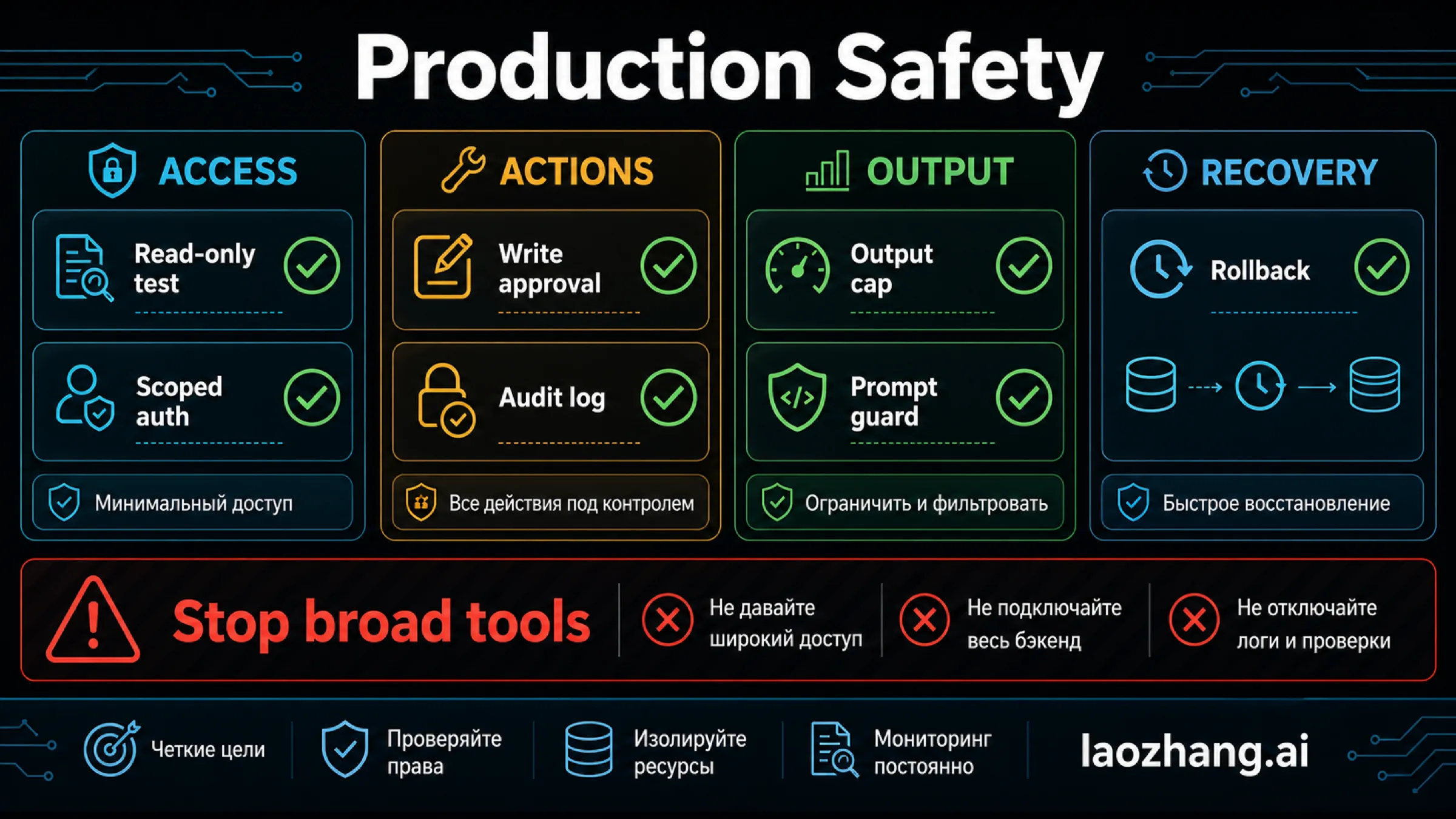
Доказательство чтения — цепочка от конкретного вызова до результата внутренней системы. В примере toolu_demo_204 связывает запрос модели с tool_result, а api-demo-72 — с результатом вымышленного API. В реальной системе второй идентификатор должен происходить из выполненного обращения или проверяемой записи, а не из текста, сгенерированного моделью.
Журналу достаточно хранить доверенного исполнителя, инструмент, идентификатор вызова, решение о доступе, время, исход записи и идентификатор результата API. При необходимости добавьте разрешённые сведения о ресурсе и длительности. Не записывайте по умолчанию токены, полный текст обращений и все поля результата. Наличие журнала попытки само по себе не доказывает успешную операцию.
Приёмка чтения должна отвечать на конкретные вопросы:
| Проверка | Ожидаемое поведение |
|---|---|
| Допустимый инцидент своей организации | Компактный результат с исходной записью и результатом API |
| Инцидент другой организации | Отказ без раскрытия статуса и других полей |
| Подмена организации в аргументах | Ошибка схемы; доверенная организация не меняется |
Нет права incident:read | Отказ до обращения к внутреннему сервису |
| Ошибка или неподходящий ответ API | Ошибка инструмента без внутренних исключений и секретов |
| Несколько блоков в ответе модели | Все вызовы обработаны и связаны по ID; остальные блоки сохранены |
| Запись без действительного подтверждения | Изменение не выполняется |
| Таймаут записи | Статус неизвестен до проверки операции, без слепого повтора |
Локальная проверка приведённого примера подтверждает обработку вымышленных данных, фильтрацию полей, отказы и сборку сообщений. Она не проверяет соединение с Claude, OAuth, реальную изоляцию организаций или развёрнутую защиту. Следующий этап в вашей разрешённой тестовой среде — пройти ту же цепочку с настоящим сервисом, проверить неуспешные ветки и убедиться, что ответ сотруднику соответствует результату операции. Открытый порт или успешный healthcheck для этого недостаточны.
Отдельно согласуйте обработку данных с выбранным маршрутом. В текущей таблице хранения данных Claude API MCP connector и MCP tunnels не входят в возможности, подходящие для ZDR и HIPAA. У стандартного Messages API условия зависят от договорённостей и модели. Это характеристика соответствующего режима обработки данных, а не обещание, что любой обычный запрос автоматически имеет нулевое хранение. Собственный сервер, туннель и доступ только на чтение не заменяют такую проверку.
Частые вопросы
Нужен ли MCP для внутреннего REST API?
Нет. Если одно приложение управляет пользователями и выполнением, прямые tools Claude API позволяют вызвать REST API из его обработчика. MCP полезен для общего набора операций, который нужен разным клиентам. В обоих случаях доступ и ограничения проверяет ваш код.
Фиксация списка MCP-инструментов фиксирует права пользователя?
Нет. Beta mcp-client-2026-09-15 фиксирует список, который видит Claude, через mcp_tool_listing или tools в MCPToolset. Серверные права, реализация операций и доступные записи проверяются отдельно. Это различие следует из механизма фиксации списка.
Можно ли подключить localhost или VPN-сервер к Claude Desktop как удалённый коннектор?
Доступность с вашего компьютера недостаточна: удалённое соединение приходит из облака Anthropic. Локальная настройка Desktop — другой механизм. Частный MCP tunnel относится к отдельному preview для Messages API и Managed Agents, а не к обычному пользовательскому коннектору. Условия смотрите в справке коннекторов и описании tunnels.
Что доказывает, что Claude действительно проверил внутреннюю систему?
Сопоставленный вызов инструмента, успешное выполнение доверенным обработчиком и проверяемый результат внутреннего API. Точный tool_use_id соединяет сообщения, а идентификатор результата API связывает их с обращением к системе. Уверенная формулировка ответа без такой цепочки не подтверждает проверку.
Можно ли автоматически повторить изменение после таймаута?
Только если это допускает контракт внутреннего API и исключено повторное применение. Сначала проверьте состояние или операцию по ключу идемпотентности. Пока результат неизвестен, нельзя сообщать сотруднику ни об успехе, ни о том, что изменение точно не произошло.
Источники11
Внешние страницы, на которые ссылается это руководство, в порядке упоминания. Последнее обновление: 7 окт. 2026 г..
Источники11
Внешние страницы, на которые ссылается это руководство, в порядке упоминания. Последнее обновление: 7 окт. 2026 г..
- 1.клиентские инструментыplatform.claude.com/docs/en/agents-and-tools/tool-use/overview
- 2.обработке вызовов инструментовplatform.claude.com/docs/en/agents-and-tools/tool-use/handle-tool-calls
- 3.Документация коннектораplatform.claude.com/docs/en/agents-and-tools/mcp-connector
- 4.MCP от 28 июля 2026 годаmodelcontextprotocol.io/specification/2026-07-28/changelog
- 5.базовая спецификацияmodelcontextprotocol.io/specification/2026-07-28/basic/index
- 6.Спецификация инструментовmodelcontextprotocol.io/specification/2026-07-28/server/tools
- 7.MCP tunnels research previewplatform.claude.com/docs/en/agents-and-tools/mcp-tunnels/overview
- 8.документации Claude Codecode.claude.com/docs/en/mcp
- 9.условия пользовательских удалённых коннекторовsupport.claude.com/zh-CN/articles/11175166-使用远程-mcp-开始自定义连接器
- 10.спецификацией авторизации MCPmodelcontextprotocol.io/specification/2026-07-28/basic/authorization
- 11.таблице хранения данных Claude APIplatform.claude.com/docs/en/manage-claude/api-and-data-retention