Claude Code Statusline 설정: 경로, 필드, 스크립트, 문제 해결
Claude Code statusline 경로를 먼저 고르고, mock JSON 으로 스크립트를 검증한 뒤 context, cost, git 필드를 안전하게 추가하고 빈 출력이나 오래된 출력을 고칩니다.
목차
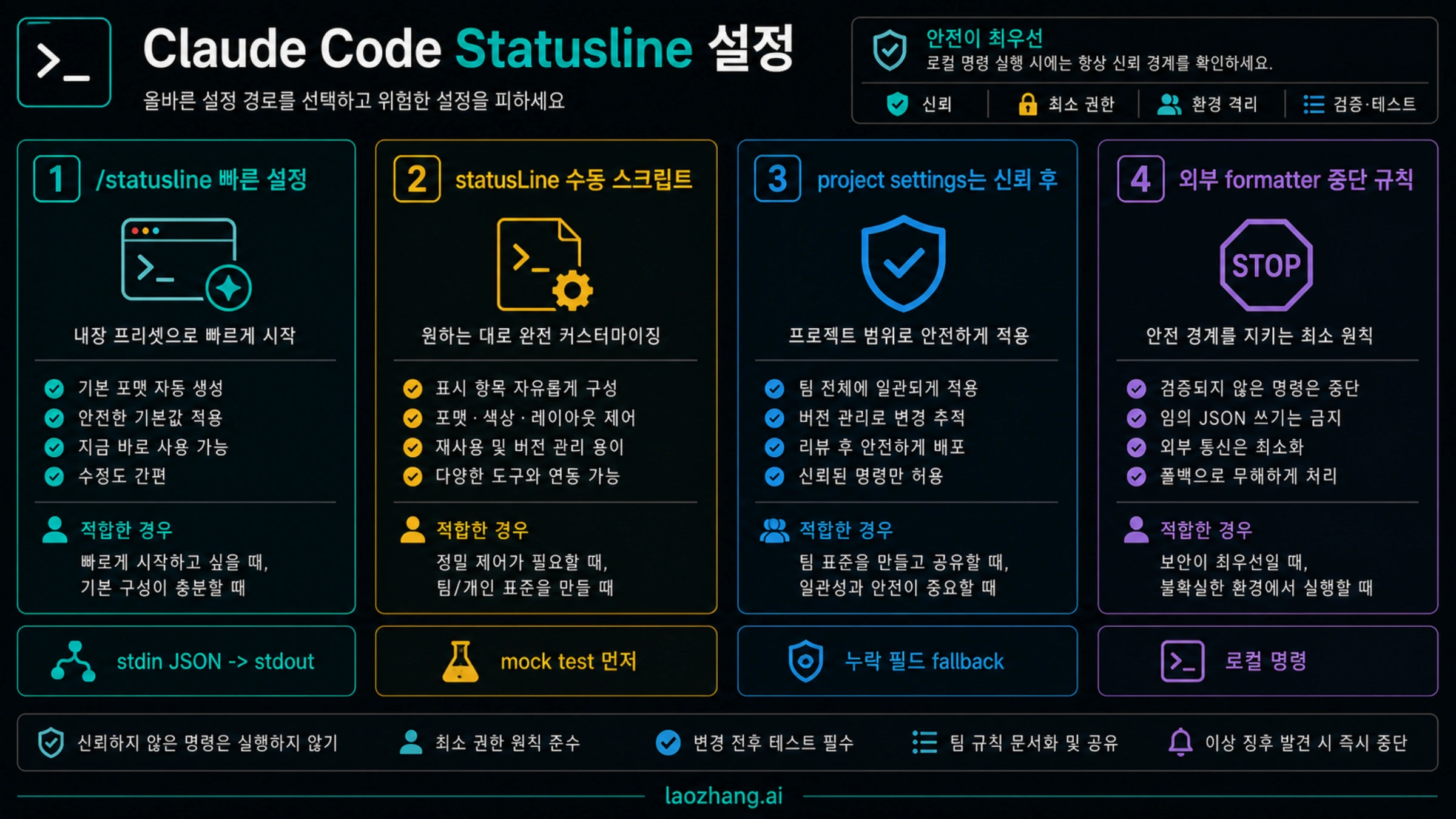
Claude Code statusline 은 로컬 명령입니다. Claude Code 가 현재 세션 JSON 을 stdin 으로 넘기고, 여러분의 명령이 stdout 에 출력한 문자열이 화면 하단의 statusline 이 됩니다. 개인용 첫 버전은 /statusline 으로 빠르게 만들고, 검토 가능한 동작이 필요하면 statusLine 을 수동 설정하며, 팀 프로젝트에는 모든 사람이 안전하게 실행할 수 있을 때만 넣습니다.
안전한 순서는 스타일이 아니라 경로, 명령 계약, 설정 범위, 표시 필드입니다. statusline 은 model, directory, git branch, context 사용량, cost estimate, 일부 계정의 rate-limit 데이터를 보여줄 수 있습니다. 하지만 모든 필드는 없거나 null 일 수 있다고 보고 fallback 을 작성해야 합니다.
| 경로 | 사용할 때 | 첫 확인 |
|---|---|---|
/statusline | 개인용 첫 버전을 빠르게 만들 때 | 줄이 보이고 생성된 스크립트를 읽을 수 있음 |
수동 statusLine | 검토 가능한 스크립트와 fallback 이 필요할 때 | Claude Code 밖에서 mock JSON 테스트 통과 |
| Project settings | 같은 non-secret 동작을 repo 에 공유할 때 | 모든 팀원이 같은 명령 경로를 안전하게 실행 |
| Third-party formatter | 테마나 복잡한 layout 이 의존성을 정당화할 때 | source, install scope, local execution 을 설명 가능 |
statusline 실행 계약부터 이해하기
statusline 은 터미널 테마가 아니며 추가 API 호출도 아닙니다. Claude Code UI 가 로컬 명령을 실행하고, stdin 으로 JSON 을 넣고, stdout 을 읽어 하단 줄에 표시합니다. 그래서 먼저 봐야 할 것은 색상이 아니라 어떤 명령이 어디서 실행되는가입니다.
첫 번째 의미는 로컬 실행입니다. 스크립트는 git 을 호출하거나 파일을 읽거나 home 디렉터리의 스크립트를 실행할 수 있습니다. 개인 설정에는 편하지만 shared project settings 에 넣으면 팀 전체 신뢰 경계가 됩니다.
두 번째 의미는 방어적 코드입니다. JSON 에는 model, workspace, git, cost, context, session, version, output style, vim, agent, worktree, rate limit 데이터가 들어올 수 있습니다. 그러나 버전, 계정, 경로마다 다릅니다. 좋은 스크립트는 ctx:?, git:- 처럼 조용히 fallback 합니다.
세 번째 의미는 stdout 이 곧 제품 표면이라는 점입니다. 디버그 로그는 stderr 로 보내고, 실제 표시 줄은 짧고 안정적이고 빠르게 유지합니다. 모든 것을 넣은 대시보드보다 매일 읽히는 한 줄이 낫습니다.
첫 개인 버전은 /statusline 으로 시작
Claude Code 안에서 실행합니다.
/statusline요청은 간단하게 씁니다.
Show model, current directory, git branch, context percentage, and estimated cost. Keep it one line and handle missing fields.Claude Code 가 스크립트를 만들고 설치할 수 있습니다. 작동한 뒤에는 파일을 열어 실제 실행 내용을 읽어야 합니다. 승인하는 것은 색상 테마가 아니라 로컬 명령입니다. 절대 경로, 네트워크 호출, private endpoint, 느린 git status 가 있으면 그대로 팀에 공유하지 않습니다.
/statusline 은 탐색용으로 좋습니다. 어떤 정보가 유용한지, 어떤 라벨이 너무 긴지, 어느 순간 줄이 읽기 어려워지는지 확인합니다. 팀 표준이 필요해지면 수동 statusLine 으로 돌아가 path, fallback, speed, trust 를 명시합니다.
제어가 필요하면 수동 statusLine
수동 설정은 settings 안의 command object 입니다.
{
  "statusLine": {
    "type": "command",
    "command": "~/.claude/statusline/statusline.js",
    "refreshInterval": 5
  }
}
핵심은 type 과 command 입니다. refreshInterval 은 선택 사항입니다. 시간 기반 값이나 외부 캐시 상태처럼 주기 갱신이 필요할 때만 사용합니다. 보통은 Claude Code 이벤트 업데이트로 충분하고, 너무 잦은 refresh 는 느린 스크립트 문제를 키웁니다.
개인용 경로는 ~/.claude/ 아래여도 괜찮습니다. 팀용 경로는 repo 안에 둘 수 있지만 코드처럼 review 해야 합니다. 개인 home path, secrets, 특정 machine 에만 있는 명령을 shared settings 에 넣지 않습니다.
mock JSON 으로 먼저 테스트
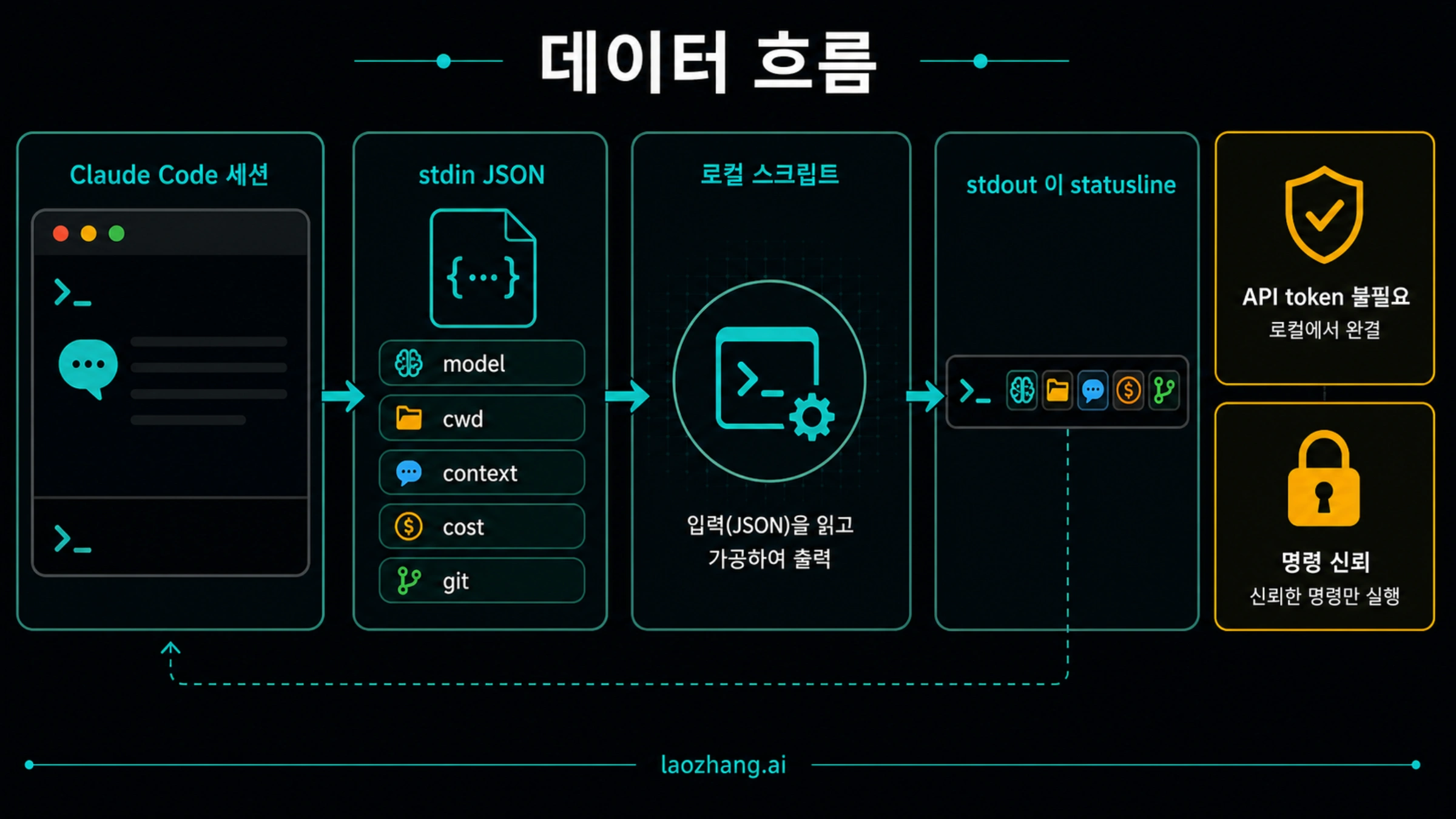
다음 Node.js 예시는 stdin 을 읽고 JSON 을 안전하게 파싱한 뒤 stdout 에 한 줄만 출력합니다.
#!/usr/bin/env node

let input = "";
process.stdin.setEncoding("utf8");
process.stdin.on("data", (chunk) => {
  input += chunk;
});

process.stdin.on("end", () => {
  let data = {};
  try {
    data = input.trim() ? JSON.parse(input) : {};
  } catch (error) {
    console.error(`statusline JSON parse failed: ${error.message}`);
  }

  const model = data.model?.display_name || data.model?.id || "model?";
  const cwd = data.workspace?.current_dir || data.cwd || "";
  const dir = cwd ? cwd.split("/").filter(Boolean).pop() : "workspace?";
  const branch = data.git?.branch ? `git:${data.git.branch}` : "git:-";
  const context =
    typeof data.context_window?.percentage === "number"
      ? `ctx:${Math.round(data.context_window.percentage)}%`
      : "ctx:?";
  const cost =
    typeof data.cost?.total_cost_usd === "number"
      ? `$${data.cost.total_cost_usd.toFixed(2)} est`
      : "$? est";

  process.stdout.write(`${model} | ${dir} | ${branch} | ${context} | ${cost}`);
});
Claude Code 에 연결하기 전에 직접 실행합니다.
chmod +x ~/.claude/statusline/statusline.js
printf '%s' '{"model":{"display_name":"Claude Sonnet"},"workspace":{"current_dir":"/Users/me/project"},"git":{"branch":"main"},"context_window":{"percentage":42},"cost":{"total_cost_usd":0.18}}' | ~/.claude/statusline/statusline.js
외부 터미널에서 한 줄이 나오지 않으면 Claude Code 설정을 바꿀 단계가 아닙니다. 먼저 스크립트의 JSON 파싱, executable path, stdout/stderr 를 고칩니다.
표시 필드는 작업 질문에서 고르기
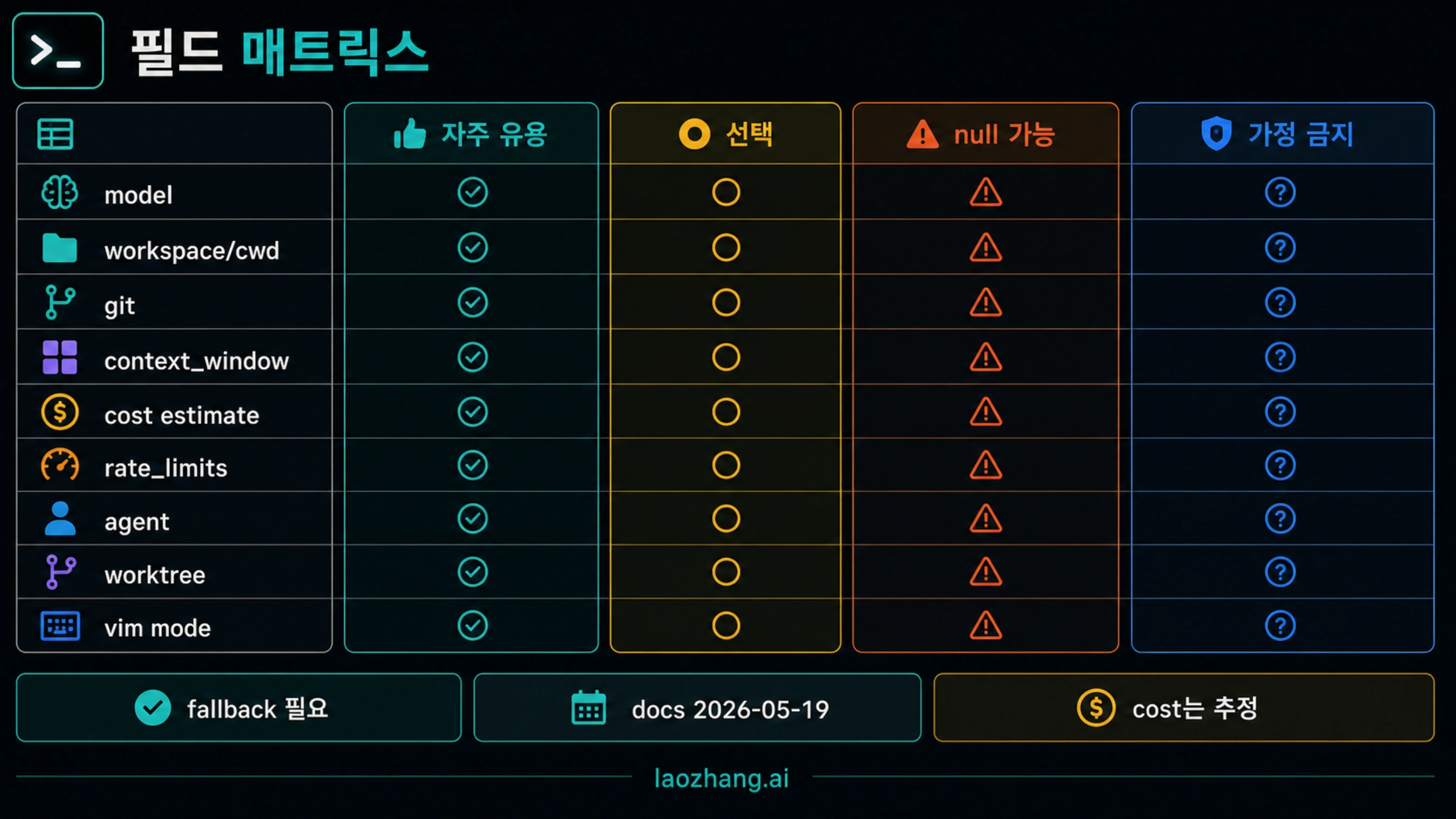
statusline 은 집중을 돕는 장치입니다. 지금 어떤 workspace 인지, 어떤 model 인지, git 이 더럽혀졌는지, context 가 얼마나 남았는지, cost estimate 이 커지고 있는지 정도를 빠르게 보여주면 충분합니다.
| 필드 | 표시 후보 | 주의 |
|---|---|---|
| Model | 짧은 model 이름 | 긴 이름은 줄을 압박 |
| Workspace | basename 또는 workspace 이름 | 전체 개인 경로는 숨김 |
| Git | branch, dirty state | 큰 repo 는 cache |
| Context window | percentage 또는 남은 신호 | 필드 없음 가능 |
| Cost | session estimate | 실제 청구값이 아님 |
| Rate limits | remaining/reset 이 있을 때 | 모든 route 에 없음 |
| Session/version | debug 정보 | 일상에는 noise |
| Agent/worktree/vim | mode state | workflow 가 필요할 때만 |
좋은 첫 줄은 네 부분 정도입니다.
Sonnet | api-docs | main* | ctx:42% | $0.18 estmain* 은 변경이 있다는 신호입니다. context 와 cost 는 risk signal 입니다. 필요 없는 필드는 삭제하고 줄 폭을 지킵니다.
설정 범위가 공유 가능성을 결정
Claude Code settings 는 여러 범위가 있습니다. statusline 은 안전한 범위에 둬야 합니다.
| 범위 | 적합한 사용 | 위험 |
|---|---|---|
| User settings | 개인 기본 statusline | 다른 machine 에 path 없음 |
| Local project settings | machine 별 override | 팀원이 원인을 못 봄 |
| Shared project settings | non-secret 팀 동작 | secrets, private path 금지 |
| Managed settings | 조직 정책 | 개인 스타일에는 과함 |
| Session/CLI override | 임시 실험 | 문서화된 계약에는 약함 |
팀용이면 이런 형태가 낫습니다.
{
  "statusLine": {
    "type": "command",
    "command": "./.claude/statusline/statusline.js"
  }
}
단, 스크립트는 review 되어야 하고, secrets 없이, private endpoint 없이, 빠르게 실패하고, fallback 을 제공해야 합니다.
업데이트는 가볍게
statusline 은 반복 실행됩니다. 매번 네트워크를 호출하고 큰 git status 를 돌리고 긴 요약을 만들면 Claude Code 가 느려집니다.
세 가지 규칙을 씁니다. Claude Code 가 이미 보낸 JSON 필드를 우선 사용합니다. 비싼 shell 작업은 cache 합니다. refreshInterval 은 시간 기반 값이 꼭 필요할 때만 설정합니다.
직접 측정합니다.
time printf '{}' | ~/.claude/statusline/statusline.js이 명령이 느리면 문제는 Claude Code 가 아니라 스크립트입니다. 외부 호출을 줄이고, git 계산을 줄이고, 표시 세그먼트를 줄입니다.
Windows 와 terminal 렌더링
Windows 에서는 JSON 보다 shell/path 가 더 자주 문제입니다. Git Bash, PowerShell, WSL, Node 는 quoting 과 path 처리 방식이 다릅니다. Claude Code 가 실제로 실행할 같은 command 로 테스트합니다.
처음에는 plain text 로 만듭니다. ANSI color, powerline glyph, OSC 8 link 는 나중에 추가합니다. macOS 에서만 되고 Windows 에서 실패하면 interpreter path, executable path, line endings, cwd 를 먼저 봅니다.
third-party formatter 선택 기준
formatter 는 테마, powerline layout, ready-made formatting 이 필요할 때 시간을 줄여줍니다. 하지만 official contract 의 소유자는 아닙니다. 결국 로컬 명령입니다.
| 확인 | 이유 |
|---|---|
| source 와 maintainer 신뢰 가능 | 로컬에서 실행됨 |
| install scope 명확 | global install 은 여러 project 에 영향 |
| official stdin JSON 사용 | private endpoint 는 깨지기 쉬움 |
| missing fields 처리 | 모든 account 가 같지 않음 |
| 빠름 | 반복 실행됨 |
| 쉽게 끌 수 있음 | 문제 해결 때 돌아갈 수 있음 |
무엇을 실행하는지 설명할 수 없다면 작은 자체 스크립트를 유지합니다.
빈 줄, skipped, stale 문제 해결
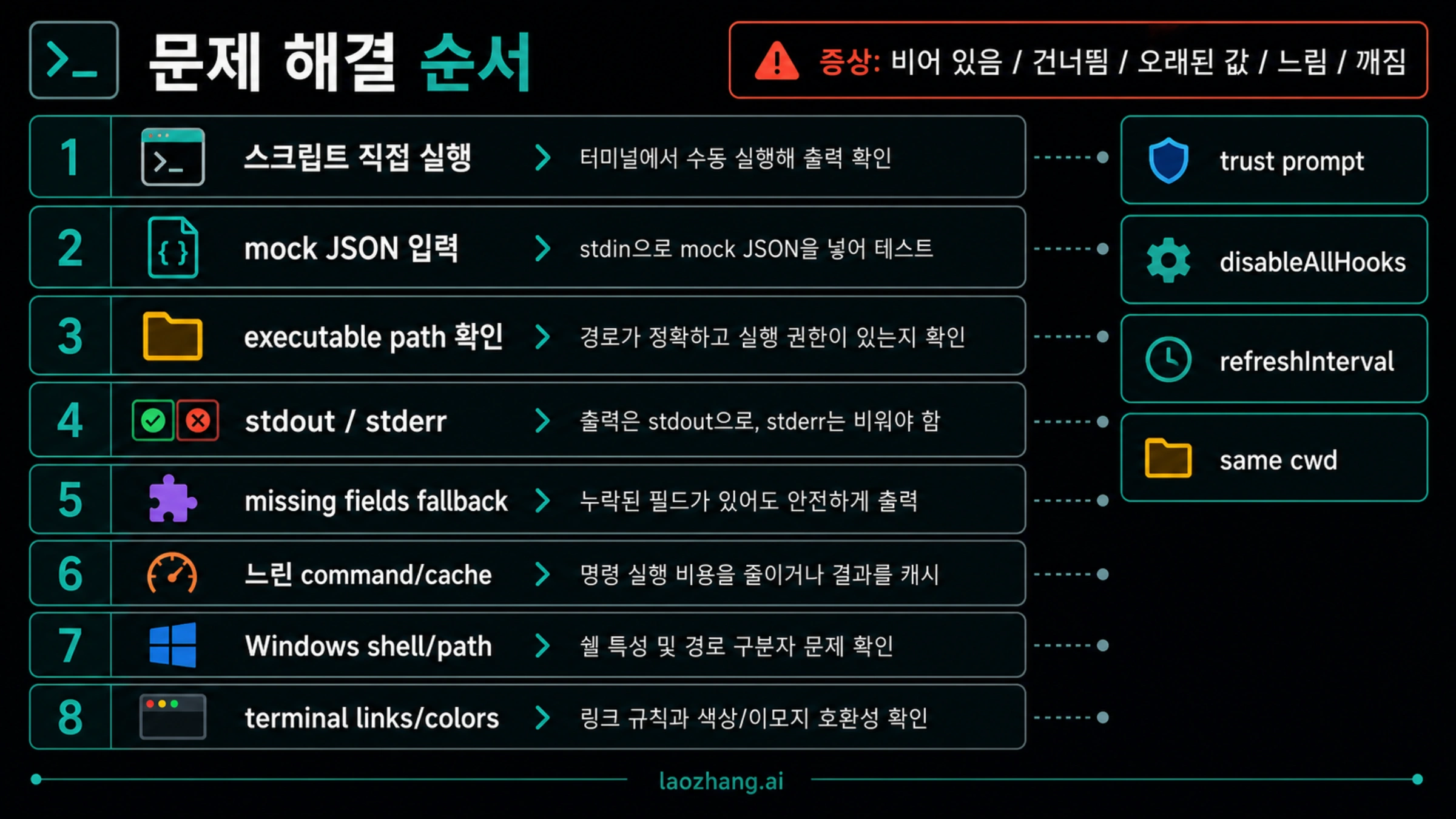
| 증상 | 빠른 확인 | 수정 |
|---|---|---|
| 줄이 없음 | command 직접 실행 | path, interpreter, executable bit |
| 밖에서는 됨 | mock JSON 입력 | trust prompt 또는 scope |
| 빈 출력 | stdout/stderr 확인 | 최종 줄은 stdout |
undefined | 필드 없는 JSON | optional chaining 과 fallback |
| stale output | 느린 작업 제거 | cache 또는 bounded refresh |
| skipped | debug 보기 | trust, hooks, command failure |
| Windows 에서만 실패 | 같은 shell/path 테스트 | 명시적 interpreter |
| 색/링크 깨짐 | plain text 로 복귀 | terminal 기능은 마지막 |
disableAllHooks 도 진단 범위입니다. 무작정 켜고 끄면 기대한 hook-like 동작까지 바뀔 수 있습니다.
관련 Claude Code 문서
- CLI 설치는 Claude Code install.
- credential 과 route 는 Claude Code API configuration.
- API key 와 subscription billing 은 Claude Code API key vs subscription billing.
- 안정 후 persistent context 는 Claude Code memory.
- 재사용 workflow 는 Claude Code best skills.
자주 묻는 질문
statusline 과 statusLine 은 같나요?
표기 역할이 다릅니다. statusline 은 일반 표현, /statusline 은 slash command, statusLine 은 settings JSON key 입니다.
statusline 이 API token 을 쓰나요?
명령 자체는 로컬 실행이며 추가 model request 가 아닙니다. Claude Code 가 넘긴 데이터를 표시합니다.
rate limits 를 보여줄 수 있나요?
활성 route 와 account 가 해당 데이터를 제공할 때만 가능합니다. 없을 때도 정상 동작해야 합니다.
스크립트를 project 에 commit 해도 되나요?
모든 팀원에게 안전할 때만 가능합니다. secrets 없이, 빠르고, path-safe, fallback 있고, review 되어야 합니다.
왜 undefined 가 보이나요?
스크립트가 없는 필드를 전제로 했기 때문입니다. 필드 없는 mock JSON 으로 테스트하고 fallback 을 추가합니다.
첫 statusline 은 무엇이 좋나요?
model, directory basename, git branch, context percentage, cost estimate 정도면 충분합니다. 색상과 formatter 는 안정 후 추가합니다.