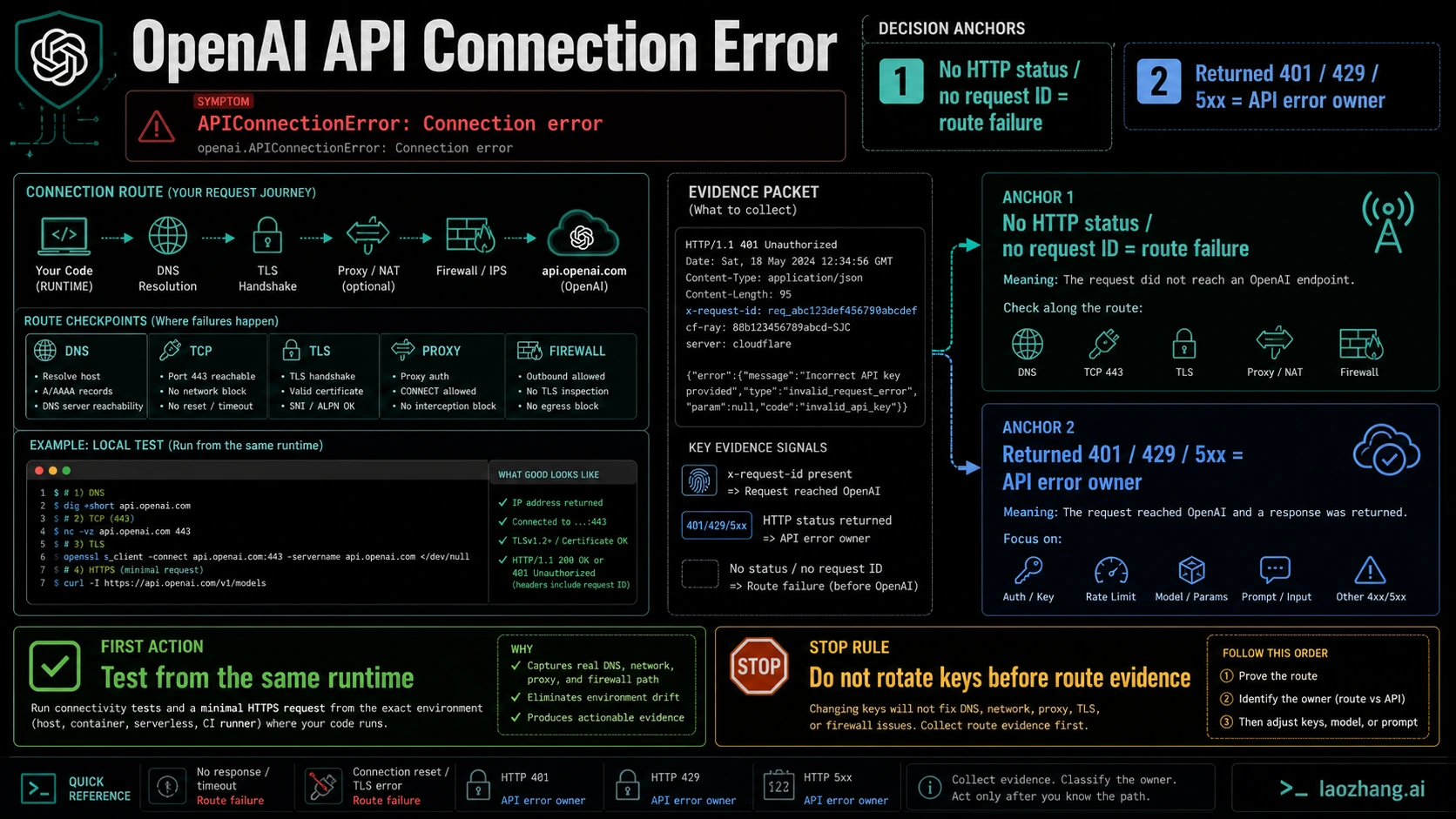
openai.APIConnectionError: Connection error means the SDK could not complete the connection path to the configured endpoint. If there is no HTTP status, JSON body, or request ID, start with the route between your runtime and OpenAI. Do not rotate API keys, upgrade billing, change models, or rewrite prompts until you know whether the request reached a server at all.
If the response includes a status code or error body, the owner changes. A returned 401 belongs to authentication, a returned 429 belongs to rate or quota, and a returned 500 or 503 belongs to server-side or temporary availability handling. In the no-response branch, the request failed before useful API evidence came back. Current as of May 6, 2026, the OpenAI status page was fully operational when checked, and the official OpenAI error-code guide describes APIConnectionError as a service-connection issue that should be checked against network settings, proxy configuration, SSL certificates, firewall rules, and container permissions.
TL;DR
| Evidence you have | First owner to test | Do next |
|---|---|---|
| No HTTP status, no body, no request ID | Connection path | Test status, DNS, TLS, proxy, firewall, and egress from the same runtime. |
| 401 or authentication body | Auth owner | Check key, project, organization, and endpoint family. |
| 429, insufficient_quota, or rate headers | Quota or rate owner | Use the quota or rate-limit sibling page instead of connection debugging. |
| 500 or 503 with request ID | API/server branch | Retry carefully, keep request ID, and check status. |
| Azure or gateway route | Route provider | Verify base URL, deployment name, provider status, and outbound HTTPS. |
Read the Response Evidence First
The fastest mistake is treating every connection error as the same OpenAI API error. APIConnectionError is different because the SDK often does not have a status code to classify. In Python, current SDK documentation maps connection failures to APIConnectionError and returned 4xx or 5xx responses to APIStatusError subclasses. That means the absence of a status is itself evidence.
Look at the log line before changing configuration. If you see a status, body, request ID, or rate-limit header, follow that owner. For example, a 429 with insufficient_quota should go to the quota branch, while RPM or TPM headers belong to the OpenAI API rate limits branch. If you see only APIConnectionError with an underlying network exception, remote disconnect, TLS failure, proxy error, DNS error, or timeout, keep diagnosing the path.
This distinction also protects your incident timeline. Blind retries can make the application quieter for a minute while hiding the real owner. Key rotation can add a second variable. Switching to another gateway can prove an alternate route works but not explain the failing route. In production, prove the failing path first.
Run the 10-Minute Same-Path Test
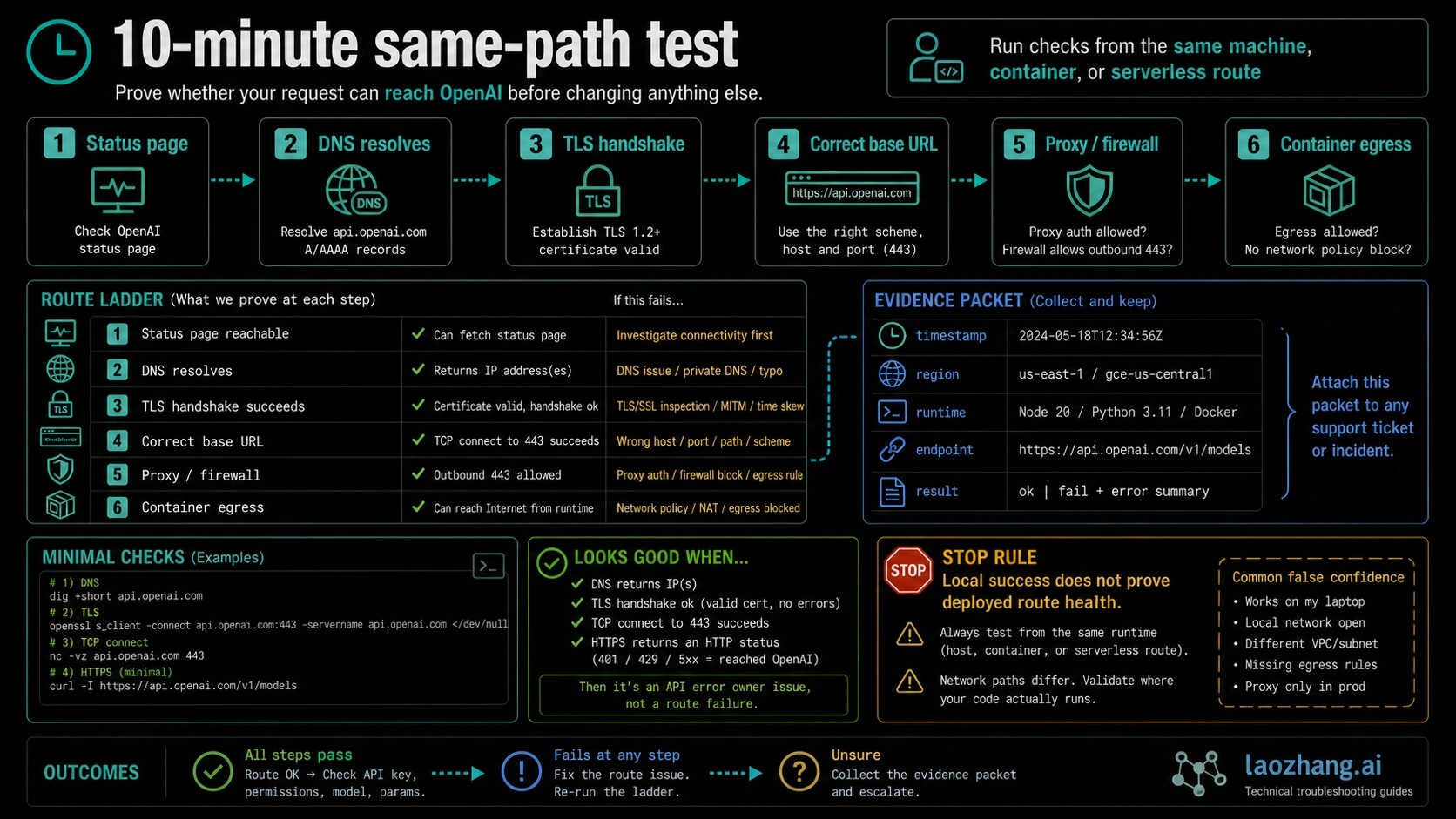
Run the checks from the same machine, container, serverless function, worker, region, and base URL that failed. A laptop test is useful only when the laptop is the failing runtime.
- Open https://status.openai.com/ and record the timestamp. A green page does not clear your local route, but it prevents unsupported outage claims.
- Confirm DNS resolution for the exact host you call, such as api.openai.com or the Azure/gateway hostname.
- Confirm outbound TLS on port 443 from the same runtime. Corporate proxies, custom CA bundles, container images, and restricted egress policies often fail here.
- Confirm the base URL and endpoint family. Direct OpenAI, Azure OpenAI, and OpenAI-compatible gateways use different routes.
- Check whether an HTTP proxy, VPN, firewall, WAF, or NAT gateway rewrites or blocks the request.
- Compare local and deployed results only after you know the same key, model, endpoint, and runtime variables are being used.
The useful result is not simply pass or fail. Write down the first point where evidence changes. DNS failure, TLS certificate failure, proxy refusal, remote disconnect, and request timeout lead to different fixes.
Use SDK Controls Without Hiding Evidence
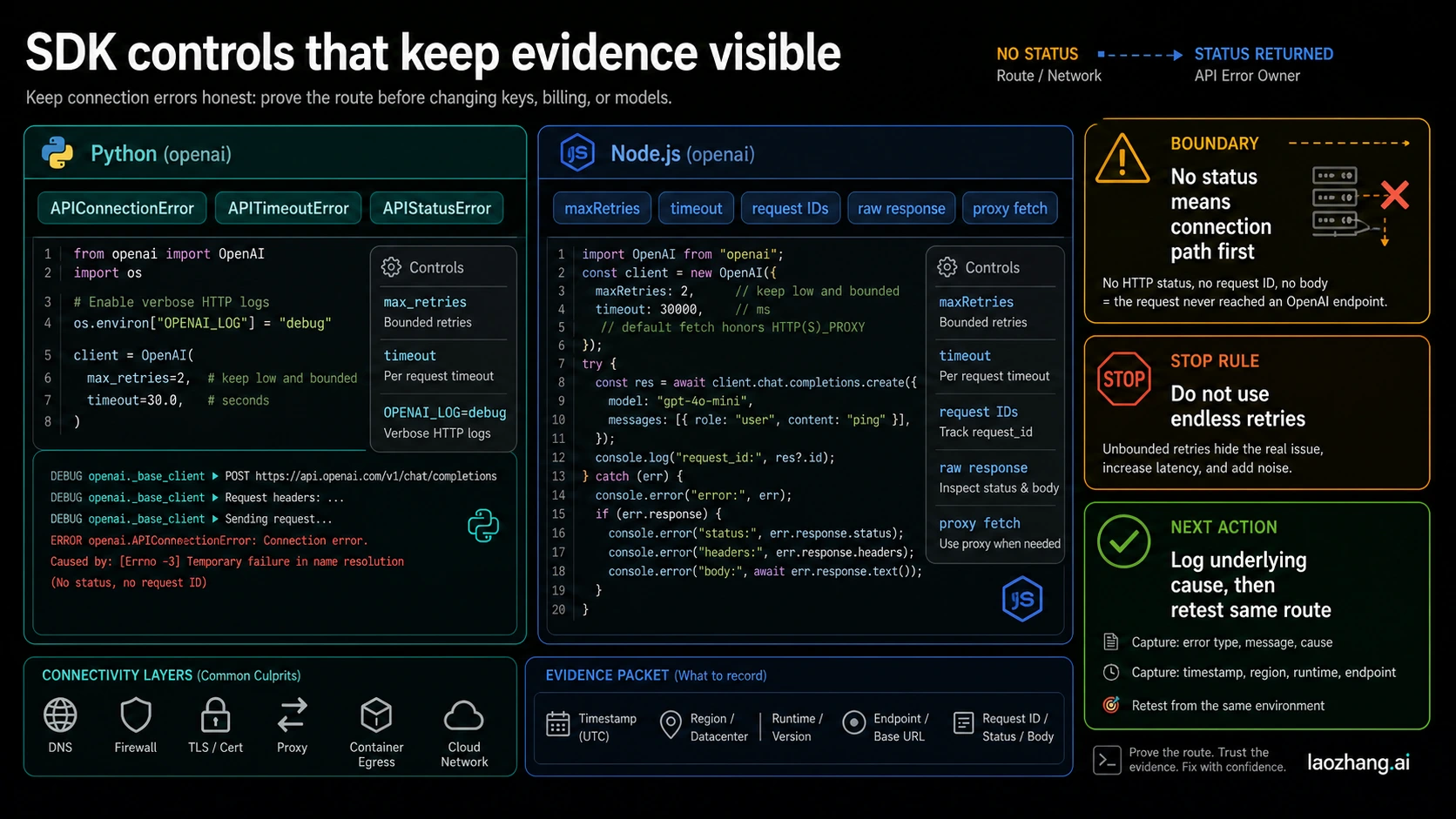
SDK settings should keep evidence visible. In Python, catch APIConnectionError separately from APITimeoutError and APIStatusError. If you collapse them into a generic exception, you lose the owner split. Set a realistic timeout, reduce max_retries during diagnosis, and use debug logging only long enough to capture the underlying cause. In Node, use maxRetries, timeout, raw response access, request IDs, and proxy fetch configuration for the same purpose.
Do not use endless retries for connection failures. Retrying a transient disconnect is reasonable; retrying a blocked proxy, bad CA bundle, wrong base URL, or closed container egress path only delays recovery. Keep one tiny same-route request as your verification probe. Once that works, reopen the real workload.
If a wrapper or agent framework hides the SDK layer, step outside the wrapper for one minimal request with the same route. The goal is not to replace the app. The goal is to prove whether the underlying path can reach the endpoint before debugging prompts, chains, tools, or queues.
Route Branches That Change the Fix
Direct OpenAI calls should first prove the route to api.openai.com, then separate returned status owners. Azure OpenAI calls should verify resource endpoint, deployment name, API version, region routing, managed identity or key use, and Azure-side network rules. OpenAI-compatible gateways should be treated as a provider route until a direct OpenAI test proves the same symptom exists without the gateway.
Browser-side calls are a separate branch. If you call the API from a client app, CORS, leaked keys, blocked browser networking, and proxy design can become the owner. Move server-side before diagnosing the official SDK as if it were a backend worker.
Serverless and containers deserve special attention because their outbound route can differ from your build or local test environment. A package install that succeeds does not prove runtime egress. Test the request from inside the running function, job, or container.
Escalate With a Useful Packet
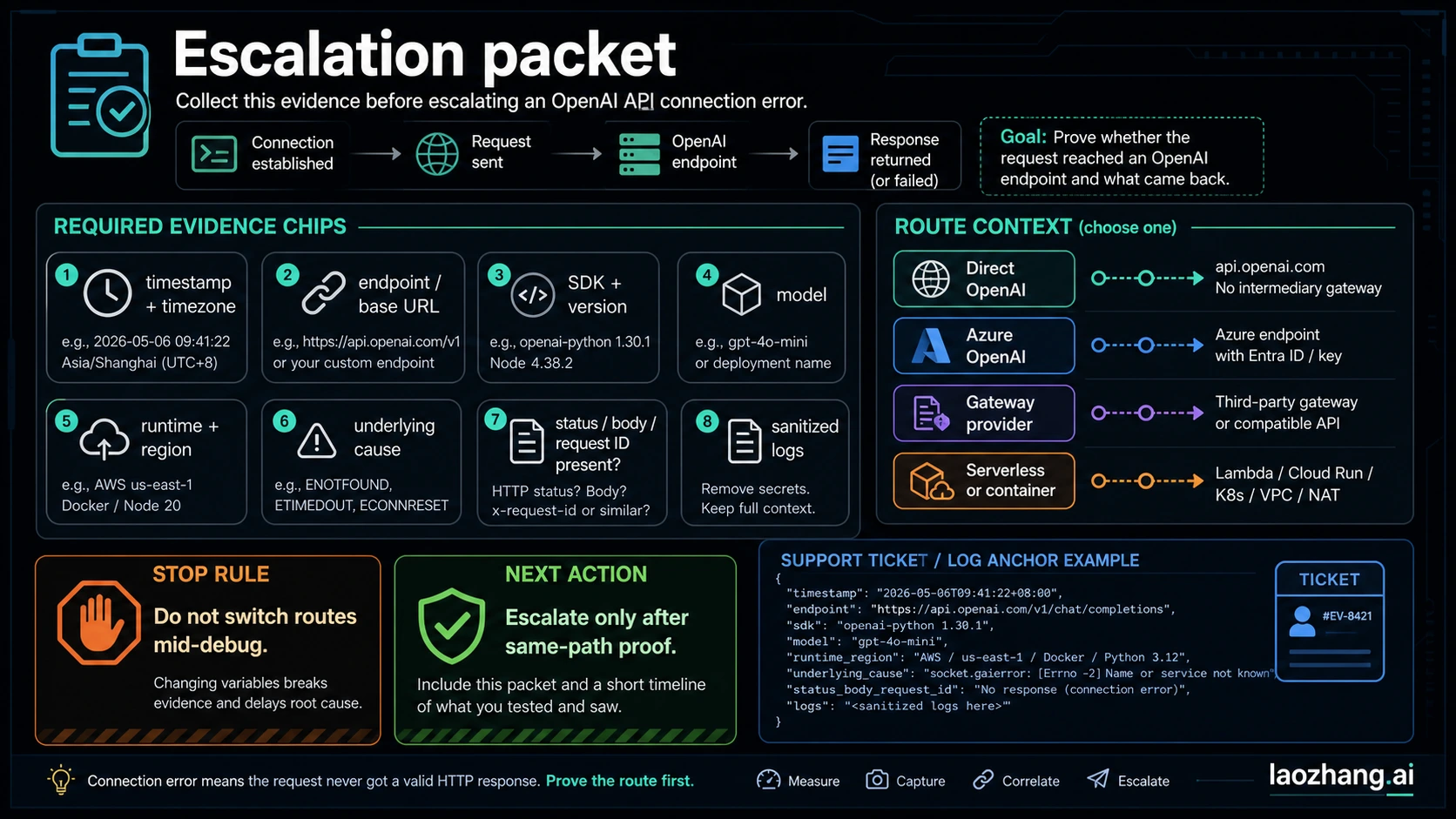
Escalate only after you can hand over a packet instead of a screenshot. Include timestamp and timezone, endpoint or base URL, SDK name and version, model, runtime and region, direct OpenAI versus Azure versus gateway route, underlying exception, whether status/body/request ID existed, and sanitized logs. Never include API keys, full headers with secrets, or customer data.
The packet should also state what you already proved from the same path. For example: status page checked at 2026-05-06 22:40 CST, DNS resolved inside the container, TLS failed with the corporate CA bundle, no request ID returned. That sentence is more useful than ten screenshots.
FAQ
Does APIConnectionError mean OpenAI is down?
No. It means your request could not complete the connection path. OpenAI may be healthy while your proxy, DNS, TLS, firewall, container egress, endpoint, or gateway route is failing. Check the status page, but do not stop there.
Why is there no request ID?
Usually because the request did not reach a point where the API could return a response. A returned API error can include request evidence; a connection-path failure often cannot.
Should I rotate my API key?
Not first. Key rotation helps an authentication owner, not a route that cannot connect. If a 401 is returned, diagnose authentication. If no response is returned, test the route.
Is this the same as a rate limit?
No. Rate limits normally return status evidence such as 429 or rate-limit headers. If your evidence points to quota or rate, use OpenAI API quota exceeded or OpenAI API rate limits.
What proves the fix?
One minimal request from the same runtime, same base URL, same key scope, same model route, and same network path should succeed without hiding the result behind a queue or wrapper.