Claude Opus 4.6 introduced a breaking change that catches many developers off guard: assistant message prefilling no longer works. If you recently upgraded your model ID to claude-opus-4-6 and your API calls started returning 400 errors, you are not alone. This guide walks you through exactly what changed, why Anthropic made this decision, and three concrete strategies to fix your code with complete before-and-after examples.
TL;DR
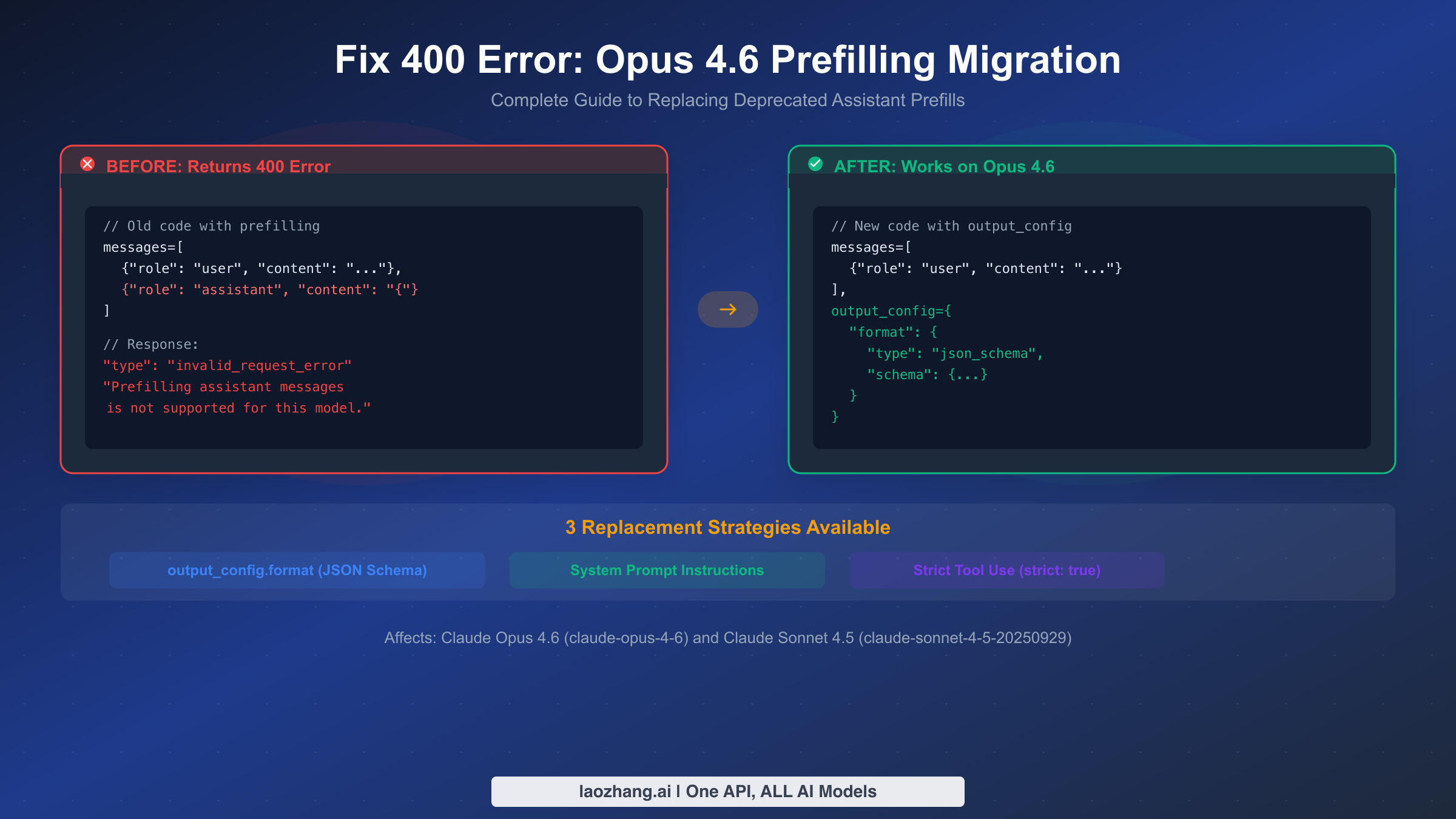
Anthropic removed assistant message prefilling support in Claude Opus 4.6 (claude-opus-4-6) and Sonnet 4.5 (claude-sonnet-4-5-20250929). Any API request that includes a partially-filled assistant message as the last item in the messages array will return a 400 invalid_request_error with the message: "Prefilling assistant messages is not supported for this model."
You have three replacement options, depending on your use case:
| Strategy | Best For | Complexity | JSON Guarantee |
|---|---|---|---|
output_config.format | Structured JSON responses | Medium | Yes, schema-validated |
| System prompt instructions | Output style and format control | Low | No guarantee |
Strict tool use (strict: true) | Agentic workflows with function calls | High | Yes, for tool parameters |
The fastest fix is to remove the prefilled assistant message from your messages array and add format instructions to your system prompt instead. For production applications that require guaranteed JSON output, migrate to output_config.format with a JSON schema definition. The rest of this guide shows you exactly how to implement each approach.
Why Your Claude API Returns 400 After Upgrading to Opus 4.6
Before diving into fixes, it helps to understand what prefilling was and why Anthropic removed it. This context matters because the replacement strategy you choose depends on what you were using prefilling for in the first place.
What prefilling was. In earlier Claude models, you could include an assistant message as the final entry in your messages array. The model would then continue generating from that point, treating your text as the beginning of its response. Developers commonly used this technique to force JSON output by starting with {, to control response format by prefilling with a specific structure, or to steer the model toward a particular response style by providing the opening words.
Here is a typical example of how prefilling looked in practice. You would send a user message asking for data, then append an assistant message containing just an opening brace. The model would pick up from that brace and complete the JSON object, making it highly likely (though never guaranteed) that the response would be valid JSON.
python# Old code that worked on Claude 3.5 Sonnet and earlier
response = client.messages.create(
    model="claude-3-5-sonnet-20241022",
    max_tokens=1024,
    messages=[
        {"role": "user", "content": "List the top 3 programming languages"},
        {"role": "assistant", "content": "{"}  # Prefilling
    ]
)
What happens now on Opus 4.6. When you send this same request with model="claude-opus-4-6", the API immediately rejects it before any token generation begins. The response you get back is not a model output but an error object:
json{
  "type": "error",
  "error": {
    "type": "invalid_request_error",
    "message": "Prefilling assistant messages is not supported for this model."
  }
}
The HTTP status code is 400, meaning this is a client-side error. Your request is malformed according to the new model's requirements. No tokens are consumed and no billing occurs, but your application will fail at this point if you do not handle the error.
Why Anthropic made this change. The removal of prefilling is part of a broader architectural shift in Claude 4.x models toward more robust structured output mechanisms. Prefilling was always a workaround rather than a proper API feature. It had several fundamental limitations: it could not guarantee valid JSON (the model might still produce malformed output), it consumed tokens from your context window without clear attribution, and it conflicted with newer features like extended thinking where the model needs to control its own response flow. By removing prefilling, Anthropic can offer genuinely guaranteed structured outputs through output_config.format, which validates against a JSON schema at the API level rather than relying on a generation trick.
Which models are affected. Based on current Anthropic documentation (February 2026), prefilling is not supported on Claude Opus 4.6 (claude-opus-4-6) and Claude Sonnet 4.5 (claude-sonnet-4-5-20250929). Older models like Claude 3.5 Sonnet and Claude 3 Opus still support prefilling, so existing code targeting those model IDs will continue to work. However, those models will eventually be deprecated, so migration is inevitable.
How to confirm this is your issue. The fastest way to verify that you are hitting the prefilling error specifically (rather than a different 400 error) is to check the error message string in the API response body. The exact text is "Prefilling assistant messages is not supported for this model." If you see a different message, such as "messages: roles must alternate between 'user' and 'assistant'" or "model not found", you are dealing with a different problem. Also check your HTTP client's error handling: some frameworks catch the 400 status code but discard the response body, making it harder to see the actual error message. Ensure your error handler logs the full response JSON, not just the status code.
Three Ways to Replace Prefilling in Your Claude Code
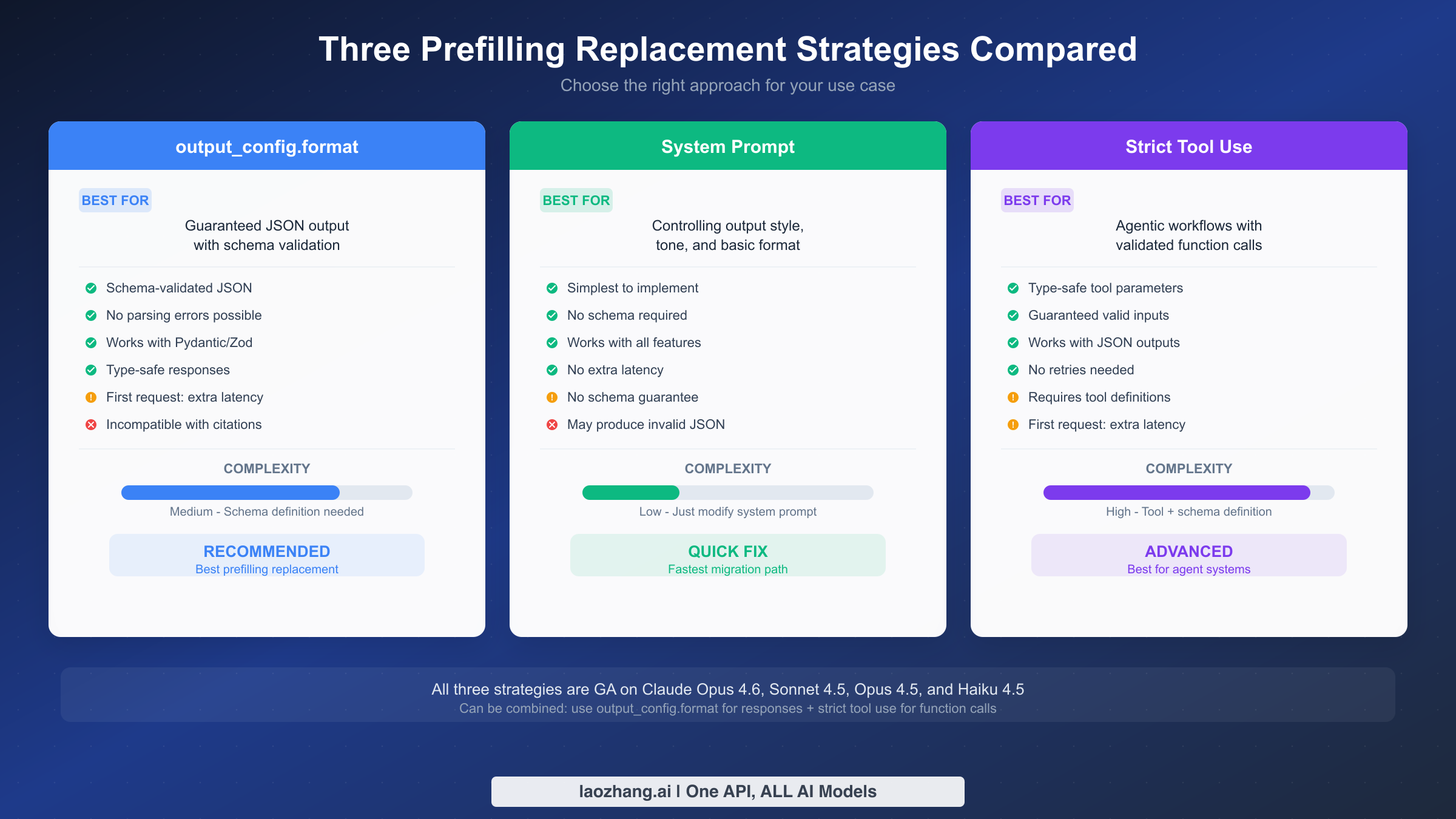
Choosing the right replacement depends on what you were using prefilling for. Each strategy has distinct trade-offs in terms of implementation complexity, output guarantees, and compatibility with other Claude features. Let us examine each approach in detail so you can make an informed decision.
Strategy 1: output_config.format with JSON Schema. This is Anthropic's recommended replacement for prefilling when you need guaranteed structured output. You define a JSON schema that describes the exact shape of the response you want, and the API ensures the model's output conforms to that schema. The validation happens at the API level, not through prompt engineering, which means you will never receive malformed JSON.
The key advantage is reliability. Unlike prefilling, which only nudged the model toward JSON output, output_config.format provides a hard guarantee. If you define a schema with specific required fields, the response will always contain those fields with the correct types. This eliminates the need for retry logic or JSON parsing error handling that was common with prefilling-based approaches. The trade-off is that you need to define a schema upfront, and the first request with a new schema incurs additional latency as the API compiles the schema constraints. Subsequent requests with the same schema are fast.
One important limitation to be aware of: output_config.format is currently incompatible with citations. If your application uses Claude's citation feature, you will need to choose a different strategy.
Strategy 2: System prompt instructions. This is the simplest migration path and works well when you do not need strict schema validation. Instead of prefilling the assistant message to hint at the desired format, you include explicit formatting instructions in the system prompt. For example, you might add "Always respond in valid JSON with the following structure:" followed by an example.
The advantage is zero additional complexity. You do not need to define schemas, install new SDK versions, or change your response parsing logic. The system prompt approach also works with all Claude features including citations, extended thinking, and tool use. The downside is that there is no guarantee the model will produce valid JSON every time. Claude 4.x models are highly reliable at following system prompt instructions, but edge cases exist, particularly with very complex nested structures or when the model needs to communicate uncertainty.
Strategy 3: Strict tool use with strict: true. This approach is best suited for agentic workflows where you need the model to produce structured data as part of a function calling pipeline. You define tools with input schemas and set strict: true on each tool definition. The API then guarantees that the tool call parameters conform to the schema, similar to how output_config.format works for direct responses.
This strategy makes the most sense when you are already using tool calling in your application. You can define a "response" tool whose sole purpose is to structure the model's output, effectively turning tool use into a structured output mechanism. The complexity is higher than the other two approaches because you need tool definitions, and you must handle tool use responses differently from regular text responses. However, you can combine strict tool use with output_config.format: use the former for function call parameters and the latter for direct responses, giving you full coverage across your application.
| Feature | output_config.format | System Prompt | Strict Tool Use |
|---|---|---|---|
| JSON guaranteed | Yes | No | Yes (tool params) |
| Schema required | Yes | No | Yes |
| First-request latency | Higher | None | Higher |
| Works with citations | No | Yes | Yes |
| Works with thinking | Yes | Yes | Yes |
| Implementation effort | Medium | Low | High |
| Best for | API responses | Quick migration | Agent systems |
Step-by-Step Migration with Code Examples
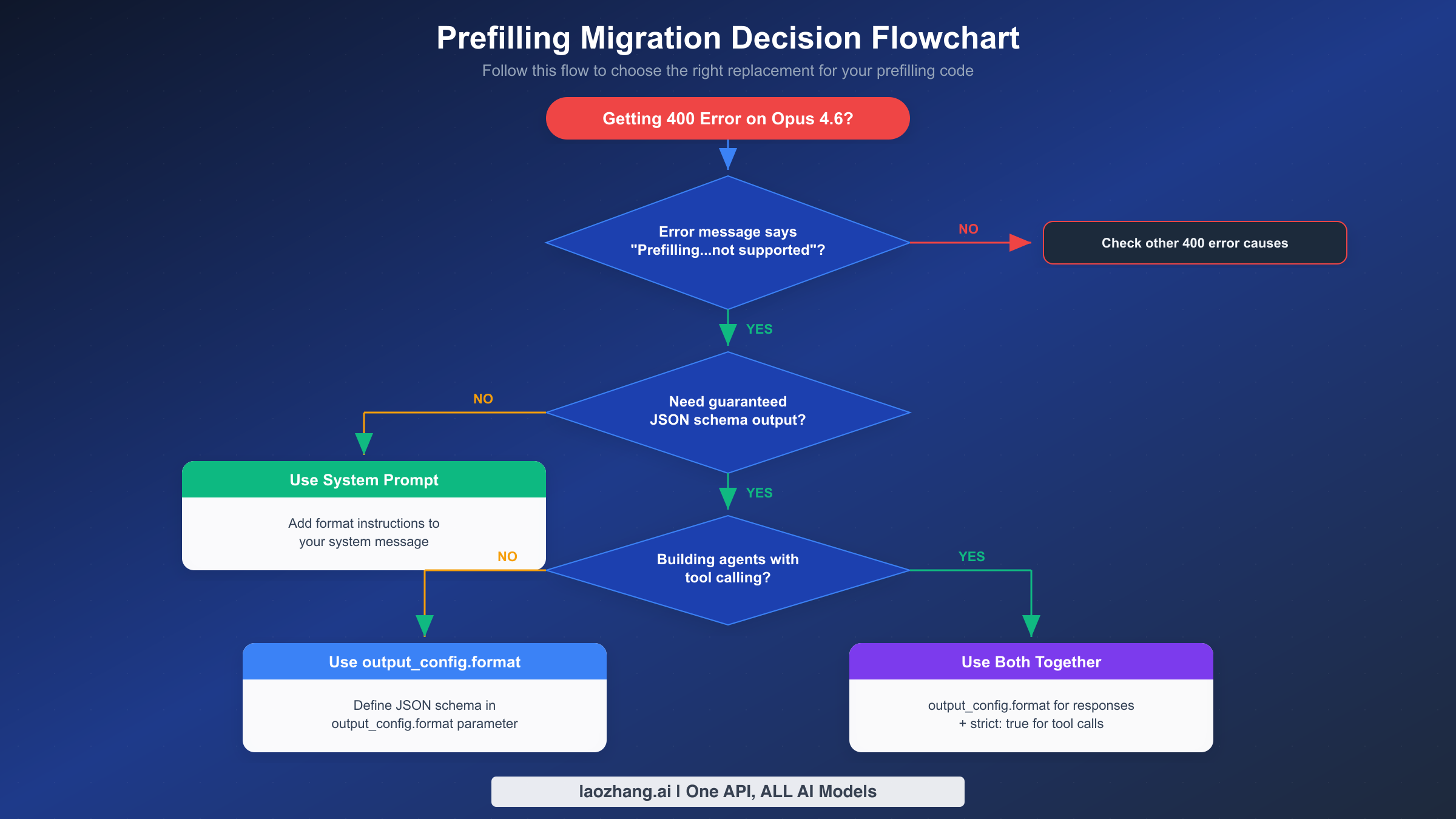
This section provides complete before-and-after code for each replacement strategy. You can copy these examples directly into your codebase. Every example uses the current Anthropic SDK versions and follows the official API specification as of February 2026.
Migration Path 1: From prefilling to output_config.format
This is the most common migration path for applications that used prefilling to force JSON output. The old code included an assistant message with an opening brace; the new code uses a structured schema definition instead.
Before (broken on Opus 4.6):
pythonimport anthropic

client = anthropic.Anthropic()

# This returns 400 on Opus 4.6
response = client.messages.create(
    model="claude-opus-4-6",
    max_tokens=1024,
    system="You are a helpful assistant that provides data in JSON format.",
    messages=[
        {"role": "user", "content": "List the top 3 programming languages by popularity"},
        {"role": "assistant", "content": "{"}  # BREAKS on Opus 4.6
    ]
)
After (works on Opus 4.6):
pythonimport anthropic

client = anthropic.Anthropic()

response = client.messages.create(
    model="claude-opus-4-6",
    max_tokens=1024,
    system="You are a helpful assistant that provides data in JSON format.",
    messages=[
        {"role": "user", "content": "List the top 3 programming languages by popularity"}
    ],
    output_config={
        "format": {
            "type": "json_schema",
            "schema": {
                "type": "object",
                "properties": {
                    "languages": {
                        "type": "array",
                        "items": {
                            "type": "object",
                            "properties": {
                                "name": {"type": "string"},
                                "rank": {"type": "integer"},
                                "description": {"type": "string"}
                            },
                            "required": ["name", "rank", "description"],
                            "additionalProperties": False
                        }
                    }
                },
                "required": ["languages"],
                "additionalProperties": False
            }
        }
    }
)

# Response content is guaranteed valid JSON matching your schema
import json
data = json.loads(response.content[0].text)
print(data["languages"][0]["name"])  # Guaranteed to exist
If you use Pydantic for data validation, the Anthropic Python SDK provides a convenient .parse() method that combines schema generation and response parsing in one step:
pythonfrom pydantic import BaseModel
from typing import List

class Language(BaseModel):
    name: str
    rank: int
    description: str

class LanguageList(BaseModel):
    languages: List[Language]

# Pydantic integration - schema auto-generated from model
response = client.messages.parse(
    model="claude-opus-4-6",
    max_tokens=1024,
    messages=[
        {"role": "user", "content": "List the top 3 programming languages by popularity"}
    ],
    output_format=LanguageList,
)

# response.parsed is already a LanguageList instance
for lang in response.parsed.languages:
    print(f"{lang.rank}. {lang.name}: {lang.description}")
TypeScript equivalent:
typescriptimport Anthropic from "@anthropic-ai/sdk";
import { z } from "zod";

const client = new Anthropic();

// Using Zod schema
const LanguageSchema = z.object({
  languages: z.array(z.object({
    name: z.string(),
    rank: z.number(),
    description: z.string(),
  })),
});

const response = await client.messages.create({
  model: "claude-opus-4-6",
  max_tokens: 1024,
  messages: [
    { role: "user", content: "List the top 3 programming languages by popularity" }
  ],
  output_config: {
    format: {
      type: "json_schema",
      schema: LanguageSchema,
    },
  },
});

const data = JSON.parse(response.content[0].text);
console.log(data.languages[0].name);
Migration Path 2: From prefilling to system prompt
This is the fastest migration when you do not need schema-level guarantees. You simply remove the assistant message and move the format instructions into the system prompt.
Before (broken on Opus 4.6):
pythonresponse = client.messages.create(
    model="claude-opus-4-6",
    max_tokens=1024,
    messages=[
        {"role": "user", "content": "Analyze this code for bugs"},
        {"role": "assistant", "content": "## Bug Analysis\n\n"}  # BREAKS
    ]
)
After (works on Opus 4.6):
pythonresponse = client.messages.create(
    model="claude-opus-4-6",
    max_tokens=1024,
    system=(
        "You are a code review assistant. Always structure your response as follows:\n"
        "1. Start with a '## Bug Analysis' heading\n"
        "2. List each bug with severity level\n"
        "3. Provide fix suggestions for each bug"
    ),
    messages=[
        {"role": "user", "content": "Analyze this code for bugs"}
    ]
)
The system prompt approach is particularly effective for controlling response style and structure without requiring JSON. If you were using prefilling to start the response with specific text like a heading or a particular phrase, this is almost always the right replacement strategy. One technique that works well is to include an explicit example of the desired output format in the system prompt. Instead of hoping the model follows vague instructions, show it exactly what the first few lines of a good response look like. Claude 4.x models are excellent at following demonstrated patterns, and this approach is more reliable than the old prefilling hack while remaining far simpler than defining a full JSON schema.
For cases where you need consistent formatting across thousands of API calls (for example, a customer-facing chatbot that must always respond in a specific tone), combine the system prompt with a few-shot example in the user message. Include one or two examples of the question-answer format you want, then ask the actual question. This gives the model strong guidance without any of the limitations of prefilling or the overhead of schema definitions.
Migration Path 3: From prefilling to strict tool use
This path is ideal when you are building agents or need structured function call parameters. You define a tool with a strict schema, and the model's tool calls are guaranteed to match that schema.
Before (broken on Opus 4.6):
pythonresponse = client.messages.create(
    model="claude-opus-4-6",
    max_tokens=1024,
    messages=[
        {"role": "user", "content": "What's the weather in Tokyo?"},
        {"role": "assistant", "content": '{"tool": "get_weather", "args": {"city": "'}
    ]
)
After (works on Opus 4.6):
pythonresponse = client.messages.create(
    model="claude-opus-4-6",
    max_tokens=1024,
    messages=[
        {"role": "user", "content": "What's the weather in Tokyo?"}
    ],
    tools=[
        {
            "name": "get_weather",
            "description": "Get current weather for a city",
            "strict": True,
            "input_schema": {
                "type": "object",
                "properties": {
                    "city": {"type": "string", "description": "City name"},
                    "units": {
                        "type": "string",
                        "enum": ["celsius", "fahrenheit"],
                        "description": "Temperature units"
                    }
                },
                "required": ["city"],
                "additionalProperties": False
            }
        }
    ]
)

# Tool calls are guaranteed to match the schema
for block in response.content:
    if block.type == "tool_use":
        print(f"Tool: {block.name}")
        print(f"Input: {block.input}")  # Always valid JSON matching schema
cURL example for output_config.format:
bashcurl https://api.anthropic.com/v1/messages \
  -H "content-type: application/json" \
  -H "x-api-key: $ANTHROPIC_API_KEY" \
  -H "anthropic-version: 2023-06-01" \
  -d '{
    "model": "claude-opus-4-6",
    "max_tokens": 1024,
    "messages": [
      {"role": "user", "content": "List 3 programming languages"}
    ],
    "output_config": {
      "format": {
        "type": "json_schema",
        "schema": {
          "type": "object",
          "properties": {
            "languages": {
              "type": "array",
              "items": {
                "type": "object",
                "properties": {
                  "name": {"type": "string"},
                  "rank": {"type": "integer"}
                },
                "required": ["name", "rank"],
                "additionalProperties": false
              }
            }
          },
          "required": ["languages"],
          "additionalProperties": false
        }
      }
    }
  }'
Common Pitfalls and Edge Cases
Even after you remove the prefilled assistant message and implement one of the three replacement strategies, there are several subtle issues that can trip up your migration. This section covers the most common problems developers encounter, based on GitHub issues, community reports, and the official migration documentation.
Extended thinking and prefill interaction. If your application previously used prefilling alongside Claude's thinking feature, you need to be especially careful during migration. Opus 4.6 changed the thinking API as well: thinking: {type: "enabled", budget_tokens: 32000} is deprecated in favor of thinking: {type: "adaptive"} combined with the new effort parameter. Attempting to use the old thinking configuration with the old prefilling pattern will produce a different error than just the prefilling error alone, which can make debugging confusing.
The correct migration for applications using both features looks like this:
python# Before: prefilling + old thinking (broken on Opus 4.6)
response = client.messages.create(
    model="claude-opus-4-6",
    max_tokens=16000,
    thinking={"type": "enabled", "budget_tokens": 10000},
    betas=["interleaved-thinking-2025-05-14"],
    messages=[
        {"role": "user", "content": "Analyze this dataset"},
        {"role": "assistant", "content": "{"}
    ]
)

# After: output_config + adaptive thinking (works on Opus 4.6)
response = client.messages.create(
    model="claude-opus-4-6",
    max_tokens=16000,
    thinking={"type": "adaptive"},
    output_config={
        "effort": "high",
        "format": {
            "type": "json_schema",
            "schema": {
                "type": "object",
                "properties": {
                    "analysis": {"type": "string"},
                    "key_findings": {
                        "type": "array",
                        "items": {"type": "string"}
                    }
                },
                "required": ["analysis", "key_findings"],
                "additionalProperties": False
            }
        }
    },
    messages=[
        {"role": "user", "content": "Analyze this dataset"}
    ]
)
# No beta headers needed - both features are GA on Opus 4.6
Notice three changes happening simultaneously: prefilling removed, thinking configuration updated, and the beta header dropped. Missing any one of these changes will produce a different error, so handle them together.
Tool parameter quoting differences. Opus 4.6 handles JSON escaping differently in tool call parameters compared to earlier models. If your code relies on specific JSON formatting patterns in tool call inputs (for example, assuming double-escaped quotes or particular whitespace formatting), you may encounter parsing failures even though the tool call is semantically correct. The fix is straightforward: always use a standard JSON parser (json.loads() in Python, JSON.parse() in JavaScript) rather than string matching or regex extraction on tool call parameters.
The additionalProperties: false requirement. When using output_config.format with type: "json_schema", every object in your schema must include "additionalProperties": false. This is not just a best practice; the API will reject schemas that omit this field. If you are generating schemas programmatically from data classes or TypeScript interfaces, make sure your schema generator adds this property. Pydantic and Zod handle this automatically when used with the respective SDK methods, but custom schema generators often miss it.
python# This will be rejected by the API
bad_schema = {
    "type": "object",
    "properties": {"name": {"type": "string"}},
    "required": ["name"]
    # Missing: "additionalProperties": false
}

# This works
good_schema = {
    "type": "object",
    "properties": {"name": {"type": "string"}},
    "required": ["name"],
    "additionalProperties": False  # Required!
}
Version checking in multi-model applications. If your application supports multiple Claude models (for example, using Opus 4.6 for complex tasks and Haiku 4.5 for simple ones), you need conditional logic for prefilling. You cannot use the same messages array for both model paths. The cleanest approach is to build your messages array dynamically based on the target model, or better yet, migrate all model paths to one of the three replacement strategies, which work consistently across all current Claude models.
Streaming and output_config.format. When using output_config.format with streaming enabled, the response still arrives as incremental text chunks. The JSON is not validated until the full response is complete. This means you cannot reliably parse partial JSON from stream chunks. If you need incremental processing, consider using the system prompt approach for streaming scenarios and output_config.format for non-streaming requests. Alternatively, design your schema to use top-level arrays where each element can be processed independently as it arrives.
Vertex AI and Amazon Bedrock considerations. If you access Claude through Google Cloud's Vertex AI or Amazon Bedrock rather than the direct Anthropic API, the prefilling restriction applies identically. The error message and behavior are the same regardless of the hosting platform. However, the SDK method names and parameter paths may differ slightly. On Vertex AI, the output_config parameter is passed through the same messages API structure. On Bedrock, ensure you are using the latest version of the AWS SDK that supports the output_config parameter, as older SDK versions may not expose this field. Check the platform-specific documentation for the exact parameter mapping, and be aware that new Anthropic API features sometimes take a few days to propagate to Vertex AI and Bedrock after they launch on the direct API.
Handling the transition period gracefully. During migration, you may want your application to support both old and new models simultaneously, especially if different customers or environments are on different model versions. A practical approach is to create a wrapper function that checks the model ID and adjusts the request accordingly:
pythondef create_message(client, model, messages, system=None, output_schema=None, **kwargs):
    """Wrapper that handles prefilling differences across model versions."""
    # Models that don't support prefilling
    no_prefill_models = ["claude-opus-4-6", "claude-sonnet-4-5-20250929"]

    # Check if last message is an assistant prefill
    if messages and messages[-1]["role"] == "assistant":
        if model in no_prefill_models:
            # Remove prefill and use output_config instead
            messages = messages[:-1]
            if output_schema:
                kwargs["output_config"] = {
                    "format": {
                        "type": "json_schema",
                        "schema": output_schema
                    }
                }

    return client.messages.create(
        model=model,
        messages=messages,
        system=system,
        **kwargs
    )
This pattern lets you migrate incrementally without breaking existing functionality. As you confirm each code path works with the new approach, you can remove the compatibility layer and use output_config.format directly.
If you encounter other Claude API errors beyond the prefilling issue, such as authentication problems with API keys, you may find the guide on troubleshooting Claude API authentication helpful for diagnosing those separately.
Your Complete Migration Checklist
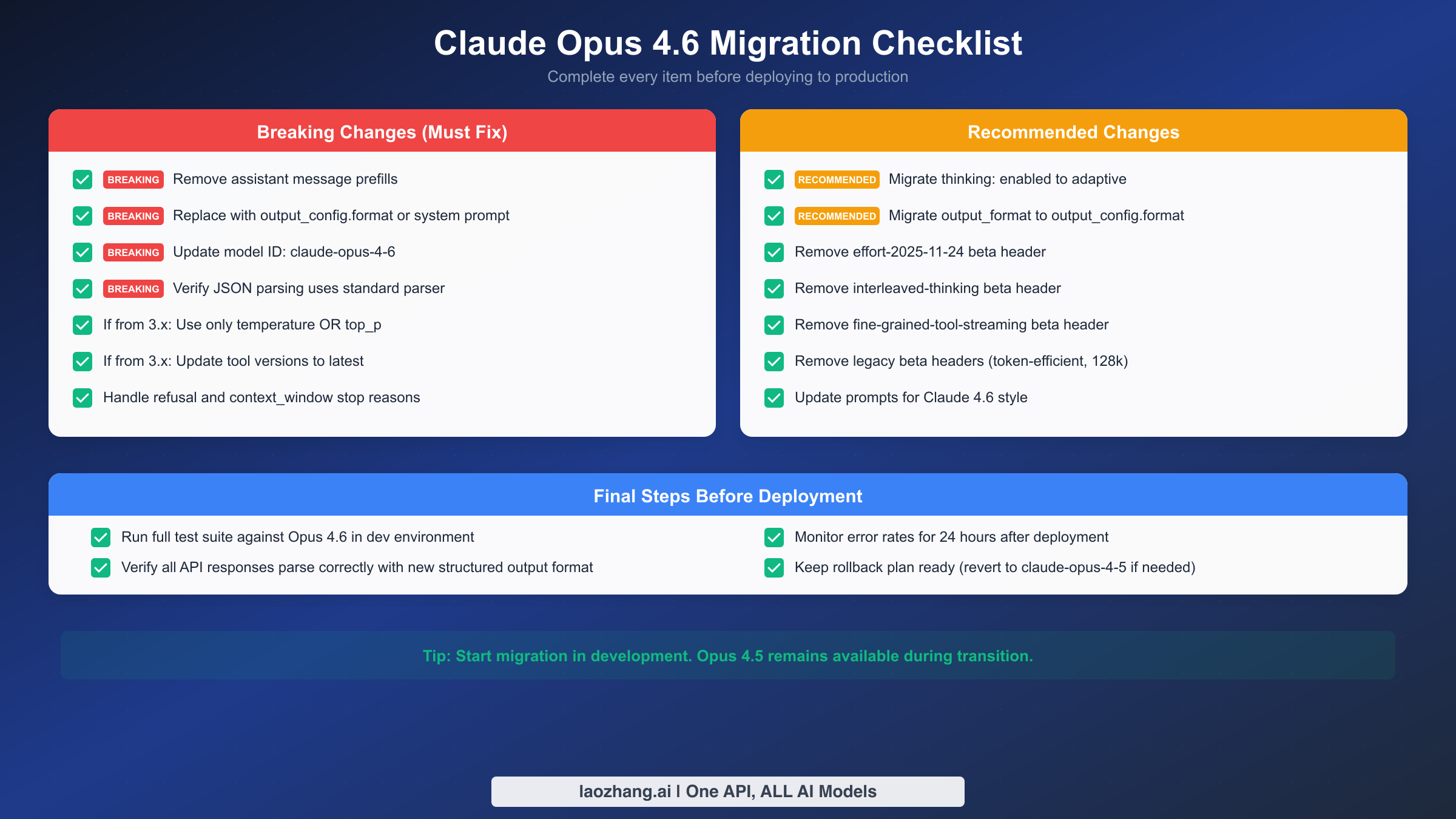
Use this checklist to ensure you have covered every aspect of the migration. Each item is marked as either a breaking change (must fix before deployment) or a recommended change (should fix for best practices). Work through the breaking changes first, then address the recommended items.
Breaking changes that must be fixed:
The following items will cause your API calls to fail if not addressed. Every one of these produces a 400 error or unexpected behavior on Opus 4.6.
First, search your entire codebase for any instance where an assistant message appears as the last element in the messages array. This is the primary cause of the prefilling error. Remove these assistant messages and replace them with one of the three strategies described above. Pay special attention to code paths that dynamically build the messages array, as prefilling logic may be buried in helper functions or middleware.
Second, update your model ID to claude-opus-4-6. If you are pinning to a specific model version rather than using an alias, make sure the string matches exactly. The model ID format for Opus 4.6 does not include a date suffix unlike Sonnet and Haiku models.
Third, verify that your JSON parsing uses a standard parser. If you were extracting JSON from prefilled responses using string slicing (for example, removing the prefilled { from the beginning of the response), that logic is no longer needed and will break with the new structured output format. Use json.loads() or JSON.parse() on the full response content.
Fourth, if you are migrating from Claude 3.x, ensure you are not sending both temperature and top_p in the same request. Opus 4.6 enforces that only one of these sampling parameters can be specified at a time.
Fifth, handle the new stop reasons. Opus 4.6 can return refusal and context_window as stop reasons in addition to the existing end_turn, max_tokens, stop_sequence, and tool_use values. If your code has a switch statement or conditional logic on the stop reason, add cases for these new values to prevent unexpected behavior.
Recommended changes for best practices:
These items will not cause immediate failures but represent deprecated patterns that will be removed in future versions. Addressing them now saves you from another emergency migration later.
Migrate from thinking: {type: "enabled"} to thinking: {type: "adaptive"}. The old thinking configuration still works on Opus 4.6 but is marked as deprecated and will be removed. Adaptive thinking is more efficient because the model dynamically allocates thinking effort based on task complexity rather than using a fixed budget.
Migrate from output_format to output_config.format. The legacy output_format parameter still works but is deprecated. The new output_config parameter is a superset that also supports the effort parameter for controlling thinking effort.
Remove beta headers that are no longer needed. The following beta flags are now GA features on Opus 4.6 and including them has no effect: interleaved-thinking-2025-05-14, effort-2025-11-24, fine-grained-tool-streaming-2025-05-14. Additionally, remove any legacy beta headers like token-efficient-tools-2025-02-19 and output-128k-2025-02-19 which are also GA.
Final deployment steps:
Before pushing to production, run your full test suite against Opus 4.6 in a development environment. Pay particular attention to tests that verify response format, as these are most likely to be affected by the prefilling removal. Verify that all API responses parse correctly with the new structured output format. After deployment, monitor error rates for 24 hours and keep a rollback plan ready. Reverting to claude-sonnet-4-5-20250929 or your previous model is a valid short-term strategy if unexpected issues arise.
Other Breaking Changes in Opus 4.6 You Should Know
While the prefilling removal is the most disruptive change, Opus 4.6 includes several other breaking changes that may affect your application. Addressing these during the same migration window saves you from multiple deployment cycles.
Adaptive thinking replaces fixed thinking budgets. The thinking: {type: "enabled", budget_tokens: N} configuration is deprecated. The replacement is thinking: {type: "adaptive"}, which lets the model decide how much thinking effort to apply based on the complexity of the task. You can influence this with the effort parameter (available at max, high, medium, low, min levels), which is now a GA feature and no longer requires the effort-2025-11-24 beta header. If you were fine-tuning thinking budgets for specific use cases, the effort parameter provides a similar level of control with less operational overhead.
The output_format parameter is deprecated. If you were already using structured outputs through the older output_format parameter, note that this is now deprecated in favor of output_config.format. The syntax is slightly different:
python# Deprecated (still works, will be removed)
response = client.messages.create(
    model="claude-opus-4-6",
    output_format={"type": "json_schema", "schema": {...}},
    ...
)

# Current (recommended)
response = client.messages.create(
    model="claude-opus-4-6",
    output_config={
        "format": {"type": "json_schema", "schema": {...}}
    },
    ...
)
The output_config parameter is a container that also supports effort alongside format, making it a more extensible configuration surface.
New capabilities worth adopting. Opus 4.6 brings several improvements that may justify the migration effort beyond just fixing the prefilling error. The model now supports 128K output tokens (doubled from previous limits), making it suitable for long-form generation tasks that previously required multiple API calls. A new fast mode is available as a research preview at $30/M input and $150/M output tokens, offering approximately 2.5x faster generation for latency-sensitive applications. The Compaction API (beta) enables server-side context compression for long conversations, which is particularly valuable for chat applications that hit context window limits. Data residency controls let you specify where inference processing occurs via the inference_geo parameter, addressing compliance requirements for organizations operating under GDPR or similar data sovereignty regulations.
The pricing structure for Opus 4.6 is $15 per million input tokens and $75 per million output tokens in standard mode (Anthropic documentation, February 2026). For comparison, Sonnet 4.5 offers a significantly lower price point at $3/$15 per MTok, while Haiku 4.5 provides the most cost-effective option at $1/$5 per MTok. If your prefilling migration coincides with a broader cost optimization effort, consider whether some of your Opus workloads could be handled by Sonnet 4.5 with structured outputs, which provides the same output_config.format capabilities at one-fifth the cost.
For a detailed comparison of how Opus 4.6 stacks up against Sonnet 4.5 across different task categories, including benchmarks and pricing trade-offs, see our Claude Opus vs Sonnet comparison.
Stay Updated with Claude API Changes
The Claude API evolves rapidly, and staying current with breaking changes prevents production incidents like the prefilling removal. Anthropic publishes migration guides for each major model release, which are the most reliable source of information about deprecated features and their replacements. The official documentation at platform.claude.com/docs is updated in real-time and should be your primary reference during any migration.
Whether you are fixing the prefilling error right now or planning a broader migration to Opus 4.6, the key takeaway is this: assistant message prefilling is permanently removed from current Claude models. The sooner you migrate to one of the three structured output strategies (output_config.format, system prompts, or strict tool use), the more resilient your application becomes against future API changes. Start with the strategy that matches your current use case, test thoroughly in development, and deploy with confidence.
The migration from prefilling to structured outputs is ultimately a positive change for production applications. While prefilling was a clever hack that worked surprisingly well, it was never designed to be a production-grade feature. The new approaches offer genuine guarantees, better error handling, and integration with the rest of the Claude API ecosystem. The short-term pain of migration pays off in more reliable, maintainable code that will continue working as Claude models evolve.