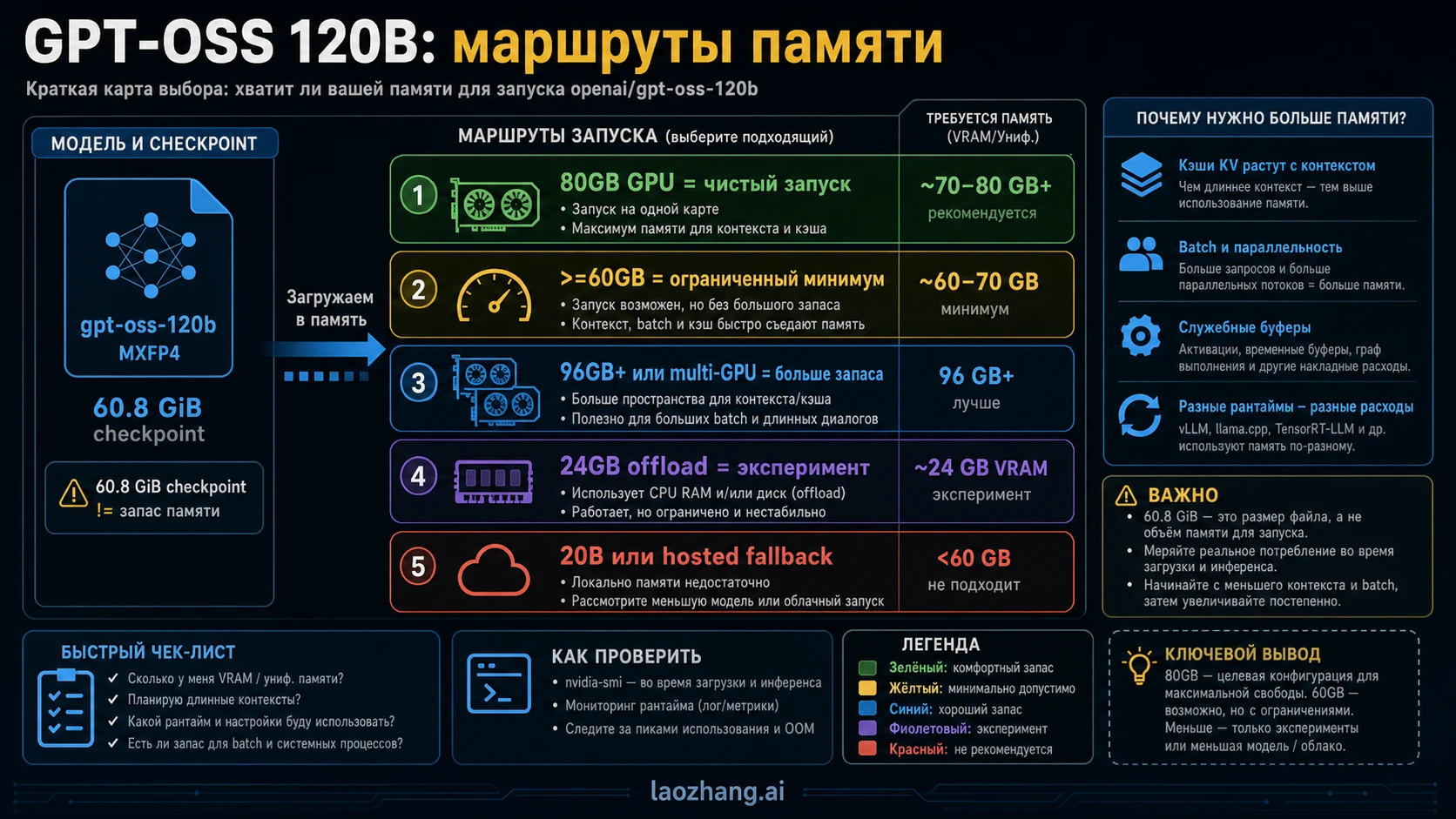
GPT-OSS 120B для нормального локального запуска следует считать моделью класса 80GB GPU memory. В некоторых стеках ее можно приблизить к порогу >=60GB VRAM или unified memory, а checkpoint в MXFP4 занимает около 60.8 GiB, но эти числа не закрывают runtime buffers, KV cache, длину контекста, batch, concurrency и цену CPU offload.
| Маршрут железа | Что означает число памяти | Когда использовать | Стоп-сигнал |
|---|---|---|---|
| 80GB GPU | Чистая цель для одной карты | Оценка, разработка, небольшой надежный локальный запуск | Все равно оставляйте запас под контекст и batch |
| >=60GB VRAM или unified memory | Нижний порог конкретного runtime | Короткие тесты с известным backend и малым контекстом | Не называйте это production headroom |
| 96GB+ или multi-GPU | Маршрут с запасом | Длинный контекст, throughput, меньше OOM | Проверяйте sharding и KV cache до deploy |
| 24GB consumer GPU с offload | Эксперимент | Цель — доказать, что модель загружается | Если скорость или OOM неприемлемы, меняйте маршрут |
| GPT-OSS 20B или hosted/API | Fallback | Локальное железо ниже порога 120B | Не тратьте время на заведомо слабый setup |
Почему 60.8 GiB, >=60GB и 80GB означают разные вещи
Главная ошибка в русскоязычных результатах — смешать размер файла, минимальную загрузку и нормальный рабочий запас. Размер checkpoint относится к артефакту модели. В model card OpenAI для GPT-OSS 120B указан MXFP4 checkpoint около 60.8 GiB, 116.83B total parameters и 5.13B active parameters. Это объясняет компактность модели, но не говорит, что карта на 64GB даст комфортный runtime.
Порог runtime — второй слой. В OpenAI Cookbook для Transformers, vLLM и Ollama встречаются маршруты около >=60GB VRAM или >=60GB VRAM / unified memory. Это граница конкретной реализации: формат весов, backend, context length, batch size, драйверы и cache могут сдвинуть реальную потребность вверх. Если setup загружается только при минимальном контексте, это не рабочий запас, а узкий proof-of-load.
Третий слой — чистая операционная цель. В launch post OpenAI сказано, что GPT-OSS 120B может работать within 80GB memory, а Hugging Face описывает fit on a single 80GB GPU вроде H100 или MI300X. Для человека, который выбирает сервер, арендует GPU или пишет внутреннюю рекомендацию, 80GB — честный короткий ответ. Ниже этого начинается разговор о компромиссах, а не о спокойном запуске.

Эти числа не конфликтуют. 60.8 GiB отвечает за весовой файл, >=60GB описывает узкую возможность загрузки, 80GB описывает более безопасный план. Если назвать одно из чисел универсальным требованием, читатель легко купит или арендует неподходящую конфигурацию.
Официальные факты, от которых стоит отталкиваться
Для fixed facts используйте первичные источники. Форумы, Reddit, Habr и локальные блоги полезны как эксперименты, но они не должны становиться владельцами требований.
| Факт | Источник решения | Практический смысл |
|---|---|---|
| GPT-OSS 120B can run within 80GB memory | OpenAI launch post | 80GB — чистая цель для одной accelerator-class карты |
| GPT-OSS 20B targets 16GB memory | OpenAI launch post | 20B — реалистичный локальный fallback |
| 60.8 GiB checkpoint | OpenAI model card | Размер артефакта меньше полной runtime потребности |
| >=60GB VRAM или unified memory | OpenAI Cookbook runtime guides | Есть нижний runtime floor, но он требует проверки |
| Single 80GB GPU framing | Hugging Face model card и MXFP4 docs | 80GB GPU — более надежный локальный план |
OpenAI launch post, model card PDF, guides for Transformers, Ollama and vLLM are the evidence owners for model facts and runtime floors. Hugging Face model page and MXFP4 documentation explain why a 120B-class open-weight model fits this smaller envelope. Community reports can show three RTX 3090, CPU offload, AMD AI Max, Apple unified memory or Habr-style experiments; they are useful only after the reader knows which facts are official.
Сначала выберите маршрут запуска
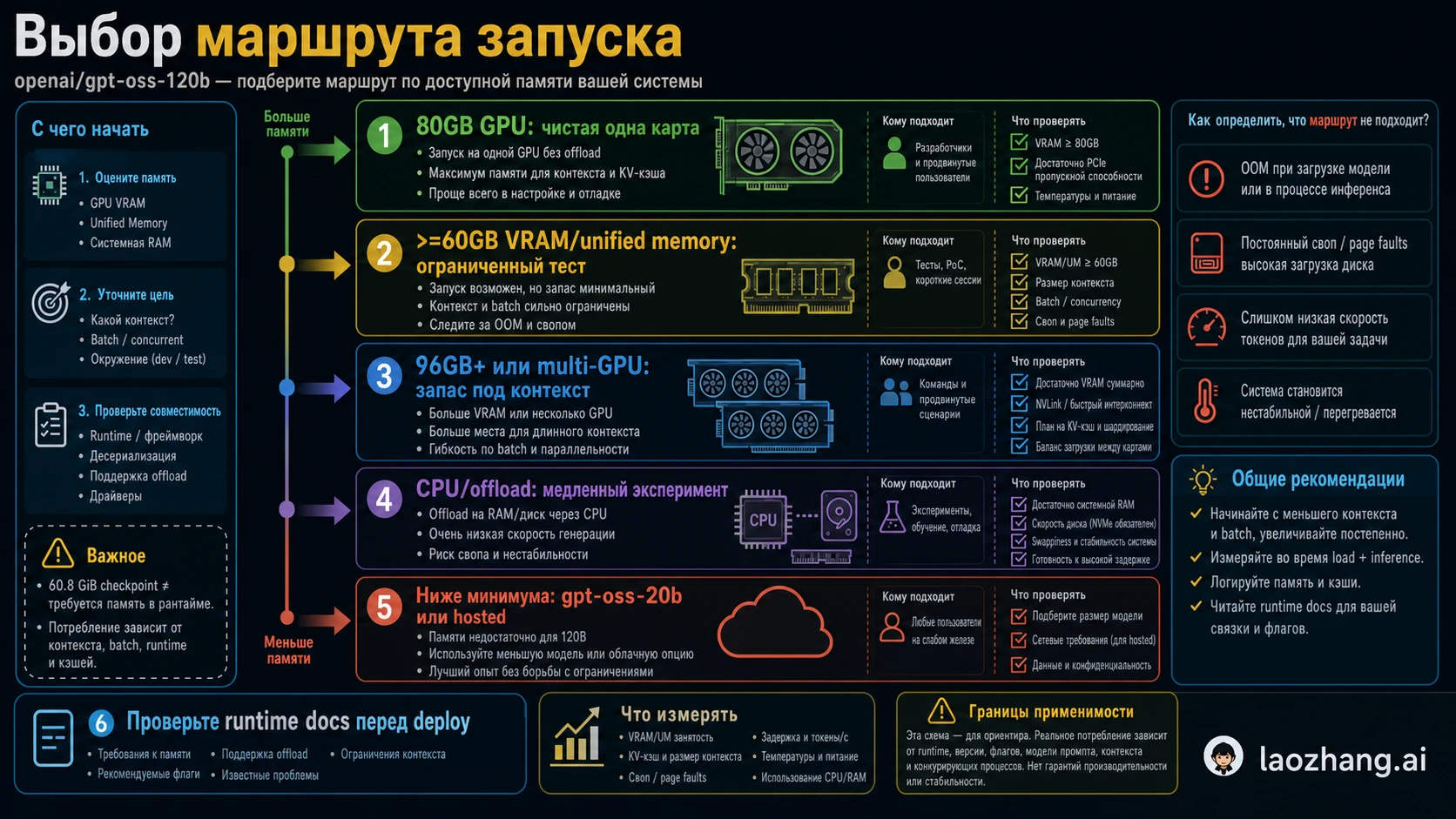
Memory requirement depends on route. Trying to tune before choosing the route usually wastes time.
| Route | Memory posture | Best use | Main risk |
|---|---|---|---|
| Transformers on 80GB GPU | Clean local route | Development, eval, controlled tests | Context and batch still need reserve |
| vLLM on 80GB or multi-GPU | Serving route | Throughput and API serving experiments | KV cache and concurrency raise memory |
| Ollama with >=60GB VRAM or unified memory | Lower-friction local route | Workstation or unified-memory tests | CPU offload may be very slow |
| 96GB+ workstation or multi-GPU | Headroom route | Long context, steady throughput, fewer OOM surprises | Setup complexity and sharding behavior |
| 24GB GPU plus offload | Experiment route | Learning the stack or proof-of-load | Speed and usable context may collapse |
| GPT-OSS 20B | Small fallback | 16GB to 24GB machines | Different quality and capacity |
| Hosted/API | No local memory burden | Product integration without owning GPUs | Cost, limits and availability replace VRAM issues |
Если цель — понять качество 120B, можно арендовать подходящую карту и быстро измерить ответы. Если цель — научиться backend, offload experiment тоже имеет смысл. Если цель — сервис, начинайте с route that has margin.
VRAM, unified memory, RAM и disk не взаимозаменяемы
VRAM is dedicated GPU memory. When results mention H100 80GB, A100 80GB or MI300X, they usually mean that weights, runtime buffers and KV cache mostly stay on the accelerator. This is the memory that matters most for speed and reliability.
Unified memory is a shared pool used by CPU and GPU on some systems. It can make a large model possible without a discrete 80GB GPU, but it does not magically provide the same bandwidth, backend maturity or predictable latency. A unified-memory route must be tested as a route, not treated as an exception that deletes the 80GB planning target.
System RAM matters for CPU offload. It can prevent immediate failure, but it usually pays with tokens per second, loading time and fragile context limits. Disk stores the checkpoint and converted files. The 60.8 GiB checkpoint is a storage fact; runtime memory is the active budget after the file is loaded.
The hidden pressure is KV cache and runtime overhead. Longer prompts, RAG chunks, larger batch size, multiple concurrent requests and serving frameworks all add memory after the model appears to load. A one-prompt demo is not the same as a deployment test.
Что делать с конкретным железом
An 80GB accelerator is the straightforward tier. If you have H100 80GB, A100 80GB, MI300X-class hardware or an equivalent supported route, start there. You still need exact backend checks, but you are not living on the narrowest floor.
60GB to 79GB is a test tier. It may load with the right runtime, quantized checkpoint and small context. It is useful for evaluation, internal experiments and learning. It is not a safe promise for long prompts, batch serving or production concurrency. Treat every successful result as conditional: backend, model file, context, batch and driver must be written down.
96GB+, multi-GPU or cloud GPU is the headroom tier. It costs more and can be more complex, but it becomes rational when failure cost is high. Long context, repeated evaluations, RAG, server experiments and multiple users usually justify extra memory.
16GB to 24GB consumer hardware is a fallback or experiment tier. It should run GPT-OSS 20B first. It can also test offload and quantization, but a successful 120B screenshot does not become a recommendation for others. Write proof-of-load, not deployment-ready.
Stop rules for 4090, 3090, 5090 and consumer GPUs
The practical consumer question is whether 24GB VRAM can run GPT-OSS 120B. Not as a clean GPU-resident route. It may load with CPU offload, unified memory, lower context or special runtime tricks, but the tradeoff appears in speed, stability and usable context.

Use these stop rules. If the model repeatedly fails to load with OOM, stop tuning and change route. If it loads but token speed is unusable, use GPT-OSS 20B, cloud GPU or hosted access. If your job needs long context, do not accept a setup that barely works with short context. If serving is required, do not rely on heavy offload as the reason it fits. If the purpose is curiosity, label the result as an experiment before sharing it.
The same logic applies to a 5090-class card. A newer GPU is not enough if VRAM remains far below the 60GB to 80GB band. More compute does not fix insufficient memory for weights, cache and context.
Context length and batch are the real headroom test
Before calling a machine enough, run the shape of the actual workload. Load the model through the intended runtime. Use the context length you plan to support. Test expected batch size or concurrency. Watch memory with nvidia-smi, runtime logs, platform metrics or the backend dashboard. Record GPU, driver, runtime version, model format, quantization, context length, batch, offload status, peak memory and tokens per second.
If the result survives only with every variable minimized, it is a demo route. Demo routes are useful for learning, but they should not drive procurement, team standards or customer-facing promises. The question is not just whether GPT-OSS 120B starts; the question is whether it stays useful under the work you actually need.
Когда fallback лучше
GPT-OSS 20B exists for a reason. It targets 16GB-class memory and usually gives a faster usable path on laptops and consumer workstations. You trade capacity, but you gain a model that can actually run without turning the whole environment into an offload experiment.
Hosted/API access is another fallback when the job is product integration rather than local hardware ownership. It removes the GPU decision, but it introduces cost, rate limits, account state, provider boundaries and availability checks. Those are different operational problems, not a free solution.
| Real goal | Better route |
|---|---|
| Learn 120B behavior on your own machine | Try constrained/offload route and label it as experiment |
| Build reliable local workflow | Use 80GB+, 96GB+ or multi-GPU |
| Work on 16GB to 24GB hardware | Start with GPT-OSS 20B |
| Ship a feature without GPUs | Use hosted/API and manage limits |
| Compare quality before buying hardware | Rent the right GPU briefly |
Часто задаваемые вопросы
Сколько VRAM нужно GPT-OSS 120B?
Clean local answer is 80GB GPU memory. Some runtime paths can load around >=60GB, but that is a constrained floor that must be tested with your context, batch and backend.
Достаточно ли 60.8 GiB для 64GB GPU?
No. 60.8 GiB is checkpoint size. Runtime buffers, KV cache, context and framework overhead still need memory.
Может ли RTX 4090 или RTX 3090 запустить GPT-OSS 120B?
Not as a clean GPU-resident route. They can be used for offload experiments, but speed and usable context decide whether the result matters.
Может ли 5090 запустить модель?
It depends on real VRAM capacity and runtime support. If it remains far below 60GB to 80GB, it stays in the experiment tier.
Сколько system RAM нужно?
System RAM helps offload and unified-memory routes, but it does not replace VRAM one-for-one. Test the real workload.
Сколько disk space нужно?
Plan for the 60.8 GiB checkpoint plus tokenizer files, cache, converted formats and working room.
vLLM, Transformers or Ollama?
Use Transformers for controlled development, vLLM for serving experiments, and Ollama for lower-friction local tests. Always record exact runtime and memory path.
Когда остановиться?
Stop when the setup only works with tiny context, constant OOM tuning, unusable tokens per second or heavy offload. Move to 20B, larger GPU, multi-GPU/cloud or hosted/API.