시스템 지시를 깨지 않고 API 400 role 미지원 오류를 고치는 방법
unsupported role은 역할 계약 불일치입니다. param, final JSON, endpoint mapping, same-route smoke test로 지시 우선순위를 지켜 복구하세요.
목차
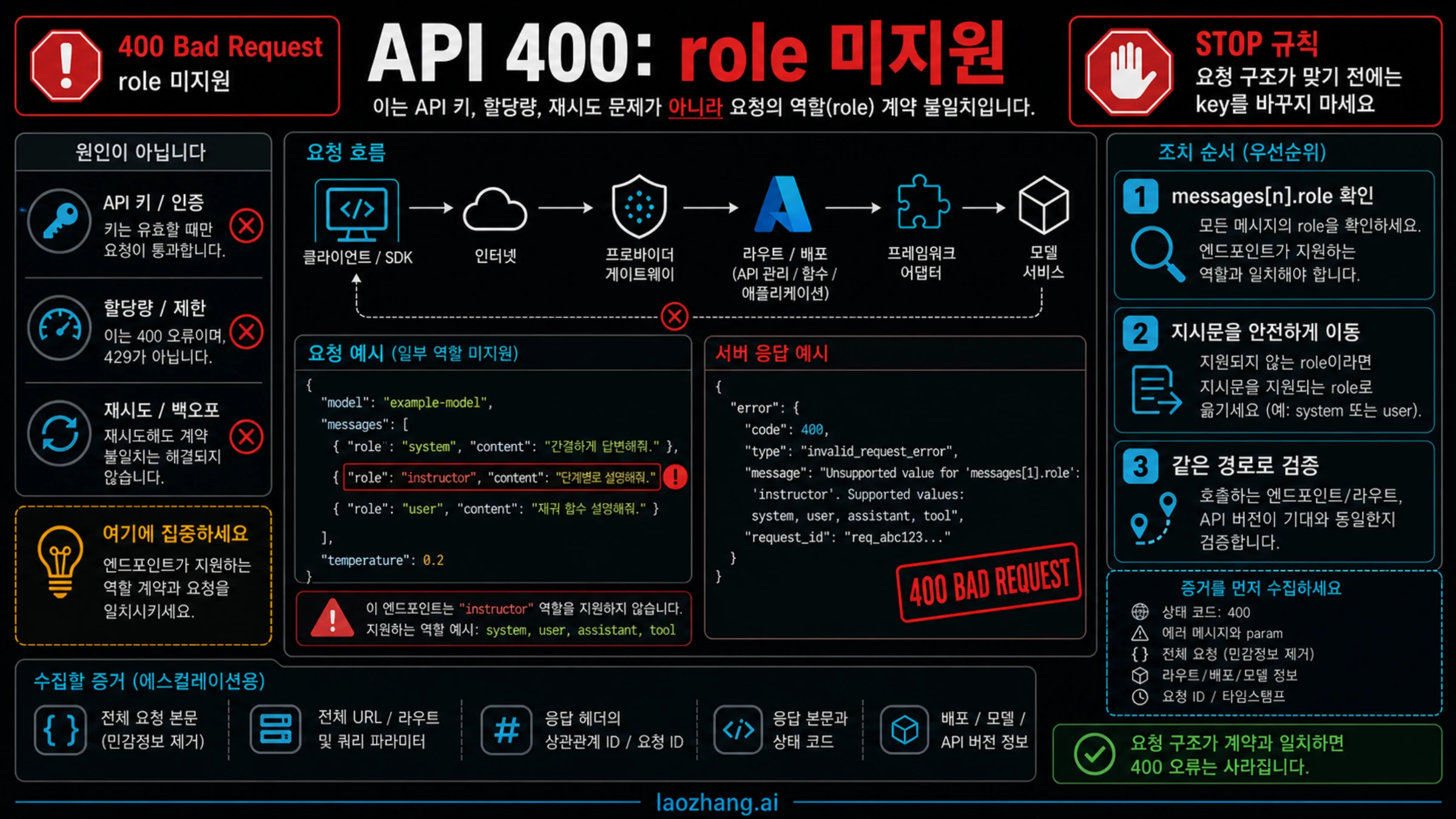
API가 400을 반환하면서 role 'system' is not supported on this model이라고 말하면, 먼저 API 키나 잔액, 재시도 설정을 바꾸지 마세요. 요청은 메시지 구조를 검사하는 라우트까지 도달했고, 그 라우트가 최종으로 전송된 messages[n].role 값을 거부한 것입니다. 이 오류의 주인은 역할 계약 불일치입니다.
먼저 오류 본문에서 param을 확인하고, SDK, 프레임워크, Azure deployment, 호환 gateway, middleware를 지난 뒤 실제 HTTP 경계로 나간 최종 outbound JSON과 대조해야 합니다. 수정은 시스템 지시의 의미와 우선순위를 보존하면서, 같은 라우트가 허용하는 가장 높은 우선순위의 지시 표면으로 옮기는 방식이어야 합니다.
| 실패 단서 | 가능한 소유 레이어 | 첫 안전 조치 | 검증 |
|---|---|---|---|
messages[n].role = system | endpoint, provider gateway, Azure deployment, adapter contract | 지시 텍스트를 보존하고 라우트가 지원하는 instruction surface로 매핑 | 같은 라우트의 최소 요청에서 role error가 사라짐 |
developer가 거부됨 | API version, compatibility layer, framework route | 현재 Chat Completions 라우트가 해당 role을 지원하는지 확인하고, 아니면 Responses instructions 또는 route-specific mapping 사용 | 같은 payload shape가 선택 라우트에서 통과 |
tool 또는 legacy function 실패 | tool-calling protocol 불일치 | 해당 API가 요구하는 tool message와 call id 형식 사용 | tool result가 role error 없이 수락됨 |
| 코드에는 그 role이 없음 | agent framework, prompt wrapper, middleware, SDK adapter | 최종 outbound JSON을 기록하고 주입 메시지를 끄거나 재매핑 | minimal repro와 전체 workflow가 같은 accepted role set 사용 |
여기서 멈추고 키 교체, quota 조정, provider 변경으로 넘어가지 마세요. 그런 조치는 잘못된 역할 계약을 고치지 못합니다. 완료 기준은 같은 provider, base URL, endpoint, API version, model 또는 deployment, SDK adapter, framework route에서 최소 요청이 통과하는 것입니다.
오류 본문부터 읽고 코드를 바꾼다
이 400에서 중요한 부분은 영어 문장이 아니라 구조화된 오류 객체입니다. status, type, code, message, 특히 param을 저장하세요. param이 messages[0].role을 가리키면 첫 메시지 객체가 문제입니다. 더 뒤의 index라면 history, tool result, middleware가 추가한 메시지도 확인해야 합니다.
애플리케이션 코드에 작성한 배열만 보면 부족합니다. 요청은 전송 전에 memory prompt, default system prompt, guardrail middleware, retry wrapper, OpenAI-compatible adapter, gateway 변환을 거칠 수 있습니다. HTTP 요청 직전에 가까운 위치에서 비식별화된 최종 payload를 기록해야 합니다.
{
  "endpoint": "POST /v1/chat/completions",
  "model": "example-model",
  "messages": [
    { "role": "system", "content": "[redacted instruction]" },
    { "role": "user", "content": "[redacted user task]" }
  ]
}
로그는 구조만 증명하면 됩니다. API key, bearer token, cookie, 고객 텍스트, 비공개 시스템 프롬프트, 파일 본문, tool output을 남기지 마세요. 필요한 것은 endpoint, model 또는 deployment, 메시지 index, role, 그리고 어떤 레이어가 최종 payload를 만들었는지입니다.
습관이 아니라 endpoint 기준으로 고친다
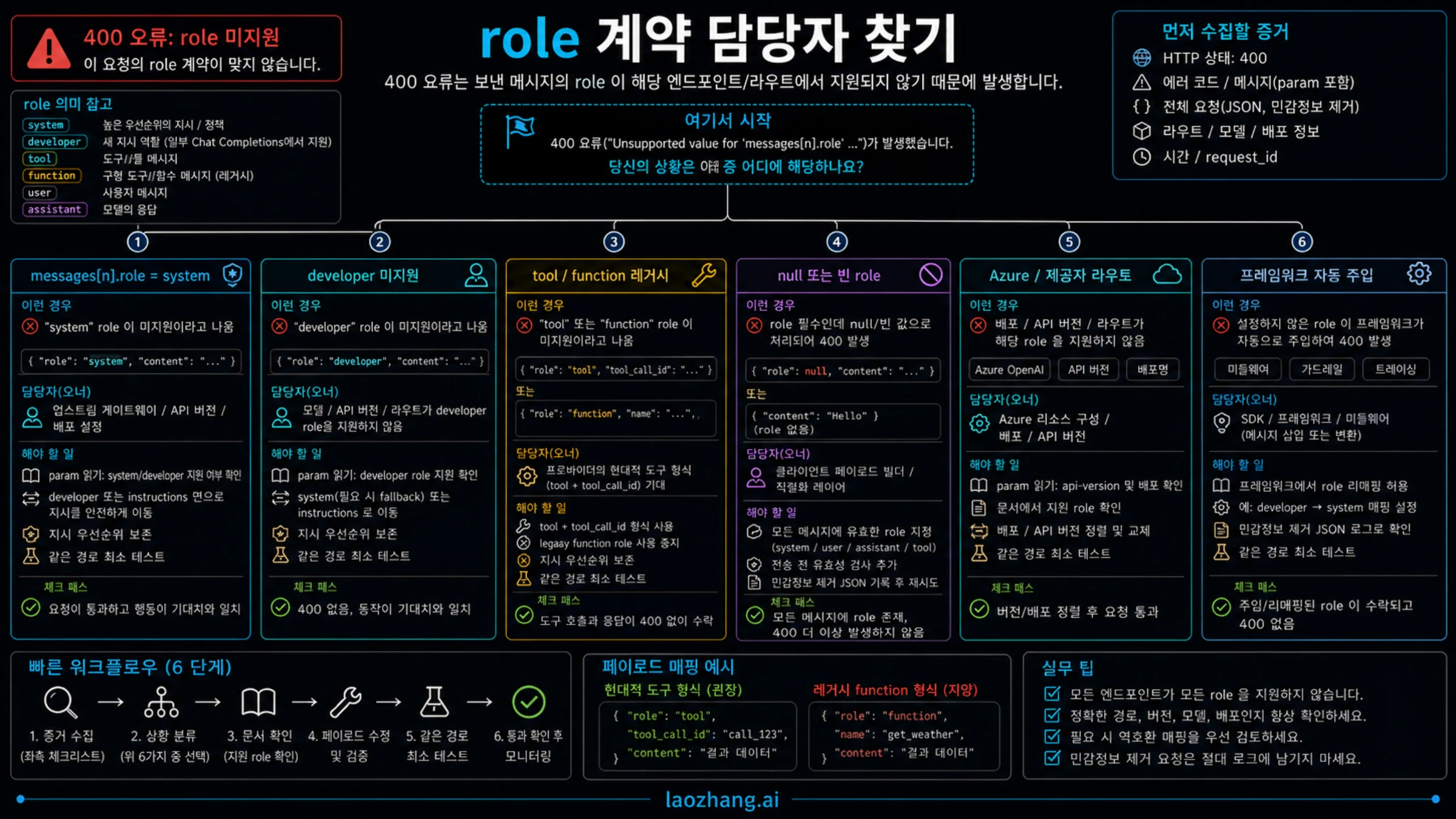
가장 위험한 수정은 system을 무조건 developer로 바꾸거나, 모든 지시를 user 메시지로 낮추는 것입니다. 역할 지원은 endpoint, API version, Azure deployment, provider gateway, SDK, framework adapter 조합에 따라 달라집니다.
2026-05-21 기준으로 OpenAI Responses에는 개발자 지시를 담는 top-level instructions가 있고, 공식 Chat Completions에는 messages 배열과 현재 공식 라우트에서 쓰이는 instruction-style role이 있습니다. 하지만 이 계약은 공식 OpenAI 라우트에 대한 것이며, Azure, 호환 gateway, 오래된 SDK adapter, provider model alias가 같은 역할 집합을 받는다는 뜻은 아닙니다.
현재 공식 Chat Completions 라우트가 developer를 받는다면 다음처럼 옮길 수 있습니다.
{
  "model": "your-selected-model",
  "messages": [
    { "role": "developer", "content": "Follow the support triage rules." },
    { "role": "user", "content": "Classify this API error." }
  ]
}
Responses 라우트라면 장기 지시는 instructions에 두고 사용자 작업은 input으로 보냅니다.
{
  "model": "your-selected-model",
  "instructions": "Follow the support triage rules.",
  "input": "Classify this API error."
}
호환 gateway가 user와 assistant만 받는다면 곧바로 system 지시를 user 메시지로 넣지 마세요. 별도 instruction field, model option, adapter 설정, 다른 upstream route가 있는지 먼저 확인하세요. 없으면 그 fallback은 동작 변경으로 기록해야 합니다.
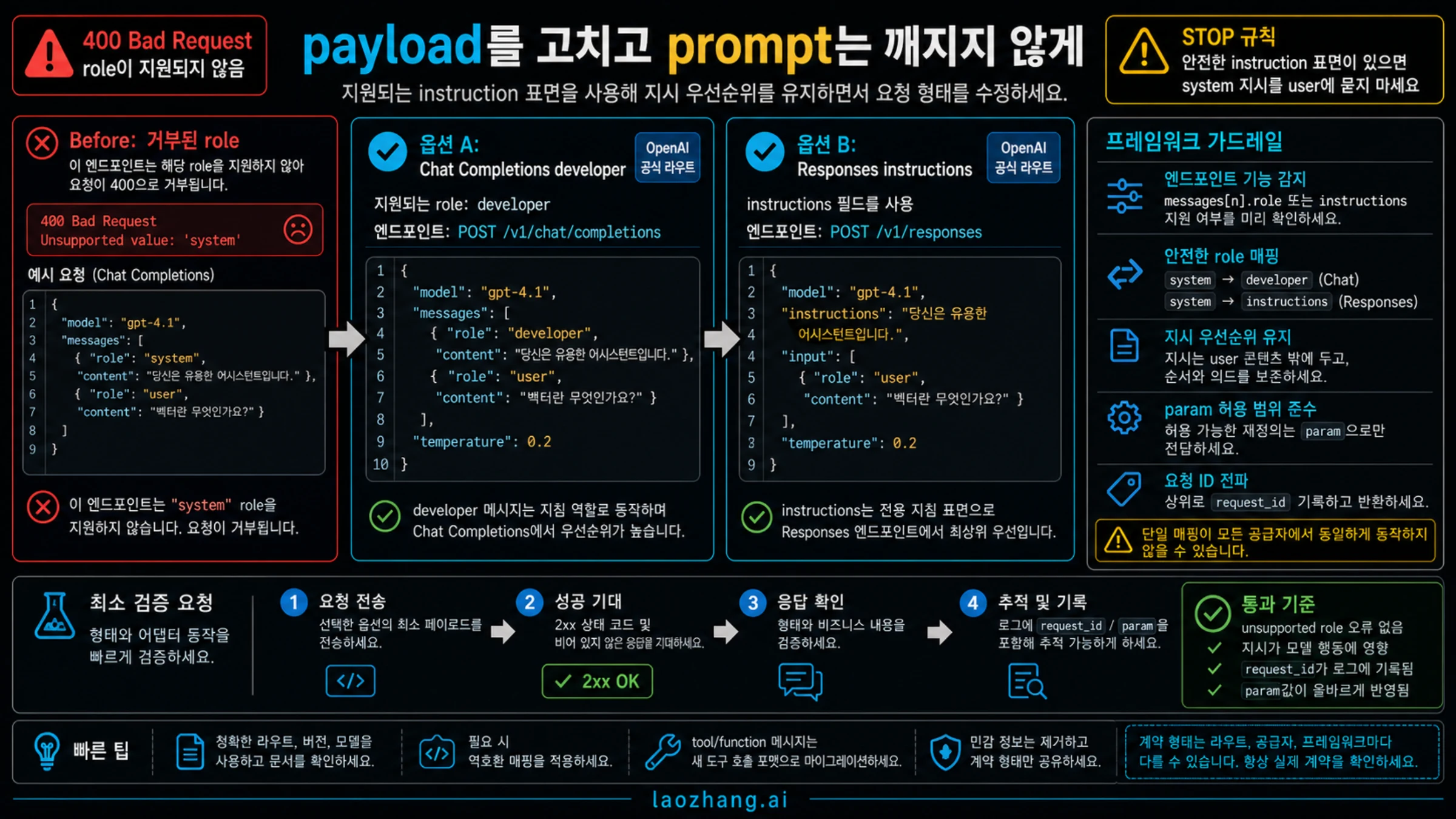
role마다 수리 분기가 다르다
system이 거부되면 목표는 시스템 지시의 제어력을 보존하는 것입니다. 공식 Chat Completions에서는 developer, Responses에서는 instructions, gateway에서는 route-specific field가 될 수 있습니다. 일반 user message로 낮추는 것은 최후의 수단이며, 출력 제어가 약해질 수 있음을 기록해야 합니다.
developer가 거부되면 오래된 compatibility layer, provider의 구형 schema, Azure/API-version 조합이 원인일 가능성이 큽니다. base URL과 API version이 다르면 클라이언트 코드는 거의 같아 보여도 서버의 role contract는 다를 수 있습니다.
tool이 거부되면 role 이름만 보지 말고 tool-calling protocol 전체를 보세요. tool call id, assistant tool call, tool result message shape가 현재 API와 맞아야 합니다. legacy function은 별도 분기이며, 신구 형식을 섞으면 모델이 tool을 지원하더라도 role error가 납니다.
role이 null이거나 빠졌거나 대소문자가 틀렸거나 enum serialization이 깨진 경우에는 client construction bug입니다. 보내기 전에 로컬에서 막으세요.
const allowedRoles = new Set(["developer", "user", "assistant", "tool"]);
for (const [index, message] of messages.entries()) {
  if (!allowedRoles.has(message.role)) {
    throw new Error("Unsupported outbound role at messages[" + index + "].role");
  }
}
이 검사는 provider 문서를 대신하지 않지만, 잘못 만들어진 payload가 production incident로 번지는 것을 막습니다.
프레임워크는 보이지 않는 곳에서 role을 추가할 수 있다
“내 코드는 system을 보내지 않았다”는 말은 애플리케이션 레이어에서는 맞을 수 있습니다. agent framework, chat UI library, RAG wrapper, memory module, tracing middleware, provider adapter가 전송 직전에 messages 배열을 완성하기 때문입니다.
| 레이어 | 확인할 것 | 흔한 실패 |
|---|---|---|
| Agent framework | default system prompt, memory prompt, tool policy, guardrail message | user input 앞에 hidden system 또는 developer 추가 |
| SDK adapter | OpenAI-compatible conversion, enum mapping, legacy tool support | role 이름이 서버 계약과 다른 값으로 직렬화 |
| Gateway | provider mode, upstream route, model alias | gateway는 받고 upstream이 role contract 거부 |
| Azure route | deployment name, api-version, region, model family | 같은 payload가 한 deployment에서는 통과하고 다른 곳에서는 실패 |
| Middleware | retry wrapper, prompt decorator, request logger | wrapper가 매 호출 instruction message 추가 |
관찰 지점은 HTTP request에 가장 가까운 경계여야 합니다. pre-framework object만 보면 서버가 실제로 검사한 artifact를 보지 못한 것입니다. 비식별화된 최종 JSON은 index, role, endpoint, adapter path를 보여 주고 수리 소유자를 좁혀 줍니다.
같은 라우트에서 smoke test한다
다른 라우트에서 성공했다고 원래 라우트가 고쳐진 것은 아닙니다. 같은 라우트란 provider, base URL, endpoint, API version, model 또는 deployment alias, SDK adapter, framework settings, tool protocol이 같다는 뜻입니다.
최소 테스트는 실패한 role branch를 유지해야 합니다.
curl "$BASE_URL/v1/chat/completions" \
  -H "Authorization: Bearer $API_KEY" \
  -H "Content-Type: application/json" \
  -d '{
    "model": "your-selected-model",
    "messages": [
      {"role": "developer", "content": "Answer in one sentence."},
      {"role": "user", "content": "Say ready."}
    ]
  }'
Azure에서 direct OpenAI로 바꾸고, API version을 바꾸고, model alias를 바꾸고, framework를 제거하고, prompt를 단순화하는 일을 한 번에 하면 진단이 아닙니다. 좋은 테스트는 수정한 payload가 통과하거나, 적어도 role contract가 아닌 다른 오류로 바뀌는 것입니다.
최소 테스트가 통과한 뒤에는 role logging을 켠 상태로 전체 app 또는 agent flow를 한 번 실행하세요. framework가 system, developer, tool, legacy function을 다시 주입하는 회귀를 여기서 잡을 수 있습니다.
escalation은 스크린샷보다 증거가 필요하다
같은 라우트의 최소 재현이 여전히 실패하면 provider, Azure 담당자, gateway 운영자, framework maintainer에게 보낼 packet을 만드세요. 오류 문장만 보내면 상대는 endpoint, version, adapter, request id를 다시 물어볼 수밖에 없습니다.
포함할 항목은 다음과 같습니다.
- secret과 사용자 데이터를 제거한 request JSON
- 정확한 base URL과 path 또는 provider route 이름
- model, deployment, region, API version
- SDK, framework, adapter, gateway version
- response body, status code,
param,code - request ID, correlation ID, gateway trace ID
- minimal same-route repro와 시도한 controlled repair 하나
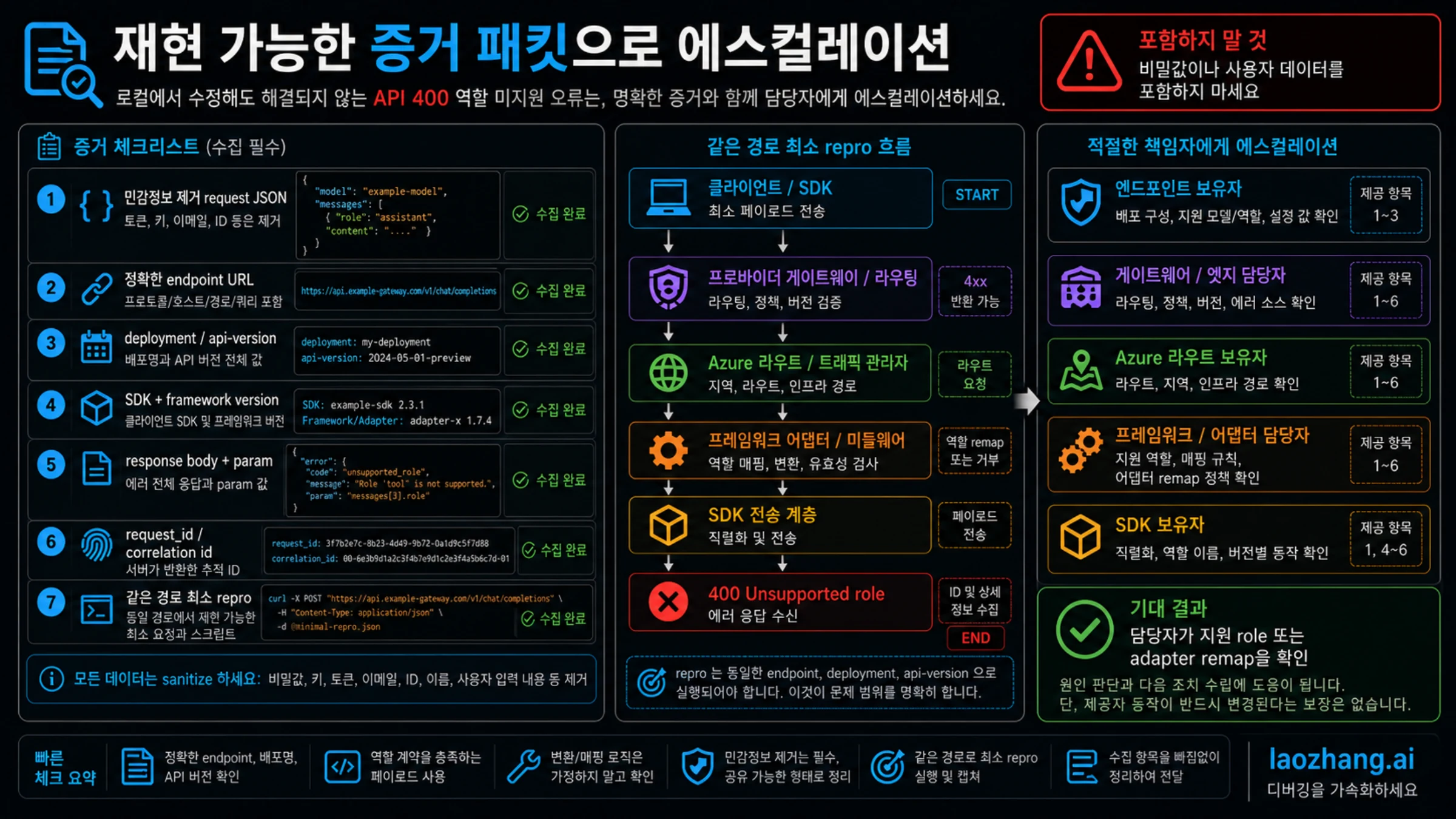
API key, bearer token, private prompt, customer text, file content, tool output, secret이 보이는 screenshot은 넣지 마세요. route가 필요한 role을 지원하지 않는다고 확인되면, 올바른 instruction surface가 있는 endpoint를 쓰거나 adapter를 설정하거나 fallback이 동작을 바꾼다고 명시해야 합니다.
빠른 복구 체크리스트
- response body와 failing
param을 저장한다. - framework와 adapter 변환 이후의 final outbound JSON을 기록한다.
- 소유자를 direct OpenAI, Azure, provider gateway, SDK, framework로 나눈다.
- instruction text를 해당 route가 지원하는 가장 높은 우선순위 surface로 옮긴다.
tool과 legacyfunction은 instruction role과 별도로 검증한다.- minimal same-route smoke test를 실행한다.
- role logging을 유지한 상태로 full workflow를 다시 실행한다.
- 그래도 실패하면 sanitized packet으로 escalation한다.
이 순서는 신호를 깨끗하게 유지합니다. 400을 없애려고 system instruction을 user message로 낮춰서, 나중에 모델 제어가 느슨해지는 문제도 막을 수 있습니다.
자주 묻는 질문
이 오류는 API key가 틀렸다는 뜻인가요?
대부분 아닙니다. 잘못된 key는 authentication 단계에서 실패하고 message role 검증까지 가지 않습니다. 이 오류는 route가 payload를 파싱한 뒤 특정 role을 거부했다는 뜻입니다.
system을 전부 developer로 바꾸면 되나요?
아닙니다. developer는 그 role을 지원하는 Chat Completions 라우트에서만 맞는 방향입니다. Responses에는 instructions가 있고, Azure나 gateway는 다른 계약을 가질 수 있습니다.
system instruction을 user에 넣어도 안전한가요?
최후의 fallback으로만 보세요. user message는 보통 system, developer, top-level instructions와 같은 우선순위를 갖지 않습니다. 오류는 사라져도 동작이 바뀔 수 있습니다.
framework upgrade 뒤에 왜 나타나나요?
default role mapping, hidden instruction message, tool protocol 변환이 바뀌었을 수 있습니다. framework에 넘긴 object가 아니라 final HTTP payload를 봐야 합니다.
direct OpenAI는 되는데 호환 provider에서 실패합니다
provider route의 계약 차이입니다. 같은 payload, endpoint, model alias, provider trace를 저장하고 그 route가 지원하는 roles와 tool message shapes를 확인하세요.
support ticket에는 무엇을 저장해야 하나요?
sanitized request JSON, 정확한 endpoint, model 또는 deployment, API version, SDK와 framework version, response body, param, request ID, minimal same-route repro를 저장하세요. secret과 사용자 데이터는 제거합니다.