Veo 3.1 vs Kling 2.6: Complete AI Video Generator Comparison (2026)
On this page

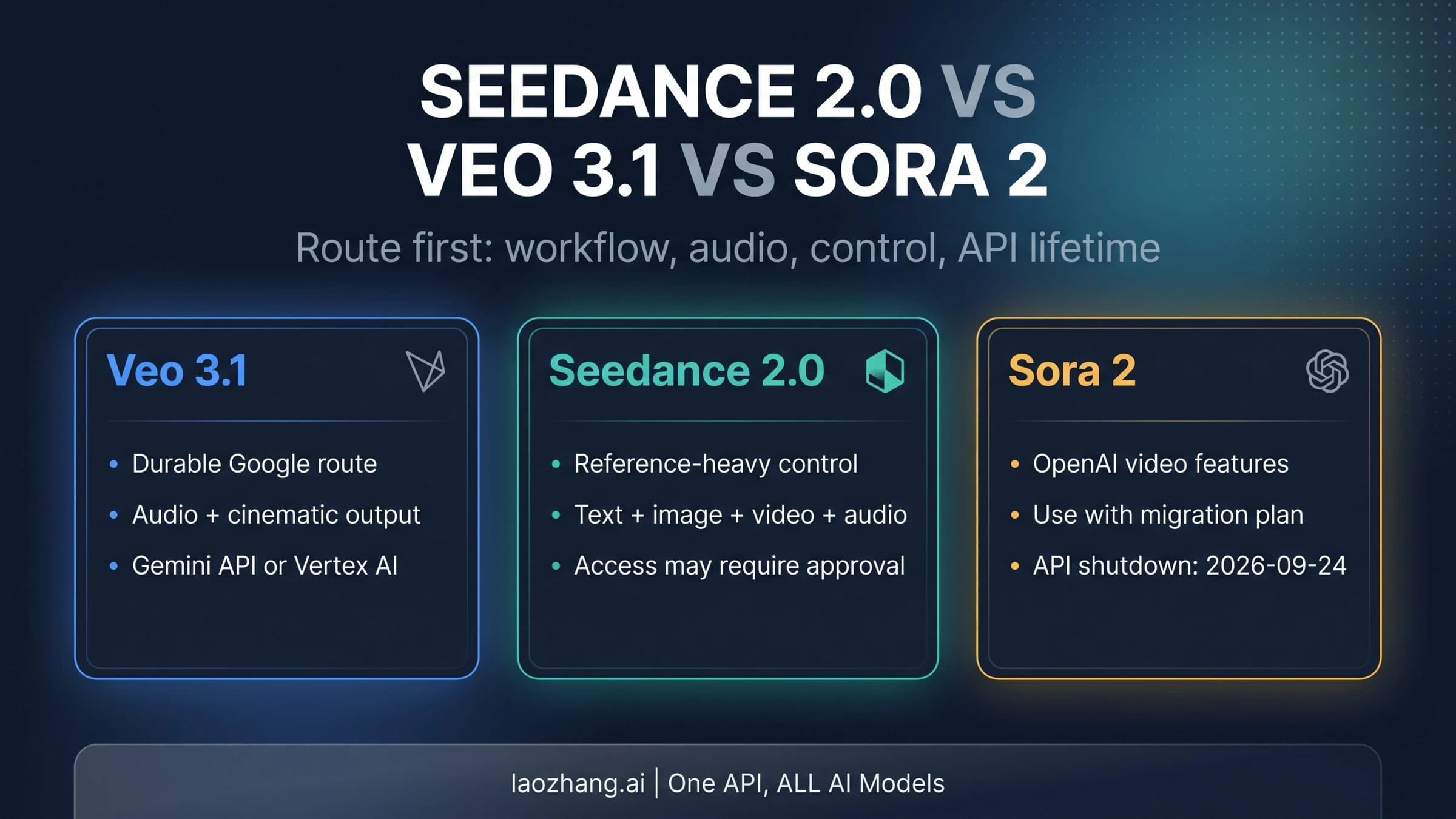
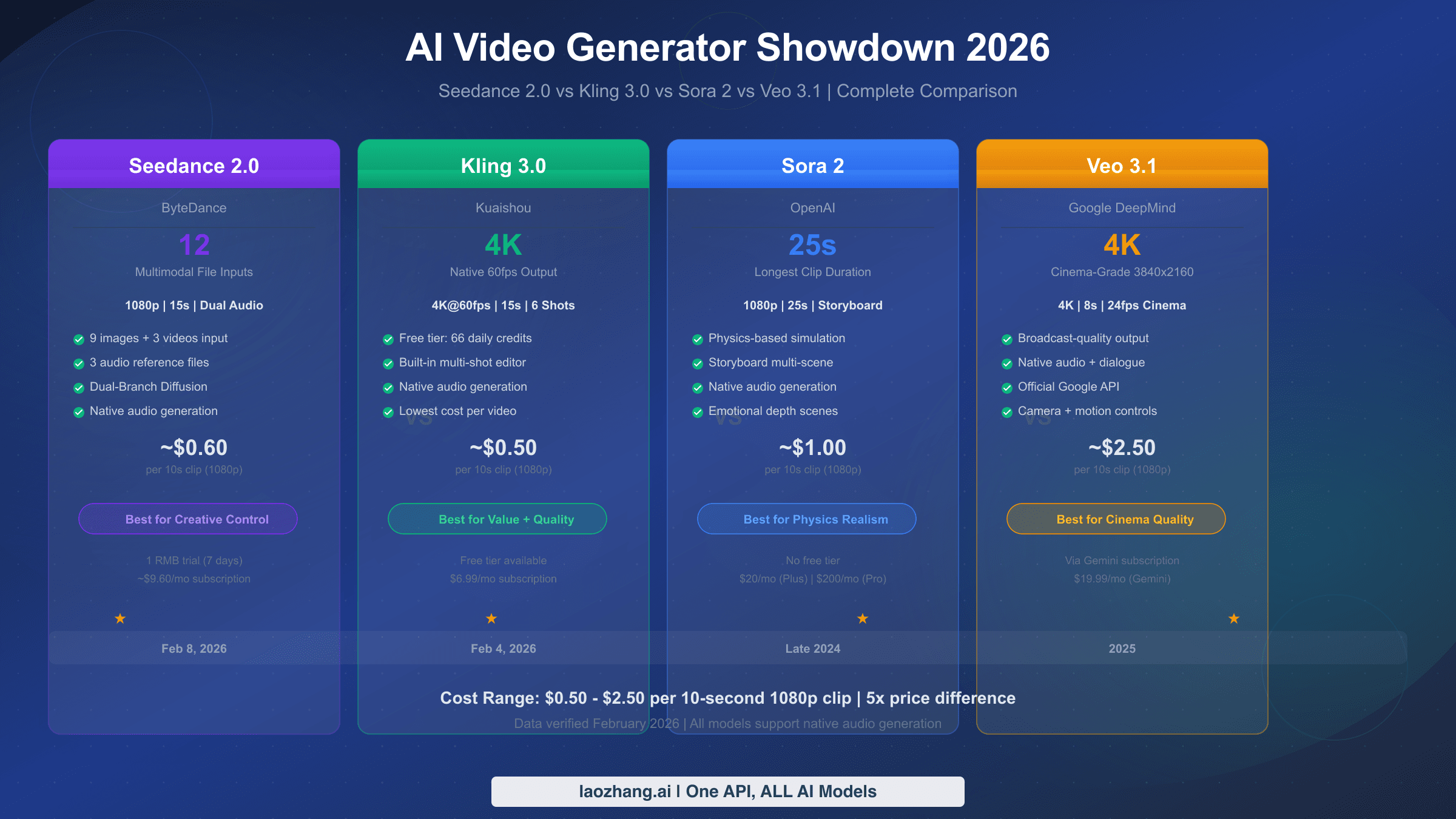
Google Veo 3.1 and Kuaishou Kling 2.6 represent the cutting edge of AI video generation in January 2026. Veo 3.1 excels at cinematic quality, text rendering (5/5 score), and narrative control at $0.40-0.75/second. Kling 2.6 leads in native audio generation, motion control, and offers 56% lower pricing at $0.07-0.14/second. For content creators, Kling 2.6 provides better value; for filmmakers requiring maximum quality, Veo 3.1 delivers superior results.
Quick Overview - What's New in 2026?
The AI video generation landscape has transformed dramatically in early 2026. Google's Veo 3.1 update on January 13, 2026 introduced vertical video support (9:16) for TikTok and YouTube Shorts, while Kuaishou's Kling 2.6 launched December 3, 2025 with groundbreaking simultaneous audio-visual generation.
Both models represent significant leaps from their predecessors. Veo 3.1 builds on the foundation of Veo 2.0 and 3.0, adding native vertical video formats, improved identity consistency across scenes, and the innovative "Ingredients to Video" feature supporting up to 3 reference images. Kling 2.6 introduced the industry's first true native audio generation, creating lip-synced dialogue, singing, sound effects, and ambient audio in a single generation pass.
For a broader understanding of the AI video model ecosystem, check out our comprehensive AI video model comparison covering all major players.
Key Developments Timeline
| Date | Model | Major Update |
|---|---|---|
| October 2025 | Veo 3.0 | Initial release with cinematic quality |
| December 3, 2025 | Kling 2.6 | Native audio generation launch |
| January 13, 2026 | Veo 3.1 | Vertical video + identity consistency |
| January 2026 | Both | Current comparison baseline |
Who Should Choose Which?
Before diving into detailed comparisons, here's a quick decision matrix:
- Choose Veo 3.1 if you prioritize: cinematic quality, precise text rendering, professional lighting control, narrative storytelling
- Choose Kling 2.6 if you prioritize: native audio with lip-sync, lower costs, motion control, action sequences, character-driven content
Both models support similar core capabilities including text-to-video, image-to-video, and various aspect ratios. The differences emerge in execution quality, specialized features, and pricing structures.
Industry Context: Why These Two Models Matter
The AI video generation market has seen explosive growth since late 2024, with dozens of models competing for creator attention. However, Veo 3.1 and Kling 2.6 have emerged as the clear leaders for different reasons.
Google's DeepMind team developed Veo as part of their broader generative AI strategy, leveraging the company's vast computational resources and research expertise. The model benefits from Google's video understanding research dating back to YouTube's recommendation systems and Google Photos' visual intelligence. This heritage shows in Veo 3.1's exceptional visual coherence and scene understanding.
Kuaishou, China's second-largest short video platform after ByteDance's Douyin (TikTok), built Kling to serve its massive creator ecosystem. With over 600 million monthly active users generating and consuming short-form video content, Kuaishou had both the training data and the practical understanding of creator needs to build a model optimized for social content. Kling 2.6 reflects this heritage with its emphasis on audio integration, cost efficiency, and features tailored for high-volume content production.
The competition between these models represents a broader technological race between American and Chinese AI capabilities, with each approach offering distinct advantages depending on use case requirements.
Understanding Model Architecture Differences
While both models generate video from text prompts, their underlying architectures differ significantly:
Veo 3.1's Approach: Built on diffusion model technology with temporal attention mechanisms that ensure frame-to-frame consistency. The model processes prompts through multiple stages: text understanding, scene planning, frame generation, and temporal smoothing. This multi-stage approach enables higher visual fidelity but requires more computational resources per generation.
Kling 2.6's Approach: Utilizes a transformer-based architecture optimized for simultaneous audio-visual generation. The model processes prompts holistically, generating both visual and audio elements in a single forward pass. This architectural choice enables the native audio generation that sets Kling apart but may limit maximum resolution compared to specialized video-only models.
Feature-by-Feature Comparison
Understanding the technical capabilities of each model requires systematic evaluation across multiple dimensions. Based on benchmark testing conducted in January 2026, here's how Veo 3.1 and Kling 2.6 compare across 8 key categories.
Benchmark Methodology
Our comparison uses a standardized testing framework evaluating both models on identical prompts across varied scenarios: character animation, landscape cinematics, action sequences, dialogue scenes, product showcases, abstract visuals, text-heavy compositions, and multi-character interactions.
Each category receives a score from 1-5 based on:
- Output quality and realism
- Prompt adherence accuracy
- Consistency across multiple generations
- Edge case handling
Complete Specification Comparison
| Specification | Veo 3.1 | Kling 2.6 |
|---|---|---|
| Developer | Google DeepMind | Kuaishou Technology |
| Release Date | January 13, 2026 | December 3, 2025 |
| Max Resolution | 4K (3840×2160) | 1080p (1920×1080) |
| Max Duration | 8 seconds | 10 seconds |
| Aspect Ratios | 16:9, 9:16, 1:1 | 16:9, 9:16, 1:1, 4:3 |
| Frame Rate | Up to 60fps | Up to 30fps |
| Native Audio | Yes (ambient, music) | Yes (full: dialogue, singing, SFX) |
| Text Rendering | 5/5 (best in class) | 3/5 (improving) |
| Image-to-Video | Yes (up to 3 images) | Yes (single image) |
| Motion Control | Camera control only | Full motion reference |
| API Access | Vertex AI, Gemini API | Official API, third-party |
| Watermark | SynthID (invisible) | Optional visible watermark |
Category-by-Category Breakdown
1. Visual Quality & Realism: Veo 3.1 Wins (5/5 vs 4/5)
Veo 3.1 produces noticeably superior visual fidelity with better handling of fine details, skin textures, and environmental elements. The lighting simulation creates more natural shadows and highlights. Kling 2.6 delivers excellent quality but shows occasional artifacts in complex scenes.
2. Text Rendering: Veo 3.1 Wins (5/5 vs 3/5)
This represents Veo 3.1's most significant advantage. Signage, titles, and in-video text appear crisp and readable. Kling 2.6 struggles with text clarity, often producing blurred or distorted lettering. For content requiring readable text, Veo 3.1 is the clear choice.
3. Motion Control: Kling 2.6 Wins (5/5 vs 4/5)
Kling 2.6's motion reference feature allows uploading a reference video to guide movement patterns. This produces more natural, fluid motion for dancing, sports, and action sequences. Veo 3.1 relies on prompt-based camera control which, while effective, offers less granular movement guidance.
4. Native Audio Generation: Kling 2.6 Wins (5/5 vs 4/5)
Kling 2.6's simultaneous audio-visual generation represents a genuine breakthrough. Creating lip-synced dialogue, character singing, realistic sound effects, and ambient audio in one pass eliminates the need for post-production audio work. Veo 3.1's audio capabilities focus primarily on ambient sounds and background music.
5. Camera Control: Veo 3.1 Wins (5/5 vs 4/5)
For cinematographers, Veo 3.1 offers superior camera movement control including dolly shots, crane movements, rack focus, and depth-of-field manipulation. These professional-grade controls enable more sophisticated visual storytelling.
6. Prompt Adherence: Tie (4/5 vs 4/5)
Both models demonstrate excellent prompt following for standard requests. Complex multi-element prompts occasionally challenge both systems, though in different ways—Veo tends to simplify, while Kling may introduce unexpected variations.
7. Maximum Duration: Kling 2.6 Wins (10 sec vs 8 sec)
Kling 2.6's 10-second maximum provides 25% more content per generation, reducing the number of clips needed for longer projects and lowering effective costs.
8. Pricing: Kling 2.6 Wins (56% cheaper)
At $0.07-0.14 per second versus $0.40-0.75 per second, Kling 2.6 offers dramatically lower costs that compound significantly at scale.
Real-World Testing Examples
To illustrate these differences practically, here are results from identical prompts tested on both models:
Test 1: Corporate Product Showcase Prompt: "A sleek smartphone rotating on a white surface, showing the screen with the text 'NEW MODEL X' clearly visible, studio lighting, 4K quality"
- Veo 3.1: Excellent text clarity, professional lighting, smooth rotation. Text readable at full resolution.
- Kling 2.6: Good rotation smoothness, acceptable lighting. Text appeared slightly blurred, readable but not crisp.
- Winner: Veo 3.1 (text rendering critical for product showcases)
Test 2: Character Dialogue Scene Prompt: "A young woman in a coffee shop explaining her startup idea enthusiastically to a friend across the table, natural dialogue, ambient cafe sounds"
- Veo 3.1: Excellent visual quality, natural movements. Audio limited to ambient sounds—no dialogue generated.
- Kling 2.6: Good visual quality, natural lip movements perfectly synced with generated dialogue. Background cafe ambience included.
- Winner: Kling 2.6 (native audio essential for dialogue content)
Test 3: Cinematic Landscape Prompt: "Aerial drone shot flying over mountain peaks at golden hour, dramatic lighting, cinematic camera movement, 4K"
- Veo 3.1: Stunning visual quality with volumetric lighting. Professional-grade camera movement simulation.
- Kling 2.6: Good quality with natural movement. Lighting slightly less sophisticated but very acceptable.
- Winner: Veo 3.1 (superior lighting and camera control)
Test 4: Action Sequence Prompt: "A martial artist performing a spinning kick in slow motion, dynamic camera following the movement, sports arena setting"
- Veo 3.1: Good movement but occasional physics inconsistencies. Camera tracking effective.
- Kling 2.6: Excellent motion fluidity. Physics simulation more realistic for human movement.
- Winner: Kling 2.6 (motion reference technology advantage)
These tests demonstrate that neither model dominates all scenarios—the optimal choice depends entirely on specific content requirements.
For more details on Kling's image-to-video capabilities specifically, see our Kling AI image-to-video guide.
Native Audio - The Game-Changing Feature
Native audio generation represents the most significant differentiator between these two models in 2026. Understanding each model's audio capabilities is crucial for content creators who want to minimize post-production work.
Kling 2.6 Audio Capabilities
Kling 2.6 introduced the industry's first true simultaneous audio-visual generation system. Rather than generating video first and adding audio later, Kling 2.6 creates both in a single inference pass, ensuring perfect synchronization.
| Audio Type | Kling 2.6 Support | Quality Rating |
|---|---|---|
| Lip-synced Dialogue | Full native support | 5/5 |
| Character Singing | Full native support | 5/5 |
| Sound Effects | Context-aware generation | 4/5 |
| Ambient Sound | Automatic environmental audio | 5/5 |
| Background Music | Style-appropriate generation | 4/5 |
| Multiple Speakers | Supported | 4/5 |
Lip-Sync Technology: Kling 2.6's lip-sync accuracy matches professional dubbing quality. Characters speaking in generated videos show realistic mouth movements, facial expressions that match emotional content, and proper timing for different languages and speaking speeds.
Singing Mode: A unique feature allowing character generation with vocal performance. Input a melody or music style prompt, and Kling 2.6 generates both the visual performance and synchronized singing audio.
Sound Effect Intelligence: The model automatically generates appropriate sound effects based on video content—footsteps on different surfaces, door sounds, ambient city noise, nature sounds—without explicit prompting.
Veo 3.1 Audio Capabilities
Veo 3.1's audio generation focuses on environmental and atmospheric elements rather than dialogue-driven content.
| Audio Type | Veo 3.1 Support | Quality Rating |
|---|---|---|
| Ambient Sound | Full support | 5/5 |
| Background Music | Style-guided generation | 4/5 |
| Environmental SFX | Automatic generation | 4/5 |
| Basic Dialogue | Limited support | 2/5 |
| Lip-Sync | Not native | 1/5 |
| Singing | Not supported | 0/5 |
When to Choose Veo 3.1 for Audio: Cinematic landscape videos, product showcases without dialogue, atmospheric content, abstract visualizations, and projects where you plan to add voiceover in post-production.
When to Choose Kling 2.6 for Audio: Character-driven content, dialogue scenes, music videos, social media content requiring speaking characters, tutorials with on-screen presenters, and any content where lip-sync matters.
Audio Quality Comparison Summary
For content creators prioritizing audio-visual integration, Kling 2.6 represents a significant workflow improvement. Eliminating separate audio generation and synchronization steps can save 30-50% of post-production time.
However, if your workflow already includes professional audio production (voice actors, licensed music, sound design), Veo 3.1's superior visual quality may be the better choice despite weaker native audio.
Technical Deep Dive: How Native Audio Works
Understanding the technical foundations helps explain why Kling 2.6's audio capabilities are so impressive:
Simultaneous Generation Architecture: Traditional approaches generate video first, then add audio in a separate pass. This requires the audio model to interpret completed video frames and match audio elements retrospectively. Kling 2.6's architecture generates both modalities from the same latent representation simultaneously, ensuring perfect synchronization from the start.
Lip-Sync Mechanism: The model includes a specialized attention layer that coordinates mouth movements with generated phonemes. During generation, the model samples both visual mouth positions and audio waveforms from the same timestep, creating natural synchronization without post-processing.
Multi-Speaker Handling: When generating scenes with multiple characters, Kling 2.6 maintains separate audio tracks for each speaker, applying spatial audio positioning based on character locations in frame. This creates realistic soundscapes where voices appear to originate from the correct screen positions.
Emotional Congruence: The audio generation includes emotional analysis that matches voice tone, pace, and intensity to visual expressions. A character shown smiling will have audio with appropriate warmth; a character shown angry will have corresponding edge in their voice.
Audio Production Workflow Comparison
For content creators, the practical impact of these audio capabilities affects entire production workflows:
Traditional Workflow (Veo 3.1):
- Generate video from prompt (2-5 minutes)
- Review video, approve or regenerate (variable)
- Write dialogue script matching video timing (30-60 minutes)
- Record voiceover or hire voice actor ($50-500 depending on length)
- Add voiceover to video in editing software (15-30 minutes)
- Sync and adjust timing (15-60 minutes)
- Add sound effects and ambient audio (30-60 minutes)
- Final mixing and export (15-30 minutes)
Total time: 2-5 hours per video Total cost: $50-500+ per video (excluding generation)
Streamlined Workflow (Kling 2.6):
- Generate video with audio from prompt (2-5 minutes)
- Review video and audio, approve or regenerate (variable)
- Minor audio adjustments if needed in editing software (5-15 minutes)
- Export (5-10 minutes)
Total time: 15-30 minutes per video Total cost: $0 additional (audio included in generation cost)
This workflow efficiency difference becomes massive at scale. A creator producing 100 videos monthly could save 150-400 hours and $5,000-50,000 annually by using Kling 2.6's native audio instead of traditional post-production.
Pricing Comparison & Monthly Cost Calculator
Understanding the true cost of AI video generation requires looking beyond per-second rates to actual monthly budgets for different use cases. This section provides real-world cost estimates based on typical production volumes.
Base Pricing Comparison
| Provider | Model | Per Second | Per 5-sec Video | Per 10-sec Video |
|---|---|---|---|---|
| Vertex AI | Veo 3.1 Fast | $0.15 | $0.75 | $1.50 |
| Vertex AI | Veo 3.1 Standard | $0.40 | $2.00 | $4.00 |
| Vertex AI | Veo 3.1 + Audio | $0.75 | $3.75 | $7.50 |
| Official | Kling 2.6 Standard | $0.07 | $0.35 | $0.70 |
| Official | Kling 2.6 Professional | $0.10 | $0.50 | $1.00 |
| Official | Kling 2.6 + Native Audio | $0.14 | $0.70 | $1.40 |
Monthly Cost by User Type
Content Creator Tier (100 videos/month, 5 seconds average)
| Model | Monthly Cost | Annual Cost |
|---|---|---|
| Veo 3.1 Standard | $200 | $2,400 |
| Veo 3.1 with Audio | $375 | $4,500 |
| Kling 2.6 Standard | $35 | $420 |
| Kling 2.6 with Audio | $70 | $840 |
| Savings with Kling | $130-305/month | $1,560-3,660/year |
Marketing Agency Tier (500 videos/month, 5 seconds average)
| Model | Monthly Cost | Annual Cost |
|---|---|---|
| Veo 3.1 Standard | $1,000 | $12,000 |
| Veo 3.1 with Audio | $1,875 | $22,500 |
| Kling 2.6 Standard | $175 | $2,100 |
| Kling 2.6 with Audio | $350 | $4,200 |
| Savings with Kling | $650-1,525/month | $7,800-18,300/year |
Enterprise Tier (2,000 videos/month, 5 seconds average)
| Model | Monthly Cost | Annual Cost |
|---|---|---|
| Veo 3.1 Standard | $4,000 | $48,000 |
| Veo 3.1 with Audio | $7,500 | $90,000 |
| Kling 2.6 Standard | $700 | $8,400 |
| Kling 2.6 with Audio | $1,400 | $16,800 |
| Savings with Kling | $2,600-6,100/month | $31,200-73,200/year |
Cost Optimization Strategies
Strategy 1: Use Appropriate Quality Tiers
Not every video requires maximum quality. For social media content, Veo 3.1 Fast mode at $0.15/second delivers acceptable quality at 63% lower cost than Standard mode. For Kling 2.6, Standard tier works well for most content types.
Strategy 2: Optimize Video Length
Both models charge per-second. Trimming average video length from 8 seconds to 5 seconds reduces costs by 37.5% with identical monthly output.
Strategy 3: Third-Party API Providers
Third-party providers often offer significantly lower rates than official APIs. These providers aggregate demand and negotiate volume pricing, passing savings to users.
For teams needing access to multiple AI video models, API aggregation services like laozhang.ai provide unified access with consistent pricing and no rate limits. This approach simplifies integration while potentially reducing costs by 15-30% compared to direct API access.
Strategy 4: Hybrid Approach
Many production teams use both models strategically: Kling 2.6 for high-volume social content and dialogue-driven videos, Veo 3.1 for hero content requiring maximum quality. This hybrid approach optimizes both quality and budget.
If you're exploring budget-friendly options, our guide to free image-to-video AI tools covers entry-level alternatives.
API Access Options: Official vs Third-Party
For developers and production teams integrating AI video generation into workflows, understanding API access options is critical. Both models offer multiple access paths with different tradeoffs.
Veo 3.1 API Access
Official: Google Cloud Vertex AI
Veo 3.1 is primarily accessible through Google Cloud's Vertex AI platform, requiring a Google Cloud account with billing enabled.
Endpoint: vertex-ai.googleapis.com
Authentication: OAuth 2.0 / Service Account
Rate Limits: Request-based, varies by quota
Output Format: MP4
Key advantages: Direct from Google, guaranteed availability, enterprise support, integration with other Google Cloud services.
Limitations: Requires Google Cloud expertise, complex pricing structure, minimum spend requirements for some features.
Official: Gemini API
The Gemini API provides a simpler integration path for developers already using Google's AI services.
Setup requirements:
- Google AI Studio account
- API key generation
- Gemini Pro Vision access
Veo 3.1 Access Summary
| Access Method | Complexity | Best For |
|---|---|---|
| Vertex AI | High | Enterprise, existing GCP users |
| Gemini API | Medium | Developers, prototyping |
| Flow (UI) | Low | Non-technical users |
Kling 2.6 API Access
Official: Kuaishou API
Kuaishou's official API provides direct access to Kling 2.6 with competitive pricing.
Access requirements:
- Kuaishou developer account
- API key approval (typically 1-3 business days)
- Credit-based billing system
Third-Party Providers
Kling 2.6 is accessible through multiple third-party API providers, often at lower costs than official channels.
| Provider | Price (5-sec) | Features |
|---|---|---|
| PiAPI | $0.195-0.33 | REST API, webhooks |
| FAL.ai | $0.35-0.70 | Serverless, fast startup |
| Kie.ai | $0.28-0.55 | Simple pricing |
| WaveSpeed AI | $0.35/run | Batch processing |
Third-Party Advantages:
- Often 30-50% lower pricing
- Simplified authentication
- No platform-specific requirements
- Sometimes faster generation times
- Pay-per-use without commitments
Third-Party Considerations:
- May lag behind official model updates
- Support varies by provider
- Terms of service differences
- Data handling policies vary
Beyond official APIs, aggregation platforms offer streamlined access to multiple video models. Services like laozhang.ai bundle multiple video models with pay-as-you-go pricing and no rate limits, simplifying integration for teams using multiple AI services.
API Integration Comparison
| Aspect | Veo 3.1 (Vertex) | Kling 2.6 (Official) | Third-Party |
|---|---|---|---|
| Setup Time | 1-2 hours | 1-3 days | 10-30 minutes |
| Documentation | Extensive | Good | Varies |
| Rate Limits | Quota-based | Credit-based | Provider-dependent |
| Support | Enterprise tier | Email support | Varies |
| SDK Availability | Python, Node.js | Python | REST-only typically |
For comparison with other video generation providers, see our Hailuo AI video generation guide.
Rate Limits and Quotas
Understanding rate limits is crucial for production planning:
Veo 3.1 (Vertex AI):
- Default quota: 100 requests per minute per project
- Daily generation limit: Varies by billing tier
- Concurrent requests: Up to 10 simultaneous
- Queue behavior: Requests queued when limit reached
Kling 2.6 (Official):
- Credit-based: Generation consumes credits from account balance
- No hard rate limits for paid accounts
- Queue during peak hours (typically 10 AM - 6 PM Beijing time)
- Priority queue for higher subscription tiers
Third-Party Providers:
- PiAPI: 10 concurrent requests, 100/minute limit
- FAL.ai: Serverless, auto-scaling with no hard limits
- Generally more flexible but may have higher latency during peak times
For high-volume production, consider distributing requests across multiple providers to avoid rate limit bottlenecks.
Error Handling and Retry Strategies
Both APIs return standard HTTP error codes with specific handling recommendations:
| Error Code | Meaning | Recommended Action |
|---|---|---|
| 400 | Bad request (invalid prompt) | Modify prompt and retry |
| 429 | Rate limit exceeded | Wait and retry with exponential backoff |
| 500 | Server error | Retry after 30-60 seconds |
| 503 | Service unavailable | Check service status, retry later |
Best practice: Implement exponential backoff starting at 1 second, doubling up to 60 seconds maximum delay. Log failed prompts for manual review if repeated failures occur.
Which Model Should You Choose? Decision Guide
Selecting between Veo 3.1 and Kling 2.6 depends on your specific use case, budget constraints, and production requirements. This decision guide provides specific recommendations for different creator types.
Decision by Use Case
TikTok/YouTube Shorts Content
Recommendation: Kling 2.6
Reasons:
- Native vertical video support matches platform requirements
- 56% lower cost enables higher volume production
- Native audio with lip-sync perfect for trending content
- 10-second maximum covers most short-form formats
Best practices: Use Kling 2.6 Standard tier for most content, Professional tier for featured posts. Leverage native audio to avoid post-production audio work.
Cinematic Short Films
Recommendation: Veo 3.1
Reasons:
- Superior visual quality and lighting simulation
- Better camera control for professional cinematography
- 4K output for large-screen viewing
- Text rendering for credits and titles
Best practices: Use Standard mode for final output, Fast mode for rapid iteration. Plan for longer production pipeline due to 8-second generation limit.
Product Demos and Advertisements
Recommendation: Veo 3.1 (with exceptions)
For products requiring text display (software, physical products with labels), Veo 3.1's superior text rendering is essential. For products demonstrated through action or requiring spokesperson dialogue, Kling 2.6 may be preferable.
Music Videos
Recommendation: Kling 2.6
The singing mode feature makes Kling 2.6 uniquely suited for music video production. Generated characters can perform vocal content with accurate lip-sync, reducing post-production complexity significantly.
Educational Content
Recommendation: Depends on format
- Talking-head style: Kling 2.6 (lip-sync)
- Animated explanations: Veo 3.1 (visual clarity)
- Text-heavy tutorials: Veo 3.1 (text rendering)
Social Media Marketing
Recommendation: Kling 2.6
For brands creating high-volume social content across TikTok, Instagram Reels, and YouTube Shorts, Kling 2.6's combination of native audio, lower cost, and longer duration makes it the practical choice. The 56% cost savings become substantial when producing 50-200+ videos monthly for social campaigns.
Best practices:
- Create content batches with similar prompts for efficiency
- Use Professional tier for brand-critical content only
- Leverage native audio for personality-driven brand content
- Test multiple variations for A/B performance testing
Documentary and Journalism
Recommendation: Veo 3.1
For documentary-style content requiring archival footage recreation, historical visualizations, or supplementary B-roll, Veo 3.1's visual quality and text rendering capabilities are essential. The cinematic quality matches professional documentary standards.
Best practices:
- Use Standard mode for all final outputs
- Plan for post-production voiceover
- Leverage camera control for consistent visual style
- Generate multiple variations for editing flexibility
Gaming and Streaming Content
Recommendation: Mixed approach
Game trailers and promotional content benefit from Veo 3.1's visual quality. However, for streaming overlays, transitions, and regular content, Kling 2.6's cost efficiency allows higher production frequency without budget strain.
Decision by Budget
| Monthly Budget | Recommendation | Reasoning |
|---|---|---|
| Under $50 | Kling 2.6 Standard | Maximum content volume |
| $50-200 | Kling 2.6 | Good quality/cost balance |
| $200-500 | Hybrid approach | Kling for volume, Veo for hero content |
| $500-1,000 | Quality-dependent | Either model depending on priorities |
| Over $1,000 | Either/Both | Budget allows quality-first selection |
Decision by Technical Requirements
Developers Building Products
Consider: API stability, documentation quality, rate limits, pricing predictability
Veo 3.1 offers better documentation and enterprise support through Google Cloud. Kling 2.6 through third-party providers offers simpler integration and often lower costs.
Non-Technical Content Creators
Consider: UI/UX, learning curve, community resources
Both offer web-based interfaces. Veo 3.1 through Gemini and Flow is more intuitive for Google ecosystem users. Kling 2.6's interface is straightforward but may require translation for non-Chinese speakers.
Quick Decision Matrix
| Priority | Choose Veo 3.1 | Choose Kling 2.6 |
|---|---|---|
| Quality | Maximum visual fidelity | Good enough for most content |
| Cost | Budget allows premium | Cost optimization important |
| Audio | Plan to add in post | Need native lip-sync |
| Volume | Lower volume, higher quality | High volume production |
| Text | In-video text required | Minimal text needs |
| Motion | Camera movement focus | Character motion focus |
Getting Started: Step-by-Step Guide
Ready to begin using Veo 3.1 or Kling 2.6? This section provides practical getting-started steps for each platform.
Getting Started with Veo 3.1
Option 1: Through Gemini (Easiest)
- Navigate to gemini.google.com
- Sign in with Google account
- Access video generation through Gemini's interface
- Enter text prompt describing desired video
- Select aspect ratio (16:9, 9:16, or 1:1)
- Generate and download
Option 2: Through Vertex AI (Developers)
- Create Google Cloud account (cloud.google.com)
- Enable Vertex AI API in console
- Create service account with appropriate permissions
- Install Google Cloud SDK locally
- Set up authentication credentials
- Use Python client library:
# Basic Veo 3.1 generation setup
from google.cloud import aiplatform

aiplatform.init(project='your-project-id')
# Follow Vertex AI documentation for video generation
Option 3: Through Flow (No-Code)
Google's Flow interface provides drag-and-drop video creation using Veo 3.1. Ideal for non-technical users wanting advanced features without API complexity.
Getting Started with Kling 2.6
Option 1: Official Platform
- Visit klingai.com
- Create account (email verification required)
- Navigate to video generation interface
- Enter prompt in text field
- Select model version (2.6)
- Configure duration and aspect ratio
- Generate and download
Option 2: Through Third-Party API (PiAPI Example)
- Create account at piapi.ai
- Generate API key from dashboard
- Add credits to account
- Use REST API for generation:
curl -X POST https://api.piapi.ai/v1/kling/generate \
  -H "Authorization: Bearer YOUR_API_KEY" \
  -H "Content-Type: application/json" \
  -d '{"prompt": "Your video prompt", "duration": 5}'
Best Practices for Both Platforms
Prompt Engineering Tips
- Be specific about visual style, lighting, and camera movement
- Include mood descriptors (cinematic, vibrant, minimalist)
- Specify subject positioning and movement direction
- For Kling 2.6 audio: describe dialogue content or sound environment
- For Veo 3.1 text: explicitly describe text content, font style, placement
Quality Optimization
- Generate multiple variations for best selection
- Use higher quality tiers for final outputs only
- Test prompts with shorter durations before full generation
- Keep prompts focused—one main action per video
- Reference uploaded images when consistency matters
Production Workflow Integration
Both models output MP4 files compatible with standard video editing software. For production pipelines:
- Generate raw clips in batches
- Review and select best outputs
- Import to editing software (Premiere, DaVinci, Final Cut)
- Apply color grading if needed
- Add transitions and compile
- Export final video
FAQ: Common Questions Answered
Q: Is Kling 2.6 better than Veo 3.1?
Neither model is universally "better." Kling 2.6 excels at native audio generation, motion control, and cost efficiency (56% cheaper). Veo 3.1 leads in visual quality, text rendering, and camera control. Your choice should depend on specific project requirements.
Q: How much does Veo 3.1 cost per video?
Veo 3.1 pricing varies by mode: Fast mode costs approximately $0.75 per 5-second video ($0.15/sec), Standard mode costs $2.00 per 5-second video ($0.40/sec), and with audio integration costs $3.75 per 5-second video ($0.75/sec). Enterprise volume pricing may be available through Google Cloud.
Q: Can Kling 2.6 generate audio?
Yes, Kling 2.6 is the first AI video generator with true native audio generation. It creates lip-synced dialogue, character singing, sound effects, and ambient audio simultaneously with video in a single generation pass. This eliminates the need for separate audio production for most use cases.
Q: Which is better for lip sync - Veo or Kling?
Kling 2.6 is significantly better for lip-sync content. Its native audio generation creates accurate lip movements synchronized with generated dialogue. Veo 3.1 does not offer native lip-sync capabilities—dialogue-driven content requires post-production audio synchronization.
Q: What is Veo 3.1 vs Kling 2.6 pricing?
Direct comparison: Veo 3.1 costs $0.40-0.75 per second through Vertex AI. Kling 2.6 costs $0.07-0.14 per second through official channels, representing 56% lower costs. Third-party API providers may offer Kling 2.6 at even lower rates ($0.039-0.07/second).
Q: Can I use both models through a single API?
Yes, API aggregation services provide unified access to multiple AI video models. This simplifies integration for teams using both Veo 3.1 and Kling 2.6 in different contexts.
Q: Are there regional restrictions for these models?
Veo 3.1 is available globally through Google Cloud, though some features may be restricted in certain regions. Kling 2.6 is a Chinese service—international access is available but may require third-party API providers for simplified authentication in some countries.
Q: What's the maximum video duration?
Veo 3.1 supports up to 8 seconds per generation. Kling 2.6 supports up to 10 seconds per generation. Both models support sequential generation for creating longer content through clip compilation.
Q: Which model updates more frequently?
Both models receive regular updates. Veo 3.1's January 2026 update added vertical video support. Kling 2.6's December 2025 release represented a major architectural upgrade with native audio. Expect continued feature additions from both Google DeepMind and Kuaishou throughout 2026.
Q: Can I use generated videos commercially?
Both models permit commercial use under their respective terms of service. Veo 3.1 videos include SynthID invisible watermarking for provenance tracking. Kling 2.6 offers optional visible watermarking. Always review current terms before commercial deployment.
Q: How do generation times compare?
Generation times vary by model tier and video length. Veo 3.1 Standard mode typically takes 2-4 minutes for an 8-second video, with Fast mode completing in 30-60 seconds at lower quality. Kling 2.6 generates 5-second videos in 1-3 minutes depending on server load and audio complexity. Both models offer queue-based generation during peak times.
Q: What happens if I'm not satisfied with the output?
Both platforms allow regeneration with modified prompts at additional cost. Neither offers refunds for unsatisfactory outputs since generation quality depends partly on prompt quality. Best practice: start with shorter, lower-cost generations to test prompts before committing to longer, higher-quality outputs.
Q: Can these models generate NSFW content?
Both models implement content filtering that blocks explicitly adult content generation. Veo 3.1 through Google's platforms enforces strict content policies. Kling 2.6 also filters inappropriate content, though third-party API providers may have varying policy enforcement. All commercial use cases should comply with platform terms of service.
Q: How do I handle copyright for generated content?
Both Google and Kuaishou assert that users own the outputs generated from their prompts, subject to terms of service. However, if your prompt references copyrighted characters, brands, or styles, the output may have legal complications. Consult with legal counsel for commercial applications involving potential intellectual property concerns.
Q: What about data privacy - are my prompts stored?
Both platforms retain prompts and generated content for varying periods depending on service tier and terms. Enterprise tiers typically offer better data retention controls. Third-party API providers have their own data handling policies—review terms carefully for sensitive use cases.
Future Outlook: What's Coming in 2026
Both Veo and Kling development teams continue active improvements. Based on announced roadmaps and industry trends, here's what to expect:
Veo 3.x Roadmap (Announced and Rumored)
Confirmed Updates:
- Improved vertical video optimization (January 2026 - delivered)
- Extended duration beyond 8 seconds (Q1 2026)
- Enhanced identity consistency for multi-scene projects
Expected Developments:
- Native lip-sync capabilities to match Kling
- Integration with Google's music generation models
- Real-time generation preview functionality
- Expanded regional availability
Kling 2.x Roadmap (Announced and Rumored)
Confirmed Updates:
- 4K resolution support (Q1 2026)
- 60fps high-frame-rate output
- Extended duration to 30+ seconds
Expected Developments:
- Improved text rendering to close gap with Veo
- Multi-language dialogue generation
- Integration with Kuaishou's music platform
- Simplified international access
Industry Trends Affecting Both Models
Longer Generation Times: Both models will likely extend maximum duration to 30-60 seconds by late 2026, reducing the need for clip stitching in production workflows.
Real-Time Generation: Early previews of real-time generation suggest that by late 2026, creators may be able to see video outputs generating live, enabling interactive prompt refinement.
Multi-Modal Integration: Expect tighter integration with other AI modalities—generating video that seamlessly incorporates AI-generated music, voices, and even interactive elements.
Pricing Pressure: As competition intensifies with models from Adobe, Runway, Stability AI, and others, pricing is likely to decrease 20-40% by end of 2026.
Summary and Next Steps
Choosing between Veo 3.1 and Kling 2.6 in January 2026 comes down to prioritizing either maximum visual quality (Veo 3.1) or cost efficiency with native audio (Kling 2.6).
Key Takeaways:
- Veo 3.1 wins on visual quality (5/5), text rendering (5/5), camera control, and professional features
- Kling 2.6 wins on native audio (5/5), motion control, pricing (56% cheaper), and video duration
- For high-volume content creation, Kling 2.6 provides the best value
- For premium productions requiring maximum quality, Veo 3.1 delivers superior results
- Many teams benefit from using both models strategically
Recommended Next Steps:
- Evaluate your use case against the decision guide above
- Test both platforms with your specific prompts and requirements
- Calculate actual monthly costs based on your expected volume
- Consider API integration needs if building automated workflows
- Start with lower tiers before committing to premium options
For API integration and cost optimization, explore documentation at laozhang.ai for unified access to multiple AI video models with simplified billing.
The AI video generation landscape continues evolving rapidly. Both Veo 3.1 and Kling 2.6 represent the current state of the art, with further improvements expected throughout 2026. Whatever your choice, you're working with genuinely impressive technology that was science fiction just a few years ago.
As this comparison demonstrates, the "best" AI video generator depends entirely on your specific needs. There is no universal winner—only the right tool for each job. Content creators benefit from understanding both models' strengths, enabling strategic selection based on individual project requirements rather than brand loyalty or surface-level comparisons.
The most successful creators in 2026 will be those who master both tools, using Veo 3.1 when visual quality is paramount and Kling 2.6 when cost efficiency and native audio matter most. This flexible, tools-agnostic approach maximizes both creative output and budget efficiency in an increasingly competitive content landscape.