Sora 2 Watermark Remover: How to Clean Up a Downloaded MP4
A practical Sora 2 watermark removal guide for saved MP4s: copyable FFmpeg commands, crop and repair tradeoffs, moving-watermark limits, and audio checks.
On this page

For a downloaded Sora 2 video, choose the cleanup method by watching where the watermark goes. A crop works when the mark stays in an expendable edge area. A fixed rectangular repair can reduce a stationary mark while keeping the frame dimensions. If the watermark moves across the picture, a single fixed rectangle will miss it; use an editor with a tracking mask and video inpainting, or retain the mark when the repair damages the scene.
The local methods below process an MP4 on your computer. They are intended for clips you own or have permission to edit. Keep the untouched export and save each attempt under a new name so you can compare the result and start over.
Choose the method before processing the whole video
Play the entire clip once. Note every place the watermark appears, whether it crosses a face or other detailed subject, and whether cutting away that area would remove something you need. OpenAI describes dynamically moving visible watermarks and C2PA provenance in Sora outputs, so do not assume the first frame tells you where to edit.
| What you see | Method to try | What you give up |
|---|---|---|
| The mark stays within an edge strip you can discard | Crop the strip | Everything else in that strip, plus the original aspect ratio unless you choose a matching crop |
| The mark stays in one small area with a simple background | A fixed-area repair such as FFmpeg delogo | Reliable detail inside the repaired area; the patch may look soft or smeared |
| The mark changes position, or the background moves behind it | A tracking mask with video inpainting | More setup and review time; reconstructed detail may flicker or look wrong |
| The mark covers a face, text, a hand, or a critical object | Test a short section before committing | An editor cannot guarantee recovery of the hidden original detail |
A larger repair rectangle is not a good substitute for tracking. It modifies more of the picture in every frame, including frames where the watermark is somewhere else.
Crop an edge watermark with FFmpeg
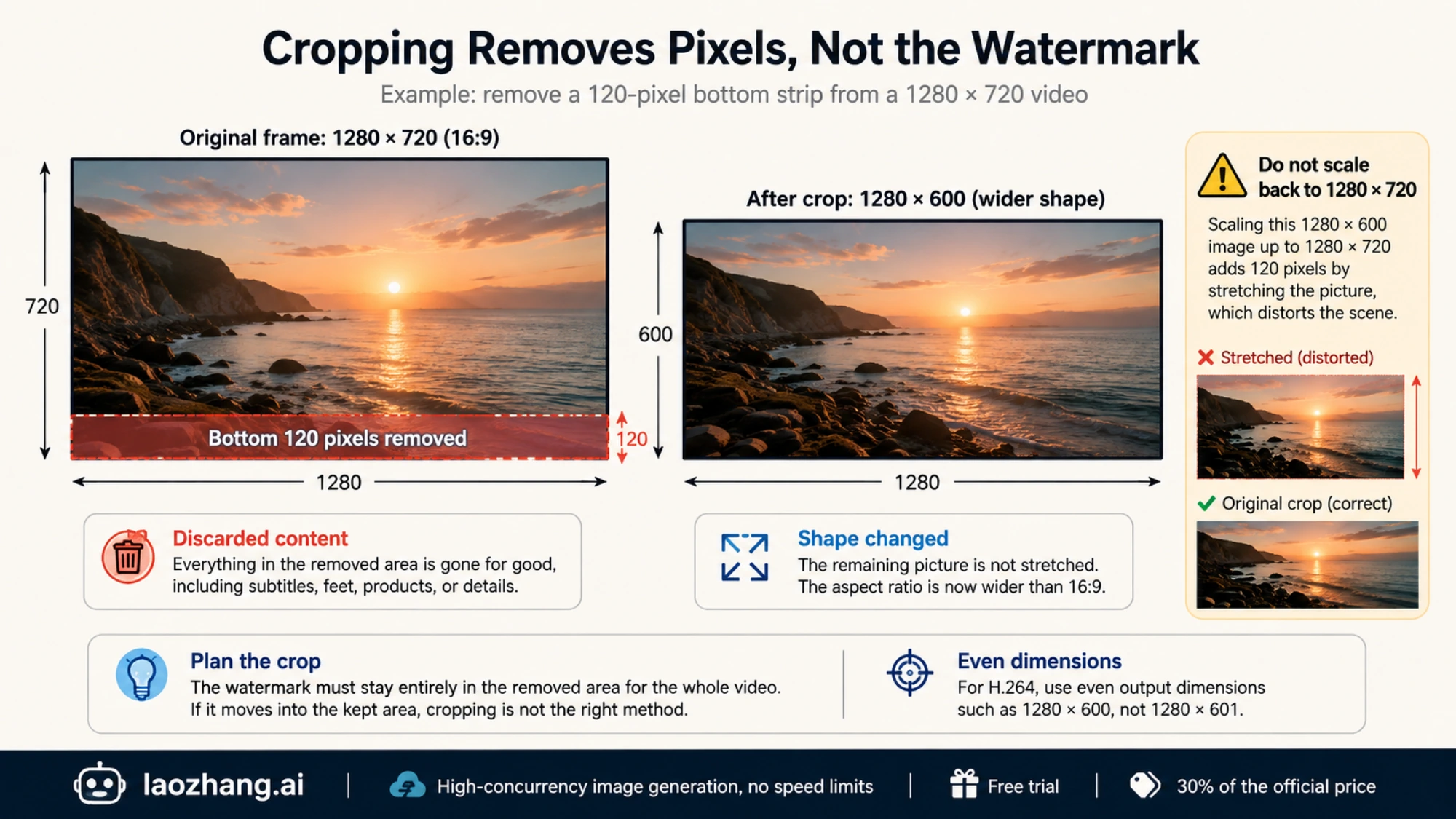
Use this when removing part of the frame is acceptable. The example cuts 120 pixels from the bottom of a 1280 × 720 video, leaving 1280 × 600. Check that the watermark stays entirely below the retained area throughout your clip.
You need FFmpeg and its companion ffprobe available in your terminal; installers and builds are listed on the FFmpeg download page. The examples use bash or zsh syntax and assume your working copy is named input.mp4, with the terminal open in its folder. Replace that filename as needed, keeping quotes around paths with spaces.
ffmpeg -i "input.mp4" \
  -map 0:v:0 -map '0:a?' \
  -vf "crop=iw:ih-120:0:0" \
  -c:v libx264 -crf 18 -preset medium \
  -c:a copy -movflags +faststart \
  "cropped.mp4"
FFmpeg's crop filter takes width:height:x:y. Here, iw keeps the input width, ih-120 keeps all but 120 pixels of height, and 0:0 starts at the top-left corner. Change 120 to the bottom-strip height you actually need to remove. For the H.264 examples here, use even output dimensions.
This does not stretch the remaining picture. It changes its shape: 1280 × 600 is wider than 16:9. If your destination requires 16:9, decide whether you can also sacrifice width with a matching crop or accept padding in your editor. Simply scaling 1280 × 600 back to 1280 × 720 would distort the scene.
The command re-encodes the video and copies existing audio streams without re-encoding them. -map '0:a?' makes audio optional, so a silent source can still be processed; keep the quotes because shells such as zsh interpret an unquoted ? as a filename wildcard. Audio copying assumes the source audio is compatible with the MP4 container. If FFmpeg reports an unsupported audio codec, replace -c:a copy with -c:a aac -b:a 192k, then check the new audio because it has been re-encoded.
Do not use this crop if the mark moves into the retained picture or the removed strip contains required subtitles, feet, products, or other meaningful content.
Repair a stationary watermark without changing the frame size
FFmpeg's delogo filter fills a rectangular region by interpolating surrounding pixels. It can be a useful quick test over a simple background. It does not reconstruct the original scene beneath a mark, and the fixed rectangle in this example does not follow motion.
First locate the watermark in the original video dimensions, using a video editor's pixel-coordinate readout. You can check the frame size with the ffprobe command below before choosing coordinates. Measurements from a scaled player window will be wrong. The top-left corner of the video is x=0, y=0; x increases to the right and y downward. Choose a rectangle that contains the whole mark with a little surrounding background, while leaving valid pixels around the rectangle inside the frame.
For example, on a 1280 × 720 frame, x=1050:y=630:w=200:h=60 selects a 200 × 60 area near the bottom-right. These coordinates are an example, not a universal Sora watermark position.
Create a preview with the rectangle outlined:
ffmpeg -i "input.mp4" \
  -map 0:v:0 -map '0:a?' \
  -vf "delogo=x=1050:y=630:w=200:h=60:show=1" \
  -c:v libx264 -crf 18 -preset medium \
  -c:a copy -movflags +faststart \
  "delogo-preview.mp4"
Watch delogo-preview.mp4 from beginning to end. The green guide shows the selected area. If the watermark ever falls outside it, a single fixed repair is unsuitable for that clip. If the rectangle is correctly placed but faces, text, or texture become visibly smeared, increasing the rectangle will usually sacrifice even more detail.
Once the placement is suitable, run the final command against the original input, with the guide disabled:
ffmpeg -i "input.mp4" \
  -map 0:v:0 -map '0:a?' \
  -vf "delogo=x=1050:y=630:w=200:h=60:show=0" \
  -c:v libx264 -crf 18 -preset medium \
  -c:a copy -movflags +faststart \
  "cleaned.mp4"
Do not feed the preview into the final command: it already contains an encoded edit and a visible guide. Keeping the original as the input also avoids accumulating compression damage across attempts.
If you get an invalid-area error, recheck the actual input dimensions and rectangle coordinates. The rectangle must fit inside the frame and leave surrounding pixels for interpolation. Coordinates copied from this 1280 × 720 example will not fit every portrait or lower-resolution video.
Handle a moving mark with a tracking mask
For a moving Sora watermark, look for an editor that supports video inpainting with a tracked or keyframed mask. A still-image eraser or an untracked rectangle may clean one frame and fail on the next. A tool offering “AI removal” is not enough information to establish that it handles motion well.
Use this workflow on a short representative section before exporting the whole video:
- Import the original MP4 and isolate a shot where the watermark moves or crosses the most detailed background.
- Draw a mask around the complete mark, including its faint edges. Keep the mask as small as practical so the editor replaces less unrelated content.
- Track the mask through the shot. Correct the mask position with keyframes wherever it drifts, jumps, changes size, or loses the mark. Start a new track at a scene cut if necessary.
- Apply the editor's video inpainting or object-removal operation. Preview at normal speed, then step through the frames around movement, occlusions, and cuts.
- Export the test at the intended delivery dimensions and compare it beside the original. Continue only if the repair is acceptable in motion.
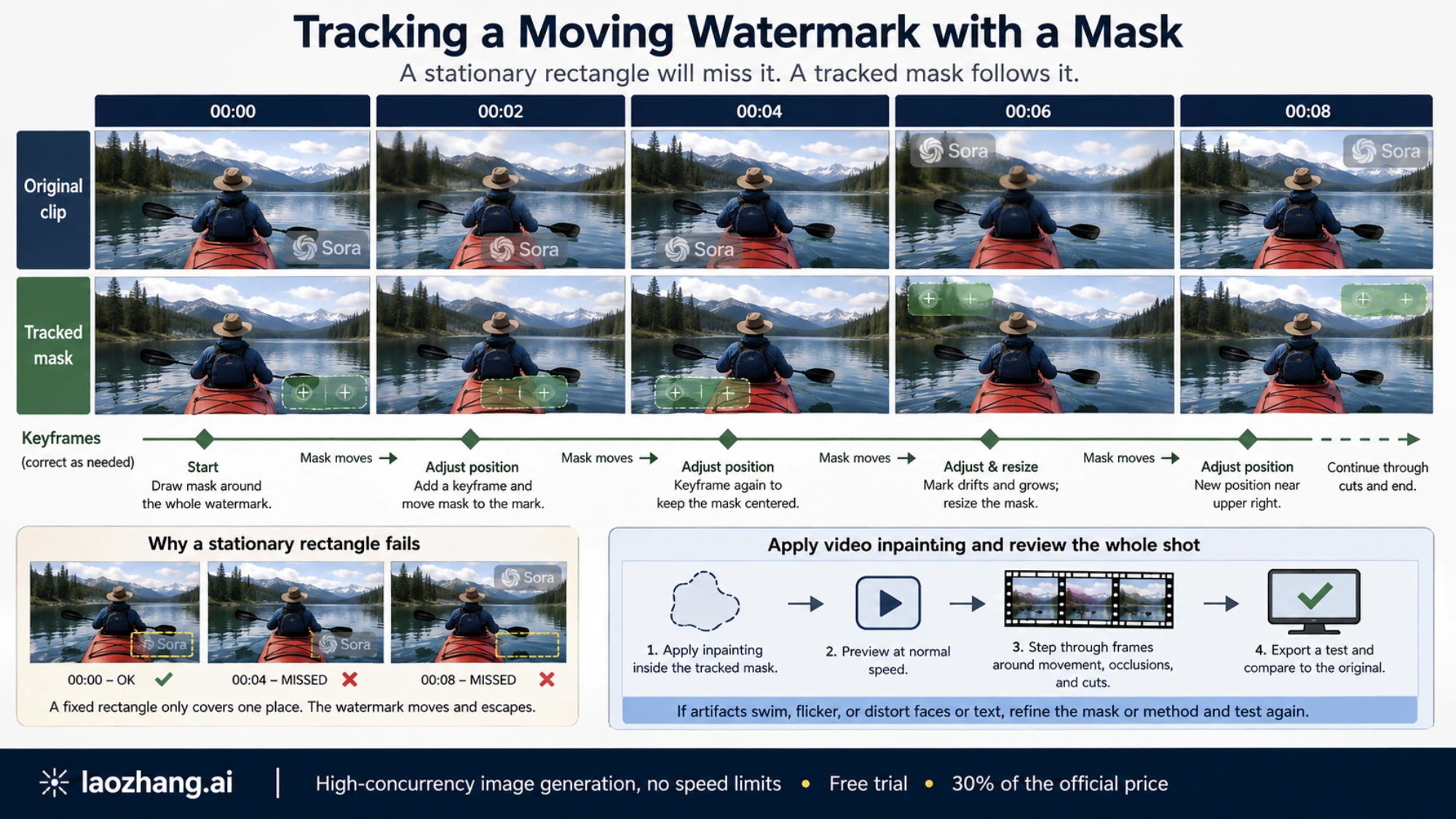
A faint logo left behind calls for a better-fitting mask. A patch that swims or flickers calls for a different repair setting or method. Changed lettering, a warped face, or invented object detail is a reason to reject the result even if the logo disappears. Where the hidden content matters more than the watermark, retaining the original may be the better finished edit.
This workflow describes what to check in a capable editor; it is not a quality claim for a particular online service.
If you only have a Sora share link
A link-based remover and a file editor solve different problems. A link-based service must retrieve a video from the shared page before it can return anything. FFmpeg needs a local media file; a Sora share-page URL is not a substitute for input.mp4 in these commands.
As checked on September 7, 2026, Remove Sora Watermark presents a public-share-link field in its remover section. Its page contains conflicting free-use allowances, and a working input form does not establish successful retrieval or output quality. We have not verified a completed removal through that service. If you try a link service, test your own non-sensitive clip and inspect the downloaded MP4 before paying for a larger job.
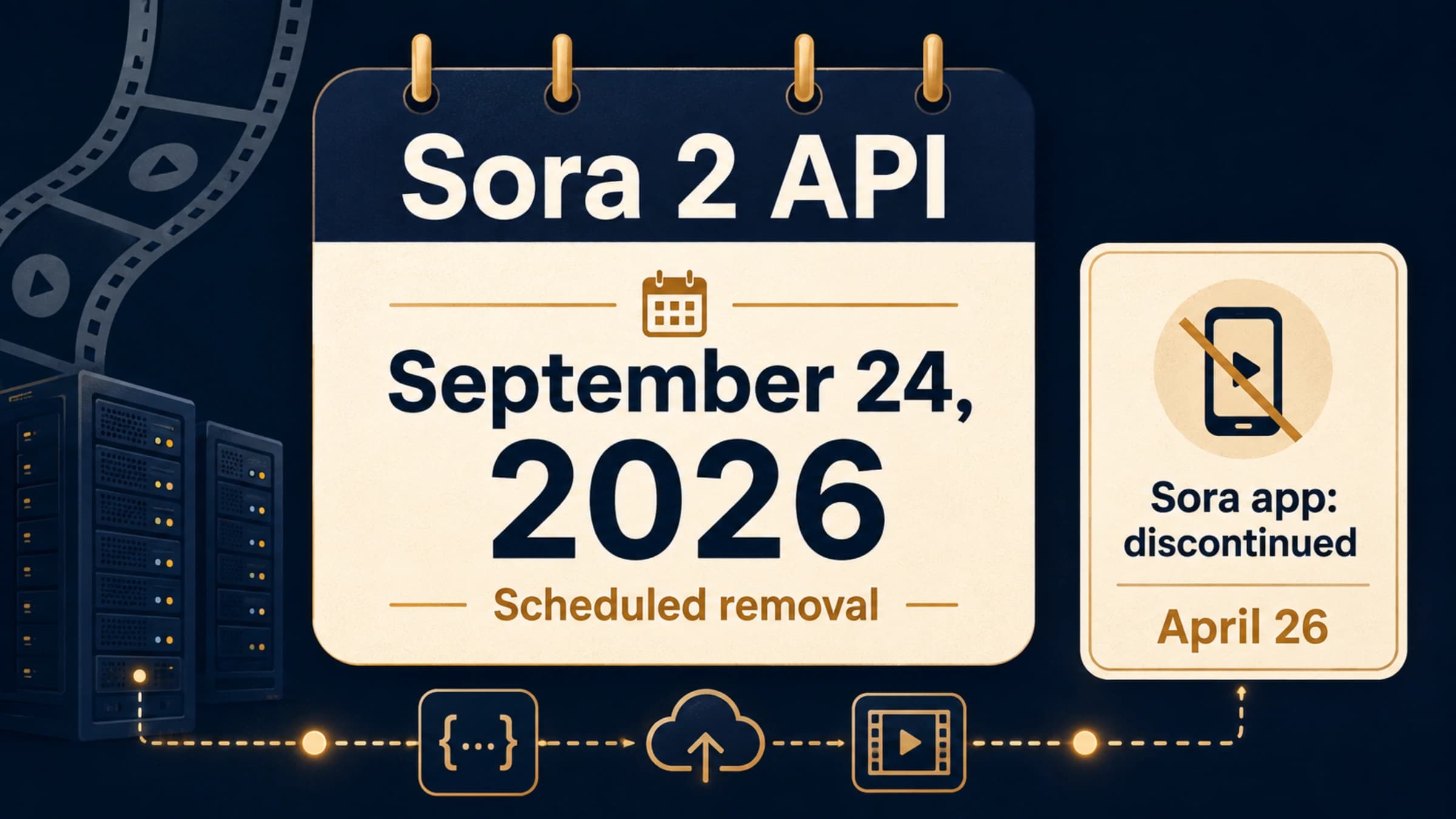
If the link no longer resolves, look for an archived download or an account export. OpenAI says the Sora web and app experience ended on April 26, 2026, with the API scheduled to end on September 24, 2026. Its discontinuation guidance describes an account export and email download process. That is not a guarantee that every old share link can be recovered or that exports are watermark-free. See our Sora shutdown and export guide if obtaining the file is your immediate problem.
For an MP4 already on your computer, a local edit avoids sending the footage to another service. Before using an upload-based editor, check its storage, reuse, and deletion terms for the material you plan to send.
Check the exported video, including its audio
A clean thumbnail is not sufficient. Watch the final export all the way through, including the last seconds, and compare the places where the watermark moved or crossed important details. Then inspect its dimensions, duration, frame rate, and audio stream with ffprobe:
ffprobe -v error \
  -show_entries stream=codec_type,codec_name,width,height,r_frame_rate,duration:format=duration \
  -of json "cleaned.mp4"
Run the same command on input.mp4; use cropped.mp4 instead of cleaned.mp4 if you chose the crop. A deliberate crop should explain the size change. An unexpectedly shorter duration, missing audio stream, or changed frame rate needs investigation before delivery. Also listen for sync at the beginning, middle, and end: matching file durations alone cannot prove lip sync.
The crop and fixed-area repair examples were run with FFmpeg 8.0.1 on a six-second synthetic test video, containing a stationary white rectangle and AAC audio. This was not a Sora-generated sample and does not demonstrate visual removal quality on Sora footage.
| Mechanical check | Original test file | Crop output | Fixed-area repair output |
|---|---|---|---|
| Video dimensions | 1280 × 720 | 1280 × 600 | 1280 × 720 |
| Video duration | 6 seconds | 6 seconds | 6 seconds |
| Reported frame rate | 30 fps | 30 fps | 30 fps |
| Copied audio packet hash | Reference | Matched original | Matched original |
Those results confirm the demonstrated commands' dimensions and audio handling for that input. They do not make either method lossless: the video is re-encoded, cropping discards pixels, and delogo replaces pixels.
Finally, visible cleanup does not establish that provenance metadata was preserved or removed. Keep the untouched Sora export alongside the edited file, and describe the video as AI-generated where that information matters to the viewer or recipient.