Brave Search API in 2026: Search vs Answers, Pricing, and First Working Requests
If you want the Brave Search API today, start by choosing between Search and Answers. Search is the better default when you want raw results, LLM Context, or specialized search endpoints and still own the application logic yourself. Answers is the OpenAI-compatible path when you want Brave to return the grounded answer.
On this page
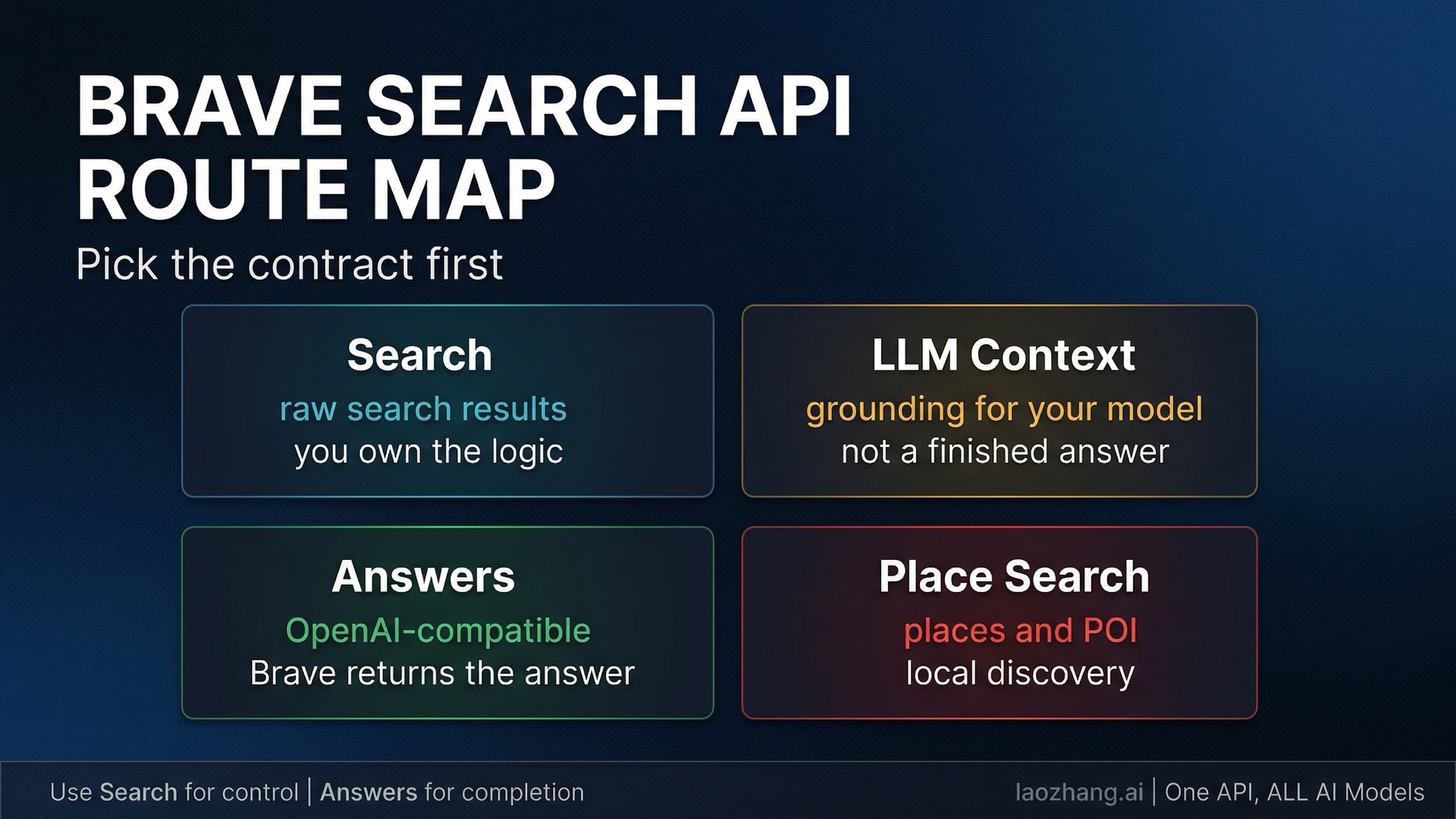
If you want the Brave Search API today, start by choosing between Search and Answers. Search is the better default when you want raw web results, model-ready grounding through LLM Context, or specialized endpoints like Place Search and still plan to own the application logic yourself. Answers is the better default when you want Brave to return the grounded answer through an OpenAI-compatible endpoint.
Brave Search API is not one magical endpoint. In 2026 it is a small route map: Search for search substrate, Answers for finished grounded output, LLM Context when you want Brave's retrieval layer but your own model, and Place Search when the object you need is a physical location rather than a web page.
Freshness note: the public Brave landing page, pricing docs, authentication docs, Search docs, Answers docs, Place Search docs, and the February 12, 2026 Brave launch post were rechecked on April 1, 2026.
TL;DR
Here is the shortest safe route.
| If this is your real job | Start here | Why | Biggest caveat |
|---|---|---|---|
| You want raw web results, snippets, pagination, filters, and direct search control | Search plan + /res/v1/web/search | This is the core search substrate | You still own ranking logic, result handling, and any answer layer above it |
| You want grounding context for your own model or agent | Search plan + /res/v1/llm/context | Brave compacts relevant web context for model consumption | It is still substrate, not a finished answer API |
| You want Brave to return the grounded answer itself | Answers plan + /res/v1/chat/completions | OpenAI-compatible path with citations, entities, and research mode | Advanced metadata features require streaming, and the default throughput is much lower |
| You want nearby businesses, landmarks, or local points of interest | Search plan + /res/v1/local/place_search | It searches places, not web pages | It is a different shape of data and should not be forced through plain Web Search first |
| You found old Summarizer tutorials | Do not start there | Brave now deprecates Summarizer in favor of Answers | Legacy Pro AI users may still have access, but it is not the right default for new work |
The simplest rule is this: use Search when you still want to own the model layer, and use Answers when you want Brave to own more of the answer layer for you.
What The Brave Search API Actually Is Now
The easiest way to get lost is to treat Brave Search API as if it were one endpoint with a long list of optional features. Brave's current public contract is tighter than that. The pricing page now splits the product into two main public plans: Search and Answers.
Search is the substrate plan. It gives you the search data your agents, chatbots, search tools, or retrieval systems need: Web Search, LLM Context, News Search, Video Search, Image Search, and the newer Place Search path. Public pricing currently shows $5 per 1,000 requests, $5 in monthly credits, and 50 requests per second default capacity. The landing page also frames this as the plan for "real-time search data your chatbots and agents need to generate answers," which is exactly the right way to think about it: it gives you the search layer, not the whole application.
Answers is the finished-answer plan. It sits on top of Brave's search infrastructure and returns grounded AI answers through an OpenAI-compatible interface. Public pricing currently shows $4 per 1,000 queries plus $5 per million input tokens and $5 per million output tokens, with $5 in monthly credits and 2 requests per second default capacity. That lower throughput is not arbitrary. Brave is doing more of the stack for you.
Two more facts matter early. First, Summarizer Search is now deprecated in favor of Answers. The docs still preserve it for users on the discontinued Pro AI plan, but that is legacy context, not a recommendation for new builds. Second, the Brave Search API is not a Google or Bing scraper. Brave's landing page says the service is powered by Brave's own index, which it describes as over 30 billion pages kept fresh by more than 100 million page updates per day. If you are evaluating the product seriously, that independent-index point matters more than most benchmark bragging.
Start By Picking The Contract, Not The Brand Name
The most important decision is not choosing the wrong layer first.
If you need a classic search substrate, start with /res/v1/web/search. This is the right path when you want URLs, snippets, pagination, search operators, result filters, or raw search results that your product will transform later. It behaves like search infrastructure. You ask for search results and then decide what your system does with them.
If you need grounding for your own model or agent, start with /res/v1/llm/context. Brave's February 2026 launch is important here because it introduced LLM Context as a first-class public API rather than just another buried feature. Brave describes it as a data-first ranking path that compacts the most relevant chunks of web context for model consumption. That means the value is not just "search, but with another name." The value is that you still own the LLM layer, but Brave gives you a more model-ready retrieval output than plain Web Search.
If you need a finished grounded answer quickly, start with Answers. This is the better route when your product does not need to own the answer synthesis itself, or when you want the fastest path to an answer engine with citations. The docs expose this through the OpenAI-compatible /res/v1/chat/completions endpoint with model="brave". That makes the path unusually short for teams already using the OpenAI client libraries.
If your object is a place in the physical world, do not force it through plain Web Search unless you have a specific reason. Brave's newer Place Search endpoint is built for businesses, landmarks, hotels, museums, and nearby discovery. The public docs describe it as an index of more than 200 million places worldwide, with structured POI data, geography-aware search, and detail endpoints for richer follow-up fetches. That is a different workload from ranking web pages.
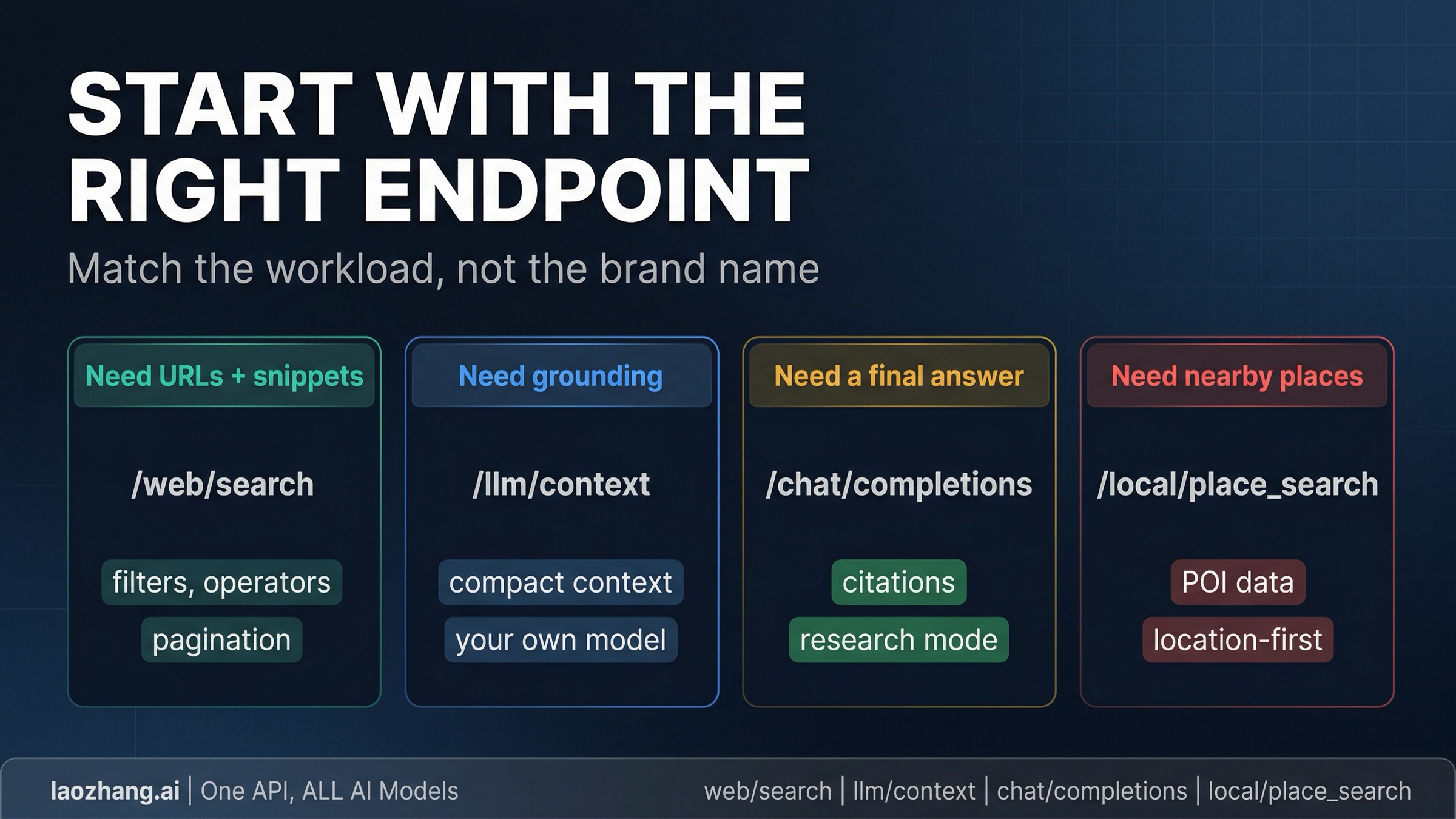
The decision gets simpler if you ask one question first: who should own the answer layer? If the answer is "my application," stay in Search and choose between Web Search, LLM Context, and Place Search. If the answer is "Brave," use Answers.
Current Pricing, Rate Limits, And The Part People Misread
The price table is straightforward, but the contract details matter just as much.
| Plan | Current public price | Monthly credit | Default capacity | Best fit |
|---|---|---|---|---|
| Search | $5 / 1,000 requests | $5 | 50 requests/sec | search results, grounding context, news, images, videos, place search |
| Answers | $4 / 1,000 queries + $5 / 1M input tokens + $5 / 1M output tokens | $5 | 2 requests/sec | finished grounded answers through OpenAI-compatible chat completions |
The important point is not that one plan is "cheap" and the other is "expensive." The important point is that Answers charges you for Brave doing more of the application work. If you are already committed to your own model stack, retrieval layer, and synthesis pipeline, Search is usually the more natural default. If you want Brave to own the search-to-answer jump, Answers is the cleaner route even with the extra token cost.
One operational constraint sits in the signup flow. Brave's current landing-page FAQ still says a credit card is required to subscribe to a free plan as an anti-fraud measure and that the card is not charged for the free plan. At the same time, the current pricing page frames the product as paid plans that include recurring monthly credits. The safe operational reading is: there are monthly credits, but do not assume the onboarding feels like a no-card public sandbox.
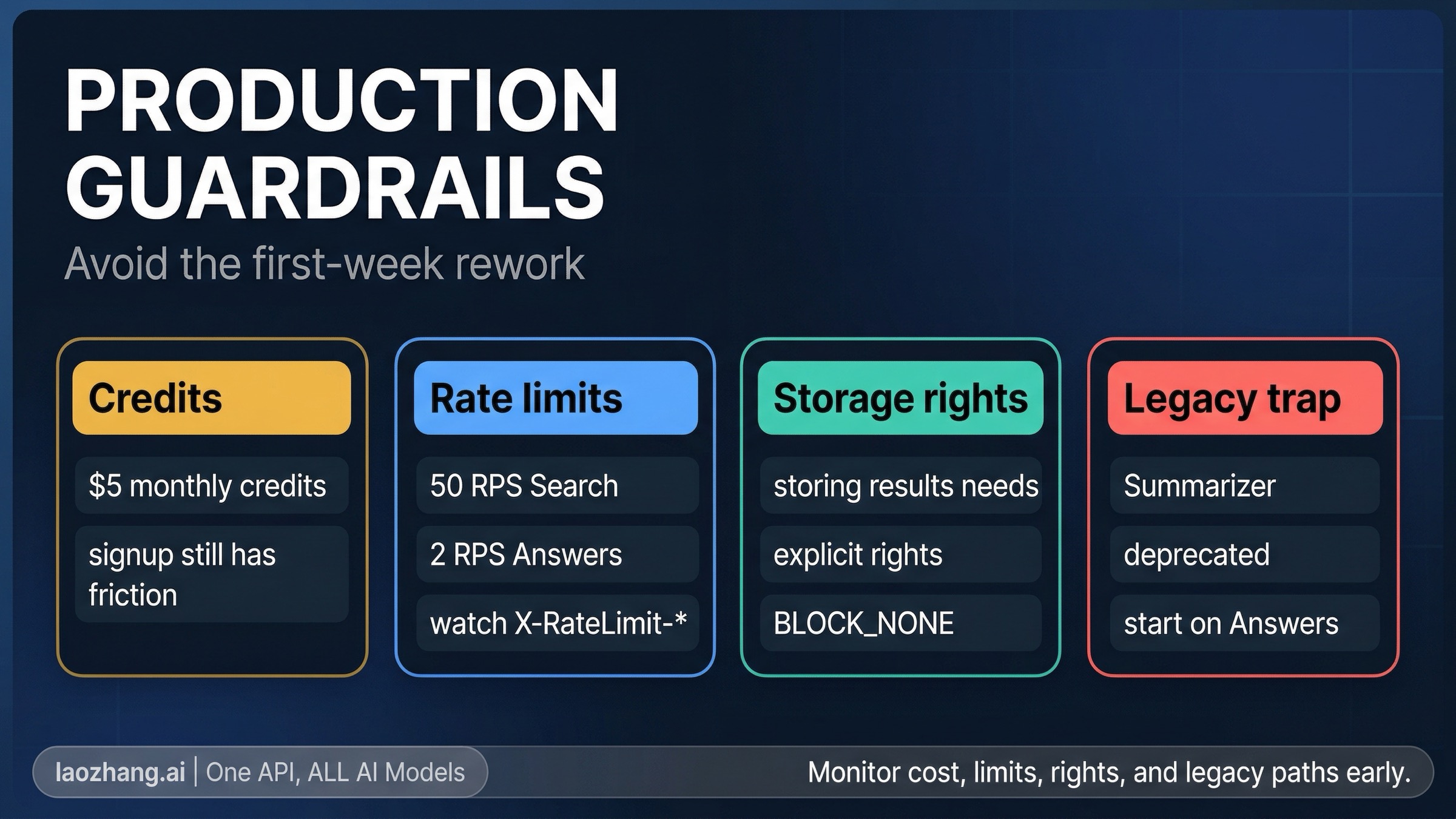
Two more details affect production use directly. Brave's rate-limiting docs say limits are enforced using a 1-second sliding window, and responses include X-RateLimit-* headers you should actually monitor rather than ignoring until the first 429. Brave also says that if you want to store results in part or whole, including for training or tuning an LLM, you need a plan that explicitly grants storage rights. That is not the sort of caveat you want to discover after you have already committed your architecture.
For enterprise buyers, Brave's public pages also surface two meaningful trust signals: SOC 2 Type II attestation and a path to Zero Data Retention. If privacy or regulated-data handling is part of your procurement argument, those are real differentiators. If you are still at the prototype stage, they are just a note that Brave's search contract is meant to scale beyond hobby experiments.
First Working Request: Plain Search Or Model-Ready Context
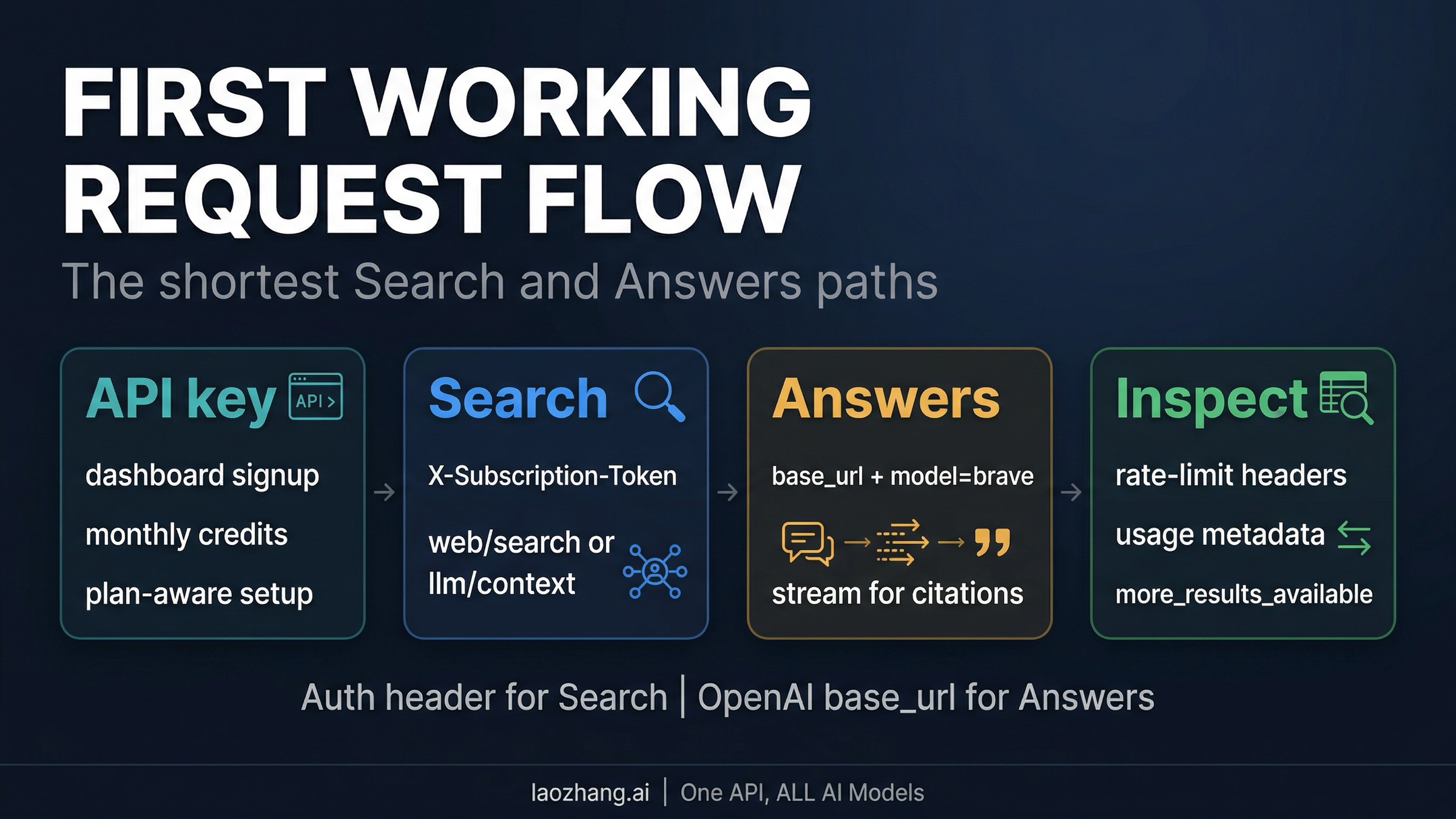
If you want to prove the Search side of the platform first, the shortest path is a basic Web Search request with your Brave API key in the X-Subscription-Token header.
const query = new URLSearchParams({
  q: "best open source vector database for hybrid search",
  count: "10",
  country: "US",
  search_lang: "en",
  extra_snippets: "true",
});

const response = await fetch(
  `https://api.search.brave.com/res/v1/web/search?${query}`,
  {
    headers: {
      Accept: "application/json",
      "Accept-Encoding": "gzip",
      "X-Subscription-Token": process.env.BRAVE_API_KEY,
    },
  },
);

const data = await response.json();
console.log(data.web?.results?.[0]);
console.log(data.query?.more_results_available);
A basic Web Search request shows the search layer directly. You get the results, you can inspect whether more pages exist through query.more_results_available, and you can decide whether to paginate again or hand the current results to your own downstream logic. Brave's Web Search docs also make three high-value knobs explicit: extra_snippets=true can surface up to five additional excerpts per result, search operators live inside the q string rather than separate params, and pagination only goes so far, so you should check more_results_available instead of blindly iterating.
If your real workload is a model or agent that needs compact grounding, LLM Context is usually the better Search-side proof:
curl -s --compressed \
  "https://api.search.brave.com/res/v1/llm/context?q=best+open+source+vector+database+for+hybrid+search" \
  -H "Accept: application/json" \
  -H "Accept-Encoding: gzip" \
  -H "X-Subscription-Token: $BRAVE_API_KEY"
The difference is in the output shape. Web Search is still URL-and-snippet oriented because it is built for search results. LLM Context is built for grounding context. That makes it the stronger default when your next step is passing the result into your own model, coding agent, or reasoning pipeline. Brave's February 2026 launch materials also frame the split this way.
First Grounded Answer: Brave Through The OpenAI SDK
If your job is not "give me retrieval substrate" but "give me a finished grounded answer," the shortest proof is the Answers endpoint through an OpenAI client.
import asyncio
from openai import AsyncOpenAI

client = AsyncOpenAI(
    api_key="YOUR_BRAVE_SEARCH_API_KEY",
    base_url="https://api.search.brave.com/res/v1",
)

async def main():
    stream = await client.chat.completions.create(
        model="brave",
        stream=True,
        messages=[
            {
                "role": "user",
                "content": "Compare Brave Search API Search vs Answers for an internal research assistant",
            }
        ],
        extra_body={
            "country": "us",
            "language": "en",
            "enable_citations": True,
            "enable_research": False,
        },
    )

    async for chunk in stream:
        if chunk.choices and chunk.choices[0].delta.content:
            print(chunk.choices[0].delta.content, end="", flush=True)

asyncio.run(main())
The docs include a subtle but important constraint here: citations, entities, and research mode all require streaming mode to be enabled. That is the kind of implementation detail many secondary guides skip, and it matters because Answers can emit richer content than a standard chat completion. Brave's docs describe special tagged payloads such as <citation>, <enum_item>, and <usage> that you should actually parse if you want a clean UX and trustworthy monitoring.
Research mode is also worth understanding before you flip it on by default. Brave says the default single-search mode is optimized for speed and typically streams in under 4.5 seconds on average, while research mode can iterate through multiple searches and run for minutes on tougher questions. That makes it a background-task tool, not a universal "better" setting. If you care about interactive latency, stay in the default mode until you can name the reason to pay the higher cost and wait the longer wall-clock time.
Where Brave Is Actually Stronger Than A Generic Search Wrapper
Brave becomes more interesting when you stop evaluating it as just another search box and start evaluating it as search infrastructure you can steer.
The first differentiator is the index itself. Brave's public materials keep returning to the same point: this is an independent index, not a scrape-and-repackage layer over Google or Bing. That claim is only useful if it changes what you can build, and in practice it does. Brave pairs the index with features that feel operator-shaped rather than brochure-shaped, including Goggles for reranking and filtering, extra snippets for more context per result, and schema-enriched results for structured data like reviews and wikis. Those are not abstract marketing bullets. They are the kinds of controls that matter when your search or agent workflow keeps failing on the same retrieval blind spots.
The second differentiator is that Brave now exposes both a substrate layer and an answer layer publicly. Many search-adjacent tools force you into one or the other. Brave lets you decide whether you want raw search results, compact model-ready context, or a finished grounded answer. That is why the right comparison is often not "is Brave a better answer engine than X?" but "how much of the answer layer do I want to own?"
The third differentiator is ecosystem fit. Brave's official tools page now lists an MCP Server and integrations across tools like LangChain, LlamaIndex, Dify, Flowise, Postman, and editor/agent ecosystems. If your fastest evaluation path is "wire search into an agent tool this afternoon," that matters. If you later decide you want a relay layer above Brave's native endpoints rather than Brave itself as the top-level integration point, our OpenClaw API guide covers that separate architecture decision.
Place Search deserves one more mention here because it changes the shape of the platform. A lot of guides still talk about Brave as if it were only web search plus AI answers. It now also has a genuinely useful local-discovery path. If your workload is "coffee shops near a coordinate," "museums in Paris," or any feature where the object is a physical place, /local/place_search is a first-class product decision, not a footnote.
The Mistakes That Waste The First Week
Most early frustration with Brave Search API comes from one wrong assumption, not from missing one exotic feature.
- Starting new work on Summarizer Search. Brave now explicitly deprecates it in favor of Answers. If you are building something new, do not begin from old Summarizer tutorials just because they still exist.
- Using Answers when you only need grounding substrate. If your application already has a model layer, jumping straight into Answers can make the contract more expensive and less controllable than it needs to be.
- Ignoring the streaming requirement for richer Answers output. If you want citations, entities, or research mode, you need to design around streaming rather than treating Answers like a plain synchronous chat response.
- Treating monthly credits like a no-friction public sandbox. Public pages still indicate signup card friction even when credits are available. That is not a reason to avoid the API, but it is a reason to plan onboarding honestly.
- Skipping rate-limit and storage-rights work until later. The
X-RateLimit-*headers and explicit storage-rights language belong in your first integration checklist, not your post-launch cleanup sprint. - Forcing local discovery through the wrong endpoint. If the object is a business, landmark, or nearby place, Place Search is usually the cleaner first move than plain Web Search.
The Shortest Safe Route
If you are still deciding where to begin, start with this rule: use Search when you want control, use Answers when you want completion.
For most engineering teams, the safest first evaluation is either Web Search or LLM Context under the Search plan, because those paths keep the architecture honest. You can inspect the retrieval layer first, then decide whether Brave should stay as substrate or move higher into the answer layer. If your product really is "grounded answer generation with minimal integration effort," skip the substrate debate and start with Answers.
What you should not do is let an old tutorial or a pricing-only summary make the decision for you. Brave's public contract is now clear enough to be useful, but only if you read it as a route map instead of as a single endpoint brand.