AI Face Swap Online: Safe Photo, Video, and Multi-Face Workflow
Pick the safest AI face swap workflow before upload: photo, video, GIF, multi-face, mobile app, or prompt-based generation, plus consent, privacy, and failure-fix checks.
On this page
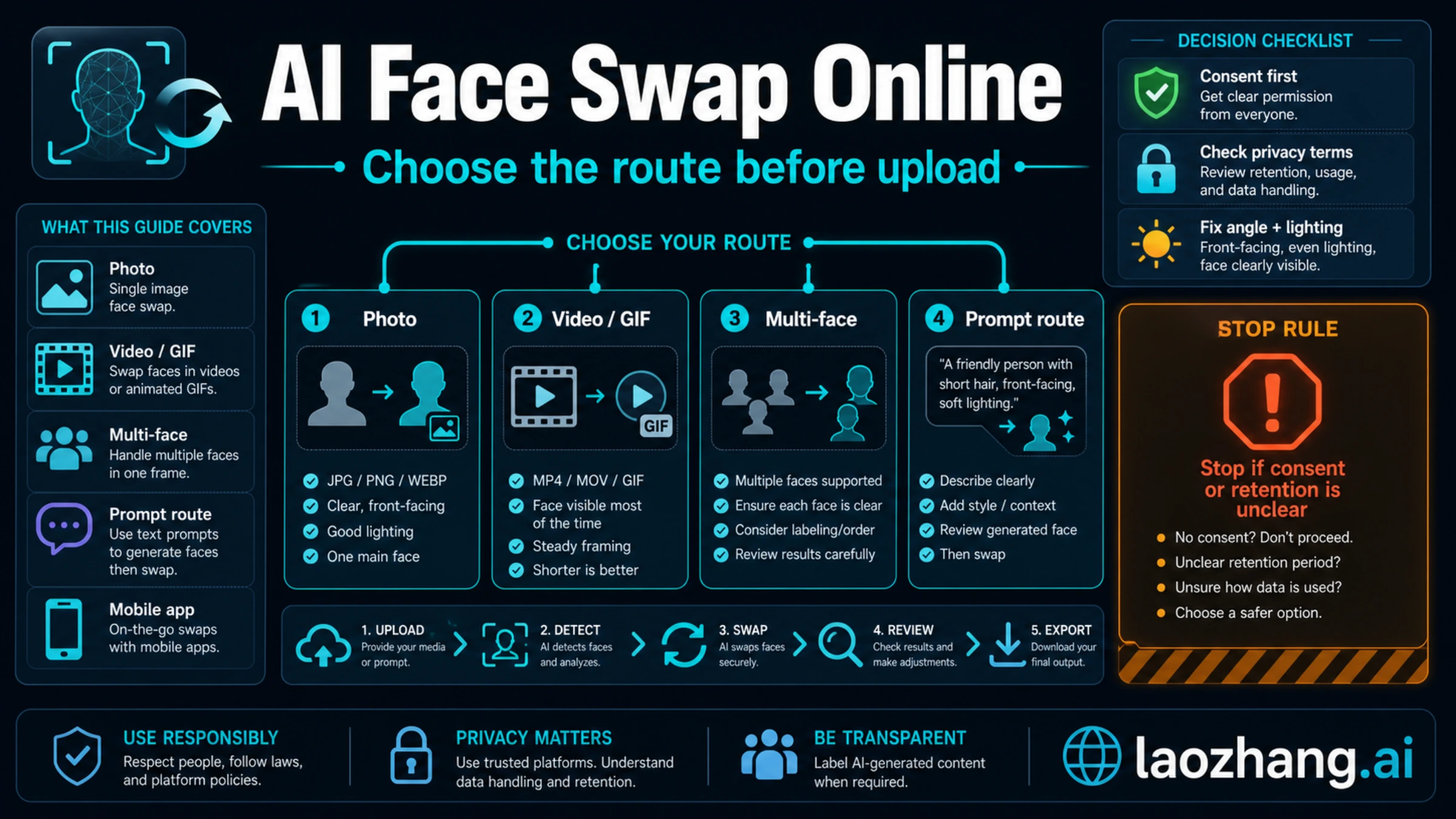
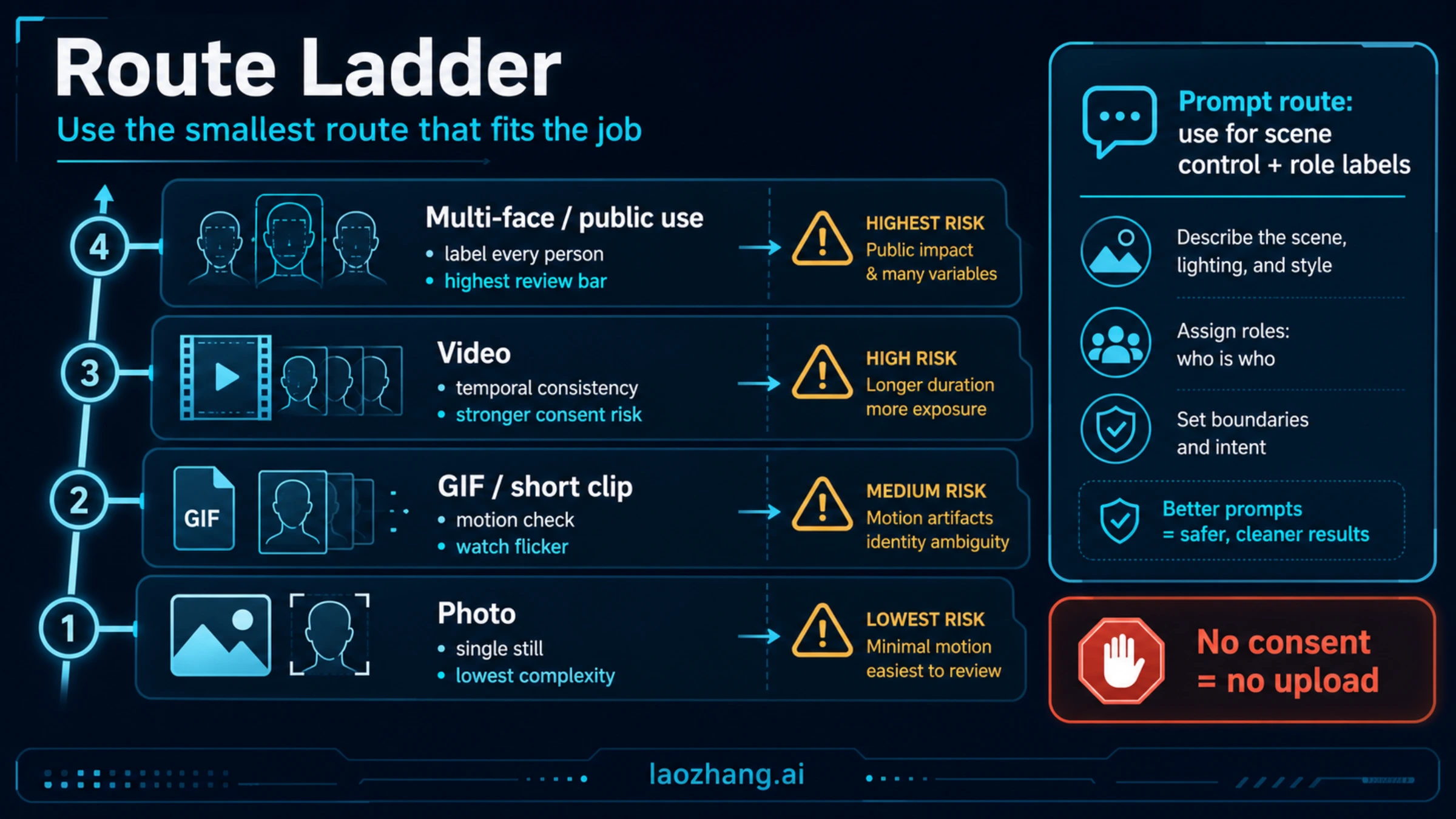
AI face swap works best when you choose the route before uploading a face. Use a photo face swap for one still image, a video or GIF route only when motion matters, a multi-face workflow only when every visible person is intentional and authorized, and a prompt-based person swap when you need scene control or full-person replacement.
Before uploading anything, stop if consent, retention, deletion, or publication rights are unclear. Free, no-login, and no-watermark labels are convenience claims, not a privacy or safety guarantee.
Start with the smallest route that fits the job, then judge the result with input quality: face angle, lighting, expression, resolution, occlusion, and whether the target media clearly shows who should be changed.
Quick Route Board
| Job | Best first route | Use it when | Stop if |
|---|---|---|---|
| One edited picture | Photo face swap | You need a single before/after image, profile mockup, costume preview, or consented portrait edit. | The source face or target image is private and the tool does not explain storage or deletion. |
| Short motion loop | GIF or short-clip face swap | A still image is not enough because expression or motion is the point. | The face flickers, the clip contains bystanders, or the person did not agree to motion use. |
| Longer moving result | Video face swap | Timing, speech, camera movement, or scene continuity matters. | The output could be mistaken for real footage of someone doing or saying something they did not do. |
| Several visible people | Multi-face swap | Every person is known, authorized, and intentionally assigned. | The tool cannot lock which face maps to which person. |
| Mobile casual edit | App route | You only need a quick personal edit and can review device permissions and subscription terms. | The app pushes public galleries, unclear trials, or broad data permissions. |
| Controlled scene edit | Prompt-based person swap | You need role labels, scene control, full-person replacement, or repeatable edits. | The prompt asks for deception, sexual content, harassment, or non-consensual likeness use. |
The first mistake is choosing by tool brand before choosing by media type. A photo-only tool can be fast and clean for a still image, but it does not solve temporal consistency in video. A video tool can preserve motion better, but it increases review cost because the viewer may read the result as a real event. A prompt-based person swap is slower, yet it gives you language for role labels, locked scene details, and safer refusal boundaries.
What AI Face Swap Can Do
AI face swap tools usually ask for a source face and a target image or clip. The model detects face geometry, estimates pose and lighting, transfers identity cues, and blends edges so the new face belongs in the target media. Online tools such as Pixlr, Higgsfield, Morph Studio, AIFaceSwap.org, and Remaker show how broad the category has become: some focus on instant photo swaps, some on video or creative clips, and some on multi-face or head-swap workflows.
That does not mean every tool solves the same job. Still-image swaps are mostly about edge blending, skin tone, perspective, and facial detail. Video swaps add frame-to-frame stability, expression changes, mouth shape, motion blur, and compression artifacts. Multi-face swaps add assignment risk: the tool may change the wrong person, blend identities, or fail when two faces have similar pose or lighting.
Treat "free", "no login", "no watermark", "HD", "private", or "commercial use" as labels to verify, not durable facts. Tool pages and app-store terms can change. If a claim matters to the job, check it at the moment of use and keep a record of the terms for client, workplace, or public work.
Preflight the Source and Target
Bad input is the fastest way to waste attempts. Before trying a different tool, check whether the source face and target media give the model enough information.
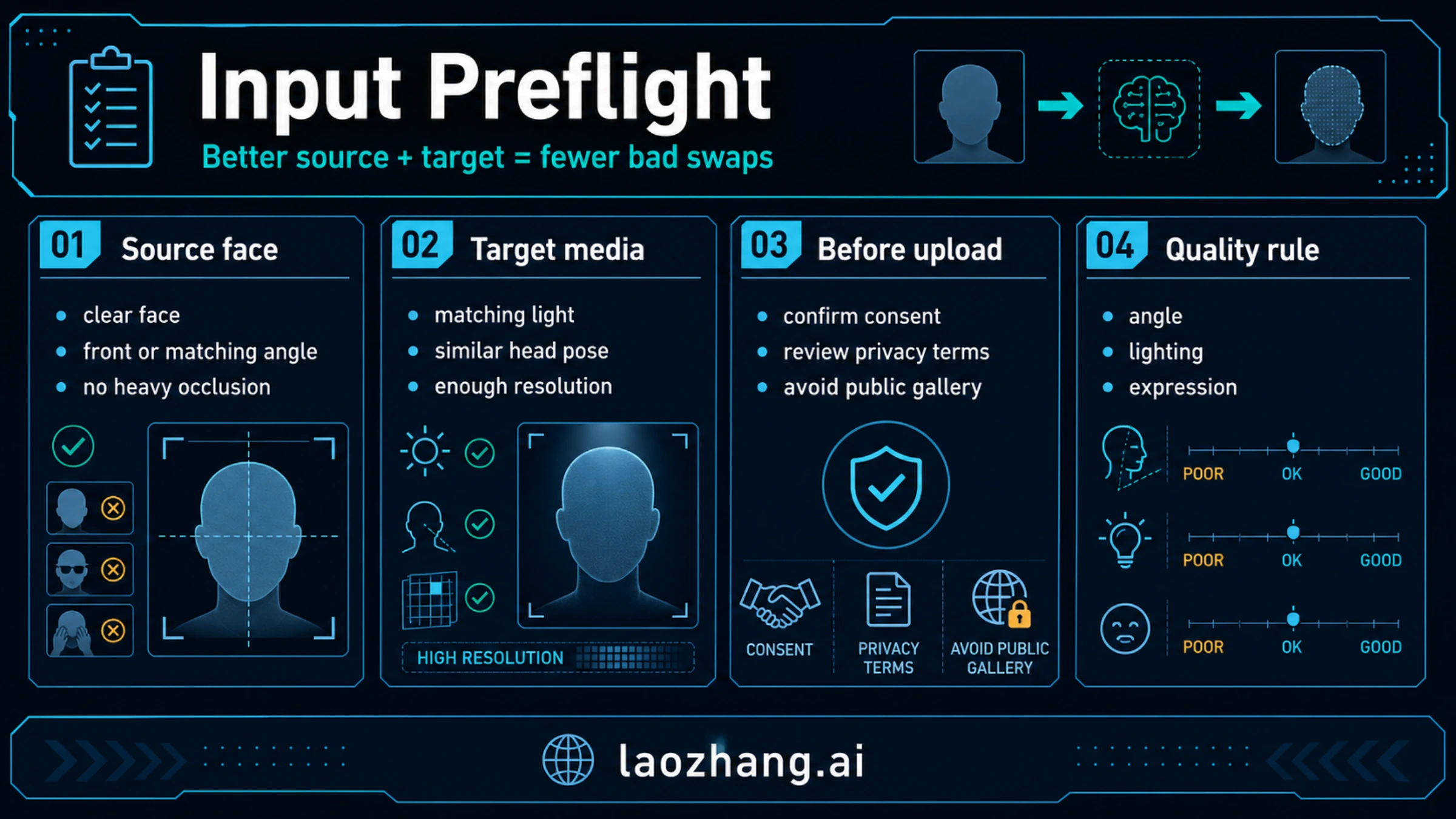
For the source face, choose an image where the person is clearly visible, not heavily filtered, not covered by sunglasses or hands, and not compressed into a tiny crop. A front-facing image is easiest, but a matching angle is often better than a perfect portrait. If the target face is in three-quarter view, a source image with a similar head angle usually beats a straight passport-style photo.
For the target media, decide what must stay locked. In a face-only photo swap, the target owns the body, hair outline, clothing, background, camera angle, and composition. In a head swap, more of the head shape and hair may move. In a full-person replacement, the source person may own more identity and body details, while the target scene owns lighting, scale, camera, and background.
Use this preflight checklist before upload:
| Check | Good input | Risky input | Repair |
|---|---|---|---|
| Consent | Everyone involved agrees to the edit and publication use. | You only have a downloaded image or social profile photo. | Do not upload or publish without permission. |
| Source face | Clear, sharp, high enough resolution, similar angle. | Sunglasses, heavy filter, motion blur, extreme crop. | Pick a cleaner source or use a prompt route with role labels. |
| Target face | Face is visible and not hidden by hair, hands, masks, or strong shadows. | Occlusion hides the shape the model must replace. | Choose another frame or crop less aggressively. |
| Lighting | Source and target light direction are compatible. | One image is flat indoor light and the other is dramatic side light. | Use a better source or request shadow and white-balance matching. |
| Expression | Expression is close enough for the target job. | Source is smiling while target is serious, or mouth shapes do not match. | Choose a source with closer expression. |
| Multi-person labels | Every visible person has a role. | The tool has to guess who should change. | Label people before editing or use a tool with explicit face selection. |
Consent, Privacy, and Publication Stop Rules
Likeness is the core material in a face swap. Consent is not a decorative safety note; it decides whether the workflow should start. Do not use online AI face swap tools for non-consensual intimate images, harassment, fake evidence, identity fraud, workplace humiliation, or public-figure impersonation that could mislead viewers.
The FTC has warned about deceptive AI claims and online harms involving deepfake-style content, and U.S. security agencies have described deepfakes as an impersonation and social-engineering threat. Those sources are not a substitute for legal advice, but they are enough to set a practical operating rule: if the output could make a reasonable viewer believe a real person did something they did not do, either disclose the edit clearly or do not publish it.
Before uploading face media, check:
| Boundary | What to check | Safer decision |
|---|---|---|
| Permission | Does the person know the specific edit and distribution context? | Keep edits private or stop if permission is vague. |
| Retention | Does the tool explain upload deletion, storage period, and training use? | Use another route if retention is unclear. |
| Public gallery | Can generated outputs appear in public feeds or examples? | Avoid for personal or client likeness work. |
| Account terms | Are trial, subscription, watermark, and commercial-use rules clear? | Screenshot or save terms for paid work. |
| Disclosure | Could a viewer mistake the output for real evidence? | Add disclosure or do not publish. |
| Sensitive context | Does the output imply sex, crime, politics, medical facts, employment, or financial identity? | Treat as a stop condition unless there is a formal, documented use case. |
Choose by Media Type
Photo face swap is the best first route for a single still image. Use it for consented portraits, mockups, creative costume previews, or internal concept work. The quality test is local: does the face match angle, lighting, skin texture, shadows, and image grain? If it looks pasted, fix the input before changing tools.
GIF or short-clip face swap is useful when a static image does not show the intended expression or action. Keep the clip short, stable, and easy to review. A short loop still carries consent risk because it makes the person appear to move, react, or participate in a scene.
Video face swap should be reserved for jobs where motion truly matters. Longer video increases temporal flicker, mouth-shape mismatch, compression artifacts, and the chance that viewers read the result as real footage. For public or client use, keep a review record: source media rights, tool terms, output date, disclosure wording, and who approved publication.
Multi-face swap requires explicit assignment. If the image contains several people, write or select exactly which person changes and which people stay unchanged. When the interface does not support clear face assignment, do not use it for crowded scenes.
Prompt-based person swap is the better branch when you need role labels, full-person replacement, or scene control. The existing Nano Banana Pro person swap prompt workflow goes deeper into identity source labels, target scene ownership, face-only versus full-person branches, and safety wording. If the same person must remain stable across multiple generated scenes, use the Nano Banana Pro face consistency workflow after the first route decision.
Fix Bad Face Swap Results
When the output fails, do not keep rerunning blindly. Classify the failure, then fix the input, route, or instruction.
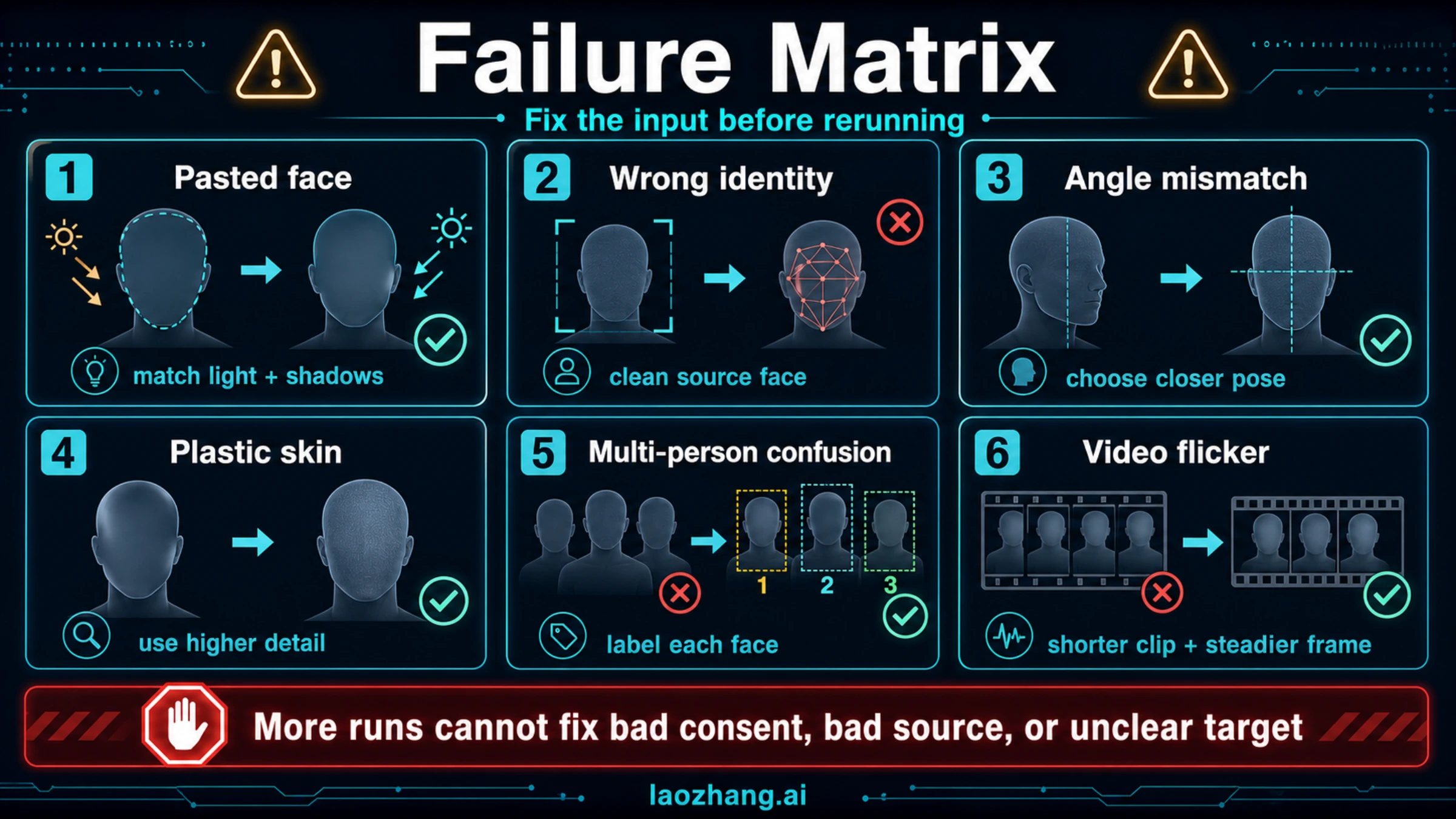
| Failure | Likely cause | Next fix |
|---|---|---|
| Face looks pasted on | Lighting, shadows, skin texture, or edge blending do not match. | Use a source with closer light direction, or request shadow, white-balance, and grain matching in a prompt route. |
| Wrong identity appears | Source face is low detail, filtered, occluded, or too different from target pose. | Use a cleaner source and avoid heavy filters. |
| Angle mismatch | Source and target head positions are too far apart. | Choose a source with closer head pose or a target frame with clearer frontal geometry. |
| Plastic skin | The tool over-smoothed detail or source resolution is weak. | Use a sharper source and avoid beauty filters before swapping. |
| Multi-person confusion | The tool guessed who should change. | Label or select every visible face; keep unrelated people unchanged. |
| Video flicker | Frames vary too much, target motion is unstable, or clip is too long. | Use a shorter clip, steadier frame, or still-image route for the key frame. |
| Unclear publication risk | The result looks realistic enough to mislead. | Add clear disclosure or do not publish. |
More attempts cannot fix bad consent, unclear retention, or a source image you do not have the right to use. Treat those as stop conditions, not quality problems.
A Safer Prompt-Based Branch
Prompt-based generation is not only for advanced users. It is often the safest route when the edit needs explicit boundaries. The prompt can say which image owns identity, which image owns the scene, what must stay locked, and what is not allowed.
Use this structure when a tool accepts image references and text instructions:
Use Image 1 as the identity source. Use Image 2 as the target scene. Transfer only the face and facial identity from Image 1 into the target person in Image 2. Keep the target body, hair outline, clothing, pose, lighting, camera angle, background, and composition unchanged. Match shadows, skin texture, perspective, white balance, and image grain so the edit looks natural. Do not change other people, sexualize anyone, create a deceptive impersonation, or imply a real event that did not happen.For a full-person replacement, change the transfer scope:
Replace the target person with the person from Image 1 while preserving the target scene, camera position, lighting, scale, background, and composition. Label every visible person first, and keep all unrelated people unchanged.The difference is important. A face-only swap locks body and clothing to the target image. A full-person replacement may move more identity and body detail from the source. Mixing those jobs is how you get a face from one image, hair from another, and a background that unexpectedly changes.
Tool Selection Checklist
Use tool pages as a starting point, then verify the terms that matter to the job.
| Tool-page promise | What it may mean | What to verify |
|---|---|---|
| Free | A limited free tier, trial, daily quota, or ad-supported run. | Quota, watermark, export resolution, and whether payment is required later. |
| No login | The first upload may not require an account. | Whether large files, HD export, video, or history require signup. |
| Private | Uploads may not be public by default. | Retention, deletion, training use, and support access. |
| Video support | The tool accepts moving clips. | Length, file size, output resolution, watermark, and flicker handling. |
| Multi-face | More than one face can be processed. | Whether you can assign each face, lock unchanged people, and review before export. |
| Commercial use | Some outputs may be allowed in business contexts. | Terms, source-media rights, likeness releases, and disclosure obligations. |
If the job is personal and low-stakes, convenience may matter most. If the job is client-facing, public, or tied to a real person's reputation, terms and documentation matter more than speed.
FAQ
Is AI face swap online safe?
It can be safe for consented, low-risk edits when the tool terms are clear and the output is not misleading. It is unsafe when the person did not consent, the upload policy is unclear, or the output could be used as fake evidence, harassment, sexual content, identity fraud, or deceptive impersonation.
Are free AI face swap tools reliable?
Free tools can be useful for quick tests, but free access does not prove privacy, quality, retention, or commercial-use rights. Check the current limits, watermark rules, deletion policy, and export quality before using a result outside personal testing.
Should I use photo face swap or video face swap?
Use photo face swap for one still image. Use video or GIF only when motion is the actual job. Video adds flicker, mouth-shape, timing, compression, and stronger consent risk, so it should not be the default route.
How do I make a face swap look realistic?
Start with a clear source face, similar target angle, compatible lighting, enough resolution, and minimal occlusion. If the result looks pasted, repair angle, light, shadows, white balance, skin texture, and image grain before blaming the tool.
What is the best route for multi-face swapping?
Use a tool or prompt workflow that lets you assign every visible face. If the interface cannot lock who changes and who stays unchanged, avoid crowded scenes. Multi-face results are higher risk because one wrong assignment can alter an unrelated person.
When is prompt-based person swap better?
Use a prompt-based route when you need controlled scene ownership, role labels, full-person replacement, or repeated edits with the same identity. It is slower than an instant web tool, but it gives you clearer instructions and safer boundaries.
Sources and Current Checks
- Pixlr face swap page: https://pixlr.com/face-swap/
- Higgsfield AI face swap page: https://higgsfield.ai/apps/face-swap
- Morph Studio face swap page: https://www.morphstudio.com/face-swap
- AIFaceSwap.org page: https://aifaceswap.org/
- Remaker head swap page: https://remaker.ai/features/head-swap/
- FTC deceptive AI claims enforcement note: https://www.ftc.gov/news-events/news/press-releases/2024/09/ftc-announces-crackdown-deceptive-ai-claims-schemes
- FTC report on online harms and deepfakes: https://www.ftc.gov/system/files/ftc_gov/pdf/Combatting%20Online%20Harms%20Through%20Innovation%3B%20Federal%20Trade%20Commission%20Report%20to%20Congress.pdf
- NSA/FBI/CISA deepfake threat guidance: https://media.defense.gov/2023/Sep/12/2003298925/-1/-1/0/CSI-deepfakethreats.pdf
- Congress.gov TAKE IT DOWN Act bill page: https://www.congress.gov/bill/119th-congress/senate-bill/146