# Seedream 5.0 Pro Layer Decomposition API Tutorial: PNGs to PSD
> One POST with layer_decomposition: true returns a base image plus up to 16 PNG layers. Each image is billed, and the restack is not a pixel copy.
- URL: https://blog.laozhang.ai/en/posts/seedream-5-pro-layer-decomposition-api
- Published: 2026-10-02
- Updated: 2026-10-02
- Author: LaoZhang AI Team (https://blog.laozhang.ai/en/about)
- Category: AI Image Generation
- Tags: Seedream 5.0 Pro, Seedream 5.0 Flash, Layer Decomposition, BytePlus ModelArk, AI Image API
---
Layer decomposition is not a separate Seedream model. It is the ordinary image endpoint with `"layer_decomposition": true`, exactly one input image, and a tier size such as `1K`. The response is a `data` array holding one base image and up to 16 transparent PNG layers, each with a stacking order, a bounding box, a name and a description. Only Seedream 5.0 Pro and Seedream 5.0 Flash support it ([BytePlus tutorial](https://docs.byteplus.com/en/docs/modelark/seedream-5-0-pro), updated September 28, 2026).
**What was run.** Three live calls on October 2, 2026, all through `api.laozhang.ai` at `1K`, all on BytePlus's own sample image (a 2784×3441 PNG of a toast band, no text): Flash with no prompt, Pro with no prompt, and Flash with a prompt naming two elements. All three returned HTTP 200. The Python script further down turned each response into PNG files, a recomposed preview and a PSD, and the PSD was re-opened with psd-tools to confirm it matches the preview.
**What was not run.** BytePlus ModelArk and Volcengine Ark directly, the `1.5K`, `2K` and `auto` sizes, bbox tags, images with text, any error case, and opening the PSD in Photoshop, Photopea or GIMP. Each configuration ran once, so the timings and percentages below describe one image, not a rate.
| Run | Model | Prompt | Time | Images returned | Charge at list price |
| --- | --- | --- | --- | --- | --- |
| 1 | Flash | none | 94.8 s | 14 (base + 13 layers) | 14 × $0.018 = $0.252 |
| 2 | Pro | none | 110.6 s | 14 (base + 13 layers) | 14 × $0.12 = $1.68 |
| 3 | Flash | two named elements | 34.8 s | 3 (base + 2 layers) | 3 × $0.018 = $0.054 |
The charges are the gateway's published per-image price multiplied by `usage.generated_images`; the billing log was not opened. Two results matter before you write any code: you pay for every returned image and you do not set the count, and stacking the layers back together does not give you the original pixels.
## Send the request: one PNG or JPEG, a tier size, no prompt needed
The minimum body is a model ID, one image, and the flag. The endpoint and the model ID depend on where your key comes from; the parameters are the same on all three.
| Where your key is from | Endpoint | Pro model ID | Flash model ID |
| --- | --- | --- | --- |
| BytePlus ModelArk | `https://ark.ap-southeast.bytepluses.com/api/v3/images/generations` | `dola-seedream-5-0-pro-260628` | `dola-seedream-5-0-flash-260915` |
| Volcengine Ark (mainland China) | `https://ark.cn-beijing.volces.com/api/v3/images/generations` | `doubao-seedream-5-0-pro-260628` | `doubao-seedream-5-0-flash-260915` |
| LaoZhang gateway | `https://api.laozhang.ai/v1/images/generations` | `seedream-5-0-pro-260628` | `seedream-5-0-flash-260915` |
This is the call that produced run 1. The body is the one that was sent; the only change is that the key is read from an environment variable here.
```python
import json
import os
import requests
body = {
"model": "seedream-5-0-flash-260915",
"image": "https://arkdocs-en.tos-ap-southeast-1.volces.com/images/image-generation/layer_auto.png",
"layer_decomposition": True,
"size": "1K",
"response_format": "url",
"watermark": False,
}
resp = requests.post(
"https://api.laozhang.ai/v1/images/generations",
headers={"Authorization": f"Bearer {os.environ['LAOZHANG_API_KEY']}"},
json=body,
timeout=420,
)
print(resp.status_code)
with open("response.json", "w") as f:
json.dump(resp.json(), f, indent=2)
```
BytePlus's first-party form is the cURL below, copied from its tutorial. It was not run for this guide.
```bash
curl https://ark.ap-southeast.bytepluses.com/api/v3/images/generations \
-H "Content-Type: application/json" \
-H "Authorization: Bearer $ARK_API_KEY" \
-d '{
"model": "dola-seedream-5-0-pro-260628",
"image": "https://arkdocs-en.tos-ap-southeast-1.volces.com/images/image-generation/layer_auto.png",
"size": "2K",
"layer_decomposition": true,
"watermark": false
}'
```
The parameters that behave differently in layer mode:
| Parameter | In layer decomposition mode |
| --- | --- |
| `image` | Required, exactly one. PNG or JPEG only, 512×512 to 6000×6000 total pixels, aspect ratio 1/16 to 16, up to 30 MB. A reachable URL or a Base64 data URL with a lowercase format name. |
| `prompt` | Optional. Leave it out for automatic splitting. |
| `size` | `1K`, `1.5K`, `2K` or `auto` (the default). Explicit width×height values are not accepted. |
| `output_format` | `jpeg` (default) or `png`, for the base image only. Layers are always PNG. |
| `response_format` | `url` (default, kept for 24 hours) or `b64_json`. |
| `watermark` | Defaults to `true`, which stamps "AI-generated" in the lower-right corner. Set it to `false` for assets. |
Two details save a failed first call. The request is synchronous: Seedream 5.0 Pro and Flash do not support `stream`, and the connection stays open until every layer exists, which took 35 to 111 seconds in the three runs. LaoZhang's documentation recommends a client timeout of at least 300 seconds at `1K` and warns that a `2K` request "can run for a long time and is still charged if your client disconnects" ([LaoZhang Seedream docs](https://docs.laozhang.ai/en/api-capabilities/seedream-image)). And `size` sets a tier, not your input size: `1K` on the 2784×3441 sample produced an 880×1088 base. With `auto`, BytePlus keeps the input dimensions when the image has between 921,600 and 4,624,220 pixels, outputs `1K` for smaller inputs and `2K` for larger ones.
## Choose what gets split: automatic, named elements, or bbox tags
With no prompt, the model decides what counts as an element, and on a busy image that means a long and expensive response. BytePlus documents three ways to steer it.
**Automatic.** Omit `prompt`. This is what runs 1 and 2 did, and both models returned 13 layers. BytePlus notes that its Python SDK and the OpenAI SDK require a `prompt` value, so with those clients you pass a general instruction to decompose the main visual elements. A plain HTTP client such as `requests` or cURL can leave the key out.
**Named elements.** Describe what you want lifted in natural language. Run 3 added one line to the body:
```json
{
"prompt": "Separate only the central toast lead singer with sunglasses and the toast-shaped electric guitar."
}
```
The response had two layers, named "toast-shaped electric guitar" and "central toast lead singer with sunglasses", plus a base that kept everything else. Compared with the automatic Flash run on the same image, the image count fell from 14 to 3, the wait from 94.8 to 34.8 seconds, and the charge from $0.252 to $0.054. If you already know which elements you need to move, naming them is the single largest saving available.
**Exact regions.** Put normalized bbox tags in the prompt. Coordinates run from 0 to 1000 in the order left, top, right, bottom. BytePlus's example, which was not run here, looks like this:
```json
{
"model": "dola-seedream-5-0-pro-260628",
"prompt": "Perform precise layer separation on the image. The text regions to separate are at 180 64 812 198 and 757 210 939 280; the parrot is at 347 305 642 997.",
"image": "https://arkdocs-en.tos-ap-southeast-1.volces.com/images/image-generation/seedream_50_pro_layer_input.png",
"layer_decomposition": true,
"size": "2K"
}
```
Because the response returns a `normalized` box for every layer on the same 0 to 1000 scale, a first automatic pass gives you coordinates you can feed back as bbox tags.
Two cautions. BytePlus states that "if the prompt requests more layers than the upper limit, some layer information may be lost", so do not ask for more than 16. And sources disagree on an empty string: LaoZhang's documentation says you can leave the prompt out "or send an empty string", while EvoLink's guide for its own gateway says an empty string loses automatic detection. None of the three runs sent an empty string, so the disagreement stands. Omitting the key is the choice that is safe on every route.
## Read the response: stacking order, boxes, and oversized layer files
Everything you need to place a layer is in its `data` entry. This is run 1's response with the URLs shortened and 11 of the 13 layers removed:
```json
{
"model": "dola-seedream-5-0-flash-260915",
"created": 1790953682,
"data": [
{
"url": "https://ark-acg-ap-southeast-1.tos-ap-southeast-1.volces.com/...",
"size": "880x1088",
"output_format": "jpeg",
"z_index": 0
},
{
"url": "https://ark-acg-ap-southeast-1.tos-ap-southeast-1.volces.com/...",
"size": "759x627",
"output_format": "png",
"z_index": 10,
"bounding_box": {
"absolute": [305, 528, 695, 851],
"normalized": [347, 485, 789, 781]
},
"name": "Light green minivan",
"description": "The main body of the light green minivan, which acts as the base supporting the central toast, excluding the toast above and the guitar in front."
},
{
"url": "https://ark-acg-ap-southeast-1.tos-ap-southeast-1.volces.com/...",
"size": "271x1037",
"output_format": "png",
"z_index": 12,
"bounding_box": {
"absolute": [231, 503, 334, 897],
"normalized": [263, 462, 378, 824]
},
"name": "Standing microphone stand",
"description": "A black standing microphone stand including the microphone and base, positioned to the left of the central toast."
}
],
"usage": {
"input_images": 1,
"generated_images": 14,
"output_tokens": 53663,
"total_tokens": 53663
}
}
```
- **`z_index`** is 0 for the base image and counts up from 1 for layers, higher on top. In all three runs the values had no gaps. The base has no `name` and no `bounding_box`.
- **`bounding_box.absolute`** is `[left, top, right, bottom]` in pixels of the returned base image, not of your input.
- **`bounding_box.normalized`** is the same box on a 0 to 1000 scale of the base's width and height.
- **`name` and `description`** are written by the model in English. They are not stable identifiers: Flash called the vehicle "Light green minivan" and Pro called it "Light green minibus".
- **`usage.generated_images`** counts the base, so 14 means one base and 13 layers. `output_tokens` is the sum of width × height over all returned images divided by 256; billing follows the image count, not the tokens.
- The `model` field came back with the `dola-` prefix even though the request used the gateway's unprefixed ID.
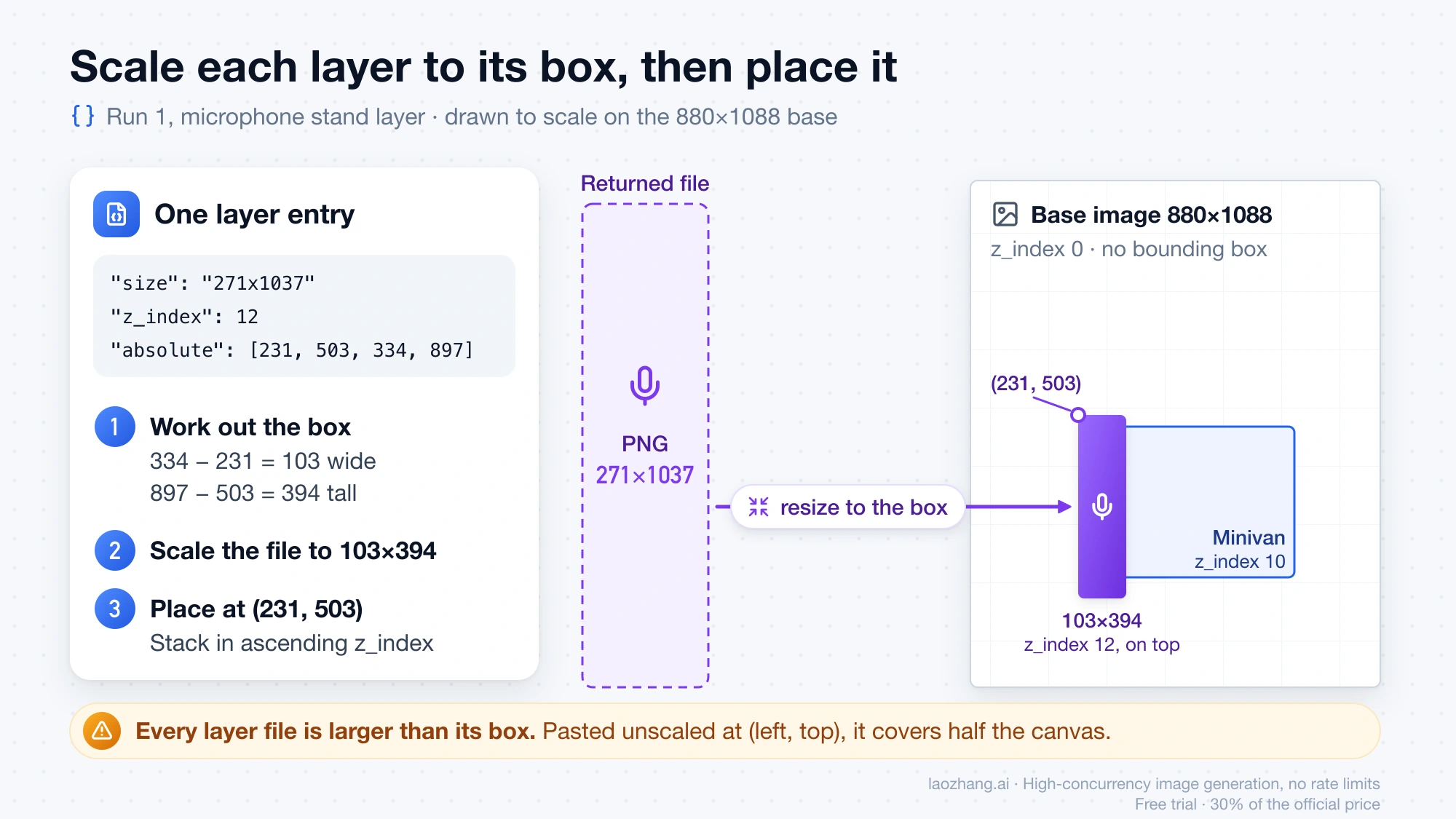
The detail that breaks naive compositing code is the layer file size. Every layer file is larger than its box. The microphone stand is a 271×1037 PNG that belongs in a 103×394 box, and the lounge chair is a 660×940 PNG for a 118×169 box. If you paste the file at `(left, top)` without resizing, it covers half the canvas. BytePlus's rule is:
```text
x = left y = top
w = right - left
h = bottom - top
Scale the layer to w × h, then place it at (x, y). Stack in ascending z_index.
```
For a canvas of any other size W × H, use the normalized box:
```text
x = left / 1000 × W y = top / 1000 × H
w = (right - left) / 1000 × W
h = (bottom - top) / 1000 × H
```
BytePlus warns that normalized values are integers, so this conversion can be off by a rounding error. The oversized files give you some room to place layers on a canvas larger than the base without upscaling, but not unlimited room. On a canvas at the sample's original 2784×3441, the microphone stand's box works out to 115 / 1000 × 2784 ≈ 320 pixels wide against a 271-pixel file, and the minivan's to 442 / 1000 × 2784 ≈ 1,230 against 759. Compare each file's `size` with its target box before you decide whether a `1K` call is enough.
## Turn the response into PNG layers, a recomposed image and a PSD
The API returns JSON and image URLs, never a PSD. This script reads a saved response, downloads every image, writes named PNG files, composites a flat preview and assembles a layered PSD. It was run on all three responses with Python 3.12, Pillow 12.3.0 and psd-tools 1.23.0.
```bash
python3 -m pip install pillow psd-tools
python3 layers_to_psd.py response.json out_dir
```
```python
"""Save every image of a Seedream layer-decomposition response, recompose a
flat preview, and write a layered PSD.
Usage: python3 layers_to_psd.py response.json out_dir
Needs: python3 -m pip install pillow psd-tools
"""
import base64
import json
import re
import sys
import urllib.request
from io import BytesIO
from pathlib import Path
from PIL import Image
from psd_tools import PSDImage
response = json.loads(Path(sys.argv[1]).read_text())
out = Path(sys.argv[2])
out.mkdir(parents=True, exist_ok=True)
def load(item):
if item.get("b64_json"):
value = item["b64_json"].split(",", 1)[-1]
return base64.b64decode(value + "=" * (-len(value) % 4))
with urllib.request.urlopen(item["url"], timeout=120) as download:
return download.read()
items = sorted(response["data"], key=lambda item: item["z_index"])
base_item, layer_items = items[0], items[1:]
assert base_item["z_index"] == 0 and "bounding_box" not in base_item
content = load(base_item)
ext = "png" if base_item.get("output_format") == "png" else "jpg"
(out / f"layer-00-base.{ext}").write_bytes(content)
base = Image.open(BytesIO(content)).convert("RGBA")
canvas = base.copy()
psd = PSDImage.new("RGBA", base.size)
psd.append(psd.create_pixel_layer(base, name="base", top=0, left=0))
for item in layer_items:
content = load(item)
slug = re.sub(r"[^a-z0-9]+", "-", item.get("name", "layer").lower()).strip("-") or "layer"
(out / f"layer-{item['z_index']:02d}-{slug}.png").write_bytes(content)
left, top, right, bottom = item["bounding_box"]["absolute"]
# The PNG is usually larger than its box: scale it to the box first.
layer = Image.open(BytesIO(content)).convert("RGBA").resize((right - left, bottom - top), Image.LANCZOS)
canvas.alpha_composite(layer, (left, top))
psd.append(psd.create_pixel_layer(layer, name=item.get("name", slug), top=top, left=left))
print(f"z={item['z_index']:>2} file={item['size']:>9} box={right - left}x{bottom - top} at ({left},{top}) {item.get('name')}")
canvas.save(out / "recomposed.png")
psd.save(out / "layers.psd")
print(f"Saved {len(layer_items)} layers + base, recomposed.png and layers.psd in {out}")
```
For run 1 the output folder held `layer-00-base.jpg`, 13 files named like `layer-12-standing-microphone-stand.png` at their full returned resolution, `recomposed.png`, and an 880×1088 `layers.psd` with 14 named pixel layers, each at its `absolute` offset. Run 3 gave a PSD with 3 layers. Re-opening each PSD with psd-tools and compositing it matched `recomposed.png` to within a mean absolute difference of 0.001 on a 0 to 255 scale.
Know the limits of that result before you hand the file to a designer:
- The PSD was verified only by reading it back with psd-tools. It was not opened in Photoshop, Photopea or GIMP.
- Inside the PSD each layer is scaled down to its box on the 880×1088 canvas. The full-resolution pixels are in the separate PNG files.
- Every layer is raster. Nothing in the response is an editable text object, and the sample image had no text, so how lettering is split was not observed.
- Download promptly. Result URLs expire after 24 hours, and LaoZhang's documentation says they send no CORS headers, so a browser client should request `b64_json` instead. The script accepts both forms; only the URL form was exercised.
If you want a layered PSD without writing code, [layerpsd.com](https://layerpsd.com/) is a browser tool that advertises image-to-PSD conversion with editable text from $0.018 per layer, with one free try. Those figures are the site's own description of its service.
## Does the restacked image match the original? No: 4% to 30% of pixels changed
Placing every layer at its `absolute` box in `z_index` order does not reproduce the input. Each recomposed image was compared with the input downscaled to 880×1088, counting pixels that differ by more than 32 out of 255 in any channel.
| Run | Pixels that differ | Mean absolute difference | What changed |
| --- | --- | --- | --- |
| Flash, automatic | 30.2% | 20.6 | Two out-of-focus foreground characters came back sharp and reshaped; the left musician was redrawn as a complete, larger character; the stage became a full disc covering grass the original showed; floating bubbles disappeared |
| Pro, automatic | 12.6% | 13.6 | Foreground blur and bubbles kept; small differences at edges |
| Flash, two named elements | 4.0% | 6.7 | The van's windscreen and grille were redrawn where the singer had stood |
The cause is visible in the files and is the point of the feature. A layer is not a cutout of visible pixels. The model completes each element, painting in the parts that were hidden behind something else, and it repaints the base behind everything it lifts. That is what lets you move the singer and find a whole van underneath. It also means the result is a redrawn version of your image, and the more elements are lifted, the more is redrawn.
These percentages come from one stylized 3D illustration at `1K`, one run per configuration. Treat them as a reason to diff your own images, not as error rates for the models. In practice: if the layers will be moved, recolored or re-laid out, the redraw is the price of editability. If the deliverable must stay identical to an approved original apart from one change, lift only the elements you need by name, or use a different tool.
## What one call costs: per-image price times every returned image
A call costs the per-image price multiplied by `usage.generated_images`, and that count includes the base. It ranges from 2 to 17 images and the caller does not set it. List prices as of October 2, 2026:
| Where you call it | Flash, per image | Pro, per image |
| --- | --- | --- |
| BytePlus ModelArk | $0.018 | $0.0225 up to 2.61 million pixels (1.5K or lower); $0.045 above |
| LaoZhang gateway | $0.018 | $0.12, flat |
BytePlus bills each layer by its own pixel tier, so one response can mix both Pro rates ([BytePlus pricing](https://docs.byteplus.com/en/docs/modelark/model-pricing)). The input image is free in layer mode on BytePlus, because only reference images after the first are charged and layer mode takes exactly one. On Volcengine Ark the list price in mainland China is 0.12 yuan per image on Flash and 0.15 or 0.30 yuan on Pro by the same pixel tiers.
Applied to the image counts from the three runs:
| Result size | Flash, either route | Pro on BytePlus, lower tier | Pro on LaoZhang |
| --- | --- | --- | --- |
| 3 images (run 3) | 3 × $0.018 = $0.054 | 3 × $0.0225 = $0.0675 | 3 × $0.12 = $0.36 |
| 14 images (runs 1 and 2) | 14 × $0.018 = $0.252 | 14 × $0.0225 = $0.315 | 14 × $0.12 = $1.68 |
| 17 images (maximum) | 17 × $0.018 = $0.306 | 17 × $0.0225 = $0.3825 | 17 × $0.12 = $2.04 |
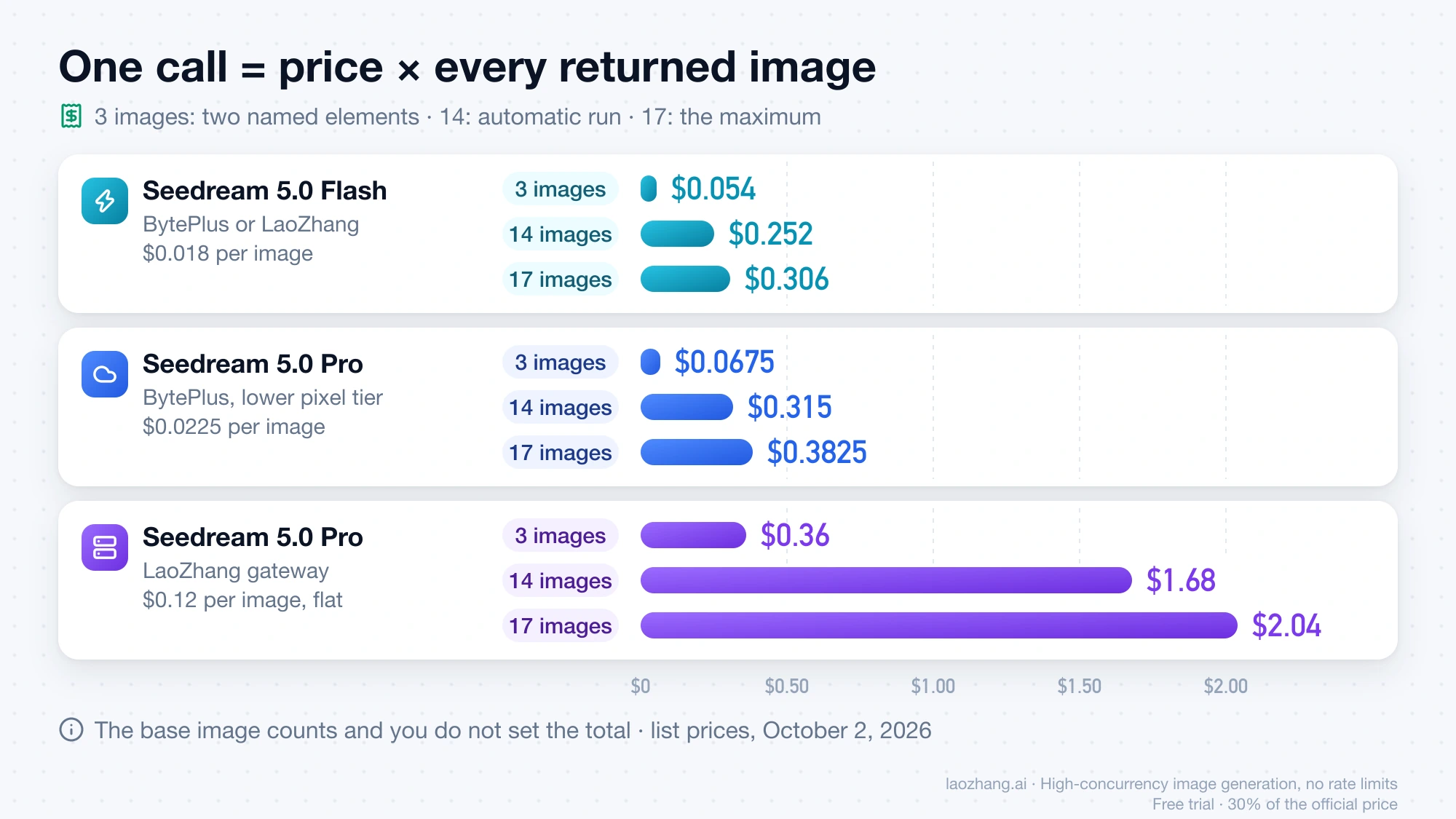
The BytePlus Pro column assumes two things. First, that the base is billed like a layer: the pricing page does not say so explicitly, but `generated_images` includes it. Second, that every image stays under 2.61 million pixels, which held at `1K`, where the base was 957,440 pixels and the largest layer file was under 0.7 million. A `2K` base such as 2048×2048 is 4.19 million pixels and falls in the upper tier, and with all 17 images in the upper tier the ceiling is 17 × $0.045 = $0.765.
To budget a batch, multiply your image count by the worst case, not the average. For 1,000 input images on Flash the bound is 1,000 × $0.306 = $306, and 1,000 results like run 1 would cost $252. Naming elements is what moves the number: 1,000 results like run 3 would cost $54. Requests that fail are not billed on BytePlus, which charges only for successfully generated images, and LaoZhang states that an image that cannot be decomposed "returns HTTP 400 and isn't charged".
Throughput has its own arithmetic on a direct account. BytePlus allows 500 images per minute per model and reserves 17 of them when a layer request starts, returning the unused part when it finishes. That lets 500 ÷ 17 = 29 layer requests start in a minute on a fresh quota, and because each took 35 to 111 seconds here, the reservations are not refunded quickly. A gateway may apply different limits.
## Flash or Pro, and BytePlus or a gateway: the price gap decides
On BytePlus the two models are close in price, so pick by output. Pro costs $0.0225 against Flash's $0.018 per image at 1.5K or below, which was $0.315 against $0.252 for a 14-image result. On the sample image Pro stayed much closer to the original (12.6% of pixels changed against 30.2%), kept the foreground blur and the bubbles, and left the stage in the base where Flash lifted it as a layer. Both found 13 layers, though not the same 13: Pro split the ukulele from its player, and Flash did not. One image is thin evidence, but at a 25% price difference Pro is the reasonable default when fidelity matters.
Through the LaoZhang gateway the answer flips. Flash costs the same $0.018 as BytePlus list, so the gateway adds nothing to the bill and saves you opening a BytePlus account. Pro costs $0.12 per image, which is 0.12 ÷ 0.0225 ≈ 5.3 times BytePlus's lower-tier rate and 2.7 times its upper-tier rate. If you need Pro layer decomposition at volume, a direct BytePlus or Volcengine account is the cheaper route. On the gateway, start with Flash, name the elements you need, and reserve Pro for small targeted calls where a 3-image result costs $0.36.
Two more constraints affect the route. BytePlus serves Seedream 5.0 Pro and Flash from `ap-southeast-1` only; its EU endpoint lists other models but not these two ([BytePlus model list](https://docs.byteplus.com/en/docs/modelark/model-list)). And a LaoZhang key must use the "Usage first" or "Per-call" billing mode to call per-image models.
BytePlus documents `1K`, `1.5K` and `2K` for both models and says 1.5K "has the same price as 1K and provides better image generation quality". That makes `1.5K` worth trying on a direct account. Only `1K` was run here.
## Requests that fail whole: input limits and rejected fields
A layer request either returns every image or nothing. BytePlus states that "if any layer fails to generate, the entire request fails. Partial success is not supported." The documented causes are below; none of these error responses were triggered in the test runs, so the exact payloads are not shown.
- **Wrong input format.** Layer mode accepts PNG and JPEG only. Ordinary Seedream generation also accepts WebP, BMP, TIFF, GIF, HEIC and HEIF, which makes it easy to send a WebP by habit. Convert first.
- **More than one image.** Passing multiple images causes an error.
- **Size out of range.** Fewer than 262,144 total pixels (512×512), more than 36,000,000 (6000×6000), an aspect ratio beyond 1/16 to 16, or a file over 30 MB.
- **Explicit pixel sizes.** `size` takes a tier name or `auto`, not a width×height value.
- **Fields the models reject.** On LaoZhang, including `sequential_image_generation` or `stream` returns HTTP 400 for both models, even when the value disables the feature.
- **An older model ID.** On LaoZhang, `seedream-5-0-260128` and `seedream-4-5-251128` return HTTP 400 with the code `InvalidParameter` when the flag is set.
- **A client timeout that is not a failure.** If your client gives up at 60 seconds, the request can still finish and be billed. Check the call log before you retry.
## Edit one layer afterward and keep its transparency
A returned layer can go straight back into a normal Seedream request as the single input image. BytePlus documents setting `"background": "transparent"` so the edited result keeps its alpha channel, for example to recolor an element or change its style. The option works only for image-to-image requests with exactly one input image that already has an alpha channel, and the output must be PNG: asking for `jpeg`, or sending a JPEG input, returns an error. This step was not run here. An edit like this is an ordinary generation request, and BytePlus lists single-image generation on Pro at $0.045 for 1.5K or below and $0.09 above.
## When layer decomposition is the wrong tool
Use something else in these cases:
- **You need one cutout.** A background remover is cheaper and returns the original pixels of the subject. [How to Make an Image Transparent (and Check It Actually Is)](https://blog.laozhang.ai/en/posts/transparent-image-maker) covers that job and how to verify real alpha.
- **You need a mask.** Layer decomposition is not segmentation. It returns completed, partly invented objects, not a map of which original pixels belong to what.
- **The output must match an approved original.** Between 4% and 30% of pixels changed on the test image.
- **You need live text layers.** The API returns raster PNGs.
- **You need more than 2K.** BytePlus documents `1K`, `1.5K` and `2K` for layer mode, nothing higher.
- **You need an EU endpoint from BytePlus.** These two models are not in its EU region.
If the open question is which image model to build on in the first place, [Nano Banana Pro vs Seedream 5.0 Pro: Which to Run First](https://blog.laozhang.ai/en/posts/nano-banana-pro-vs-seedream) compares the two by job with first-party prices.
For a first working session: send one `1K` Flash call with no prompt and save the JSON, run the script, and diff `recomposed.png` against your input. Then repeat with a prompt naming only the elements you plan to move, and compare the image count and the diff before you batch anything.