OpenAI Sora API in 2026: How to Use the Official Videos API
Yes, OpenAI has an official developer video API today, but the cleanest way to think about it is as the Videos API powered by Sora 2 and Sora 2 Pro. This guide separates the consumer Sora app from the developer surface, shows the fastest working integration path, and explains current pricing, advanced endpoints, and the docs mismatch developers should know about.
On this page
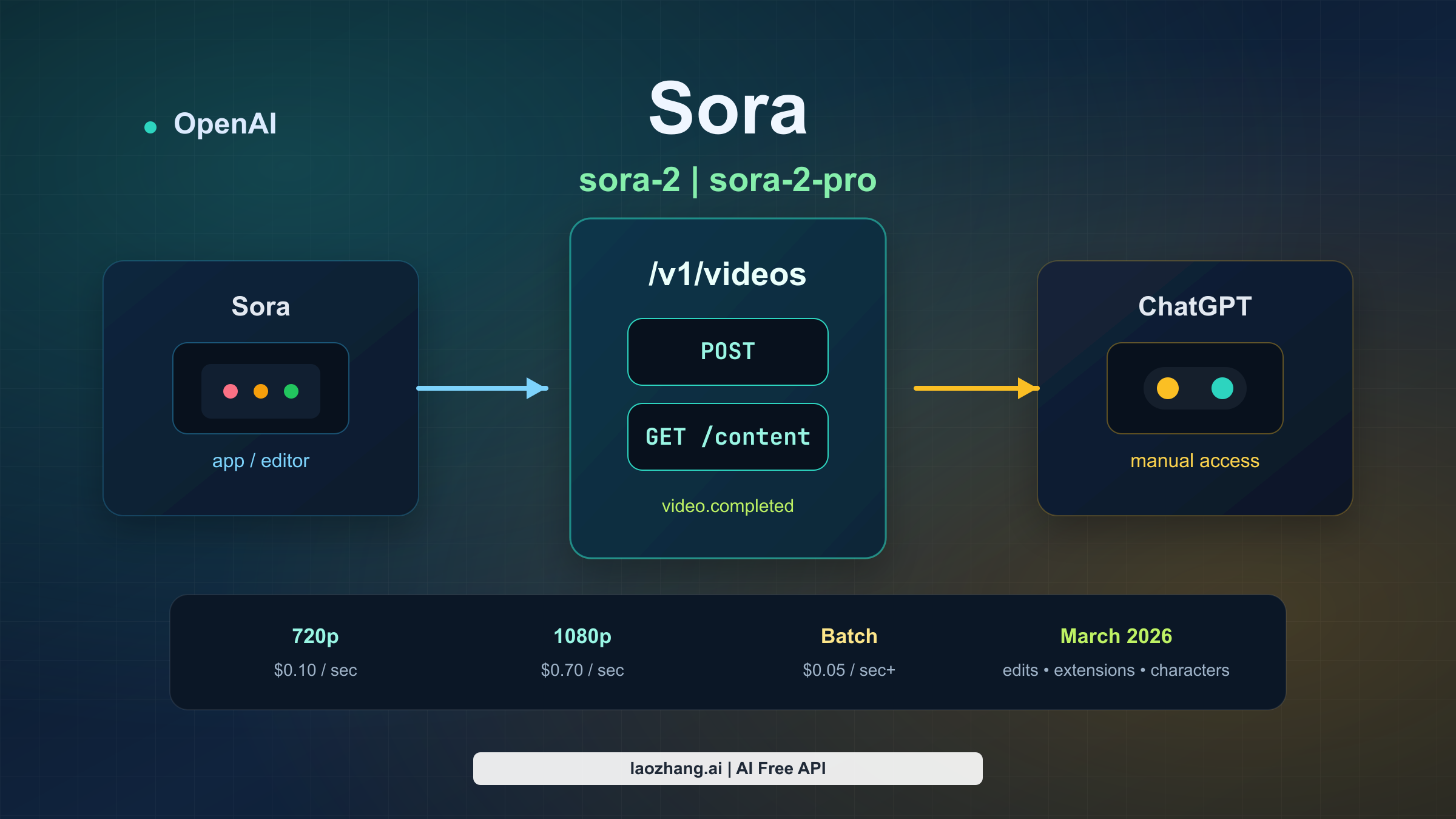
If by "OpenAI Sora API" you mean official programmatic video generation on the OpenAI platform, the answer is yes: OpenAI's current developer surface is the Videos API, centered on POST /v1/videos and the sora-2 / sora-2-pro models. The part that confuses people is that OpenAI also has a consumer Sora app/editor and ChatGPT-based Sora access, and those surfaces do not map cleanly to the same "API" language. That is why the search results still look contradictory in March 2026.
This guide is written for the developer question, not the app question. It focuses on the official OpenAI developer contract that exists today, the fastest working create -> wait -> download flow, the pricing and policy constraints that matter before you build, and the March 2026 changes that made older Sora API summaries incomplete.
Freshness note: verified against current OpenAI Developers docs, pricing, model pages, and help-center materials on March 28, 2026.
TL;DR
- Yes, official developer access exists today. The surface you want is
/v1/videos, not the consumer Sora editor. - Use
sora-2first when you are iterating on prompt, framing, or motion at lower cost. - Use
sora-2-prowhen you need higher-fidelity output, and especially when you need1920x1080or1080x1920. - Treat the workflow as asynchronous by default. Create the job, poll
GET /videos/{video_id}or use webhooks, then download the asset fromGET /videos/{video_id}/content. - OpenAI's docs are partially out of sync right now. The current guide and March 2026 changelog document 16/20-second support, video edits, extensions, reusable characters, Batch, and 1080p
sora-2-pro, while some older reference snippets still show shorter durations and lower maximum sizes.
What "OpenAI Sora API" actually means right now
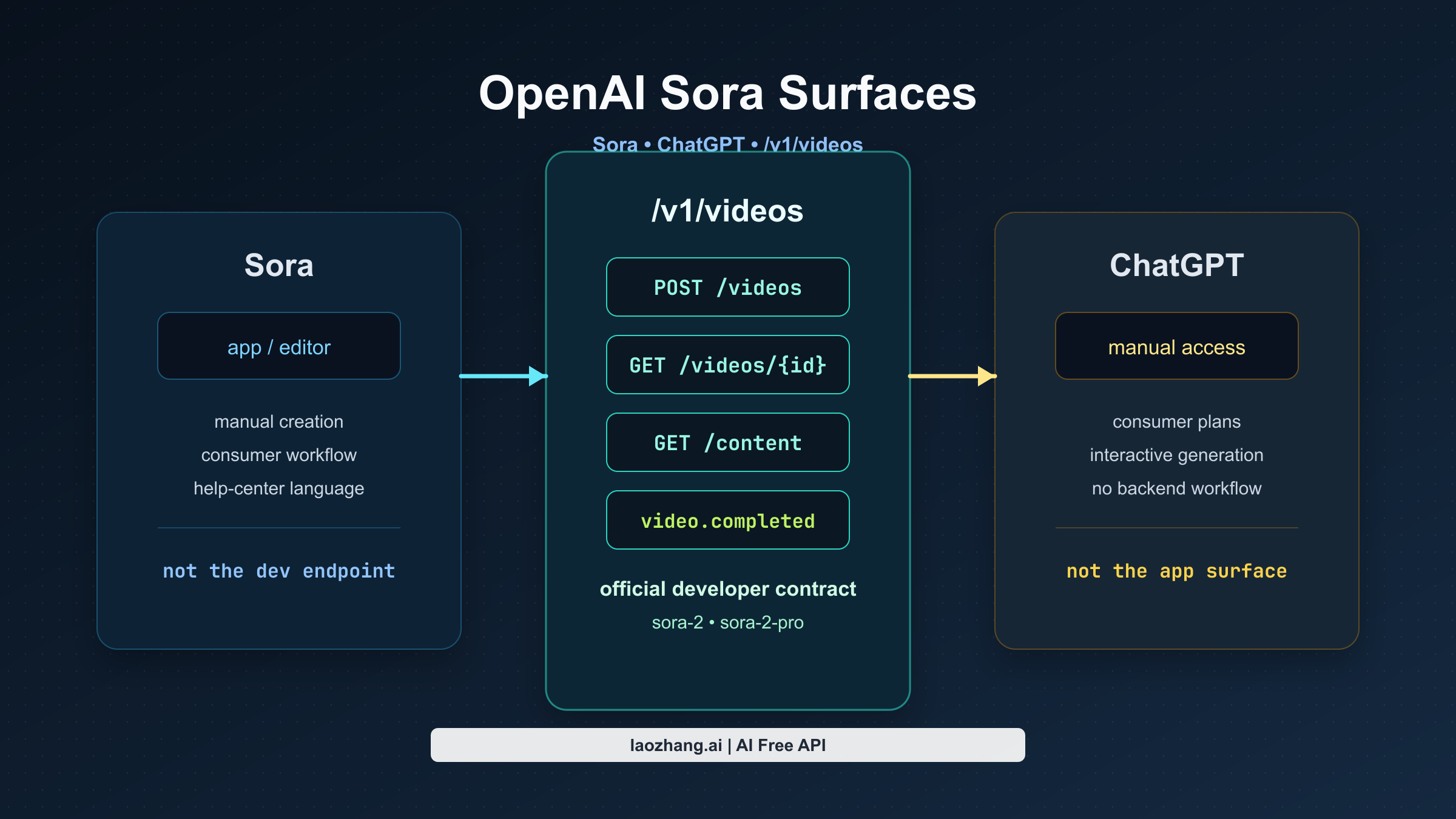
The biggest mistake in this topic is treating Sora as one product surface. In practice, there are three:
| Surface | What it is | Who it is for | What to use it for |
|---|---|---|---|
| Sora app/editor | OpenAI's consumer Sora experience | individual users making videos manually | creative exploration in the app or web editor |
| ChatGPT access | Sora generation inside ChatGPT plans | consumers and pros who want manual generation inside ChatGPT | one-off or interactive generation without building a backend |
| Videos API | OpenAI's official developer surface | developers, startups, product teams | programmatic video generation, edits, extensions, Batch, and asset handling |
This split explains why official OpenAI pages can sound inconsistent. The Help Center still has app-focused Sora guidance, and that guidance is about the consumer product. The developer docs, by contrast, now document a live Video generation with Sora stack with current endpoints, models, pricing, and code samples.
So the simplest reliable mental model is this:
Do not integrate "the Sora app." Integrate OpenAI's Videos API.
That sounds obvious once stated, but it is exactly the clarification missing from most current search results.
The fastest working OpenAI path today
If you only need the shortest official route from zero to a working result, the path is straightforward.
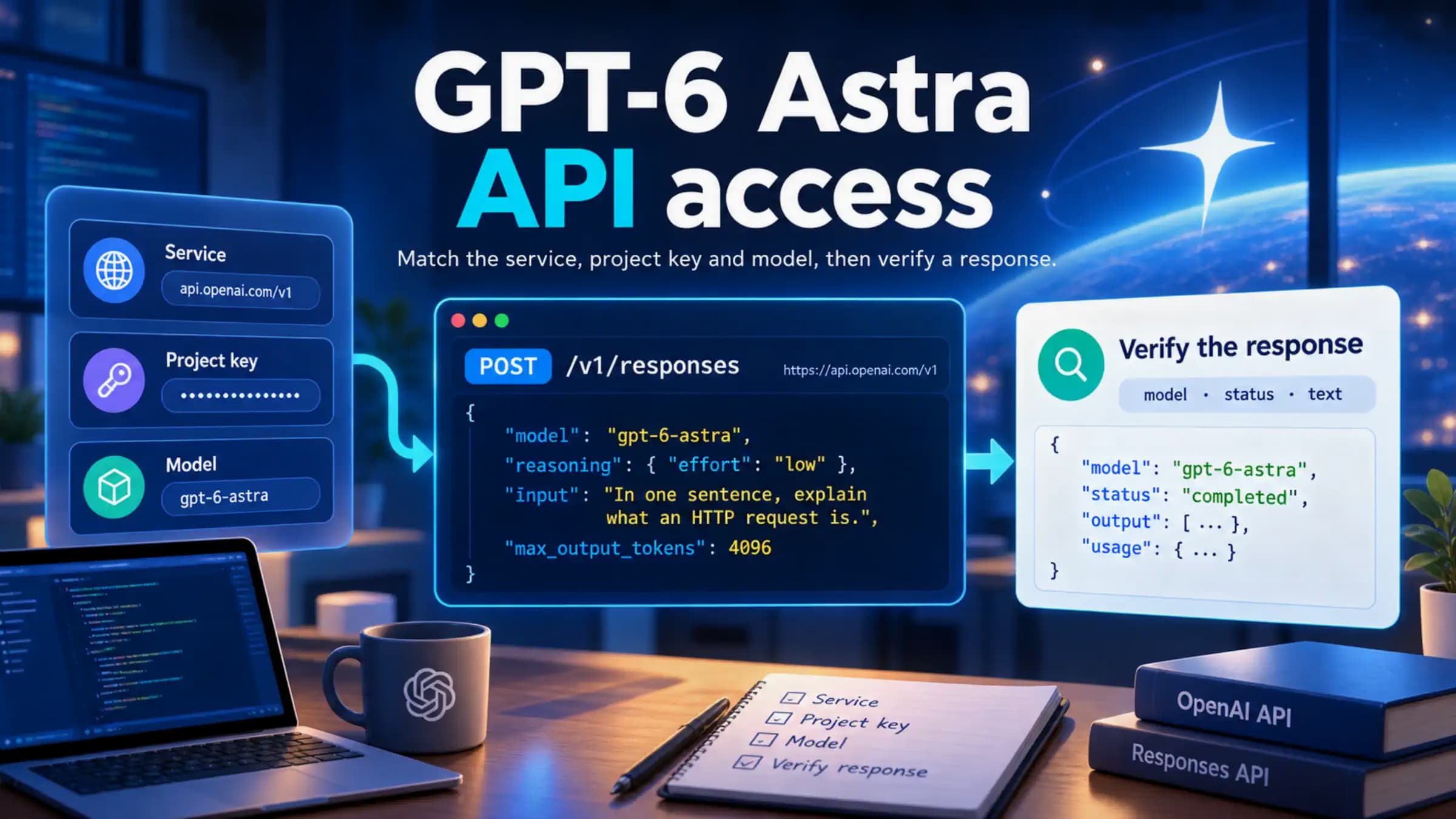
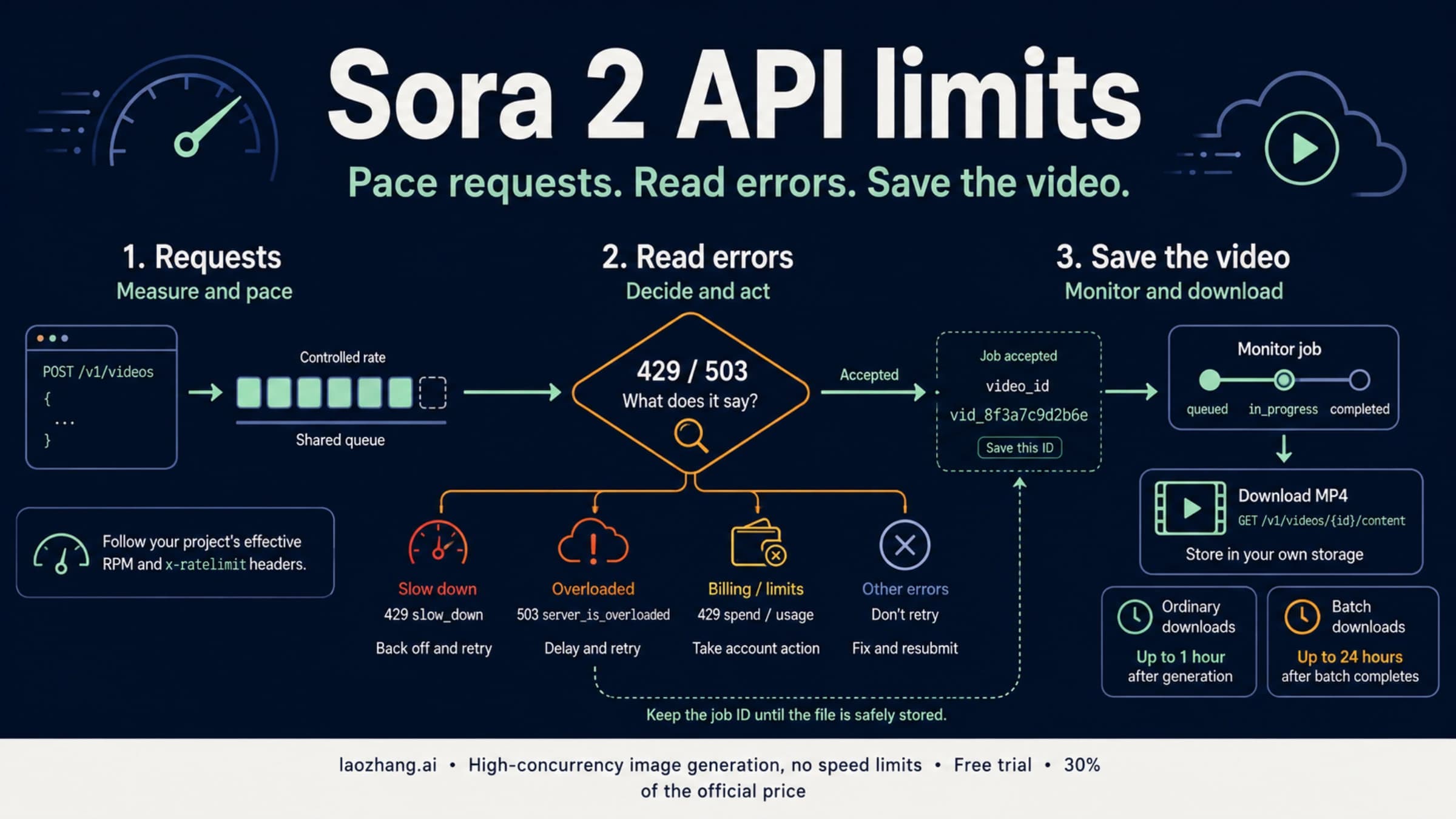
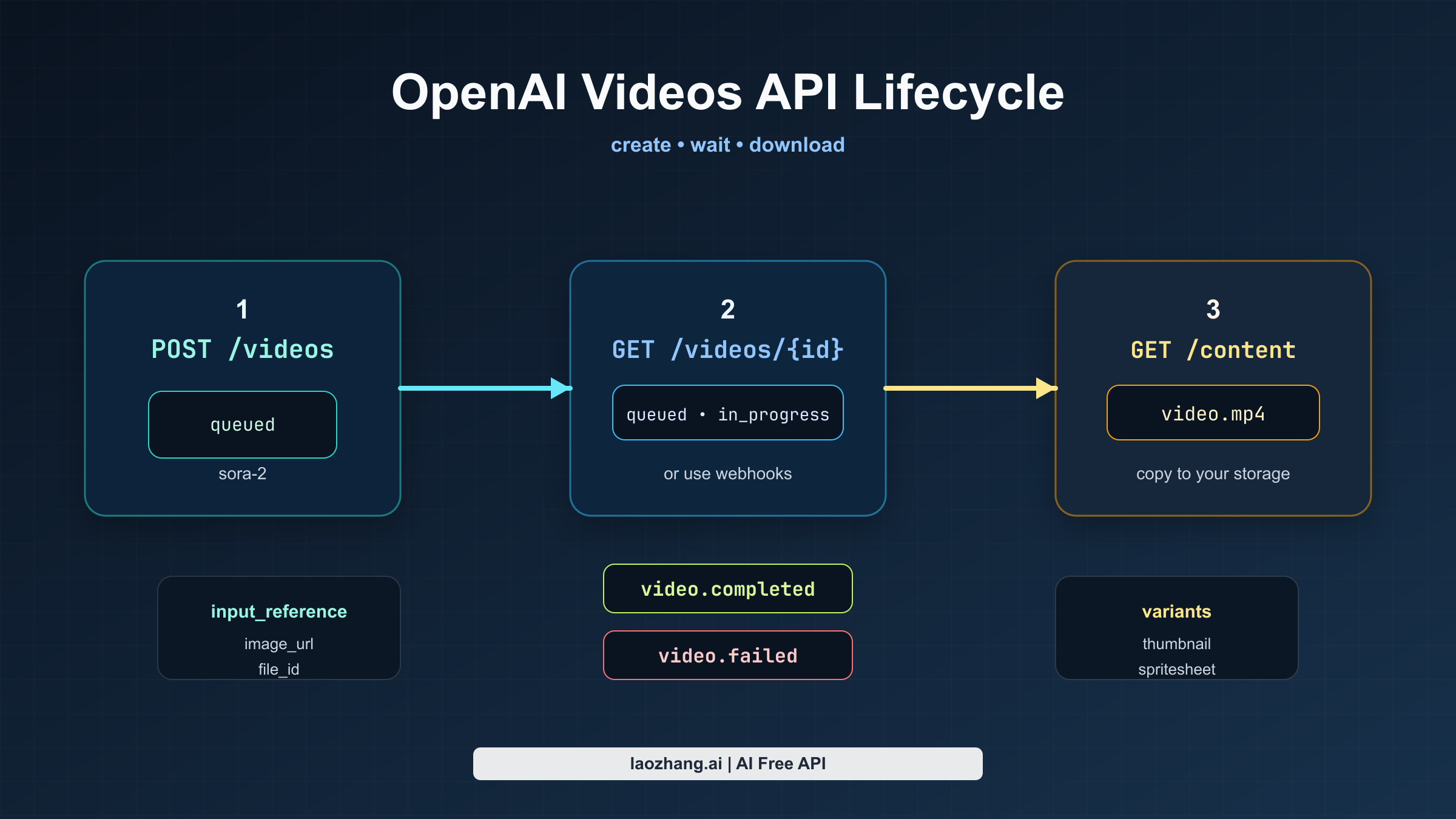
First, call POST /v1/videos with a prompt, model, size, and duration. OpenAI treats video generation as an asynchronous job, so the initial response only tells you that the job exists and has entered a state such as queued or in_progress. Next, either poll GET /v1/videos/{video_id} until the status becomes completed, or register a webhook and let OpenAI notify you with video.completed or video.failed. Once the job is finished, fetch the binary asset from GET /v1/videos/{video_id}/content.
For prototypes, polling is good enough. For production, webhooks are the cleaner contract, because long renders can take minutes and you do not want your backend burning unnecessary requests just to learn that the job is still running.
Here is the minimal JavaScript path using OpenAI's current SDK pattern:
import OpenAI from "openai";
import { writeFile } from "node:fs/promises";

const openai = new OpenAI({ apiKey: process.env.OPENAI_API_KEY });

const video = await openai.videos.createAndPoll({
  model: "sora-2",
  prompt:
    "Wide tracking shot of a yellow taxi crossing a rain-soaked city street at blue hour, neon reflections, natural ambient audio.",
  size: "1280x720",
  seconds: "8",
});

if (video.status !== "completed") {
  throw new Error(`Video failed with status ${video.status}`);
}

const content = await openai.videos.downloadContent(video.id);
const buffer = Buffer.from(await content.arrayBuffer());

await writeFile("video.mp4", buffer);
// In production, copy the file into your own object storage immediately.
And here is the same lifecycle in raw HTTP form:
curl -X POST "https://api.openai.com/v1/videos" \
  -H "Authorization: Bearer $OPENAI_API_KEY" \
  -F model="sora-2" \
  -F prompt="Wide tracking shot of a yellow taxi crossing a rain-soaked city street at blue hour, neon reflections, natural ambient audio." \
  -F size="1280x720" \
  -F seconds="8"

curl "https://api.openai.com/v1/videos/$VIDEO_ID" \
  -H "Authorization: Bearer $OPENAI_API_KEY"

curl -L "https://api.openai.com/v1/videos/$VIDEO_ID/content" \
  -H "Authorization: Bearer $OPENAI_API_KEY" \
  --output video.mp4
That is the core integration. Everything else in the current Sora stack builds outward from that job model.
Pricing, models, and the docs mismatch developers should notice
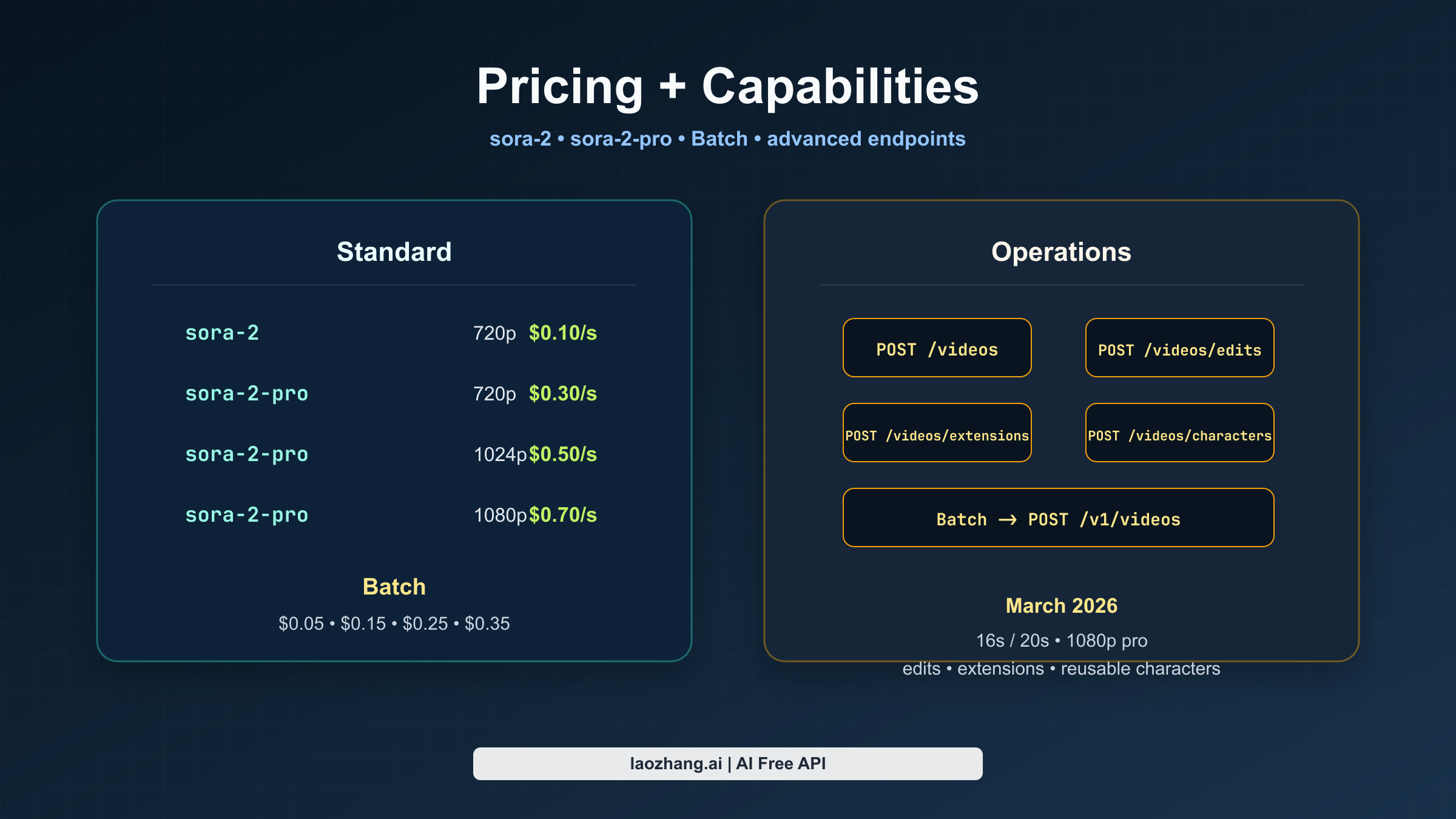
The current official pricing page makes the model split easy to understand. sora-2 is the cheaper and faster iteration model. sora-2-pro is the more polished output model, and it is the route you need when you want 1080p export.
OpenAI's pricing docs currently list this per-second structure for standard usage:
| Mode | Model | Output | Official price |
|---|---|---|---|
| Standard | sora-2 | 720x1280 or 1280x720 | $0.10/sec |
| Standard | sora-2-pro | 720x1280 or 1280x720 | $0.30/sec |
| Standard | sora-2-pro | 1024x1792 or 1792x1024 | $0.50/sec |
| Standard | sora-2-pro | 1080x1920 or 1920x1080 | $0.70/sec |
And for Batch, the page currently shows the same ladder at half the standard price:
| Mode | Model | Output | Official price |
|---|---|---|---|
| Batch | sora-2 | 720x1280 or 1280x720 | $0.05/sec |
| Batch | sora-2-pro | 720x1280 or 1280x720 | $0.15/sec |
| Batch | sora-2-pro | 1024x1792 or 1792x1024 | $0.25/sec |
| Batch | sora-2-pro | 1080x1920 or 1920x1080 | $0.35/sec |
That already tells you most of what matters operationally:
- If you are exploring prompts, start with
sora-2. - If you are shipping final assets and visual polish matters, move to
sora-2-pro. - If you are rendering a shot list offline, Batch changes the economics enough that it is worth serious consideration.
The more subtle but more important point is that OpenAI's Sora docs are currently partially out of sync. This is an inference from current official sources, not a guess:
- the main video guide says both
sora-2andsora-2-prosupport16- and20-second generations, - the March 2026 changelog explicitly says the Sora API expanded to longer generations up to 20 seconds and 1080p
sora-2-pro, - but older create-reference snippets still show the older
4,8,12duration set and a smaller size matrix.
If you are trying to understand the latest contract, the safest reading today is:
trust the current guide, pricing page, and March 2026 changelog before you trust older create-reference fragments in isolation.
That warning is worth making explicit because it can easily affect your resolution picker, quota planning, and product messaging.
What the official API can do beyond plain text-to-video
The guide is no longer just a text-prompt entry point. OpenAI's current Sora stack now covers the broader lifecycle around generation and iteration.
Image references
You can guide a generation with an input_reference, either as an uploaded asset in multipart form or as a JSON object with file_id or image_url. OpenAI describes the reference image as effectively setting the first frame of the clip. The important constraint is that the reference image needs to match the target size, and the currently documented formats are image/jpeg, image/png, and image/webp.
That makes image references useful for brand assets, art direction, or cases where you care more about matching an opening composition than about preserving a reusable character across many jobs.
Reusable characters
OpenAI now documents the characters workflow for creating reusable non-human character assets from uploaded video. In the current guide, characters are positioned as a consistency tool for animals, mascots, or objects, and the API allows up to two characters in a single generation. The guide also says character uploads that depict human likeness are blocked by default, which matters if you were assuming this was a general "train a human actor" surface.
The operational takeaway is simple: use characters for reusable non-human subjects, not as a loophole for real people.
Video extensions
OpenAI now documents video extensions for continuing a completed clip. This is the right route when you want continuity of motion and scene rather than just a similar opening frame. The current guide says each extension can add up to 20 seconds, a single video can be extended up to six times, and extensions do not support characters or image references.
That last detail matters a lot. If your product design assumes that every advanced Sora feature composes with every other one, it will drift away from the actual contract.
Video edits
OpenAI's March 2026 changelog added the video edits workflow, which is now the preferred route for making targeted changes to an existing generated or uploaded video. The guide explicitly says the older remix route is being deprecated and that edits work best when the requested change is narrow and well defined.
This is a strong sign that OpenAI is treating Sora less like a single one-shot generator and more like an iterative media workflow.
Batch
The current guide now supports Batch for POST /v1/videos, with a few important restrictions:
- Batch supports
POST /v1/videosonly. - Batch requests must be JSON, not multipart.
- You need to upload assets ahead of time and reference them from JSON.
- Batch-generated video downloads remain available for up to 24 hours after the batch completes.
If you are building offline render queues, studio workflows, or shot-list pipelines, Batch is no longer an afterthought. It is now part of the official route.
Guardrails and operational gotchas that matter before you build
The Sora stack has enough constraints now that you should treat policy and retention as part of the product contract, not just as compliance footnotes.
The current guide says the API currently enforces all of the following:
- content must be suitable for audiences under 18,
- copyrighted characters and copyrighted music will be rejected,
- real people and public figures cannot be generated,
- character uploads that depict human likeness are blocked by default,
- and input images with human faces are currently rejected.
If your planned workflow depends on any of those, you do not have a small edge case. You have a routing problem.
The storage model matters too. OpenAI currently says direct download URLs are valid for up to 1 hour after generation. Batch downloads last up to 24 hours after the batch completes. That means vendor-hosted URLs should be treated as temporary delivery assets, not as durable storage. In production, you should copy outputs into your own object storage as part of the normal completion workflow.
Latency matters as well. The guide says a single render can take several minutes depending on model, load, and resolution. That makes background jobs, progress states, retries, and webhook-based completion handling the normal case rather than an enterprise-only nicety.
Finally, access and rate ceilings are usage-tier dependent. OpenAI's Rate limits guide says organizations graduate through usage tiers as spend increases, and it explicitly tells developers to check the live Limits page in account settings for the current effective caps. The Sora model pages also expose tier-dependent ceilings, but the current search-index rendering is abbreviated enough that it is safer to point readers to the live limits view than to over-explain partially labeled numbers.
Which OpenAI surface should you actually use?
If your real goal is to build a product, the answer is the Videos API.
If your real goal is to generate a few videos manually, ChatGPT or the Sora app may still be the better fit, because you do not need to manage async jobs, storage, or webhooks at all.
That distinction sounds small, but it is what fixes the whole topic. A large share of the confusion around "OpenAI Sora API" comes from people reading app-oriented Sora help, then reading developer-oriented Videos API docs, then assuming one of those surfaces must be wrong. In reality, they are describing different jobs.
For developers, the shortest good answer is:
Yes, OpenAI has official programmatic video generation today. Integrate the Videos API, not the consumer Sora product surface.
FAQ
Does OpenAI officially support Sora video generation by API right now?
Yes. The official developer route is OpenAI's current Videos API, documented in the video-generation guide and the POST /v1/videos reference.
Why do some OpenAI pages still make Sora sound non-API?
Because some official surfaces are still talking about the consumer Sora app/editor, not the developer Videos API. That distinction is the root of the current search confusion.
Which model should I start with?
Start with sora-2 for prompt iteration and cheaper runs. Move to sora-2-pro when you need higher-fidelity output, especially 1080p.
Is 1080p officially live?
Yes, OpenAI's current guide, pricing docs, and March 2026 changelog all document 1080p sora-2-pro, with the changelog explicitly stating that 1080p generations on sora-2-pro are billed at $0.70/sec.
Can I rely on polling alone?
You can for prototypes. For production, webhooks are cleaner because renders can take minutes and you do not want a polling loop to become your normal control plane.
Can I build around reusable characters and then extend the same clip?
Not as one composable workflow today. The current guide says extensions do not support characters or image references, so plan that feature surface carefully.