# Claude Opus 5.5 Video Generation: Code In, Rendered MP4 Out
> Opus 5.5 outputs text, not video. It writes animation code that a headless browser captures frame by frame, which suits motion graphics and not live action.
- URL: https://blog.laozhang.ai/en/posts/claude-opus-5-5-video-generation
- Published: 2026-10-01
- Updated: 2026-10-01
- Author: LaoZhang AI Team (https://blog.laozhang.ai/en/about)
- Category: AI Video Generation
- Tags: Claude Opus 5.5, Video Generation, Motion Graphics, Claude Code, FFmpeg
---
**Claude Opus 5.5 does not output video. It writes the code for an animation, and a browser plus ffmpeg turn that code into an MP4.** The videos labeled "made with Opus 5.5" are motion graphics, explainers and launch films drawn by a program. No video model produced their frames. That is why the text in them is sharp and the timing is exact, and also why this method cannot give you a realistic person talking to a camera.
Anthropic's model documentation states that all current Claude models take text and image input and return text ([models overview](https://platform.claude.com/docs/en/about-claude/models/overview)). The [Opus 5.5 announcement](https://www.anthropic.com/claude-opus-5-5) of September 22, 2026 does not mention video, animation or motion graphics at all. The technique came from people using the model, and as of October 1, 2026 it runs entirely on tools you install yourself: Node.js, Chrome and ffmpeg.
## What Opus 5.5 produces when people say it generates video
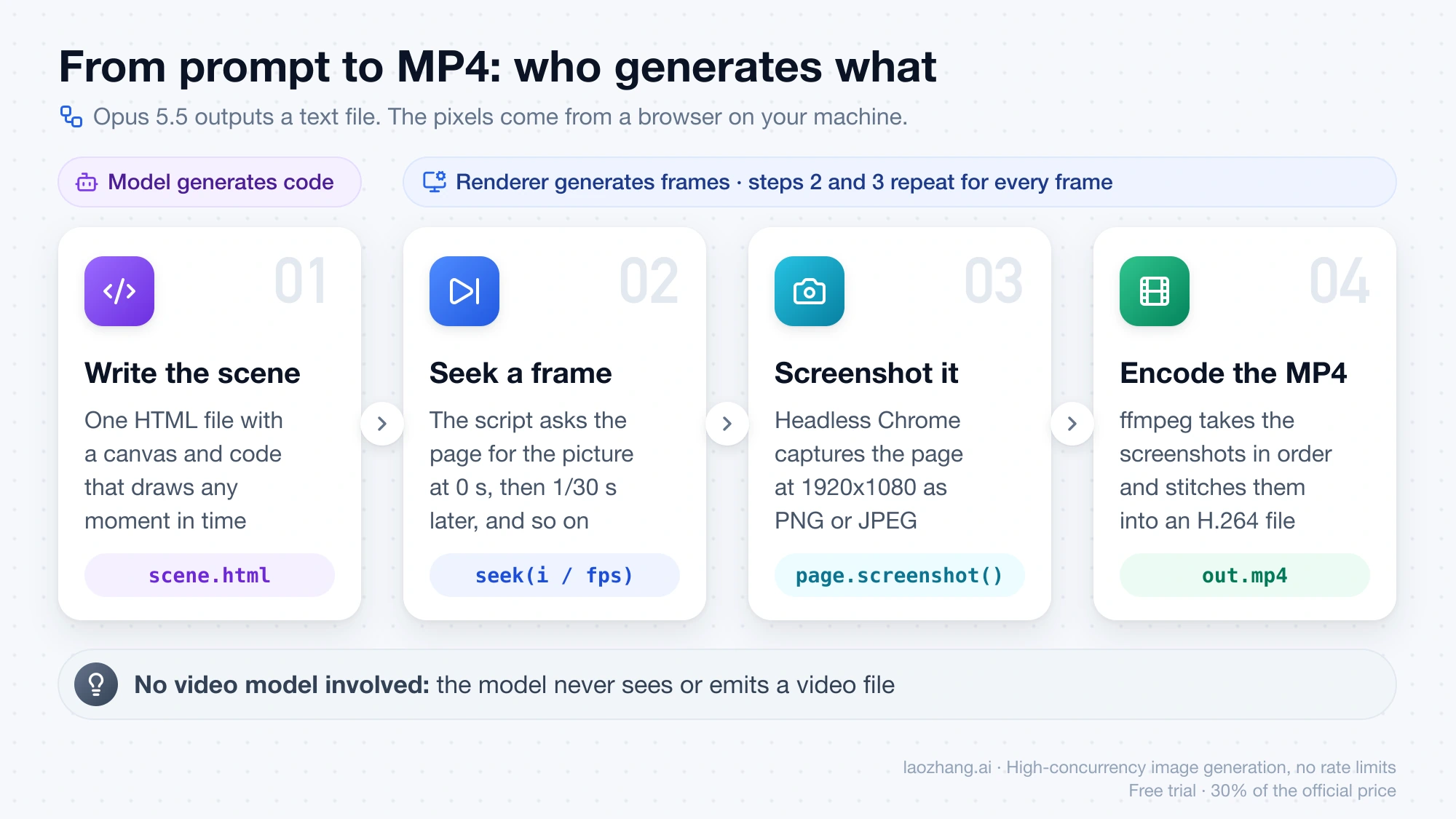
The model's output is a text file. In the most common setup that file is a single HTML page containing a canvas and some JavaScript that draws a picture for any moment in time. A script then opens the page in a headless browser, asks for the picture at 0 seconds, takes a screenshot, asks for the picture 1/30 of a second later, takes another, and so on. ffmpeg stitches the screenshots into an H.264 file.
So two different things are being "generated", and it helps to keep them apart:
- **Opus 5.5 generates code.** It decides the layout, the colors, the motion curves and the sequence of shots, and it writes them as a program.
- **A renderer generates frames.** The browser executes the program and produces pixels. The model never sees or emits a video file.
Claude's help center describes the still-image version of the same idea: Claude "doesn't generate photos or illustrations the way image-generation tools do," but it can build diagrams, charts and interactive visuals with HTML and SVG ([Claude Help Center](https://support.claude.com/en/articles/9002504-can-claude-produce-images)). [Can Claude Generate Images? No, But Here's What It Can Do](https://blog.laozhang.ai/en/posts/can-claude-generate-images) covers that case. Video is the same trick with a time variable added.
The clearest public description of the method is the README of [LaunchVideo](https://github.com/diggerhq/shipvideo), an open-source project whose repository is named `shipvideo`. It says: "No video model: Opus 5.5 writes a single HTML film and a serverless agent ... renders it frame by frame in headless Chromium, encodes it with ffmpeg." The film is one 1920x1080 HTML document, and the output is a 20 to 40 second launch video.
## Which videos fit the code-rendered route
A program draws what can be described with shapes, text, curves and math. It does not film anything. That one fact sorts most projects:
| What the video needs | Use | Reason |
| --- | --- | --- |
| Titles, kinetic typography, UI mockups, charts, diagrams, logo animation, step-by-step explainers | Code written by Opus 5.5, rendered locally | Text stays sharp, every element can be edited by changing a line, and the same code renders the same video again |
| Hand-drawn, line-art or ink-style animation, lyric videos | Code written by Opus 5.5, usually with a drawing library such as p5.js | These styles are procedural; public examples exist for each |
| Photoreal people, natural lip-sync, footage that should look filmed | A video-generation model | Drawing code has no camera and no learned sense of how real scenes look |
| A designed piece that also needs a few realistic shots | Both | A video model supplies the clips; Opus 5.5 writes the layout, titles and edit around them |
The split follows a curated collection of public cases, [opus-video-prompts](https://github.com/joeseesun/opus-video-prompts). Its author lists motion graphics, hand-drawn and ink animation, explainers, launch films and lyric videos as strengths, and photoreal live action as the weakness. For realistic footage, the collection says the common practice is to have the model call a video model such as Seedance or Runway and handle the sequencing and editing itself. One music video in it combined generated character images, Seedance 2.5 footage and frame-by-frame redrawing in JavaScript. That is a curator's judgment based on cases from September 22 to 25, not a benchmark.
A larger sample points the same way. The [awesome-opus-5-5-videos](https://github.com/athemeroy/awesome-opus-5-5-videos) repository collected 1,401 video files from X posts up to September 26, 2026, and a classifier labeled 1,119 of them as involving Opus 5.5. Among those, "Motion graphics / UI" (350 files) and "3D render" (324 files) were the two leading styles, together 60.2%. The repository warns that the labels come from an automated classifier reading post text and nine frames per file, so they describe what people posted. They do not prove what the model did in each case.
If your project sits in the third row, a text model is the wrong tool for the footage itself. [Seedance 2.5 API Guide: Model IDs, Python, and Node.js](https://blog.laozhang.ai/en/posts/seedance-2-api) shows how to call a real video-generation model from code, and [Is There a Free AI Video API? What Works Without Paying](https://blog.laozhang.ai/en/posts/best-free-ai-video-api) covers ways to try one without paying first.
## Render a first MP4 on your own machine
The steps below reproduce a test run on October 1, 2026. The scene was written in one pass by Opus 5.5 inside Claude Code and was not edited by hand. The setup is small enough to copy.
### What to install
- **Node.js.** The test used Node 24.11.0.
- **Google Chrome.** The script drives the copy already installed on your machine, so no separate browser download is needed.
- **ffmpeg** on your PATH. The test used ffmpeg 8.0.1.
- **playwright-core**, installed in an empty folder with `npm install playwright-core`. The test used version 1.63.0.
- **Claude Code with Opus 5.5 selected**, model ID `claude-opus-5-5`. An agent that can run commands matters here because the model can then render, pull a frame, look at it and fix its own scene. The opus-video-prompts quick start recommends effort `high` or `xhigh`; the default in Claude Code is `medium`. Effort here is the Claude setting that controls how much reasoning the model spends, and its thinking tokens bill as output.
### The scene contract
The scene and the renderer need one agreement: the page exposes its length and a function that draws any moment on request. Put this in your prompt alongside the description of the video you want:
```text
Write the video as a single file, scene.html, 1920x1080, one canvas.
Rules:
- Set window.DURATION to the length in seconds.
- Expose async window.seek(t). It must draw the complete frame for time t
(seconds) and nothing else may draw.
- Every pixel must depend only on t. Do not use requestAnimationFrame,
setTimeout, setInterval, Date, performance.now or CSS transitions to
drive motion.
- If you need randomness, use a seeded pseudo-random generator.
- No external images, fonts, video or audio. System fonts only.
After writing it, render it with render.mjs, extract two frames, look at
them, and fix anything that is cut off or overlapping.
```
A scene that follows the contract has this shape:
```html
```
Nothing in it moves on its own. The frame at 3.5 seconds looks the same whether it is requested first, last or twice.
### The render script
Save this as `render.mjs` next to the scene. It is the script used in the test.
```js
// node render.mjs scene.html out.mp4 [fps] [png|jpeg]
import { chromium } from "playwright-core";
import { spawn } from "node:child_process";
import { once } from "node:events";
import { createHash } from "node:crypto";
import { statSync } from "node:fs";
import path from "node:path";
import { pathToFileURL } from "node:url";
const [scene, out, fpsArg = "30", type = "png"] = process.argv.slice(2);
if (!scene || !out) throw new Error("Usage: node render.mjs scene.html out.mp4 [fps] [png|jpeg]");
const fps = Number(fpsArg);
const started = Date.now();
const browser = await chromium.launch({ channel: "chrome", headless: true });
const page = await browser.newPage({ viewport: { width: 1920, height: 1080 }, deviceScaleFactor: 1 });
await page.goto(pathToFileURL(path.resolve(scene)).href);
await page.waitForFunction(() => typeof window.seek === "function");
await page.evaluate(() => document.fonts.ready);
const total = Math.round((await page.evaluate(() => window.DURATION)) * fps);
const ff = spawn("ffmpeg", ["-y", "-loglevel", "error", "-f", "image2pipe", "-framerate", String(fps), "-i", "-",
"-c:v", "libx264", "-pix_fmt", "yuv420p", "-crf", "18", "-movflags", "+faststart", out],
{ stdio: ["pipe", "inherit", "inherit"] });
const hash = createHash("sha256");
const shotOpts = type === "jpeg" ? { type: "jpeg", quality: 92 } : { type: "png" };
const captureStart = Date.now();
for (let i = 0; i < total; i++) {
await page.evaluate((t) => window.seek(t), i / fps);
const buf = await page.screenshot(shotOpts);
hash.update(buf);
if (!ff.stdin.write(buf)) await once(ff.stdin, "drain");
}
const captureMs = Date.now() - captureStart;
ff.stdin.end();
const [code] = await once(ff, "close");
await browser.close();
if (code !== 0) throw new Error(`ffmpeg exited with ${code}`);
console.log(JSON.stringify({
scene, out, fps, frames: total, shot: type,
capture_seconds: +(captureMs / 1000).toFixed(2),
total_seconds: +((Date.now() - started) / 1000).toFixed(2),
ms_per_frame: +(captureMs / total).toFixed(1),
mp4_bytes: statSync(out).size,
frames_sha256: hash.digest("hex").slice(0, 16),
}));
```
Run it:
```bash
node render.mjs scene.html out.mp4 30 png
```
The loop is the whole idea. For frame `i` it calls `seek(i / fps)`, screenshots the page and writes the image into ffmpeg's standard input. The last line prints the frame count, the capture time and a short hash of every captured frame.
### Check the result
Three checks catch most problems before you spend more tokens on revisions.
```bash
# 1. Container facts: codec, size, frame rate, frame count, duration
ffprobe -v error -select_streams v:0 \
-show_entries stream=codec_name,width,height,r_frame_rate,nb_frames,duration \
-of default=nw=1 out.mp4
# 2. Pull one frame and look at it
ffmpeg -ss 9.5 -i out.mp4 -frames:v 1 check.png
# 3. Render again and compare the frames_sha256 values the script prints
node render.mjs scene.html out2.mp4 30 png
```
The frame count should equal duration times frame rate. The extracted frame should show what the scene is supposed to show at that second. The two hashes should match. If they differ, the scene is not a pure function of time, and the section on clocks below explains what that costs you.
Have the model do the second check itself. Layout mistakes such as clipped text or overlapping labels are invisible in code and obvious in a screenshot. LaunchVideo builds the same habit into its agent: before rendering, a `check_scene` step loads the film and reports JavaScript errors and the visible text at several timestamps.
## What the test render measured
Environment: Apple M4 with 10 cores and 16 GB of memory, macOS 26.1, Chrome 154 headless at 1920x1080, ffmpeg with libx264 at crf 18 and yuv420p. The scene was a 12-second Canvas 2D animation with a title, a four-box pipeline diagram, a frame counter and 140 drifting particles placed by a seeded generator.
| Screenshot format | Frames | Capture time | Per frame | Capture time vs. clip length | MP4 size |
| --- | --- | --- | --- | --- | --- |
| PNG, run 1 | 360 | 25.93 s | 72 ms | 2.2x | 915,183 bytes |
| PNG, run 2 | 360 | 25.80 s | 71.7 ms | 2.2x | 915,183 bytes |
| JPEG, quality 92 | 360 | 11.51 s | 32 ms | 0.96x | 1,093,045 bytes |
ffprobe reported h264, 1920x1080, 30 fps, 360 frames and 12.000 seconds. The whole process, including browser startup and encoding, took 33.46 s and 27.24 s for the two PNG runs.
Three things follow from these numbers.
**The two PNG renders were identical.** The frame hashes matched, the files were the same size to the byte, and decoding both MP4s gave the same per-frame checksums. This is what "deterministic" means in practice: the same scene file produces the same video every time. You can fix one title, re-render and know that nothing else moved.
**Frame content matched frame number.** The scene prints its own time. The frame extracted at 9.5 seconds showed "frame 285 / 360, t = 9.500 s", and 9.5 times 30 is 285.
**JPEG screenshots more than halved the capture time and cost 19% in file size.** At 32 ms per frame the capture ran slightly faster than the clip plays. That is in line with LaunchVideo's README, which pipes JPEG frames into ffmpeg and says "a 30 s film takes 30-40 s." Use PNG for a final render and JPEG while iterating.
This is one machine and one simple 2D scene with no audio and no web fonts. A WebGL scene with heavy geometry will take longer per frame, and these figures say nothing about the speed of Remotion or HyperFrames.
## Why a scene that reads the clock breaks
Most web animation is written against real time: `requestAnimationFrame` fires, the code reads `performance.now()`, and things move by however many milliseconds have passed. In a browser tab that is correct. Under frame-by-frame capture it is wrong, because the capture does not run at the speed of the video.
A second scene was built that way on purpose. It ran for 3 seconds, was driven by `requestAnimationFrame` and `performance.now()`, used unseeded `Math.random()` for its particles and ignored `seek(t)`. Rendered twice with the same script:
- The frame hashes differed between the two runs.
- The files differed: 115,816 bytes and 131,033 bytes.
- The frame at 1.5 seconds of video displayed the scene's own time as "t = 1.572 s".
The speed looked almost right, but only by accident. Capture happened to take 33.6 to 38 ms per frame, and one frame of 30 fps video lasts 33.3 ms, so the scene's clock and the video's clock advanced at nearly the same rate.
The arithmetic for a slower capture is simple, though it was not recorded as a separate render. If each screenshot takes 72 ms, as in the PNG test above, a clock-driven scene advances 72 ms between frames that the video plays 33.3 ms apart. The motion would run about 2.2 times too fast, and a 12-second animation would be over before the 6-second mark of the file.
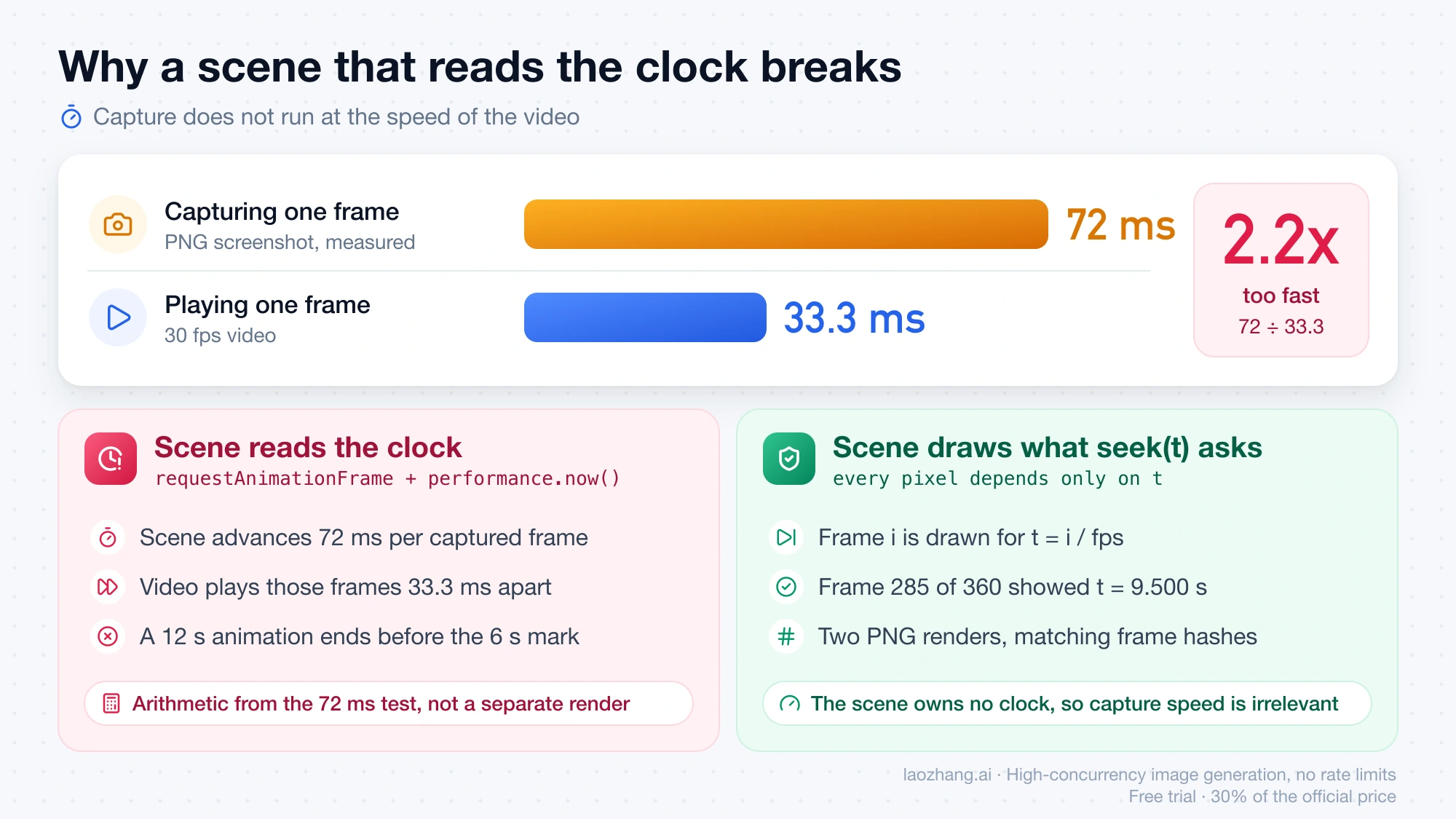
There are two ways out. The first is the contract above: the scene owns no clock and draws whatever `seek(t)` asks for. The second is to take the clock away from the page. LaunchVideo's renderer injects a virtual clock so that `requestAnimationFrame`, timers, `Date` and CSS or Web Animations API animations are all driven by its seek function. Its README also bans CSS transitions, `Math.random`, external images, and video, audio and iframe elements in a scene "so renders stay deterministic."
## Choosing a rendering route
All of these do the same job: step a scene through time and encode the frames. They differ in what the model has to write and what you have to accept.
| Route | The model writes | Requirements and license | Pick it when |
| --- | --- | --- | --- |
| Plain HTML scene plus the script above | One HTML file with `seek(t)` | Node.js, Chrome, ffmpeg, playwright-core. You maintain the short script yourself | You want the smallest setup and full control, and the video has no complex audio |
| [HyperFrames](https://github.com/heygen-com/hyperframes) | HTML and CSS with seekable animation through GSAP, CSS animations, Lottie, Three.js, Anime.js or WAAPI | Node.js 22 or later and FFmpeg. Apache 2.0, "with no per-render fees or commercial-use thresholds" | You want preview and render commands, animation libraries and a Claude Code plugin instead of maintaining your own script |
| Remotion | React components | Free for individuals, for-profit organizations with up to 3 employees, and nonprofits. Larger companies need a Company License ([Remotion license](https://github.com/remotion-dev/remotion/blob/main/LICENSE.md)) | Your team already works in React and the license terms fit |
| Manim | Python scenes | Python toolchain | The video is a math or research explainer. The opus-video-prompts collection lists a paper explainer made with Manim, a text-to-speech model and FFmpeg |
| LaunchVideo | Nothing from you; you paste a URL or a prompt | Hosted, or deploy the open-source repository yourself | You want a 20 to 40 second launch video and do not need to touch the scene |
Only the first route was run for the measurements above. The rest are described from each project's own documentation.
HyperFrames installs into Claude Code with two commands from its README:
```bash
claude plugin marketplace add heygen-com/hyperframes
claude plugin install hyperframes@hyperframes
```
After that, `/hyperframes:hyperframes` starts its workflow. The README describes the renderer the same way as the script above: it "seeks each frame in headless Chrome and encodes the result with FFmpeg, so the same input produces the same video."
The decision usually comes down to two questions. If your company has more than 3 employees and you do not want to buy a license, Remotion is out, and HyperFrames or the plain script remain. If you need sound, a framework saves work: the test clip here was silent, and public cases add music with Web Audio or Python synthesis and narration with text-to-speech, then combine the tracks with ffmpeg.
## What a video costs
On the Claude API, Opus 5.5 lists at $4 per million input tokens and $20 per million output tokens. The cost of the writing step is:
```text
cost = input_tokens × $4 / 1,000,000 + output_tokens × $20 / 1,000,000
```
No measured typical token count exists as of October 1, 2026. Anthropic has published none, and the public figures are self-reports. Two of them show the spread:
- **LaunchVideo's creators**, as relayed by a Hugging Face community tutorial, report roughly 90,000 input and 15,000 output tokens per film. The figure does not appear in the project's own README. Taking it at face value: 90,000 × $4 / 1M = $0.36, plus 15,000 × $20 / 1M = $0.30, for $0.66 per film at uncached list price.
- **Deedy Das** made a startup launch video from one line, "make a modern slick and punchy video for a modern startup that works on inference". The opus-video-prompts collection records his report of about 1 minute and about $2.
The same collection lists an animated music video whose first version reportedly took 45 minutes at `xhigh` effort and cost about $200. Length, effort level and the number of revision rounds move the bill far more than the list price does.
Four things change your own number:
1. **Every revision repeats the cost.** A second pass re-reads the scene and rewrites part of it. Three full passes at the LaunchVideo size would be 3 × $0.66 = $1.98.
2. **Thinking counts as output.** Opus 5.5 always thinks, and thinking tokens bill at the $20 output rate, so a higher effort setting shows up here.
3. **Rendering is free but not everything else is.** Capture and encoding run on your machine. Narration, music and any clips from a video model are billed by whoever provides them. [How Much Does an AI Video Generator Cost Per Month and Per Clip?](https://blog.laozhang.ai/en/posts/how-much-does-ai-video-generator-cost) has the per-second prices for that part.
4. **A subscription shows cost as usage, not dollars.** On Pro or Max plans the work draws down your usage limit. One creator in the collection reports that a 156.6-second music video, made in two rounds, used 10% of a Max 5x weekly limit. [Claude Opus 5.5 Pricing and Limit Reset: What Each One Changes](https://blog.laozhang.ai/en/posts/claude-opus-5-5-pricing-limit-reset) explains how those limits work.
To get your own figure, make one short video end to end, read the input and output token totals for that session from your API usage, and put them in the formula. Multiply by the number of revision rounds you needed. That number is worth more than any reported average, because it reflects your prompts and your tolerance for imperfect frames.
## Does this work with Opus 4.8, Opus 4.7 or Sonnet 5.5?
No Claude model outputs video. The documentation's statement about text output covers every current model, so the answer to "can Opus generate video" is the same for each version: it can write the program, and something else has to render it.
The rendering method itself does not depend on the model. The script above accepts any HTML file that exposes `DURATION` and `seek(t)`, whoever wrote it. What differs between models is how good the scene is on the first try and how many rounds it takes to fix. Anthropic's documentation does not describe that for any model, since video is not a feature it lists. If cost per video matters more to you than first-try quality, run the same prompt on both 5.5 models and compare the token totals and the frames. [Claude Sonnet 5.5 vs Opus 5.5: When Half the Price Really Saves](https://blog.laozhang.ai/en/posts/claude-sonnet-5-5-vs-opus-5-5) covers how to weigh the lower token price against extra rounds.
## Where to start
Decide first whether your video is drawn or filmed. If it is titles, diagrams, UI and motion, install Node.js, Chrome and ffmpeg, give Opus 5.5 the scene contract, and render 10 seconds before you plan anything longer. Check one frame, render twice, compare the hashes. If the video needs real-looking people or footage, generate those clips with a video model and let the code-rendered part handle everything around them.