Fix API 400 Unsupported Role Errors Without Breaking System Prompts
This error is a request role-contract mismatch. Use the failing `param`, sanitized payload, current OpenAI Chat Completions or Responses shape, and a same-route smoke test to repair it safely.
On this page
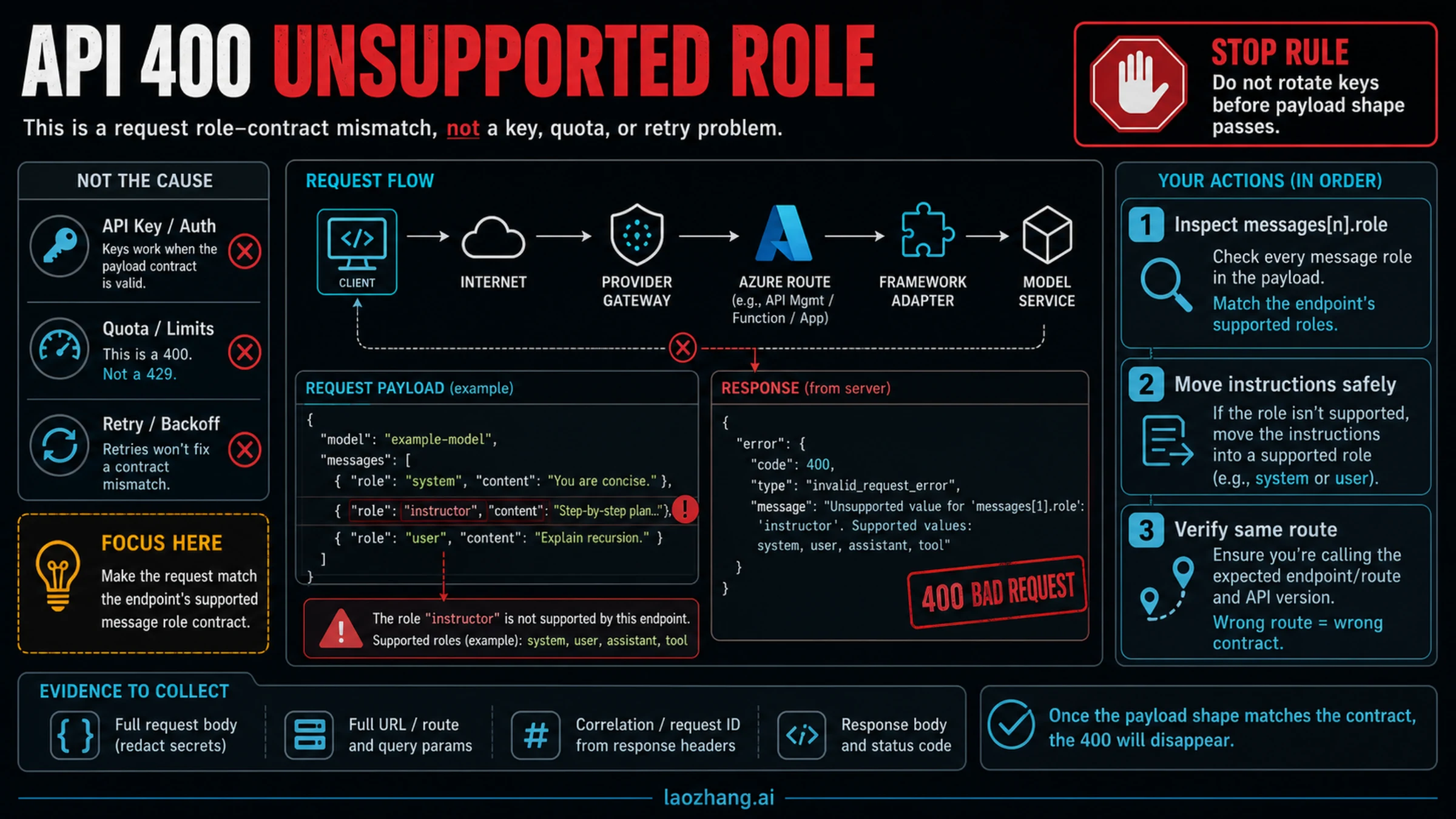
If your API returns 400 with role 'system' is not supported on this model, the request reached an endpoint that rejected one message role in the JSON you sent; treat it as a role-contract mismatch, not as a key, quota, or retry problem.
Start by reading the error param and finding the exact messages[n].role in the sanitized outbound payload. Then move the instruction text to a request surface that the same endpoint accepts, such as a supported Chat Completions instruction role or the Responses instructions field, without burying system instructions in ordinary user text.
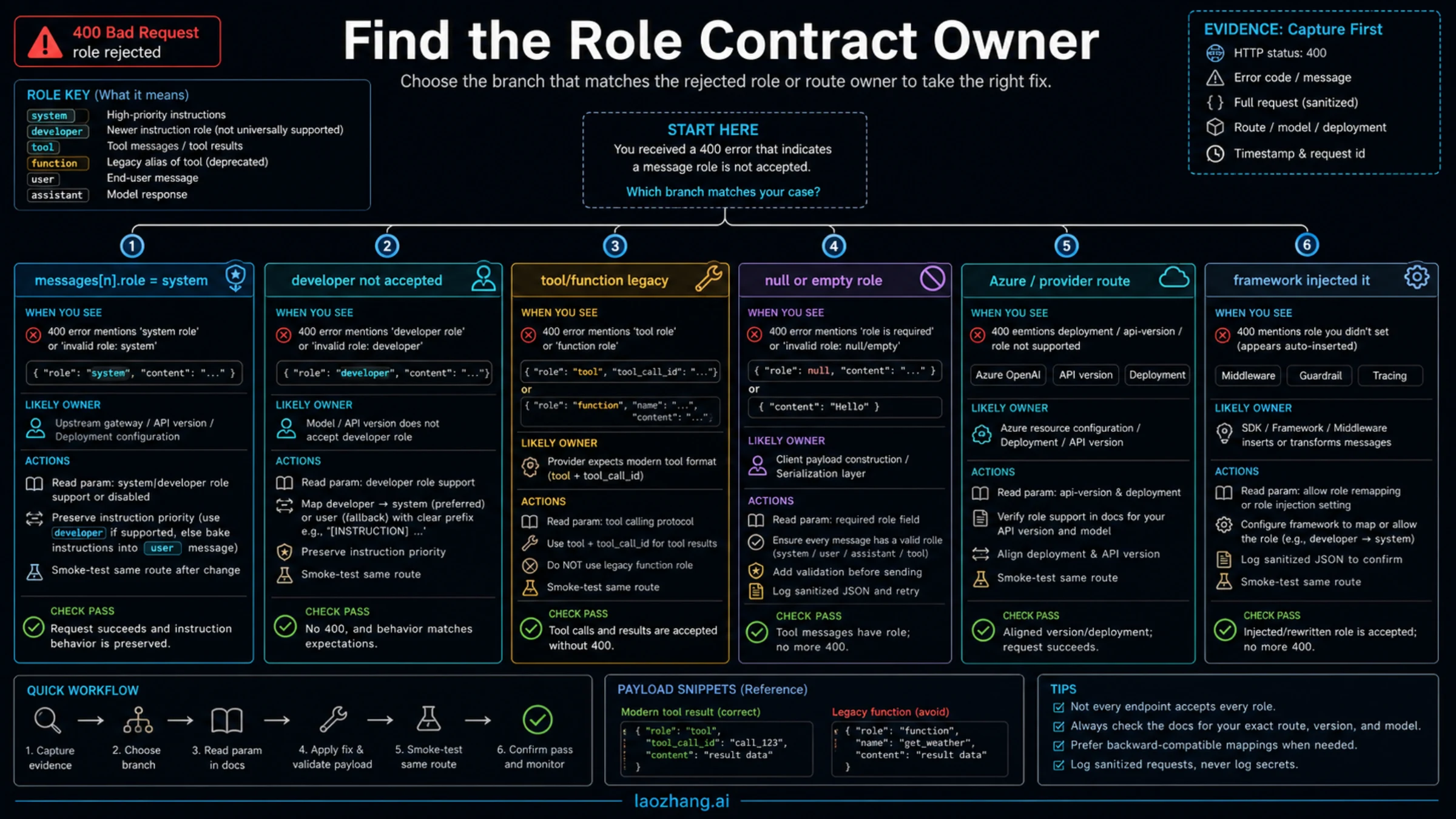
| Failing clue | Likely owner | First safe move | Verification |
|---|---|---|---|
messages[n].role = system | Endpoint, provider gateway, Azure deployment, or adapter contract | Preserve the instruction text, then map it to the supported instruction surface for that route | Minimal same-endpoint request returns 2xx or a different, non-role error |
developer is rejected | API version, provider compatibility layer, or framework route | Check whether the route supports current Chat Completions roles; otherwise use Responses instructions or route-specific mapping | Same payload shape passes on the selected route |
tool or legacy function fails | Tool-calling protocol mismatch | Use the tool message shape and call ID format that the selected route documents | Tool result is accepted without a role error |
| The role was not in your source code | Framework, agent library, middleware, or prompt wrapper | Log the final outbound JSON and disable or remap the injected message | The minimal repro and full workflow use the same accepted role set |
Stop here before rotating API keys, changing quota settings, adding retries, or switching providers. Those actions do not fix a malformed role contract; the proof is a minimal request against the same model, endpoint, API version, provider route, and framework adapter that failed.
Decode the Error Payload Before You Change Code
The useful part of this 400 is usually not the English sentence. It is the structured error body. Look for type, code, message, and especially param. A precise param such as messages[0].role tells you which outbound message was rejected. If the SDK wraps the request, log the final JSON after middleware, agent setup, framework adapters, and provider gateway transforms have all run.
Use a redacted log shape like this:
{
  "endpoint": "POST /v1/chat/completions",
  "model": "example-model",
  "messages": [
    { "role": "system", "content": "[redacted instruction]" },
    { "role": "user", "content": "[redacted user task]" }
  ]
}
Do not log real user data, private system prompts, API keys, bearer tokens, cookies, or tool outputs that contain customer content. The goal is only to prove the request shape. If the error says messages[0].role, inspect that object first. If the role is injected by a library, fix the library route or adapter configuration instead of rewriting business prompts by hand.
Choose the Repair by Endpoint, Not by Habit
The biggest trap is assuming that one role mapping is universally correct. It is not. Role support depends on the endpoint, current API version, provider compatibility layer, Azure deployment, SDK, and sometimes the agent framework.
As of May 21, 2026, OpenAI's Responses migration guide recommends the Responses API for new projects and gives it a top-level instructions surface for developer instructions. OpenAI's Chat Completions reference documents the messages array used by Chat Completions, including instruction-style roles on current official routes. That does not mean every OpenAI-compatible gateway, older model route, Azure deployment, or framework wrapper accepts the same set of roles. Treat official OpenAI docs as the contract for official OpenAI routes, then verify any provider or Azure route against its own contract.
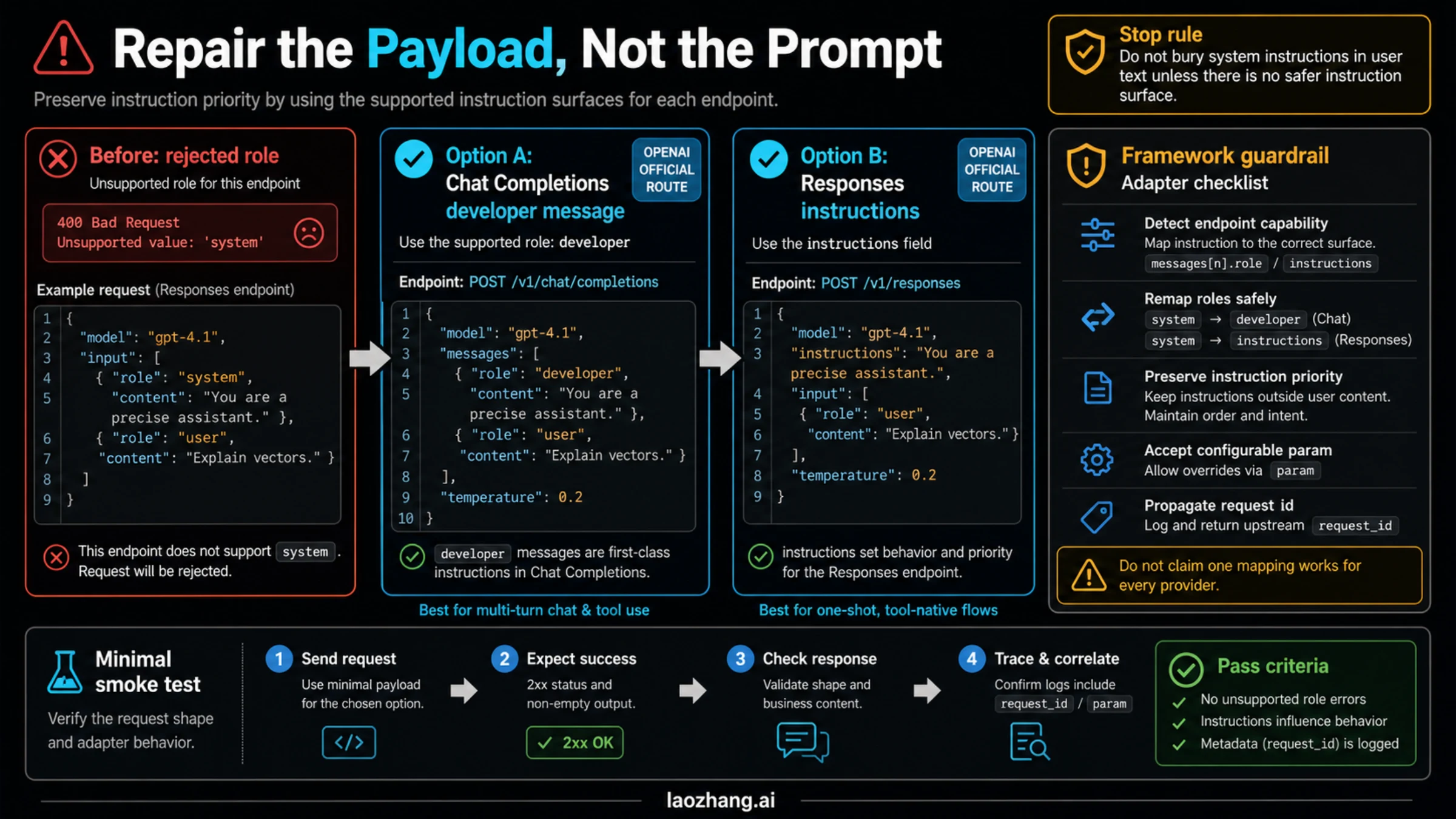
For a current OpenAI Chat Completions route that accepts developer, the repair can be as direct as moving instruction text out of a rejected system message:
{
  "model": "your-selected-model",
  "messages": [
    { "role": "developer", "content": "Follow the support triage rules." },
    { "role": "user", "content": "Classify this API error." }
  ]
}
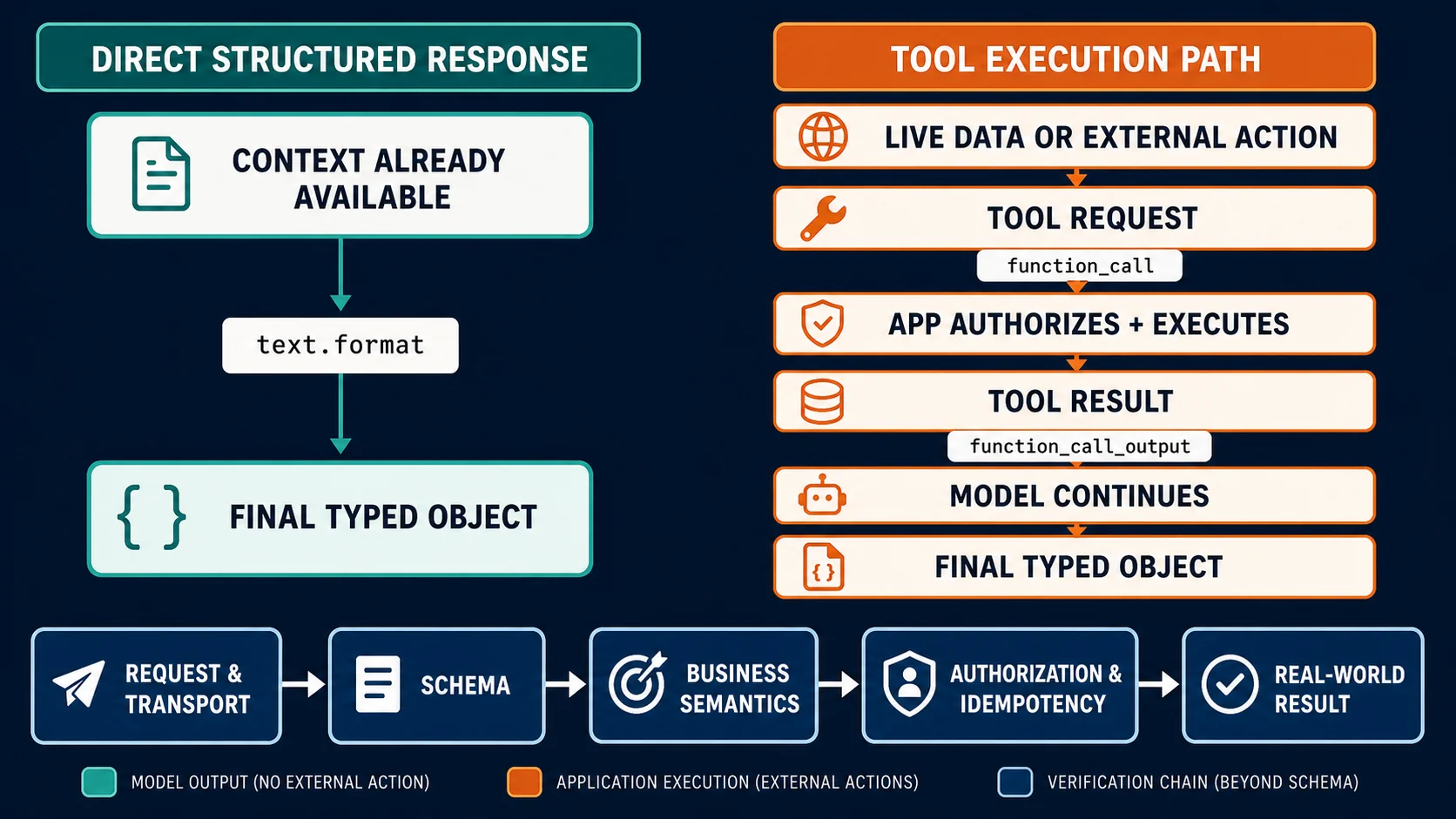
For a Responses route, keep persistent instruction text in instructions and send the user task through input:
{
  "model": "your-selected-model",
  "instructions": "Follow the support triage rules.",
  "input": "Classify this API error."
}
The exact target depends on the selected route. If a gateway only accepts user and assistant, do not automatically downgrade system instructions into ordinary user text. First check whether the gateway exposes an instruction field, model option, adapter setting, or route switch that preserves instruction priority. If it does not, document that loss of priority as a behavior change, not as a harmless syntax fix.
Fix Each Role Branch Without Losing the Original Intent
When system is rejected, the safest repair is to preserve the instruction text and move it to the highest-priority surface the route supports. On a current official OpenAI Chat Completions route that may be developer; on Responses it is usually instructions; on a provider gateway it may be a route-specific field or an adapter setting. If the provider's route only accepts user messages, the result may behave differently because the instruction no longer has the same priority.
When developer is rejected, you are often on an older compatibility layer, a provider that mirrors an older Chat Completions schema, or an Azure/API-version combination that has not adopted that role. Check the actual endpoint and API version before changing the role. A direct OpenAI request and a provider gateway request can look nearly identical in client code but enforce different role contracts.
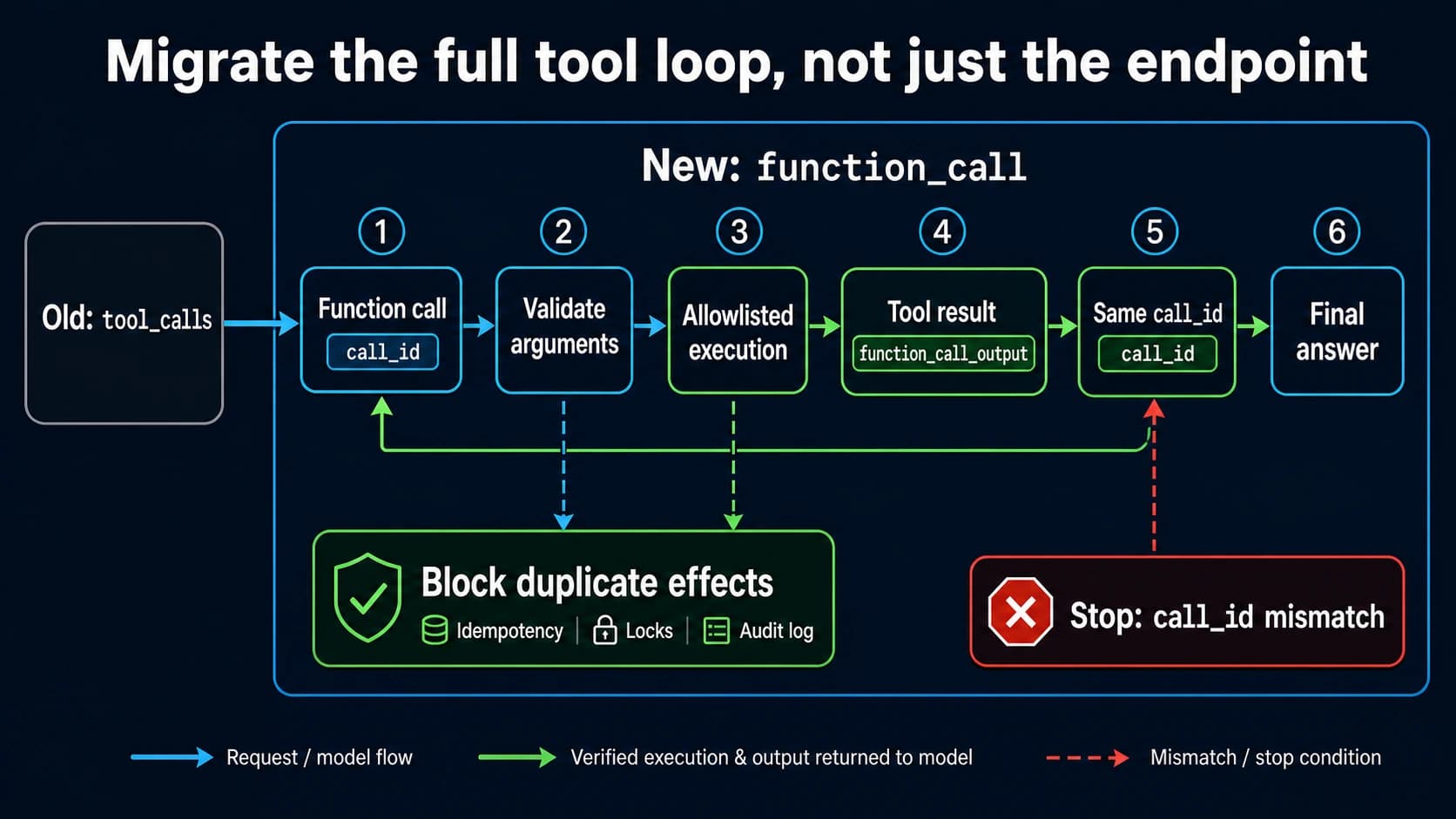
When tool is rejected, inspect the full tool-calling protocol. Modern tool results usually need a tool call identifier and a role/shape that matches the selected API. Legacy function messages are a separate branch. Mixing a legacy function role with a modern tool-call response can produce a role error even when the model supports tools in principle.
When the role is null, missing, capitalized incorrectly, or serialized as an enum label your provider does not recognize, treat it as a client construction bug. Validate the outbound array before sending the request:
const allowedRoles = new Set(["developer", "user", "assistant", "tool"]);

for (const [index, message] of messages.entries()) {
  if (!allowedRoles.has(message.role)) {
    throw new Error(`Unsupported outbound role at messages[${index}].role`);
  }
}
That validation is not a substitute for provider docs. It is a local guardrail that stops accidental malformed requests before they become production incidents.
Frameworks Can Add the Failing Role After Your Code Looks Correct
Agent frameworks, chat UI libraries, tracing middleware, and provider adapters often build the final messages array after your application code has finished. That is why developers sometimes say, "I never sent a system role," while the server says messages[0].role was system.
Look for these transformation points:
| Layer | What to inspect | Failure pattern |
|---|---|---|
| Agent framework | Default system prompt, memory prompt, tool policy, guardrail message | A hidden system or developer message appears before user input |
| SDK adapter | OpenAI-compatible conversion, enum mapping, legacy tool support | Role names are remapped or serialized differently from your source object |
| Gateway | Provider compatibility mode, selected upstream route, model alias | The gateway accepts the request but upstream rejects the role contract |
| Azure route | Deployment name, api-version, region, model family | Same payload works in one deployment but fails in another |
| Middleware | Request logging, retry wrapper, prompt decorator | A wrapper appends an instruction message on every call |
The fix is to log the final outbound payload at the boundary closest to the HTTP request. If you can only see your pre-framework object, you are debugging the wrong artifact. A sanitized final payload gives you the exact message index, role, endpoint, and adapter path needed to make a controlled repair.
Verify With the Same-Route Smoke Test
A working request on a different route does not prove the failing route is fixed. Same-route means same provider, base URL, endpoint, API version, model or deployment alias, SDK adapter, framework settings, and tool protocol.
Use the smallest payload that still exercises the rejected role branch:
curl "$BASE_URL/v1/chat/completions" \
  -H "Authorization: Bearer $API_KEY" \
  -H "Content-Type: application/json" \
  -d '{
    "model": "your-selected-model",
    "messages": [
      {"role": "developer", "content": "Answer in one sentence."},
      {"role": "user", "content": "Say ready."}
    ]
  }'
Change only one variable at a time. If you switch from Azure to direct OpenAI, change API versions, rename the model, remove the framework, and simplify the prompt all at once, the result is no longer diagnostic. The ideal smoke test either succeeds with the repaired payload or returns a different error that proves the role contract is no longer the blocker.
After the smoke test passes, run the full agent or app path once with the same logging turned on. This catches frameworks that reintroduce system, developer, tool, or legacy function messages after the minimal request succeeds.
Escalate With Evidence, Not a Screenshot
Escalate only after you can reproduce the failure on a minimal same-route request. A support ticket that says "role system is not supported" is weak because the owner still has to guess which layer produced it. A useful packet shows the contract boundary.
Include:
- sanitized request JSON with secrets and user data removed
- exact endpoint URL or base URL plus path
- model, deployment name, region, and API version
- SDK, framework, and adapter versions
- response body, status code,
param, andcode - request ID, correlation ID, or gateway trace ID when available
- the minimal same-route repro and the one controlled repair you tried
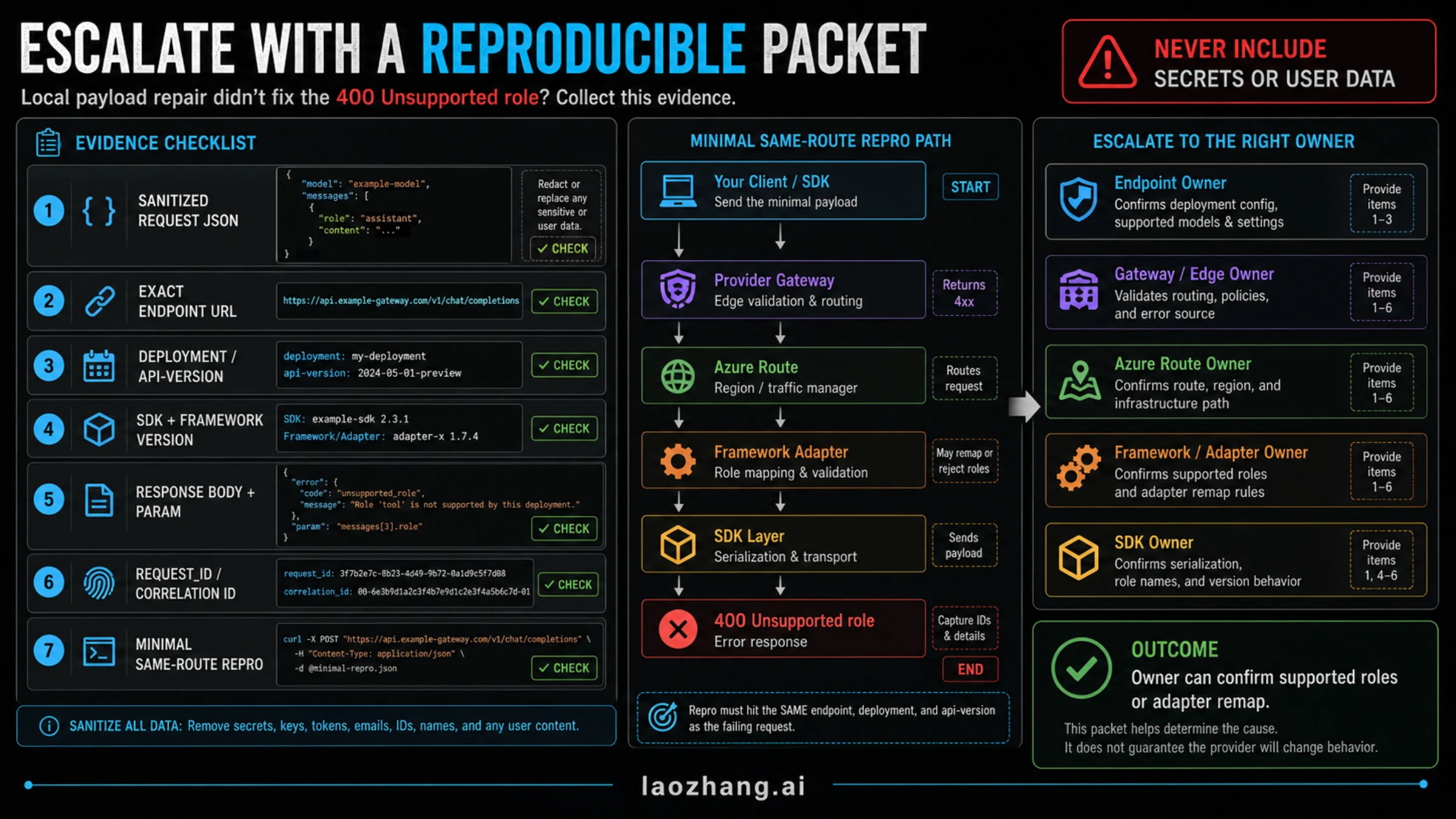
Do not include API keys, bearer tokens, private prompts, customer text, file content, tool outputs, or screenshots that expose secrets. If the provider confirms that the route cannot accept the role you need, you have three honest choices: use an endpoint with the right instruction surface, configure the adapter to preserve instruction priority, or document that the fallback route changes behavior.
Quick Recovery Checklist
Use this checklist when the incident is live:
- Capture the response body and the failing
param. - Log the final outbound request JSON after framework and adapter transforms.
- Identify the route owner: direct OpenAI, Azure, provider gateway, SDK, or framework.
- Move instruction text to the highest-priority surface that route supports.
- Validate
tooland legacyfunctionshapes separately from instruction roles. - Run one minimal same-route smoke test.
- Run the full workflow once with role logging still enabled.
- Escalate with the sanitized packet if the repaired same-route request still fails.
That order keeps the signal clean. It also protects your system prompt from the common "just put it in user" shortcut, which may make the 400 disappear while silently weakening instruction hierarchy.
FAQ
Does role 'system' is not supported on this model mean my API key is wrong?
Usually no. A wrong key typically fails authentication before the server validates message roles. This error means the request reached a route that parsed the payload and rejected one role. Check the role contract before rotating keys.
Should I replace system with developer everywhere?
No. developer is the right direction only for routes that support that Chat Completions role. Responses has a different instruction surface, and provider gateways or Azure deployments may enforce a different contract. Map by endpoint and verify on the same route.
Is it safe to move system instructions into a user message?
Only as a last-resort fallback, and you should treat it as a behavior change. A user message does not normally carry the same instruction priority as a system, developer, or top-level instruction surface. Prefer a supported instruction field or a compatible route.
Why does the error appear after a framework upgrade?
The framework may have changed its default role mapping, inserted a hidden instruction message, or switched from a legacy function format to a modern tool format. Log the final HTTP payload, not only your app's pre-framework message array.
What if direct OpenAI works but my OpenAI-compatible provider fails?
Then the provider route owns the contract difference. Keep the same payload, endpoint, model alias, and provider logs, then ask the provider which roles and tool-message shapes that route supports. Do not cite official OpenAI behavior as proof that a compatibility gateway accepts the same roles.
What should I save for a support ticket?
Save the sanitized request JSON, exact endpoint, model or deployment, API version, SDK and framework versions, response body, param, request ID, and a minimal same-route repro. Remove secrets and user data before sending it.